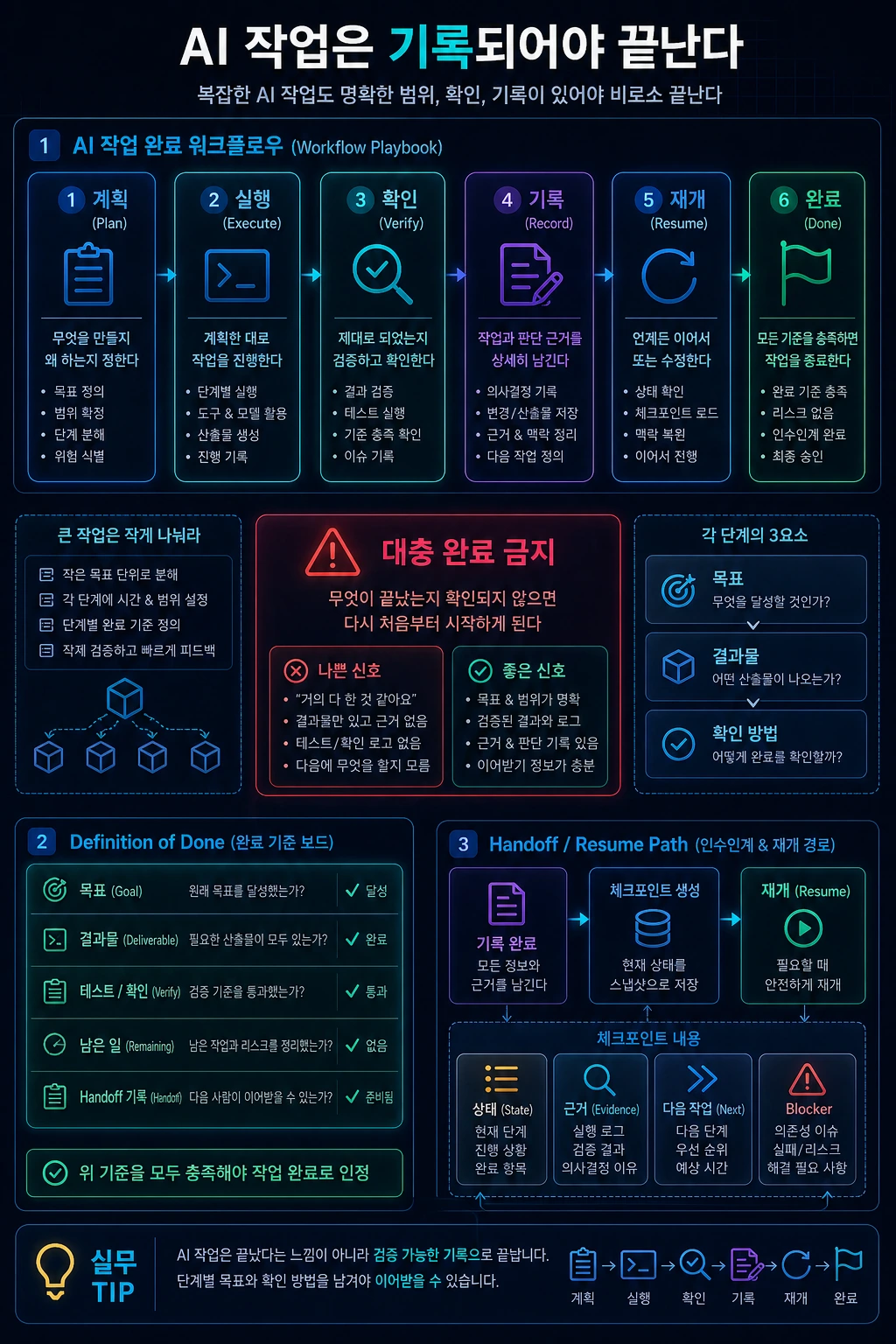
AI 작업을 끝내는 법
메뉴

AI Workflow

AI 작업을 끝내는 법

작업을 작게 나누고, 진행 상황을 확인하고, 완료 기준을 분명히 남기는 실전 흐름입니다.

AI 작업을 끝내는 법 hero image
Markdown약 1404 tokens

핵심 요약

AI와 함께 일할 때 가장 위험한 순간은 "대충 다 된 것 같다"는 느낌만 있고 실제로 무엇이 끝났는지 확인되지 않았을 때입니다.

큰 작업은 한 번에 맡기는 것보다 작은 단계로 나누는 편이 안전합니다. 각 단계마다 목표, 결과물, 확인 방법을 정해두면 작업이 길어져도 흐름을 잃지 않습니다.

왜 단계가 필요한가

짧은 수정은 간단합니다. 오타를 고치거나 버튼 문구를 바꾸는 정도라면 바로 수정하고 확인하면 됩니다.

하지만 기능을 만들고, 화면을 바꾸고, 문서를 고치고, 테스트까지 확인해야 하는 작업은 다릅니다. 이때는 AI가 어떤 판단을 했는지, 어디까지 진행했는지, 무엇을 검증했는지 남아 있어야 합니다.

단계가 없으면 다음 문제가 생깁니다.

  • 작업 범위가 중간에 커집니다.
  • 완료 기준이 사람마다 달라집니다.
  • 테스트가 빠졌는데 완료처럼 보입니다.
  • 다음에 이어서 볼 때 맥락을 다시 추적해야 합니다.

Phase Runner를 쓰는 흐름

여러 파일을 바꾸거나 검증까지 필요한 작업에서는 Moonshot Phase Runner가 먼저 떠오릅니다. 이름은 거창하지만, 실제 사용법은 어렵지 않습니다.

가장 단순한 시작은 이렇게 요청하는 것입니다.

/moonshot-phase-runner이 작업을 끝까지 진행해줘.중간에 막히면 어디서 막혔는지 남기고, 검증 결과까지 확인해줘.

이미 계획 문서가 있는 작업이라면 계획 디렉터리를 함께 넘깁니다.

/moonshot-phase-runner docs/implementation --autonomous

기대하는 것은 "한 번에 멋진 답을 내는 것"이 아닙니다. 작업을 작게 나누고, 각 단계마다 무엇이 바뀌었는지와 어떤 확인을 했는지를 남기는 것입니다.

단계확인할 것
계획어떤 범위까지 할지 정했는가
실행실제 파일, 화면, 문서가 바뀌었는가
검토빠진 요구사항이나 어색한 결과가 없는가
검증테스트, 빌드, 화면 확인 같은 근거가 있는가
기록다음에 이어서 볼 수 있게 상태가 남았는가

언제 쓰면 좋은가

아래 중 하나라도 해당하면 단계 기반으로 진행하는 편이 좋습니다.

  • 여러 파일이나 화면을 함께 바꿔야 합니다.
  • 구현뿐 아니라 문서, 테스트, 배포 확인까지 필요합니다.
  • 한 번에 끝나지 않고 여러 번 이어서 작업해야 합니다.
  • 중간에 실패했을 때 어디서부터 다시 시작할지 알아야 합니다.
  • "끝까지 진행해줘"처럼 결과보다 과정 관리가 중요한 요청입니다.

반대로 아주 작은 수정에는 과합니다. 단일 문구 수정, 명확한 오타 수정, 작은 스타일 조정은 바로 고치고 확인하는 방식이 더 빠릅니다.

어떻게 요청하면 좋은가

AI에게 큰 작업을 맡길 때는 "무엇을 만들지"만 말하지 말고 "어떻게 완료를 확인할지"도 함께 말하는 것이 좋습니다.

좋은 요청은 보통 이런 형태입니다.

이 기능을 단계별로 진행해줘.각 단계가 끝나면 무엇을 바꿨는지, 어떤 확인을 했는지 남겨줘.테스트나 빌드가 실패하면 원인과 다음 작업을 정리해줘.

Phase Runner를 쓰지 않더라도 아래처럼 요청하면 비슷한 효과를 얻을 수 있습니다.

이 작업을 계획, 실행, 검증 순서로 진행해줘.수정한 내용과 확인한 결과를 마지막에 짧게 정리해줘.화면 문제가 있으면 desktop/mobile 기준으로 직접 확인해줘.

진행 상황을 확인하는 법

긴 작업에서는 "지금 어디까지 왔는지"를 자주 확인할 수 있어야 합니다. 확인할 때는 말로 된 진행 보고보다 실제 결과물을 보는 편이 낫습니다.

예를 들어 블로그 작업이라면 다음을 봅니다.

  • 글 파일이 실제 공개 글 기준으로 작성되었는가
  • 이미지가 잘리지 않고 보이는가
  • 카테고리와 태그가 너무 길거나 어색하지 않은가
  • 검색, RSS, 사이트맵 같은 노출 경로가 최신인가
  • 테스트와 빌드가 통과했는가

이런 항목은 개발자만을 위한 것이 아닙니다. 운영자가 보기에도 "이 글을 공개해도 되는가"를 판단하는 기준이 됩니다.

완료 기준을 분명히 하기

작업이 끝났다고 말하려면 최소한 세 가지가 맞아야 합니다.

  • 요청한 범위가 실제 결과물에 반영되었다
  • 눈에 보이는 문제를 확인했다
  • 테스트, 빌드, 문서처럼 필요한 검증을 마쳤다

특히 AI 작업에서는 "작성했다"와 "완료했다"를 구분해야 합니다. 작성은 결과물을 만든 상태이고, 완료는 그 결과물이 기대대로 동작하는지 확인한 상태입니다.

실패 사례: 큰 요청을 한 번에 끝내려 할 때

실무에서 자주 보는 실패는 "블로그 품질을 전반적으로 개선해줘"처럼 큰 목표를 한 번에 던지는 방식입니다. AI는 여러 파일을 훑고, 일부 문장을 고치고, 테스트 몇 개를 실행한 뒤 완료처럼 보이는 답변을 만들 수 있습니다. 하지만 나중에 확인하면 정작 중요한 글은 그대로 짧고, 변경된 파일 목록은 설명과 다르고, 광고 설정 같은 정책 조건은 빠져 있는 경우가 생깁니다.

문제의 핵심은 모델 능력이 아니라 작업 경계입니다. 큰 요청 안에는 보통 서로 다른 완료 기준이 섞여 있습니다. 콘텐츠 보강은 편집 품질 문제이고, 광고 차단은 메타데이터 정책 문제이고, 테스트 통과는 빌드 안정성 문제입니다. 이 셋을 하나의 막연한 "개선"으로 묶으면 어느 기준을 통과해야 끝났다고 말할 수 있는지 흐려집니다.

더 나쁜 패턴은 중간 체크포인트 없이 마지막에만 결과를 받는 것입니다. 긴 작업 중간에 방향이 틀어지면 모델은 틀어진 방향으로도 많은 일을 할 수 있습니다. 그래서 phase runner 방식에서는 먼저 이번 시도에서 처리할 atomic task를 고르고, 그 task의 상태를 in_progress로 바꾸고, 결과물과 검증 명령을 기록합니다. 이 기록은 번거로운 문서가 아니라 작업을 멈췄다가 다시 잡을 때 필요한 안전장치입니다.

적용 예시: 콘텐츠 개선 요청을 phase로 나누기

아래처럼 요청을 작게 바꾸면 AI가 무엇을 해야 하는지 훨씬 분명해집니다.

# 나쁜 요청블로그 글 품질을 개선하고 AdSense에 맞게 정리해줘. # 좋은 요청이번 시도에서는 Phase 04의 active atomic task 하나만 처리한다.1. 지정된 12개 글만 1200단어 이상으로 보강한다.2. 각 글에 실패 사례, 구현 예시, 비교표, 체크리스트 중 2개 이상을 추가한다.3. 1200단어 미만의 나머지 공개 글은 adsEnabled: false인지 확인한다.4. npm run validate:posts와 npm run test 결과를 기록한다.

이 예시는 단순히 문장을 길게 만든 것이 아닙니다. 범위, 값이 더해지는 방식, 정책 조건, 검증 명령을 모두 분리합니다. AI가 중간에 다른 글을 정리하고 싶어도 "지정된 12개 글만"이라는 문장이 막아줍니다. 테스트가 실패하면 "그래도 대부분 됐다"가 아니라 어떤 기준이 막혔는지 바로 알 수 있습니다.

체크리스트 적용 결과

실제로 이 글을 phase 작업으로 다룬다면 다음처럼 확인합니다.

확인 항목통과 기준실패 신호
범위active atomic task 하나만 처리다른 phase 파일이나 unrelated refactor가 섞임
콘텐츠글이 독자에게 새로운 판단 기준을 제공분량만 늘고 예시나 실패 사례가 없음
정책짧은 공개 글은 광고 비활성 유지adsEnabled 값이 누락되거나 true로 남음
검증지정 명령이 실제로 실행됨추정이나 수동 확인만 기록

이 표를 쓰면 "AI 작업을 끝낸다"는 말이 훨씬 구체적이 됩니다. 완료는 감상이 아니라 증거의 집합입니다. 어떤 파일을 고쳤고, 어떤 기준을 통과했고, 어떤 위험을 남겼는지 보이면 다음 사람이 같은 작업을 다시 추적하지 않아도 됩니다.

복구 예시: 중간에 실패했을 때 남겨야 하는 기록

긴 작업은 한 번에 깨끗하게 끝나지 않을 수 있습니다. 테스트가 실패하거나, 글 하나가 기준 단어 수를 넘지 못하거나, 검증 도구가 환경 문제로 실행되지 않을 수 있습니다. 이때 중요한 것은 실패를 숨기지 않고 다음 시도가 바로 이어받을 수 있는 형태로 남기는 것입니다.

좋은 handoff에는 최소한 네 가지가 들어갑니다. 첫째, 어떤 단계에서 멈췄는지 적습니다. 둘째, 어떤 파일을 바꿨고 어떤 파일은 의도적으로 건드리지 않았는지 적습니다. 셋째, 실행한 명령과 실패한 명령을 구분합니다. 넷째, 다음 시도가 가장 먼저 확인해야 할 조건을 적습니다.

Stage: verifyChanged: content/posts/example.mdxPassed: word count check, metadata checkFailed: npm run testNext action: failing test name을 확인하고 content rendering regression인지 판단

이 기록은 변명이나 장식이 아닙니다. AI 작업에서 가장 비싼 비용은 같은 상태를 다시 파악하는 시간입니다. 실패를 구조화하면 다음 agent나 사람이 "어디까지 믿어도 되는가"를 빠르게 판단할 수 있습니다. 그래서 phase runner식 작업에서는 성공 기록만큼 실패 기록도 중요합니다. 실패한 시도라도 범위, 증거, 다음 행동이 명확하면 전체 작업은 앞으로 갑니다.

마무리

AI와 큰 작업을 할 때 중요한 것은 더 많은 지시를 한 번에 넣는 것이 아닙니다. 작업을 나누고, 각 단계의 결과를 확인하고, 다음 사람이 이어서 볼 수 있게 기록하는 것입니다.

Moonshot Phase Runner는 그 흐름을 자동화하는 이름이지만, 원칙 자체는 어떤 도구를 쓰든 똑같이 적용됩니다.

Key takeaways

The most dangerous moments when working with AI are when you feel like you're "almost done" and you don't know what's actually done.

It is safer to break down large tasks into small steps rather than taking on them all at once. If you set goals, results, and confirmation methods for each step, you won't lose the flow even if the work takes longer.

Why are the steps needed?

The short fix is ​​simple: If it's just a matter of fixing a typo or changing the button text, you can edit and check it right away.

However, the tasks that require creating functions, changing screens, editing documents, and even checking tests are different. At this time, it must remain what judgment the AI ​​made, how far it progressed, and what it verified.

Without the step, the following problem arises:

  • The scope of work grows in the middle.
  • Completion standards vary from person to person.
  • I'm missing a test, but it looks complete.
  • Next time you watch it again, you'll have to keep track of the context.

Flow of using Phase Runner

For tasks that require changing multiple files or even verification, Moonshot Phase Runner comes to mind first. Although the name is grandiose, it is not difficult to actually use.

The simplest way to start is to ask:

/moonshot-phase-runnerPlease continue this task until the end.If you get stuck, leave a message about where you got stuck and check the verification results.

If the task already has a planning document, pass along the planning directory.

/moonshot-phase-runner docs/implementation --autonomous

The expectation is not “to come up with a great answer the first time.” The idea is to break the task down into smaller pieces and keep track of what changed and what was checked at each step.

Step What to check
Plan What scope has been decided
Execution Have the actual files, screens, and documents changed
Review Are there any missing requirements or awkward results
Verification Is there a basis for testing, building, and screen verification
Record Is the status left for subsequent viewing

When is it best to use it?

If any of the following applies, it is better to proceed on a step-by-step basis.

  • You need to change multiple files or screens together.
  • Not only does it require implementation, but it also requires documentation, testing, and deployment verification.
  • It cannot be completed all at once; it must be done several times in succession.
  • If you fail along the way, you need to know where to start again.
  • Like “Please proceed until the end,” this is a request in which process management is more important than the outcome.

Conversely, it is overkill for very small corrections. Fixing single phrases, fixing obvious typos, or making small style adjustments is faster when you can fix and confirm them right away.

How to make a request

When entrusting AI with a large task, it's a good idea to not just say "what to build" but also "how to ensure completion."

Good requests usually look like this:

Please go through this function step by step.After each step, please leave a message about what you changed and what you confirmed.If a test or build fails, explain the cause and what to do next.

Even if you don't use Phase Runner, you can achieve a similar effect by making a request like below.

Proceed with this task in the order of planning, execution, and verification.Briefly summarize the changes you made and the results you confirmed at the end.If there is a screen problem, please check it yourself on a desktop/mobile basis.

How to check your progress

In long tasks, you need to be able to check “how far we have been” frequently. When checking, it is better to see actual results rather than verbal progress reports.

For example, if you are working on a blog, you would look at:

  • Was the article file based on actual public articles?
  • Is the image visible without being cropped?
  • Are the categories and tags too long or awkward?
  • Are exposure paths such as search, RSS, and sitemap up to date?
  • Did the tests and build pass?

These items aren't just for developers. In the eyes of the administrator, it is also a standard for judging whether this article can be made public.

Clarify completion criteria

To say the job is done, at least three things must be true.

  • The requested scope was reflected in the actual results
  • Visible problems were confirmed
  • Necessary verifications such as testing, building, and documentation were completed

Especially in AI work, we need to distinguish between “written” and “done.” Writing is the state of creating a result, and completion is the state of confirming that the result works as expected.

Failure example: When trying to complete a large request at once

A common failure we see in practice is to set big goals at once, such as “Improve the overall quality of the blog.” The AI ​​can go through several files, fix some sentences, run a few tests, and come up with an answer that seems complete. However, when you check later, you may find that the really important text is short, the list of changed files is different from the description, and policy conditions such as ad settings are missing.

The key to the problem is not model capabilities but task boundaries. Large requests often have different completion criteria mixed in. Enriching content is an editorial quality issue, ad blocking is a metadata policy issue, and passing tests is a build stability issue. Bundling these three into one vague "improvement" makes it unclear which criteria must be met before you can say you're done.

A worse pattern is to only receive results at the end, with no intermediate checkpoints. If the direction changes in the middle of a long task, the model can do a lot even in the wrong direction. So, in the phase runner method, we first select the atomic task to be processed in this attempt, change the state of that task to in_progress, and record the results and verification commands. This record is not a cumbersome document, but a necessary safeguard when stopping and picking up work again.

Application example: Dividing content improvement requests into phases

If you change the request to something smaller like below, it becomes much clearer what the AI ​​should do.

# bad requestImprove the quality of your blog posts and organize them for AdSense. # good requestIn this attempt, only one active atomic task in Phase 04 is processed.1. Only the 12 designated articles should be strengthened to at least 1,200 words.2. Add two or more failure cases, implementation examples, comparison tables, or checklists to each article.3. For the remaining public posts of less than 1200 words, check whether adsEnabled: false.4. Record npm run validate:posts and npm run test results.

This example isn't just a long sentence. Scope, how values ​​are added, policy conditions, and validation commands are all separated. Even if the AI ​​wants to organize other articles in the middle, the sentence “Only 12 designated articles” prevents it. If a test fails, you will know right away which criterion was blocked, rather than saying, “But most of it worked.”

Checklist application results

If you actually treat this article as a phase task, check it as follows.

Check itemspassing criteriafailure signal
rangeProcesses only one active atomic taskMixing of different phase files or unrelated refactors
contentThe text provides readers with a new standard of judgmentOnly the volume has increased and there are no examples or failure cases.
policyShort public posts keep ads disabledadsEnabledvalue is missing or left as true
verificationSpecified command is actually executedOnly records estimates or manual confirmations

This table makes “finishing AI work” much more concrete. Completion is not a sentiment, but a collection of evidence. By showing which files were fixed, which criteria passed, and which risks were left behind, the next person doesn't have to track down the same task again.

Recovery example: Records to be kept in case of intermediate failure

Long tasks may not be completed cleanly in one go. A test may fail, a post may not exceed the word count, or the verification tool may not run due to environmental issues. The important thing at this time is not to hide the failure but to leave it in a form that can be immediately followed by the next attempt.

A good handoff includes at least four things: First, write down what step you got stuck on. Second, write down which files you changed and which files you intentionally left untouched. Third, distinguish between executed commands and failed commands. Fourth, write down the conditions that the next attempt must check first.

Stage: verifyChanged: content/posts/example.mdxPassed: word count check, metadata checkFailed: npm run testNext action: Check the failing test name and determine if it is content rendering regression.

This record is not an excuse or embellishment. The most expensive cost in AI work is the time it takes to reacquire the same state. Structuring failure allows the next agent or person to quickly determine “how much they can trust.” So, in phase runner-type work, failure records are as important as success records. Even in failed attempts, if the scope, evidence, and next actions are clear, the entire operation moves forward.

finish

When working on big things with AI, the important thing is not to throw in more instructions at once. Divide the work, check the results of each step, and record them for the next person to follow.

Moonshot Phase Runner is the name for automating the flow, but the principles themselves apply the same no matter which tool you use.

댓글

GitHub 계정으로 로그인하면 댓글을 남길 수 있습니다. 댓글은 GitHub Discussions를 통해 운영됩니다.

TOP