한 번 지시하면 계속 작업하는 목표 기반 코딩 에이전트 사용법
이번 글에서는 Codex CLI 0.128.0에 추가된 /goal 기능을 정리합니다.
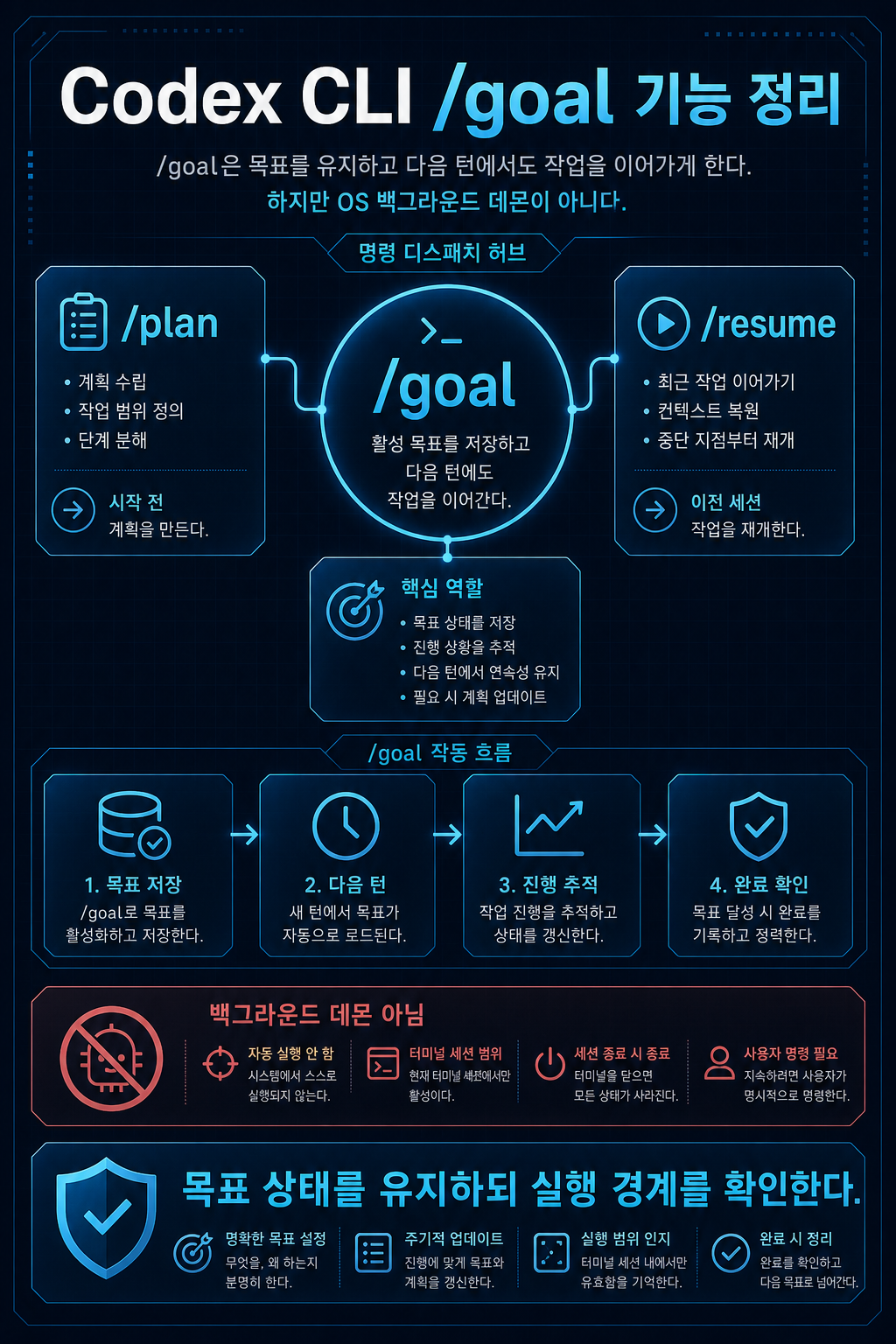
단순히 새로운 slash command 하나가 추가됐다는 이야기가 아닙니다. /goal은 Codex에게 “이 목표가 끝날 때까지 계속 작업해”라고 지정하는 방식에 가깝습니다. 기존에는 한 번 응답이 끝나면 사용자가 다시 “계속해”, “테스트도 돌려”, “남은 것 마저 해”라고 이어서 지시해야 했다면, /goal은 목표 상태를 유지하면서 다음 작업을 이어가도록 설계된 기능입니다.
이 글은 사용법과 실무 적용 관점에서 봅니다. 내부 코드 구조는 2편에서 따로 다룹니다.
분석 기준일: 2026-05-02
기준 버전: Codex CLI0.128.0
주요 참고자료: OpenAI Codex changelog, Codex GitHub PR #18073–#18077, Codex CLI slash command 문서, GitHub issue #19910/#20536
주의:/goal은 출시 직후 기능입니다. 2026-05-02 확인 기준 공식 changelog와 PR에는 반영되어 있지만, 공식 CLI slash command 문서에는/goal항목이 아직 보이지 않습니다. 실제 명령명은 설치 버전의 help에서 다시 확인하는 것이 좋습니다.
핵심 요약
/goal은 목표를 thread 단위로 저장하고, 목표가 끝날 때까지 continuation turn을 이어가는 기능입니다.- 공식 changelog 기준 Codex CLI
0.128.0에서 “persisted/goalworkflows”가 추가됐습니다. /plan은 실행 전 계획 수립,/resume은 이전 대화 재개,/goal은 active goal을 유지하면서 다음 작업을 계속 이어가는 목표 루프에 가깝습니다./goal은 터미널을 닫아도 무조건 백그라운드에서 계속 실행되는 OS daemon 기능으로 이해하면 안 됩니다. 더 정확히는 목표 상태 저장 + idle continuation + resume 가능한 thread 상태의 조합입니다.- 실무적으로는 리팩터링, 테스트 실패 수정, 기능 구현 마무리, PR 준비처럼 “완료 기준이 명확하고 여러 턴이 필요한 작업”에 잘 맞습니다.
1. 왜 /goal을 따로 봐야 하나
AI 코딩 도구를 오래 써보면 가장 답답한 순간이 있습니다.
# 읽기 가이드: 아래 블록은 명령, 상태 흐름, 또는 템플릿 예시입니다.사용자: 이 기능 구현하고 테스트까지 통과시켜줘.AI: 일부 파일을 수정하고 테스트를 실행했습니다. 여기까지 완료했습니다.사용자: 실패한 테스트 고쳐.AI: 고쳤습니다.사용자: 전체 테스트 다시 돌려.AI: 하나가 더 실패합니다.사용자: 그것도 고쳐.
이런 흐름은 사람이 계속 감독해야 합니다. AI가 코드를 잘 고치더라도, “목표가 끝났는지”를 계속 사람이 판단하고 다음 턴을 열어줘야 합니다.
/goal은 이 지점을 건드립니다. 핵심은 코드 생성 능력 자체보다 작업 지속성입니다. 사용자가 목표를 지정하면 Codex가 그 목표를 active 상태로 유지하고, 세션이 idle일 때 다음 continuation turn을 이어갑니다.
결국 실무적으로는 이 변화가 중요합니다.
# 읽기 가이드: 아래 블록은 명령, 상태 흐름, 또는 템플릿 예시입니다.기존 방식:사용자 프롬프트 → 한 턴 작업 → 멈춤 → 사용자가 계속 지시 /goal 방식:목표 저장 → 작업 → 완료 감사 → 미완료면 continuation → 완료/중단/예산 도달까지 반복
2. /goal은 무엇을 하는가
OpenAI Codex changelog 기준으로 Codex CLI 0.128.0에는 persisted /goal workflow가 추가됐습니다. changelog는 이 기능을 다음 구성요소와 함께 설명합니다.
| 구성요소 | 의미 |
|---|---|
| persisted workflow | 목표 상태가 thread 단위 상태로 유지됨 |
| app-server APIs | client가 goal 상태를 읽고 설정하고 지울 수 있음 |
| model tools | 모델이 제한된 방식으로 goal을 조회·생성·완료 처리할 수 있음 |
| runtime continuation | active goal이 있으면 다음 작업 턴을 이어갈 수 있음 |
| TUI controls | TUI에서 goal 생성, pause, resume 또는 unpause, clear 제어 가능 |
간단히 말하면 /goal은 “프롬프트를 길게 기억하는 기능”이 아닙니다. 목표 상태를 별도로 저장하고, 그 목표를 runtime 생명주기에 연결한 기능입니다.
예시는 이런 식입니다.
# 읽기 가이드: 아래 블록은 명령, 상태 흐름, 또는 템플릿 예시입니다./goal Implement the login error reporting flow and make the test suite pass.
조금 더 실무적으로 쓰면 이렇게 됩니다.
# 읽기 가이드: 아래 블록은 명령, 상태 흐름, 또는 템플릿 예시입니다./goal Implement the login error reporting flow.Requirements:- Add client-side error boundary reporting.- Capture API 500 traces.- Update tests for the new reporting behavior.- Run lint and test.- Summarize changed files and remaining risks.
이렇게 목표를 주면 Codex는 한 턴에서 일부 파일을 수정하고 멈추는 것이 아니라, 목표가 아직 미완료라고 판단되면 다음 concrete action을 이어가도록 설계되어 있습니다.
3. /goal vs /plan vs /resume
/goal은 기존 slash command와 혼동하기 쉽습니다. 특히 /plan, /resume과 많이 헷갈립니다.
| 명령 | 목적 | 사용 시점 | 핵심 차이 |
|---|---|---|---|
/plan | 실행 전 계획 수립 | 구현 전에 방향을 잡을 때 | 계획 모드로 들어가지만 목표 완료까지 자동 반복하는 기능은 아님 |
/resume | 이전 session 재개 | 과거 대화나 작업을 다시 이어갈 때 | transcript를 불러오는 기능이지 목표 루프는 아님 |
/goal | active objective 유지 | 여러 턴이 필요한 작업을 맡길 때 | 목표 상태를 유지하고 미완료 시 continuation을 이어감 |
/plan은 “어떻게 할지 먼저 생각해봐”에 가깝고, /resume은 “이전 대화를 다시 열자”에 가깝습니다.
/goal은 다릅니다. “이 목표가 끝날 때까지 계속 진행해”라는 작업 단위입니다.
# 읽기 가이드: 아래 블록은 명령, 상태 흐름, 또는 템플릿 예시입니다./plan = 실행 전 계획/resume = 이전 대화 재개/goal = 목표 기반 지속 작업
이 차이를 이해하지 못하면 /goal을 단순한 긴 프롬프트로 오해하게 됩니다.
4. 실제 사용 예시
예시 1. 테스트 실패를 끝까지 고치기
# 읽기 가이드: 아래 블록은 명령, 상태 흐름, 또는 템플릿 예시입니다./goal Fix the failing test suite for this repository.Requirements:- Identify the failing tests.- Explain the root cause before changing code.- Apply the smallest safe fix.- Run the failed test file again.- Run the full relevant test suite.- Stop only when tests pass or a clear blocker remains.
이 goal은 좋은 편입니다. “무엇을 해야 하는지”와 “언제 멈춰야 하는지”가 명확하기 때문입니다.
예시 2. 기능 구현과 검증까지 맡기기
# 읽기 가이드: 아래 블록은 명령, 상태 흐름, 또는 템플릿 예시입니다./goal Implement CSV export for the admin user list.Requirements:- Add an export button to the admin user list page.- Implement the API endpoint.- Include user id, email, status, created_at columns.- Add unit or integration tests for the export behavior.- Run lint and relevant tests.- Summarize changed files.
이런 작업은 /goal에 잘 맞습니다. 기능 구현, 파일 수정, 테스트 실행, 오류 수정, 최종 요약까지 여러 턴이 필요하기 때문입니다.
예시 3. 너무 나쁜 goal
# 읽기 가이드: 아래 블록은 명령, 상태 흐름, 또는 템플릿 예시입니다./goal Make this project better.
이건 나쁜 goal입니다. 완료 기준이 없습니다. Codex가 아무리 continuation을 잘 이어도, “better”가 무엇인지 알 수 없습니다.
예시 4. 개선된 goal
# 읽기 가이드: 아래 블록은 명령, 상태 흐름, 또는 템플릿 예시입니다./goal Improve the API error handling in this project.Success criteria:- Find all API routes that return unstructured 500 responses.- Introduce a shared error response helper.- Update at least the user and billing route handlers.- Add tests for the changed routes.- Run the relevant test command.- Summarize any routes intentionally left unchanged.
좋은 goal은 다음 요소를 포함합니다.
| 요소 | 설명 | 예시 |
|---|---|---|
| 대상 | 어느 파일/기능/영역을 다룰지 | admin user list, billing route |
| 요구사항 | 반드시 해야 할 일 | add tests, run lint |
| 완료 기준 | 언제 끝났다고 볼지 | relevant tests pass |
| 제한 | 하지 말아야 할 일 | avoid schema migration |
| 산출물 | 마지막에 무엇을 보고할지 | changed files, risks |
5. 좋은 goal을 쓰는 방법
/goal을 잘 쓰려면 프롬프트를 “작업 지시”가 아니라 완료 가능한 objective로 써야 합니다.
추천 템플릿은 다음입니다.
# 읽기 가이드: 아래 블록은 명령, 상태 흐름, 또는 템플릿 예시입니다./goal [목표]Context:- [현재 상황]- [작업 대상] Requirements:- [필수 요구사항 1]- [필수 요구사항 2]- [필수 요구사항 3] Constraints:- [건드리지 말아야 할 영역]- [권한 또는 비용 제한] Verification:- [실행해야 할 명령]- [확인해야 할 파일 또는 결과] Final response:- [변경 파일 요약]- [테스트 결과]- [남은 리스크]
실무에서는 특히 Verification을 명시하는 것이 중요합니다. Codex의 goal continuation prompt도 완료 전 실제 파일, 명령 출력, 테스트 결과 같은 증거를 확인하도록 설계되어 있습니다. 사용자가 goal에 검증 기준을 명확히 넣을수록 종료 판단 품질이 좋아집니다.
팁:
/goal에는 “작업을 많이 해줘”보다 “끝났다고 판단할 수 있는 증거를 남겨줘”가 더 중요합니다.
6. 작업은 어떻게 계속 이어지는가
사용자 관점에서 흐름은 대략 이렇습니다.
# 읽기 가이드: 아래 블록은 명령, 상태 흐름, 또는 템플릿 예시입니다.사용자: /goal <목표> ↓Codex가 goal 상태를 저장 ↓현재 턴에서 파일 읽기, 수정, 명령 실행, 테스트 수행 ↓턴 종료 시 goal runtime이 목표 상태 확인 ↓아직 미완료라면 continuation prompt로 다음 작업 선택 ↓세션이 idle이면 다음 continuation turn 실행 ↓완료, pause, clear, interrupt, budget limit 중 하나까지 반복
여기서 중요한 점은 “무한 while loop”가 아니라는 것입니다. core runtime은 세션이 idle일 때 continuation turn을 시작하고, 사용자 입력이나 다른 작업이 있으면 그것을 우선합니다. 또 continuation turn이 실제 tool call 없이 끝나면 반복 continuation을 억제하는 방어 장치도 들어가 있습니다.
즉 /goal은 단순히 모델에게 “계속해”라고 반복 입력하는 기능이 아니라, runtime이 목표 상태와 턴 생명주기를 함께 관리하는 구조입니다.
7. 어떤 작업에 적합한가
/goal은 모든 작업에 맞지는 않습니다. 특히 “완료 기준이 명확하고, 여러 단계가 필요하며, 검증이 가능한 작업”에 적합합니다.
| 시나리오 | 추천도 | 이유 |
|---|---|---|
| 테스트 실패 수정 | 높음 | 실패 → 수정 → 재실행 → 검증 루프가 명확함 |
| 기능 구현 + 테스트 | 높음 | 산출물과 완료 기준을 명확히 줄 수 있음 |
| 대규모 리팩터링 | 중간–높음 | 작업 지속성은 유용하지만 scope 제한이 중요함 |
| PR 요약 준비 | 중간 | 변경사항 정리에는 좋지만 구현 goal과 분리하는 편이 좋음 |
| 단순 파일 하나 수정 | 낮음 | 일반 프롬프트가 더 빠름 |
| 모호한 제품 개선 | 낮음 | 완료 기준이 불명확해 과잉 작업 위험 |
| 보안 민감 코드 자동 수정 | 낮음 | 권한, 데이터 전송, secret 노출 검토가 먼저 필요 |
추천하는 경우
- “테스트가 모두 통과할 때까지 수정해”처럼 검증 루프가 있는 작업
- 여러 파일을 건드리는 기능 구현
- migration, refactor, lint fix처럼 단계적 작업이 필요한 경우
- 사람이 중간중간 “계속해”를 입력하는 비용이 큰 경우
- 최종 산출물과 테스트 명령이 명확한 경우
피하는 것이 좋은 경우
- 요구사항이 아직 정해지지 않은 기획성 작업
- 자동 수정 권한을 주기 어려운 회사 코드베이스
- 비용과 토큰 사용량을 엄격하게 제한해야 하는 작업
- 작은 변경 하나만 필요한 작업
- 모델이 잘못 판단하면 피해가 큰 보안·결제·권한 코드
8. 비용, 권한, 보안 리스크
/goal은 편리하지만, 장시간 이어지는 작업인 만큼 리스크도 커집니다.
비용 리스크
여러 턴을 자동으로 이어가면 토큰 사용량이 늘어납니다. 특히 대규모 코드베이스 탐색, 반복 테스트, 긴 로그 분석이 포함되면 비용 예측이 어려워질 수 있습니다.
비용 주의:
/goal은 “작업을 계속 이어가는 기능”이므로 일반 단발성 프롬프트보다 토큰 사용량이 커질 수 있습니다. 큰 저장소에서는 목표 범위, 실행할 테스트, 중단 조건을 명확히 적는 것이 좋습니다.
권한 리스크
Codex가 파일을 읽고 수정하고 명령을 실행할 수 있는 환경이라면 /goal은 그 행동을 여러 턴에 걸쳐 이어갑니다. approval policy와 writable root 설정을 먼저 확인해야 합니다.
# 읽기 가이드: 아래 블록은 명령, 상태 흐름, 또는 템플릿 예시입니다.확인할 것:- 현재 approval policy- writable root 범위- 실행 가능한 shell command 범위- 테스트 명령이 외부 서비스나 비용 발생 API를 호출하는지- git working tree 상태
보안 리스크
AI 코딩 도구를 회사 코드베이스에 적용할 때는 비밀키, 환경변수, 로그, 사내 정책을 확인해야 합니다. /goal은 장시간 탐색할 수 있으므로 민감 파일 접근 가능성을 특히 주의해야 합니다.
보안 주의:
/goal을 회사 코드베이스에 적용하기 전에는 데이터 전송 범위, 비밀키 마스킹, 로그 보관, 권한 설정, 자동 명령 실행 정책을 반드시 확인해야 합니다.
완료 판정 리스크
/goal은 completion audit을 유도하지만, 출시 초기 기능인 만큼 edge case가 있을 수 있습니다. 예를 들어 GitHub issue #19910에서는 compaction 이후 goal prompt와 audit requirement가 충분히 유지되지 않아 목표가 조기 완료 처리될 수 있다는 사용자 보고가 있었습니다.
이 이슈는 사용자 보고이며 모든 환경에서 재현된다고 단정할 수는 없습니다. 다만 긴 작업에서는 다음 습관이 좋습니다.
# 읽기 가이드: 아래 블록은 명령, 상태 흐름, 또는 템플릿 예시입니다.- goal에 명확한 success criteria를 적는다.- 중요한 테스트 명령을 직접 명시한다.- 완료 직전 변경 파일과 테스트 결과를 확인하게 한다.- 장시간 작업 후에는 사람이 최종 diff를 리뷰한다.
9. 실전 체크리스트
# 읽기 가이드: 아래 블록은 명령, 상태 흐름, 또는 템플릿 예시입니다.적용 전 체크리스트 [ ] Codex CLI 버전이 0.128.0 이상인지 확인했다.[ ] 현재 설치 버전에서 /goal help 또는 slash command 목록을 확인했다.[ ] 작업 목표가 한 문장으로 명확하다.[ ] Requirements를 bullet로 썼다.[ ] Success criteria 또는 Verification을 명시했다.[ ] 실행할 테스트 명령을 적었다.[ ] 건드리지 말아야 할 파일 또는 영역을 적었다.[ ] git working tree가 깨끗하거나 별도 branch를 만들었다.[ ] approval policy와 writable root를 확인했다.[ ] 비용과 토큰 사용량이 커질 수 있음을 고려했다.[ ] 보안 민감 파일 접근 가능성을 확인했다.[ ] 완료 후 사람이 diff와 테스트 결과를 리뷰할 계획이 있다.
10. Q&A
Q1. /goal은 /resume과 같은 기능인가?
아닙니다. /resume은 저장된 session transcript를 다시 불러와 이어서 작업하는 기능입니다. /goal은 active objective를 유지하고 미완료 시 continuation을 이어가는 목표 기반 workflow입니다.
Q2. /goal은 /plan보다 좋은가?
역할이 다릅니다. /plan은 구현 전 계획 수립에 좋고, /goal은 실행과 검증을 여러 턴에 걸쳐 이어가야 할 때 좋습니다. 복잡한 작업이라면 먼저 /plan으로 계획을 검토한 뒤, 실행 단계에서 /goal을 쓰는 흐름이 안전합니다.
Q3. 터미널을 닫아도 계속 실행되나?
그렇게 단정하면 안 됩니다. /goal은 persisted goal state를 갖고 thread resume과 client reconnect에 필요한 상태를 유지하도록 설계되어 있습니다. 하지만 이것이 곧바로 “터미널을 닫아도 OS daemon처럼 로컬에서 계속 돈다”는 보장은 아닙니다.
정확히는 다음에 가깝습니다.
# 읽기 가이드: 아래 블록은 명령, 상태 흐름, 또는 템플릿 예시입니다.상태는 저장된다.세션 또는 app-server runtime이 살아 있고 idle 상태면 continuation이 이어질 수 있다.중단 후 resume 시 goal 상태를 다시 볼 수 있다.
Q4. 명령은 /goal pause, /goal resume, /goal clear인가?
공식 changelog는 TUI controls를 create, pause, resume, clear로 설명합니다. 반면 TUI PR 설명에는 /goal clear, /goal pause, /goal unpause가 추가됐다고 되어 있습니다. 2026-05-02 확인 기준 공식 CLI slash command 문서에는 /goal 항목이 아직 보이지 않고, GitHub issue #20536에는 특정 로컬 설치에서 /goal pause, /goal resume, /goal clear help string을 확인했다는 사용자 보고가 있습니다.
따라서 실제 발행 전에는 설치한 Codex CLI 버전에서 /goal help를 직접 확인하는 것이 좋습니다.
Q5. 회사 코드에 써도 안전한가?
도구 자체보다 설정과 정책이 중요합니다. approval policy, writable root, 데이터 전송 범위, 비밀키 마스킹, 로그 보관, 사내 보안 정책을 먼저 확인해야 합니다. 특히 /goal은 여러 턴 동안 파일을 읽고 수정할 수 있으므로 일반 단발성 프롬프트보다 권한 검토가 중요합니다.
Q6. 어떤 개발자에게 가장 잘 맞나?
CLI 중심으로 개발하고, 테스트 기반으로 작업을 검증하며, 여러 단계의 구현·수정·검증을 AI에게 맡기고 싶은 개발자에게 잘 맞습니다. 반대로 작은 수정 하나를 빠르게 요청하는 경우에는 일반 프롬프트가 더 효율적입니다.
11. 2편 예고
이번 글에서는 /goal을 사용자 관점에서 정리했습니다.
다음 글에서는 내부 구조를 봅니다. 특히 다음 질문을 다룹니다.
# 읽기 가이드: 아래 블록은 명령, 상태 흐름, 또는 템플릿 예시입니다.- goal 상태는 어디에 저장되는가?- model tool은 어떤 권한을 갖는가?- runtime은 언제 continuation turn을 시작하는가?- budget limit은 어떻게 처리되는가?- completion audit prompt는 실제로 무엇을 요구하는가?- 나만의 AI Agent를 만들 때 어떤 설계를 가져올 수 있는가?
핵심은 이겁니다.
# 읽기 가이드: 아래 블록은 명령, 상태 흐름, 또는 템플릿 예시입니다./goal은 while true로 agent를 돌리는 기능이 아니다.Goal State + Runtime Event + Continuation Scheduler + Evidence Audit + Budget Guard의 조합이다.
12. 참고자료와 불확실성
참고자료
- OpenAI Codex changelog: https://developers.openai.com/codex/changelog
- Codex CLI slash commands 문서 반영 상태 확인용: https://developers.openai.com/codex/cli/slash-commands
- OpenAI Codex GitHub repository: https://github.com/openai/codex
- PR #18073 — goal persistence foundation: https://github.com/openai/codex/pull/18073
- PR #18074 — app-server goal API: https://github.com/openai/codex/pull/18074
- PR #18075 — model-facing goal tools: https://github.com/openai/codex/pull/18075
- PR #18076 — core runtime goal loop: https://github.com/openai/codex/pull/18076
- PR #18077 — TUI goal UX: https://github.com/openai/codex/pull/18077
- Issue #19910 — compaction 관련 사용자 보고: https://github.com/openai/codex/issues/19910
- Issue #20536 —
/goal문서화 요청: https://github.com/openai/codex/issues/20536
확인된 사실
- Codex CLI
0.128.0changelog에 persisted/goalworkflows가 추가됐다고 명시되어 있습니다. - PR #18073–#18077은 persistence, app-server API, model tools, core runtime, TUI UX를 단계적으로 추가합니다.
- core runtime PR은 idle 상태에서 continuation turn을 시작하고, 사용자 입력과 mailbox work를 우선한다고 설명합니다.
- TUI PR은
/goalsummary rendering,/goal <objective>,/goal clear,/goal pause,/goal unpause를 설명합니다. - 2026-05-02 확인 기준 공식 CLI slash-command 문서에는
/goal항목이 아직 보이지 않습니다.
작성자의 해석
/goal은 단순 slash command보다 goal-oriented agent runtime에 가깝습니다.- 실무 적용 핵심은 “좋은 goal 작성”과 “검증 가능한 완료 기준”입니다.
- long-running agent workflow를 설계하는 개발자라면
/goal의 구조에서 많은 힌트를 얻을 수 있습니다.
불확실성
- 출시 직후 기능이므로 CLI help, 공식 slash-command 문서, 실제 명령 alias가 버전에 따라 달라질 수 있습니다.
- compaction 이후 active goal 유지 문제는 사용자 보고 기준이며, 향후 수정될 수 있습니다.
- token budget 옵션과 표시 방식은 API/tool-created goal과 TUI-created goal에 따라 다르게 보일 수 있습니다.
마무리
정리하면, Codex CLI의 /goal은 긴 개발 작업을 AI에게 맡길 때 가장 귀찮았던 “계속해” 루프를 runtime 차원에서 줄이려는 기능입니다.
다만 이 기능을 “알아서 다 끝내주는 자동 개발자”로 받아들이면 위험합니다. 좋은 goal은 명확한 요구사항, 제한, 검증 명령, 완료 기준을 가져야 합니다. 그리고 최종 diff와 테스트 결과는 여전히 사람이 확인해야 합니다.
개인 개발자라면 테스트 실패 수정이나 작은 기능 구현부터 써보는 것이 좋습니다. 팀 단위라면 권한, 보안, 비용 정책을 먼저 정리한 뒤 제한된 저장소에서 검증하는 편이 안전합니다.
How to use a goal-based coding agent that tells you once and keeps working
In this article, we will summarize the /goalfunction added to Codex CLI 0.128.0.
This is not simply a story of adding a new slash command./goalis more of a way of telling Codex, “Keep working on this goal until it’s done.” Previously, once a response was completed, the user had to continue with instructions such as “Continue,” “Run the test,” and “Do the rest.”/goalis a function designed to continue the next task while maintaining the goal state.
This article looks at it from a usage and practical application perspective. The internal code structure is covered separately in Part 2.
Analysis base date: 2026-05-02 Base version: Codex CLI
0.128.0Key references: OpenAI Codex changelog, Codex GitHub PR #18073–#18077, Codex CLI slash command document, GitHub issue #19910/#20536 Note:/goalis a soon-to-be-launched feature. As of 2026-05-02 confirmation, it is reflected in the official changelog and PR, but the/goalitem is not yet visible in the official CLI slash command document. It is recommended to double-check the actual command name in the help of the installed version.
Key takeaways
/goalis a function that stores the goal in thread units and continues the continuation turn until the goal is completed.- Based on the official changelog, “persisted
/goalworkflows” has been added to Codex CLI0.128.0. /planestablishes a plan before execution,/resumeresumes the previous conversation, and/goalis close to a goal loop that continues the next task while maintaining the active goal./goalshould not be understood as an OS daemon function that continues to run in the background even if the terminal is closed. More precisely, it is a combination of target state storage + idle continuation + resumeable thread state.- In practice, it works well for “tasks that have clear completion criteria and require multiple turns,” such as refactoring, fixing test failures, finalizing feature implementations, or preparing PRs.
1. Why should I look at/goalseparately?
If you use an AI coding tool for a long time, there is the most frustrating moment.
# Reading Guide: The blocks below are examples of commands, state flows, or templates.User: Please implement this feature and pass the test.AI: Modified some files and ran tests. You're done up to this point.User: Fix failed test.AI: Fixed.User: Run the full test again.AI: One more failure.User: Fix that too.
This flow must be continuously supervised by humans. Even if AI is good at fixing the code, humans still need to determine whether “the goal is over” and open the next turn.
/goaltouches on this point. The key is task continuity rather than the ability to generate code itself. When the user specifies a goal, Codex keeps that goal in the active state and continues with the next continuation turn when the session is idle.
Ultimately, in practical terms, this change is important.
# Reading Guide: The blocks below are examples of commands, state flows, or templates.Traditional method:User prompt to one turn operation to stop to user instructed to continue /goal method:Save goal to Task to Completion Audit to If not completed Continue to Complete/Stop/Repeat until budget is reached
2. What does/goaldo?
Based on the OpenAI Codex changelog, the persisted/goalworkflow has been added to Codex CLI0.128.0. The changelog describes this feature with the following components:
| component | meaning |
|---|---|
| persisted workflow | Goal state is maintained on a per-thread basis |
| app-server APIs | Client can read, set, and clear goal state |
| model tools | The model can view, create, and complete goals in a limited way. |
| runtime continuation | If there is an active goal, you can continue to the next work turn. |
| TUI controls | Control goal creation, pause, resume or unpause, and clear in TUI |
Simply put,/goalis not a “long remember prompt function”. This is a function that stores the goal state separately and connects the goal to the runtime life cycle.
An example goes something like this:
# Reading Guide: The blocks below are examples of commands, state flows, or templates./goal Implement the login error reporting flow and make the test suite pass.
If you put it a little more practically, it goes like this.
# Reading Guide: The blocks below are examples of commands, state flows, or templates./goal Implement the login error reporting flow.Requirements:- Add client-side error boundary reporting.- Capture API 500 traces.- Update tests for the new reporting behavior.- Run lint and test.- Summarize changed files and remaining risks.
If you give a goal like this, Codex is designed not to modify some files in one turn and then stop, but to continue with the next concrete action if it determines that the goal is not yet completed.
3./goalvs/planvs/resume
/goalis easy to confuse with the existing slash command. In particular, I am very confused with/planand/resume.
| command | purpose | When to use | key differences |
|---|---|---|---|
/plan | Establish a plan before implementation | When orienting yourself before implementation | Enters planning mode, but does not automatically repeat until the goal is completed |
/resume | Resume previous session | When resuming a past conversation or task | This is a function to load transcripts, not a target loop. |
/goal | Maintain active objective | When assigning a task that requires multiple turns | Maintain the goal state and continue if not completed |
/planis closer to “Think about what to do first,” while/resumeis closer to “Let’s reopen the previous conversation.”
/goalis different. It is a unit of work that says, “Keep going until this goal is finished.”
# Reading Guide: The blocks below are examples of commands, state flows, or templates./plan = pre-execution plan/resume = resume previous conversation/goal = goal-based continuous action
If you don't understand this difference, you will misunderstand/goalas simply a long prompt.
4. Actual usage example
Example 1. Fixing a test failure until the end
# Reading Guide: The blocks below are examples of commands, state flows, or templates./goal Fix the failing test suite for this repository.Requirements:- Identify the failing tests.- Explain the root cause before changing code.- Apply the smallest safe fix.- Run the failed test file again.- Run the full relevant test suite.- Stop only when tests pass or a clear blocker remains.
This goal is good. Because “what to do” and “when to stop” are clear.
Example 2. Entrusting function implementation and verification to others
# Reading Guide: The blocks below are examples of commands, state flows, or templates./goal Implement CSV export for the admin user list.Requirements:- Add an export button to the admin user list page.- Implement the API endpoint.- Include user id, email, status, created_at columns.- Add unit or integration tests for the export behavior.- Run lint and relevant tests.- Summarize changed files.
These tasks are well suited to/goal. This is because it takes several turns to implement features, modify files, run tests, fix errors, and finally summarize.
Example 3. Too bad goal
# Reading Guide: The blocks below are examples of commands, state flows, or templates./goal Make this project better.
This is a bad goal. There are no completion criteria. No matter how well the Codex connects continuations, it cannot know what “better” is.
Example 4. Improved goal
# Reading Guide: The blocks below are examples of commands, state flows, or templates./goal Improve the API error handling in this project.Success criteria:- Find all API routes that return unstructured 500 responses.- Introduce a shared error response helper.- Update at least the user and billing route handlers.- Add tests for the changed routes.- Run the relevant test command.- Summarize any routes intentionally left unchanged.
A good goal includes the following elements:
| element | explanation | example |
|---|---|---|
| Target | Which files/functions/areas to cover | admin user list, billing route |
| Requirements | must do | add tests, run lint |
| Completion criteria | When will you think it's over? | relevant tests pass |
| limits | What not to do | avoid schema migration |
| output | What to report at the end | changed files, risks |
5. How to write a good goal
To use/goalwell, you need to write prompts as completeable objectives rather than “task instructions.”
Recommended templates are:
# Reading Guide: The blocks below are examples of commands, state flows, or templates./goal [goal]Context:- [Current situation]- [Work target] Requirements:- [Essential Requirement 1]- [Essential Requirement 2]- [Essential Requirement 3] Constraints:- [Areas that should not be touched]- [Permission or Cost Restrictions] Verification:- [Command to be executed]- [Files or results to check] Final response:- [Summary of changed files]- [Test results]- [Remaining Risk]
In practice, it is especially important to specifyVerification. Codex's goal continuation prompt is also designed to check evidence such as actual files, command output, and test results before completion. The more clearly the user enters the verification criteria in the goal, the better the quality of the termination decision.
tip: In
/goal, “leave evidence to determine that it is finished” is more important than “do a lot of work.”
6. How does the work continue?
From a user perspective, the flow goes something like this:
# Reading Guide: The blocks below are examples of commands, state flows, or templates.User: /goal <goal>↓Codex saves the goal state↓Read files, modify them, run commands, and perform tests in the current turn.↓At the end of the turn, goal runtime checks the goal status↓If not completed yet, select next task with continuation prompt↓If the session is idle, execute the next continuation turn↓Repeat until one of the following: complete, pause, clear, interrupt, budget limit
The important thing here is that it is not an “infinite while loop”. The core runtime starts the continuation turn when the session is idle, and takes precedence over any user input or other tasks. Additionally, a defense device is included to suppress repeated continuations if the continuation turn ends without an actual tool call.
In other words,/goalis not a function that simply repeatedly inputs “Continue” to the model, but is a structure in which runtime manages the goal state and turn life cycle together.
7. What tasks is it suitable for?
/goalis not suitable for all tasks. It is especially suitable for “tasks that have clear completion criteria, require multiple steps, and can be verified.”
| scenario | Recommendation | reason |
|---|---|---|
| Fix test failure | height | The failure to fix to rerun to verification loop is clear. |
| Function implementation + testing | height | Can provide clear deliverables and completion criteria |
| massive refactoring | medium to high | Task persistence is useful, but scope restrictions are important |
| PR summary preparation | middle | It's good for organizing changes, but it's better to separate it from the implementation goal. |
| Edit one simple file | lowness | Normal prompt is faster |
| Ambiguous product improvements | lowness | Risk of overwork due to unclear completion criteria |
| Automatic correction of security-sensitive code | lowness | Authorization, data transmission, and secret exposure must be reviewed first. |
When recommended
- Tasks that have a verification loop, such as “Fix until all tests pass”
- Implementing the ability to touch multiple files
- When step-by-step work is required, such as migration, refactor, or lint fix
- When the cost of having a person enter “Continue” every now and then is high.
- When final deliverables and test instructions are clear
When it's best to avoid
- Planning work where requirements have not yet been determined
- Company code base that is difficult to give permission to auto-correct
- Operations that require strict limits on cost and token usage
- A task that requires just one small change
- Security, payment, and authorization codes that can cause significant damage if the model determines incorrectly.
8. Cost, permission, and security risks
/goalis convenient, but as it is a long-term operation, the risk also increases.
cost risk
Automatically continuing multiple turns increases token usage. Cost estimation can become difficult, especially when it involves exploring large codebases, iterative testing, and analyzing long logs.
Cost Note:
/goalis a “continuing task” feature, so token usage may be greater than a regular one-shot prompt. For large repositories, it's a good idea to clearly state the target scope, tests to run, and stopping conditions.
authority risk
While Codex is an environment in which files can be read, modified, and commands executed,/goalcontinues that action over several turns. You must first check the approval policy and writable root settings.
# Reading Guide: The blocks below are examples of commands, state flows, or templates.Check:- Current approval policy- writable root scope- Range of executable shell commands- Does the test command call an external service or cost-incurring API?- git working tree status
security risk
When applying AI coding tools to a company's codebase, you must check secret keys, environment variables, logs, and company policies./goalcan browse for long periods of time, so you should be especially careful about possible access to sensitive files.
Security Note: Before applying
/goalto your company codebase, you must check the data transmission scope, secret key masking, log storage, permission settings, and automatic command execution policies.
Completion Judgment Risk
/goalinduces a completion audit, but since it is an early release feature, there may be edge cases. For example, in GitHub issue #19910, users reported that goal prompts and audit requirements were not sufficiently maintained after compaction, which could lead to early completion of goals.
This issue is user reported and cannot be guaranteed to reproduce in all environments. However, for long tasks, the following habits are good.
# Reading Guide: The blocks below are examples of commands, state flows, or templates.- Write clear success criteria in the goal.- Directly specify important test commands.- Check changed files and test results just before completion.- After a long period of work, a person reviews the final diff.
9. Practical checklist
# Reading Guide: The blocks below are examples of commands, state flows, or templates.Checklist before application [ ] Confirmed that the Codex CLI version is 0.128.0 or higher.[ ] Checked the /goal help or slash command list in the current installed version.[ ] The work goal is clear in one sentence.[ ] Requirements were written as bullets.[ ] Success criteria or Verification are specified.[ ] I wrote down the test command to run.[ ] Files or areas that should not be touched are written down.[ ] The git working tree is clean or a separate branch has been created.[ ] Approval policy and writable root were confirmed.[ ] Considering that costs and token usage may increase.[ ] Possibility of accessing security-sensitive files was confirmed.[ ] There are plans to have a human review the diff and test results after completion.
10. Q&A
Q1. Is/goalthe same function as/resume?
no./resumeis a function that reloads the saved session transcript and continues work./goalis a goal-based workflow that maintains the active objective and continues when incomplete.
Q2. Is/goalbetter than/plan?
Their roles are different./planis good for planning before implementation, and/goalis good when execution and verification must continue over several turns. For complex tasks, it is safe to first review the plan with/planand then use/goalin the execution stage.
Q3. Will it continue to run even if I close the terminal?
You shouldn't be so sure./goalhas a persisted goal state and is designed to maintain the state required for thread resume and client reconnect. However, this does not immediately guarantee that “even if you close the terminal, it will continue to run locally like an OS daemon.”
To be exact, it's closer to the following:
# Reading Guide: The blocks below are examples of commands, state flows, or templates.The state is saved.If the session or app-server runtime is alive and idle, continuation can continue.When you resume after stopping, you can see the goal status again.
Q4. Are the commands/goal pause,/goal resume,/goal clear?
The official changelog describes TUI controls as create, pause, resume, and clear. On the other hand, the TUI PR description says that/goal clear,/goal pause, and/goal unpausehave been added. Confirmed on 2026-05-02 I still don't see the/goalentry in the official CLI slash command documentation, and in GitHub issue #20536 there are users reporting that they have seen/goal pause,/goal resume, and/goal clearhelp strings on specific local installations.
Therefore, before actual publication, it is recommended to check/goalhelp directly in the installed Codex CLI version.
Q5. Is it safe to use in company code?
Settings and policies are more important than the tool itself. You must first check approval policy, writable root, data transmission scope, secret key masking, log storage, and company security policy. In particular,/goalcan read and modify files over several turns, making permission review more important than a regular one-shot prompt.
Q6. Which developer is best suited for you?
It is well suited to developers who want to develop with a CLI focus, verify work based on tests, and leave various stages of implementation, modification, and verification to AI. Conversely, if you're requesting one small fix quickly, a generic prompt is more efficient.
11. Part 2 preview
In this article, we summarize/goalfrom the user's perspective.
In the next article, we will look at the internal structure. In particular, it addresses the following questions:
# Reading Guide: The blocks below are examples of commands, state flows, or templates.- Where is the goal state stored?- What permissions does the model tool have?- When does the runtime start the continuation turn?- How are budget limits handled?- What does the completion audit prompt actually ask for?-What design can I bring when creating my own AI Agent?
The key is this.
# Reading Guide: The blocks below are examples of commands, state flows, or templates./goal is not a function that runs the agent while true.It is a combination of Goal State + Runtime Event + Continuation Scheduler + Evidence Audit + Budget Guard.
12. References and uncertainty
References
- OpenAI Codex changelog:https://developers.openai.com/codex/changelog
- Codex CLI slash commands for checking document reflection status:https://developers.openai.com/codex/cli/slash-commands
- OpenAI Codex GitHub repository:https://github.com/openai/codex
- PR #18073 — goal persistence foundation:https://github.com/openai/codex/pull/18073
- PR #18074 — app-server goal API:https://github.com/openai/codex/pull/18074
- PR #18075 — model-facing goal tools:https://github.com/openai/codex/pull/18075
- PR #18076 — core runtime goal loop:https://github.com/openai/codex/pull/18076
- PR #18077 — TUI goal UX:https://github.com/openai/codex/pull/18077
- Issue #19910 — User report regarding compaction:https://github.com/openai/codex/issues/19910
- Issue #20536 —
/goalDocumentation Request:https://github.com/openai/codex/issues/20536
confirmed facts
- It is stated in the Codex CLI
0.128.0changelog that persisted/goalworkflows have been added. - PR #18073–#18077 adds persistence, app-server API, model tools, core runtime, and TUI UX step by step.
- The core runtime PR explains that it starts the continuation turn in idle state and gives priority to user input and mailbox work.
- TUI PR describes
/goalsummary rendering,/goal <objective>,/goal clear,/goal pause,/goal unpause. - As of confirmation on 2026-05-02, the
/goalentry is not yet visible in the official CLI slash-command documentation.
Author's interpretation
/goalis closer to a goal-oriented agent runtime than a simple slash command.- The key to practical application is “writing good goals” and “verifiable completion criteria.”
- Developers designing long-running agent workflows can get many hints from the structure of
/goal.
uncertainty
- Since this is a soon-to-be-released feature, CLI help, official slash-command documentation, and actual command aliases may vary depending on the version.
- The issue of maintaining active goals after compaction is based on user reports and may be fixed in the future.
- token budget options and display may look different depending on the API/tool-created goal and TUI-created goal.
finish
In summary, Codex CLI's/goalis a function that aims to reduce the “continue” loop at the runtime level, which is the most annoying thing when entrusting long development tasks to AI.
However, it is dangerous to accept this function as an “automatic developer that takes care of everything.” A good goal should have clear requirements, constraints, verification mandates, and completion criteria. And the final diff and test results still need to be verified by humans.
If you are an individual developer, it is a good idea to start by fixing test failures or implementing small features. For teams, it is safer to organize permissions, security, and cost policies first and then verify them in a restricted repository.

댓글
GitHub 계정으로 로그인하면 댓글을 남길 수 있습니다. 댓글은 GitHub Discussions를 통해 운영됩니다.