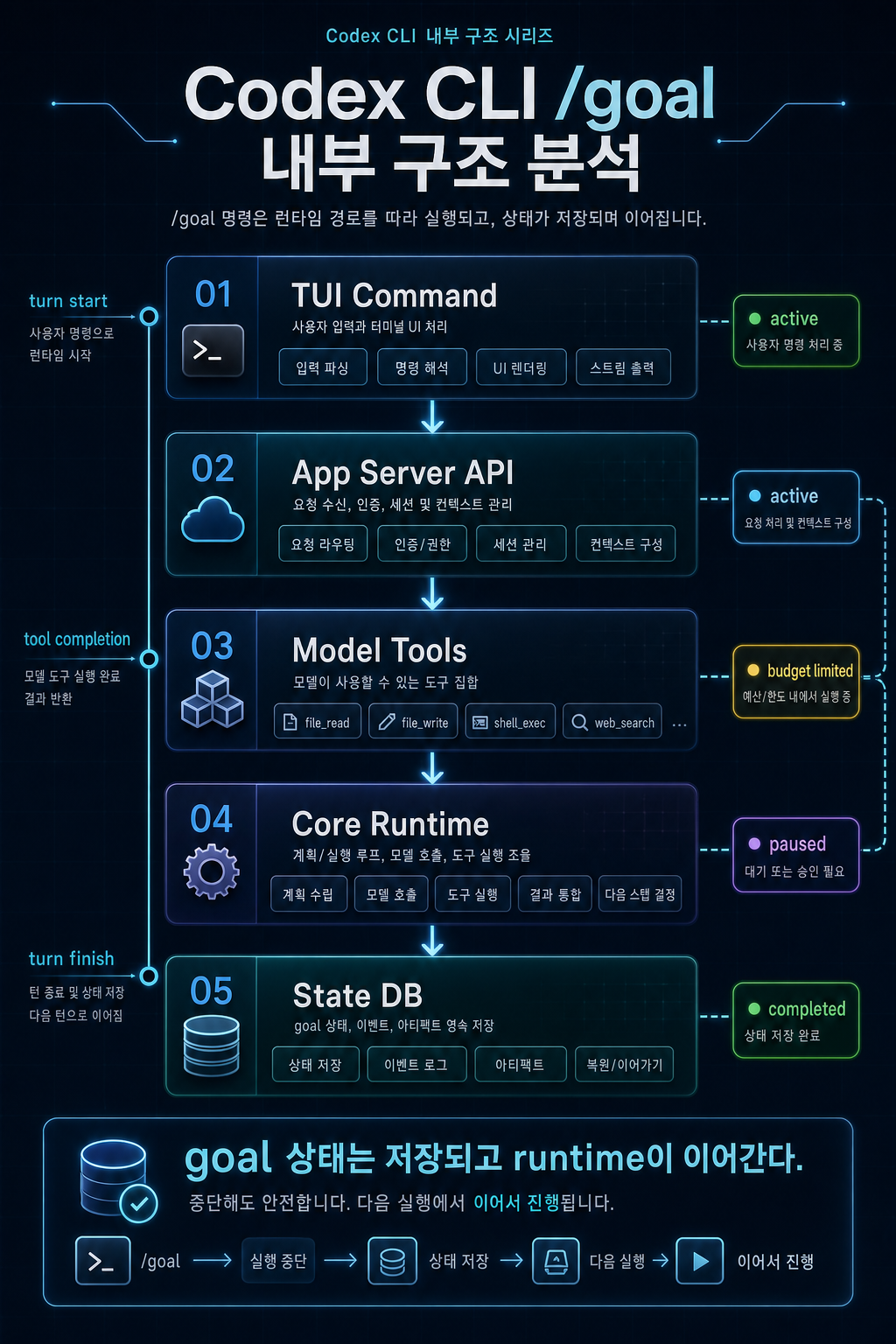
thread_goals, continuation runtime, completion audit까지 코드 레벨로 보기
1편에서는 Codex CLI /goal을 사용자 관점에서 봤습니다. 이번 글에서는 내부 구조를 봅니다.
핵심은 간단합니다.
# 읽기 가이드: 아래 블록은 명령, 상태 흐름, 또는 템플릿 예시입니다./goal은 명령 하나가 아니다.목표 상태 저장소, app-server API, model tool, runtime continuation, TUI 제어가 결합된 기능이다.이 글은 Codex GitHub PR과 공개된 소스 파일을 기준으로 작성했습니다. 출시 직후 기능이므로 실제 구현은 이후 버전에서 달라질 수 있습니다.
분석 기준일: 2026-05-02
기준 버전: Codex CLI0.128.0
주요 참고자료: OpenAI Codex changelog, GitHub PR #18073–#18077,thread_goalsmigration,continuation.md,budget_limit.md
핵심 요약
/goal은 TUI command → app-server API → model tools → core runtime → state DB로 이어지는 5개 레이어 기능입니다.- goal 상태는
thread_goals테이블에 저장되며, status는active,paused,budget_limited,complete로 제한됩니다. - model tool은 goal을 마음대로 조작하지 못합니다.
update_goal은 완료 처리 중심으로 제한되고, pause/resume/clear/budget-limited 전이는 사용자 또는 runtime 제어에 남습니다. - core runtime은
GoalRuntimeEvent를 통해 turn start, tool completion, turn finish, interrupt, resume, idle continuation을 처리합니다. - continuation prompt는 완료 전 “현재 실제 상태”를 기준으로 completion audit을 수행하라고 요구합니다.
- 좋은 agent 설계 관점에서
/goal의 핵심은while true가 아니라 event-driven continuation + evidence audit + budget guard입니다.
1. 전체 구조: 5개 레이어로 보기
코드 기준으로 /goal은 아래 구조에 가깝습니다.
# 읽기 가이드: 아래 블록은 명령, 상태 흐름, 또는 템플릿 예시입니다.TUI /goal command ↓app-server thread/goal API ↓model tools: get_goal / create_goal / update_goal ↓core runtime: continuation / accounting / interrupt / resume ↓state DB: thread_goals table각 레이어의 역할은 다릅니다.
| 레이어 | 역할 | 핵심 포인트 |
|---|---|---|
| TUI | 사용자가 /goal을 만들고 멈추고 지우는 UI | command와 상태 표시 |
| app-server | client가 thread goal 상태를 제어하는 API | get/set/clear, notification, resume snapshot |
| model tools | 모델이 goal을 조회·생성·완료 처리하는 도구 | 권한 제한이 중요 |
| core runtime | continuation, accounting, interrupt, resume 처리 | 실제 “계속 작업”을 만드는 중심 |
| state DB | goal objective/status/usage 저장 | thread 단위 persistence |
이 구조를 보면 /goal이 단순히 “모델에게 계속하라고 말하는 프롬프트”가 아니라는 점이 분명합니다. 목표 상태는 DB에 있고, runtime은 턴 생명주기에 맞춰 그 상태를 갱신합니다.
2. State DB: thread_goals 테이블
가장 아래에는 thread_goals 테이블이 있습니다. 공개 migration 기준으로 이 테이블은 다음 정보를 저장합니다.
| 컬럼 | 의미 |
|---|---|
thread_id | goal이 붙은 thread 식별자 |
goal_id | goal 자체의 식별자 |
objective | 사용자가 지정한 목표 |
status | active, paused, budget_limited, complete 중 하나 |
token_budget | 선택적 token budget |
tokens_used | goal 수행 중 누적 token 사용량 |
time_used_seconds | goal 수행 중 누적 시간 |
created_at_ms | 생성 시각 |
updated_at_ms | 갱신 시각 |
의사 타입으로 쓰면 이렇게 볼 수 있습니다.
// 읽기 가이드: 실제 API가 아니라 구조를 설명하는 의사코드입니다.type ThreadGoal = { thread_id: string goal_id: string objective: string status: "active" | "paused" | "budget_limited" | "complete" token_budget?: number tokens_used: number time_used_seconds: number created_at_ms: number updated_at_ms: number}여기서 중요한 건 thread_id입니다. goal은 단순 메모리 플래그가 아니라 thread 상태에 붙어 있습니다. 그래서 resume, reconnect, app-server snapshot 같은 기능과 연결될 수 있습니다.
또 하나 중요한 건 goal_id입니다. PR #18073 설명에 따르면 stale update protection이 들어갔습니다. 즉 오래된 goal update가 새 goal을 덮어쓰지 못하도록 막는 장치입니다.
# 읽기 가이드: 아래 블록은 명령, 상태 흐름, 또는 템플릿 예시입니다.문제:- goal A가 진행 중이다.- 사용자가 goal B로 교체한다.- 늦게 도착한 goal A update가 goal B 상태를 덮어쓴다. 해결:- update 시 expected goal_id를 확인한다.- 현재 goal_id와 다르면 stale update로 보고 막는다.AI agent runtime에서 이런 보호는 중요합니다. 여러 async task, tool result, user mutation이 섞이면 “늦게 도착한 업데이트”가 상태를 망가뜨릴 수 있기 때문입니다.
3. App-server API: thread goal 제어면
두 번째 레이어는 app-server API입니다. PR #18074는 v2 API로 다음 RPC와 notification을 추가했다고 설명합니다.
# 읽기 가이드: 아래 블록은 명령, 상태 흐름, 또는 템플릿 예시입니다.RPC:- thread/goal/get- thread/goal/set- thread/goal/clear Notification:- thread/goal/updated- thread/goal/cleared이 API가 필요한 이유는 client가 goal 상태를 안정적으로 읽고 제어해야 하기 때문입니다.
| API 요소 | 역할 |
|---|---|
thread/goal/get | 현재 thread의 goal 상태 조회 |
thread/goal/set | goal 설정 또는 상태 변경 |
thread/goal/clear | goal 제거 |
thread/goal/updated | goal 변경을 client에 알림 |
thread/goal/cleared | goal 삭제를 client에 알림 |
| resume/snapshot wiring | reconnect한 client가 현재 goal 상태를 볼 수 있게 함 |
이 레이어가 있으면 TUI뿐 아니라 다른 client도 동일한 goal 상태를 볼 수 있습니다. 즉 /goal은 TUI 전용 hack이 아니라 app-server를 통해 materialized thread goal을 다루는 구조입니다.
4. Model tools: 제한된 모델 권한
세 번째 레이어는 model-facing tool입니다. PR #18075에 따르면 goal 관련 tool은 다음 세 가지입니다.
# 읽기 가이드: 아래 블록은 명령, 상태 흐름, 또는 템플릿 예시입니다.get_goalcreate_goalupdate_goal여기서 설계가 흥미롭습니다. 모델이 goal을 무제한으로 조작할 수 있게 하지 않았습니다.
| Tool | 허용된 역할 | 제한 |
|---|---|---|
get_goal | 현재 goal 확인 | read 중심 |
create_goal | 명시적으로 요청된 goal 생성 | 기존 goal이 없을 때만 생성하도록 제한 |
update_goal | goal 완료 처리 | completion 중심으로 제한 |
PR 설명은 pause, resume, clear, budget_limited 전이를 모델이 마음대로 처리하지 않고 사용자 또는 runtime-controlled 상태로 남겨둔다고 설명합니다.
이 설계는 중요합니다.
모델에게 모든 상태 제어권을 주면 이런 문제가 생길 수 있습니다.
# 읽기 가이드: 아래 블록은 명령, 상태 흐름, 또는 템플릿 예시입니다.- 모델이 스스로 pause 처리해서 작업을 회피한다.- 예산 초과 상태를 모델이 임의로 해제한다.- 사용자가 만든 goal을 모델이 clear한다.- 완료되지 않았는데 complete로 표시한다.그래서 /goal은 모델이 작업을 수행하고 완료를 선언할 수는 있지만, 사용자 제어와 runtime 제어를 분리합니다.
# 읽기 가이드: 아래 블록은 명령, 상태 흐름, 또는 템플릿 예시입니다.모델 권한: 조회, 명시적 생성, 완료 처리사용자 권한: pause, resume/unpause, clear, replacementruntime 권한: budget_limited, accounting, continuation scheduling이 권한 분리는 agent 시스템을 만들 때 그대로 참고할 만합니다.
5. Core runtime: continuation 상태 머신
네 번째 레이어가 가장 중요합니다. PR #18076은 long-running goal을 client가 아니라 core runtime concern으로 봅니다. core가 turn lifecycle, tool completion boundaries, interruptions, resume behavior, token usage를 관리하기 때문입니다.
공개 코드의 goals.rs 주석을 보면 이 모듈은 core session과 state DB goal table을 연결하고, goal mutation 검증, protocol 변환, goal-update event 발행, lifecycle hook을 담당합니다.
핵심 이벤트는 다음처럼 볼 수 있습니다.
# 읽기 가이드: 아래 블록은 명령, 상태 흐름, 또는 템플릿 예시입니다.GoalRuntimeEvent- TurnStarted- ToolCompleted- ToolCompletedGoal- TurnFinished- MaybeContinueIfIdle- TaskAborted- ExternalMutationStarting- ExternalSet- ExternalClear- ThreadResumed의사코드로 정리하면 이렇습니다.
// 읽기 가이드: 실제 API가 아니라 구조를 설명하는 의사코드입니다.on TurnStarted: capture token usage baseline if current thread has active goal: mark goal active for this turn on ToolCompleted: account token/time usage reset no-tool continuation suppression if token budget exceeded: mark goal as budget_limited inject budget wrap-up steering on TurnFinished: account final usage if this was a continuation turn and tool_calls == 0: suppress next automatic continuation on MaybeContinueIfIdle: if session is idle and active goal exists: start continuation turn on TaskAborted with interrupt: account usage pause active goal on ThreadResumed: reactivate paused goal outside plan mode여기서 /goal의 실체가 드러납니다. Codex가 “계속 작업하는 것처럼 보이는 이유”는 모델이 혼자 무한 루프를 돌기 때문이 아니라, core runtime이 idle 상태에서 continuation turn을 예약하기 때문입니다.
# 읽기 가이드: 아래 블록은 명령, 상태 흐름, 또는 템플릿 예시입니다.active goal exists+ session is idle+ not suppressed+ budget not exhausted= start continuation turn6. Continuation prompt: 완료 감사의 핵심
continuation.md 템플릿은 /goal 품질의 핵심입니다.
이 prompt는 먼저 active thread goal을 계속 수행하라고 지시합니다. 동시에 objective를 “user-provided data”로 취급하라고 명시합니다. 즉 goal 문구가 system instruction처럼 승격되는 구조가 아닙니다.
또 매 continuation마다 다음 정보를 넣습니다.
# 읽기 가이드: 아래 블록은 명령, 상태 흐름, 또는 템플릿 예시입니다.Time spent pursuing goalTokens usedToken budgetTokens remaining가장 중요한 부분은 completion audit입니다. prompt는 완료를 선언하기 전에 다음을 하라고 요구합니다.
| 요구 | 의미 |
|---|---|
| objective를 concrete deliverables/success criteria로 재정리 | 목표를 검증 가능한 형태로 바꿈 |
| 모든 explicit requirement를 evidence checklist에 매핑 | 요구사항 누락 방지 |
| 파일, 명령 출력, 테스트 결과, PR 상태 등 실제 증거 확인 | 말이 아니라 현재 상태 기준으로 판단 |
| proxy signal만으로 완료 처리하지 않기 | “테스트 통과”도 목표 전체를 커버할 때만 증거 |
| 불확실하면 완료가 아니라 계속 작업 | 애매한 상태에서 premature complete 방지 |
이 부분은 AI agent 설계에서 매우 중요합니다.
나쁜 agent loop는 이렇게 끝납니다.
# 읽기 가이드: 아래 블록은 명령, 상태 흐름, 또는 템플릿 예시입니다.테스트 하나 통과함→ 아마 됐겠지→ complete좋은 goal runtime은 이렇게 끝나야 합니다.
# 읽기 가이드: 아래 블록은 명령, 상태 흐름, 또는 템플릿 예시입니다.목표 요구사항 목록화→ 각 요구사항을 실제 evidence와 매핑→ 누락/미검증 항목 확인→ 모두 충족되면 complete→ 아니면 다음 concrete action 선택이것이 /goal과 단순 반복 프롬프트의 차이입니다.
7. Budget limit: soft stop 설계
/goal에는 token budget 개념이 있습니다. 공개 migration에는 token_budget, tokens_used가 있고, runtime PR은 token budget exhaustion을 soft stop으로 처리한다고 설명합니다.
중요한 점은 예산 도달 시 active turn을 강제로 abort하지 않는다는 것입니다. 대신 goal을 budget_limited로 표시하고 wrap-up steering을 주입합니다.
budget_limit.md의 의도는 다음과 같습니다.
# 읽기 가이드: 아래 블록은 명령, 상태 흐름, 또는 템플릿 예시입니다.- active thread goal이 token budget에 도달했다.- objective는 user-provided data로 취급한다.- 새 실질 작업을 시작하지 않는다.- 진행 상황, 남은 작업, blocker, 다음 단계를 정리한다.- 실제 완료된 것이 아니라면 update_goal complete를 호출하지 않는다.이건 좋은 설계입니다. 예산이 끝났다고 목표가 완료된 것은 아니기 때문입니다.
# 읽기 가이드: 아래 블록은 명령, 상태 흐름, 또는 템플릿 예시입니다.budget exhausted != goal complete실무 agent에서 budget limit을 잘못 설계하면 두 가지 문제가 생깁니다.
| 잘못된 설계 | 문제 |
|---|---|
| 예산 초과 시 즉시 hard abort | 사용자에게 남은 작업과 상태가 전달되지 않음 |
| 예산 초과를 complete로 처리 | 미완료 작업이 완료처럼 보임 |
Codex의 방향은 그 중간입니다.
# 읽기 가이드: 아래 블록은 명령, 상태 흐름, 또는 템플릿 예시입니다.예산 초과→ budget_limited 상태 전이→ 새 작업 시작 금지→ 진행 요약과 남은 작업 보고→ complete는 실제 완료일 때만8. Loop guard와 safety 장치
long-running goal에서 가장 위험한 것은 무한 반복입니다. /goal에는 이를 줄이기 위한 장치들이 들어가 있습니다.
8.1 No-tool continuation suppression
PR #18076은 continuation turn이 tool call 없이 끝나면 반복 automatic continuation을 suppress한다고 설명합니다.
의미는 이렇습니다.
# 읽기 가이드: 아래 블록은 명령, 상태 흐름, 또는 템플릿 예시입니다.continuation turn 시작→ 모델이 실제 파일 읽기/수정/명령 실행 없이 말만 함→ tool_calls == 0→ 다음 자동 continuation 억제이 장치는 중요합니다. 그렇지 않으면 모델이 “계속 진행하겠습니다” 같은 말만 반복하는 루프에 빠질 수 있습니다.
8.2 Interrupt pause
사용자가 중단하면 active goal은 pause됩니다. 사용자가 멈췄는데도 goal이 계속 이어지는 것을 막기 위한 구조입니다.
# 읽기 가이드: 아래 블록은 명령, 상태 흐름, 또는 템플릿 예시입니다.사용자 interrupt→ active goal accounting→ goal status paused8.3 Resume auto-reactivation
PR #18076 설명에 따르면 thread resume 시 plan mode가 아니면 paused goal을 자동 재활성화하는 동작이 들어갔습니다. 즉 중단과 재개를 goal lifecycle의 일부로 다룹니다.
8.4 Stale goal_id protection
상태 레이어에서는 goal_id 기반 stale update protection이 있습니다. 오래된 update가 새 goal을 덮어쓰지 못하게 막습니다.
8.5 Objective privilege separation
Continuation prompt는 objective를 “higher-priority instruction”이 아니라 user-provided data로 취급합니다. 사용자가 goal 안에 강한 명령을 넣더라도 system/developer instruction처럼 승격되지 않도록 하기 위한 구조입니다.
9. 나만의 Agent 설계에 적용하기
/goal에서 가장 배울 만한 점은 “자동 반복”을 runtime event로 분리한 것입니다.
나쁜 구현은 대개 이렇게 됩니다.
// 읽기 가이드: 실제 API가 아니라 구조를 설명하는 의사코드입니다.while (true) { const result = await agent.run(goal) if (result.done) break}이 방식은 간단하지만 위험합니다.
# 읽기 가이드: 아래 블록은 명령, 상태 흐름, 또는 템플릿 예시입니다.- 완료 판정이 약하다.- 비용 제한이 부실하다.- 중단/재개가 어렵다.- 사용자 입력 우선순위를 다루기 어렵다.- 도구 호출 없는 반복을 막기 어렵다.- 이전 goal update가 새 goal을 덮어쓸 수 있다.더 나은 구조는 이런 식입니다.
// 읽기 가이드: 실제 API가 아니라 구조를 설명하는 의사코드입니다.interface GoalRuntime { state: GoalStateStore scheduler: ContinuationScheduler auditor: CompletionAuditor accounting: UsageAccounting controls: UserControls guards: LoopGuards}각 컴포넌트의 책임은 분리합니다.
| 컴포넌트 | 책임 |
|---|---|
GoalStateStore | objective, status, usage, timestamps 저장 |
ContinuationScheduler | idle 상태에서만 다음 turn 시작 |
CompletionAuditor | 요구사항과 증거를 매핑해 완료 판단 |
UsageAccounting | token/time budget 누적 |
UserControls | pause, resume, clear, replace |
LoopGuards | no-tool suppression, stale update protection, interrupt handling |
실제 구현 의사코드는 다음처럼 잡을 수 있습니다.
// 읽기 가이드: 실제 API가 아니라 구조를 설명하는 의사코드입니다.async function maybeContinueIfIdle(session: Session) { if (!session.isIdle()) return if (session.hasPendingUserInput()) return const goal = await goalStore.get(session.threadId) if (!goal || goal.status !== "active") return if (goalRuntime.isContinuationSuppressed(goal.goal_id)) return if (goal.token_budget && goal.tokens_used >= goal.token_budget) return await session.startContinuationTurn({ prompt: renderContinuationPrompt(goal), goal_id: goal.goal_id, })}완료 판정도 별도 auditor로 분리하는 것이 좋습니다.
// 읽기 가이드: 실제 API가 아니라 구조를 설명하는 의사코드입니다.async function auditCompletion(goal: Goal, evidence: Evidence[]) { const checklist = buildChecklist(goal.objective) const coverage = mapEvidenceToChecklist(checklist, evidence) if (coverage.hasMissingItems()) { return { complete: false, nextAction: coverage.suggestNextAction() } } if (coverage.hasWeakVerification()) { return { complete: false, nextAction: "collect stronger evidence" } } return { complete: true }}핵심은 agent가 열심히 했는지가 아니라 요구사항이 실제 증거로 충족됐는지를 보는 것입니다.
10. 구현 체크리스트
나만의 goal 기반 agent를 만든다면 다음을 체크하는 것이 좋습니다.
# 읽기 가이드: 아래 블록은 명령, 상태 흐름, 또는 템플릿 예시입니다.Goal State[ ] goal_id를 둔다.[ ] objective를 저장한다.[ ] status를 active/paused/budget_limited/complete 등으로 제한한다.[ ] token/time usage를 누적한다.[ ] stale update protection을 둔다. Runtime[ ] turn started/finished 이벤트를 분리한다.[ ] tool completed 이벤트에서 usage를 집계한다.[ ] idle 상태에서만 continuation을 시작한다.[ ] 사용자 입력을 continuation보다 우선한다.[ ] interrupt 시 active goal을 pause한다.[ ] resume 시 goal 상태를 복원한다. Completion Audit[ ] objective를 success criteria로 재정리한다.[ ] 요구사항을 checklist로 만든다.[ ] 각 항목을 파일/명령/test 결과와 매핑한다.[ ] proxy signal만으로 완료 처리하지 않는다.[ ] 불확실하면 complete가 아니라 continue로 처리한다. Budget[ ] token budget을 둘 수 있다.[ ] budget 초과 시 complete로 처리하지 않는다.[ ] budget_limited 상태에서 wrap-up을 제공한다.[ ] 새 실질 작업을 시작하지 않도록 steering한다. User Controls[ ] pause를 지원한다.[ ] resume 또는 unpause를 지원한다.[ ] clear를 지원한다.[ ] replacement 시 기존 goal과 새 goal을 구분한다. Loop Guards[ ] tool call 없는 continuation은 반복하지 않는다.[ ] long-running command timeout을 둔다.[ ] 같은 실패를 반복하지 않도록 history를 기록한다.[ ] 권한과 writable scope를 제한한다.11. 참고자료와 불확실성
참고자료
- OpenAI Codex changelog: https://developers.openai.com/codex/changelog
- OpenAI Codex GitHub repository: https://github.com/openai/codex
- PR #18073 — goal persistence foundation: https://github.com/openai/codex/pull/18073
- PR #18074 — app-server goal API: https://github.com/openai/codex/pull/18074
- PR #18075 — model-facing goal tools: https://github.com/openai/codex/pull/18075
- PR #18076 — core runtime goal loop: https://github.com/openai/codex/pull/18076
- PR #18077 — TUI goal UX: https://github.com/openai/codex/pull/18077
thread_goalsmigration: https://raw.githubusercontent.com/openai/codex/main/codex-rs/state/migrations/0029_thread_goals.sqlcontinuation.md: https://raw.githubusercontent.com/openai/codex/main/codex-rs/core/templates/goals/continuation.mdbudget_limit.md: https://raw.githubusercontent.com/openai/codex/main/codex-rs/core/templates/goals/budget_limit.md- Issue #19910 — compaction 관련 사용자 보고: https://github.com/openai/codex/issues/19910
- Issue #20536 —
/goal문서화 요청: https://github.com/openai/codex/issues/20536
확인된 사실
thread_goals테이블은thread_id,goal_id,objective,status,token_budget,tokens_used,time_used_seconds, timestamp를 저장합니다.status는active,paused,budget_limited,complete로 제한됩니다.- app-server에는
thread/goal/get,thread/goal/set,thread/goal/clearRPC와 goal updated/cleared notification이 추가됐습니다. - model-facing tool은
get_goal,create_goal,update_goal이며,update_goal은 completion 중심으로 제한됩니다. - core runtime은 idle continuation, usage accounting, budget limit, interrupt pause, resume reactivation, no-tool suppression을 처리합니다.
작성자의 해석
/goal은 AI coding agent의 “목표 기반 runtime”을 대중 제품에 넣은 사례로 볼 수 있습니다.- 가장 중요한 설계 포인트는 continuation scheduler보다 completion audit입니다.
- 이 구조는 Codex CLI뿐 아니라 자체 AI Agent, CI repair bot, long-running coding assistant에도 응용할 수 있습니다.
불확실성
- 출시 직후 기능이라 CLI help, command alias, 문서 반영은 변경될 수 있습니다.
- GitHub issue #19910에서 언급된 compaction failure mode는 사용자 보고 기준이며, 향후 수정될 수 있습니다.
- 공개 소스 분석 기준이므로 내부 런타임 세부사항이나 제품 동작은 버전에 따라 달라질 수 있습니다.
마무리
정리하면, Codex CLI /goal은 단순한 slash command가 아니라 goal state를 중심으로 agent runtime을 구성한 기능입니다.
가장 중요한 교훈은 이겁니다.
# 읽기 가이드: 아래 블록은 명령, 상태 흐름, 또는 템플릿 예시입니다.AI Agent를 오래 돌리고 싶다면 while loop를 먼저 만들지 말고,상태, 이벤트, 감사, 예산, 사용자 제어를 먼저 설계해야 한다./goal은 그 방향을 잘 보여줍니다. 목표를 저장하고, runtime event로 이어가고, 실제 증거로 완료를 감사하고, budget과 interrupt를 상태 전이로 처리합니다.
AI coding agent를 직접 만들고 있다면 이 구조를 그대로 참고할 만합니다. 특히 Goal State + Evidence Checklist + Continuation Scheduler + Budget Stop + User Control 조합은 단순 반복보다 훨씬 안전한 출발점입니다.
댓글
GitHub 계정으로 로그인하면 댓글을 남길 수 있습니다. 댓글은 GitHub Discussions를 통해 운영됩니다.