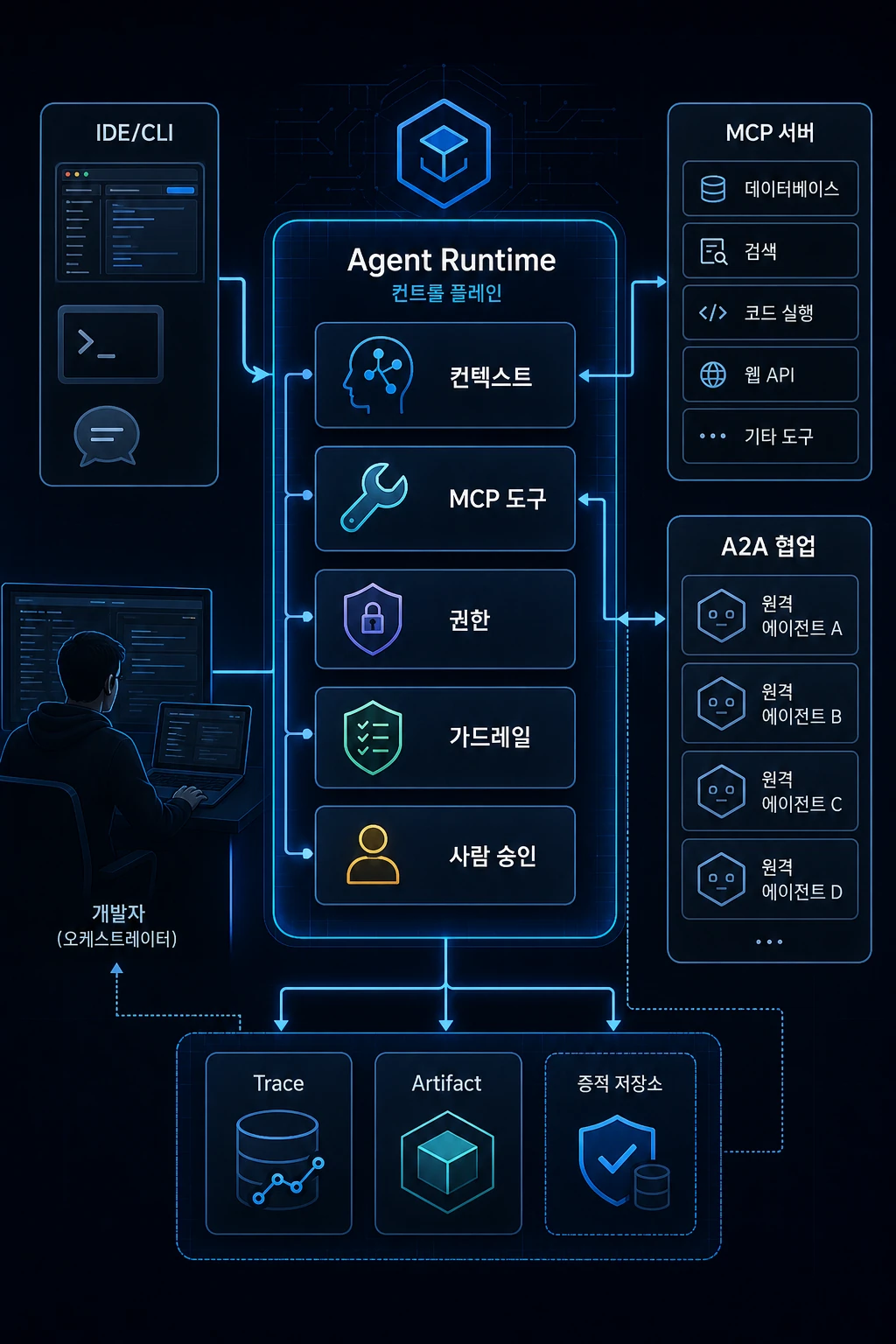
작은 팀이 AI 코딩 도구에 GitHub 이슈, 로그 검색, 테스트 실행, PR 요약 권한을 붙였다고 해봅시다. 처음에는 생산성이 올라갑니다. 이슈를 읽고, 관련 파일을 찾고, 테스트를 돌리고, PR 설명까지 정리해주기 때문입니다.
하지만 곧 새로운 질문이 생깁니다. AI가 어떤 로그를 읽어도 되는지, 테스트 실패 후 어디까지 자동 수정해도 되는지, migration을 만들 때 멈춰야 하는지, PR 요약에 내부 장애 정보를 포함해도 되는지 정해야 합니다.
이 순간 개발 환경은 단순 IDE가 아닙니다. AI가 컨텍스트를 읽고, 도구를 호출하고, 권한 경계에서 멈추고, 실행 기록과 산출물을 남기는 Agent Runtime에 가까워집니다.
개발 환경이라고 하면 보통 IDE를 떠올립니다. VS Code, IntelliJ, WebStorm, Cursor 같은 도구들입니다. 여기에 터미널, Git, 패키지 매니저, 브라우저, DB 클라이언트, 배포 도구가 붙습니다.
기존 개발 환경의 중심은 사람이었습니다. 사람이 IDE에서 코드를 읽고, 터미널에서 명령을 실행하고, 로그를 해석하고, 배포 버튼을 누르고, PR을 작성했습니다. AI 코딩 도구가 들어오면서 이 전제가 흔들립니다.
MCP는 LLM 애플리케이션이 외부 데이터와 도구를 표준화된 방식으로 연결하는 protocol입니다. A2A는 서로 다른 AI agent system이 공통의 communication model로 협업하도록 설계된 open standard입니다.
여기까지가 공식 specification에서 확인할 수 있는 사실입니다. 이 글의 해석은 MCP와 A2A 자체가 곧바로 완성된 개발 플랫폼이라는 뜻이 아니라, 개발 환경이 IDE 기능 묶음에서 agent 실행 환경 설계로 확장된다는 신호로 보자는 것입니다.
| 기준 | 내용 |
|---|---|
| 분석 기준일 | 2026-05-10 |
| 주요 참고자료 | Model Context Protocol Specification, A2A Protocol Specification, OpenAI Agents SDK |
| 글의 목적 | AI 개발 도구의 다음 구조를 시스템 설계 관점으로 이해하기 |
| 핵심 질문 | 도구 연결과 멀티 에이전트 협업은 개발 환경을 어떻게 바꾸는가 |
핵심 요약
- MCP는 LLM 애플리케이션과 외부 데이터·도구를 연결하는 표준화된 방식이며, Resources, Prompts, Tools를 핵심 구성 요소로 둡니다.
- MCP Prompts는 서버가 prompt template을 제공하고, 클라이언트가 이를 발견해 사용자 주도 명령처럼 사용할 수 있는 구조를 설명합니다.
- A2A specification은 독립적인 AI agent system 간 communication과 interoperability를 위한 open standard이며, Agent Card, Task, Message, Artifact 같은 개념을 사용합니다.
- OpenAI Agents SDK Tracing, Guardrails, Human-in-the-loop은 agent runtime이 관측, 승인, 검증 구조를 포함해야 함을 보여줍니다.
- 앞으로 개발 환경은 사람이 IDE에서 모든 일을 직접 수행하는 구조에서 사람이 agent runtime을 설계하고 감독하는 구조로 이동할 가능성이 큽니다.
IDE 중심 개발 환경의 한계
기존 IDE는 사람이 코드를 작성하기 좋은 환경입니다. 자동완성, 검색, 리팩터링, 디버깅, 테스트 실행, Git 연동을 제공합니다. 하지만 기본 전제는 여전히 "사람이 중심"입니다.
AI 코딩 도구가 들어오면 이 전제가 흔들립니다. AI는 단순 자동완성보다 더 많은 일을 합니다. 코드베이스를 탐색하고, 파일을 수정하고, 테스트를 실행하고, 오류를 고치고, 결과를 요약합니다.
Claude Code 공식 문서도 Claude Code를 agentic coding environment로 설명하며, 사용자가 원하는 것을 설명하면 Claude가 탐색하고 계획하고 구현한다고 설명합니다.
이제 개발 환경은 이런 질문을 해야 합니다.
AI는 어떤 파일을 읽을 수 있는가?AI는 어떤 도구를 호출할 수 있는가?AI는 어떤 명령을 실행할 수 있는가?AI가 만든 결과는 어디에 artifact로 남는가?AI의 판단과 도구 호출은 어떻게 trace되는가?사람은 어느 지점에서 승인해야 하는가?
이 질문은 IDE 기능만으로는 충분히 다루기 어렵습니다. 그래서 필요한 개념이 Agent Runtime입니다.
Agent Runtime이란 무엇인가
Agent Runtime은 AI가 작업을 수행하기 위해 필요한 실행 환경입니다. 단순히 모델 API를 호출하는 코드가 아닙니다.
Agent Runtime =Model+ Context+ Tools+ Permissions+ Guardrails+ State+ Tracing+ Artifacts+ Human Approval
기존 개발 환경과 비교하면 이렇습니다.
| 구분 | IDE 중심 개발 | Agent Runtime 중심 개발 |
|---|---|---|
| 주 실행자 | 사람 | 사람 + AI agent |
| 컨텍스트 | 사람이 읽음 | AI가 선별적으로 읽음 |
| 도구 실행 | 사람이 클릭/명령 실행 | AI가 tool call |
| 권한 | 사람 계정 기준 | agent별 권한 필요 |
| 검증 | 사람이 테스트 실행 | AI 실행 + 사람 승인 |
| 기록 | Git/PR 중심 | trace, tool log, artifact 추가 |
| 산출물 | 코드 변경 | 코드 + 보고서 + evidence |
Agent Runtime은 "AI가 개발 작업을 할 수 있게 만드는 운영 환경"입니다. 이 관점에서 MCP와 A2A는 중요합니다.
MCP: 도구와 컨텍스트를 연결하는 표준
MCP는 Model Context Protocol의 약자입니다. 공식 specification은 MCP를 LLM 애플리케이션과 외부 데이터 소스 및 도구를 통합하기 위한 open protocol로 설명합니다.
개발자 관점에서 MCP를 쉽게 말하면 이렇습니다.
AI 도구가 매번 제각각 방식으로 외부 도구를 붙이지 말고,공통 규격으로 컨텍스트와 도구를 제공하자.
예를 들어 AI 코딩 도구가 다음을 사용해야 한다고 해봅시다.
GitHub IssueJira Ticket프로젝트 문서DB schema로그 검색테스트 실행코드 검색배포 상태
각 도구마다 따로 붙이면 복잡합니다. MCP는 이런 것들을 LLM client와 server 사이에서 정해진 방식으로 노출하는 구조를 제공합니다.
MCP Resources, Prompts, Tools
MCP를 개발 워크플로우 관점으로 보면 세 가지가 핵심입니다.
| MCP 구성 요소 | 의미 | 개발 워크플로우 예시 |
|---|---|---|
| Resources | AI가 참고할 컨텍스트와 데이터 | README, API schema, 로그, 이슈 |
| Prompts | 사용자가 선택할 수 있는 작업 템플릿 | 코드 리뷰 요청, 테스트 생성, PR 요약 |
| Tools | AI가 실행할 수 있는 함수 | 파일 검색, 테스트 실행, 이슈 조회 |
Resources
이 계층은 AI가 읽을 수 있는 컨텍스트를 다룹니다. 코드베이스 전체를 무작정 넣는 것이 아니라 필요한 데이터를 구조적으로 노출하는 개념에 가깝습니다.
resource://project/architectureresource://project/api-schemaresource://logs/recent-errorsresource://issues/current-sprintresource://docs/coding-convention
Prompts
MCP의 prompt 기능은 서버가 prompt template을 클라이언트에 노출하고, 클라이언트가 이를 발견해 인자를 넣어 사용할 수 있게 하는 구조를 설명합니다.
개발팀에서는 이런 식으로 쓸 수 있습니다.
/review-api-change/write-regression-test/analyze-prod-log/summarize-pr/refactor-component
중요한 점은 이 명령들이 단순 프롬프트가 아니라 팀의 작업 규칙과 연결될 수 있다는 것입니다.
Tools
마지막 계층은 AI가 실행할 수 있는 함수입니다.
search_code()read_file()run_tests()query_logs()create_pr_summary()get_issue()
적용해 보면, MCP를 붙인다는 것은 생산성을 올리는 일이면서 동시에 권한을 설계하는 일입니다. tool은 외부 시스템 접근이나 코드 실행 경로가 될 수 있으므로 사용자 동의, 데이터 프라이버시, tool safety를 함께 다뤄야 합니다.
A2A: 에이전트 간 협업 프로토콜
MCP가 AI와 도구의 연결에 가깝다면, A2A는 AI와 AI의 연결에 가깝습니다.
A2A 공식 specification은 A2A Protocol을 독립적이고 내부가 불투명할 수 있는 AI agent system 간 communication과 interoperability를 위한 open standard로 설명합니다. 또한 agent가 서로의 내부 상태, 메모리, 도구에 접근하지 않고도 사용자 목표 달성을 위해 정보를 안전하게 교환하도록 돕는다고 설명합니다.
A2A의 핵심 개념은 다음과 같습니다.
| 개념 | 의미 |
|---|---|
| Agent Card | agent의 능력, endpoint, 권한 요구사항을 설명하는 메타데이터 |
| Message | client와 agent 사이의 통신 단위 |
| Task | agent가 처리하는 stateful 작업 단위 |
| Artifact | task 결과로 생성되는 산출물 |
| Part | message나 artifact 안의 최소 콘텐츠 단위 |
개발 워크플로우로 바꾸면 이렇게 볼 수 있습니다.
- Planner Agent
- Coder Agent
component artifact - Test Agent
test report artifact - Reviewer Agent
review artifact - Release Agent
release note artifact
A2A가 중요한 이유는 앞으로 AI 작업이 하나의 agent 안에서 끝나지 않을 가능성이 높기 때문입니다.
Agent Runtime의 핵심 구성 요소
Agent Runtime을 개발 환경으로 본다면 다음 구성 요소가 필요합니다.
| 구성 요소 | 역할 |
|---|---|
| Context Manager | AI에게 줄 문서, 코드, 로그를 선별 |
| Tool Gateway | AI가 호출할 도구를 관리 |
| Permission Layer | 파일/명령/외부 API 권한 제한 |
| Guardrail Engine | 위험 입력·출력·도구 호출 차단 |
| State Store | 작업 상태, session, task 관리 |
| Trace Store | LLM 호출, tool call, 승인 기록 저장 |
| Artifact Store | 결과물, 보고서, 테스트 결과 저장 |
| Human Approval UI | 사람 승인/거절 지점 제공 |
OpenAI Agents SDK Tracing은 agent run 중 LLM generation, tool call, handoff, guardrail, custom event 등을 기록한다고 설명합니다. Human-in-the-loop 문서는 tool call이 approval을 요구할 때 run이 멈추고, pending approval을 사람이 approve 또는 reject한 뒤 재개하는 구조를 설명합니다.
Trace 없이는 디버깅할 수 없다.Approval 없이는 위험한 실행을 막을 수 없다.Artifact 없이는 결과를 검증할 수 없다.
개발 워크플로우는 어떻게 바뀌는가
기존 개발 워크플로우는 대략 이랬습니다.
요구사항 확인→ 코드 작성→ 테스트→ 리뷰→ 배포
AI Agent Runtime이 들어오면 흐름이 바뀝니다.
요구사항 계약→ 컨텍스트 구성→ agent 작업 계획→ 도구 호출→ 코드 변경→ 자동 검증→ evidence 제출→ 사람 승인→ PR merge
| 단계 | 기존 방식 | Agent Runtime 방식 |
|---|---|---|
| 요구사항 | 사람이 읽고 이해 | 작업 계약서로 구조화 |
| 코드 탐색 | 사람이 검색 | agent가 context 탐색 |
| 구현 | 사람이 작성 | agent가 수정, 사람이 검토 |
| 테스트 | 사람이 실행 | agent 실행 + 결과 제출 |
| 리뷰 | 사람이 diff 확인 | diff + evidence + trace 확인 |
| 배포 | 사람이 실행 | 승인 게이트 후 실행 |
사람의 역할은 사라지지 않습니다. 직접 실행자에서 작업 시스템 설계자이자 승인자로 바뀝니다.
실무 아키텍처 예시
팀에서 바로 적용할 수 있는 단순 Agent Runtime 구조는 다음과 같습니다.
AI_GUIDE · TASK_CONTRACT · Docs · Logs
Code Search · Test Runner · Issue · Log Query
read/test 허용 · write 승인 · secret/deploy 차단
secret check · dangerous command check · output validation
tool calls · approvals · failures
code diff · VERIFY_REPORT · PR summary
처음부터 플랫폼으로 만들 필요는 없습니다. 초기에는 문서와 PR 템플릿으로 시작하면 됩니다.
AI_GUIDE.mdTASK_CONTRACT.mdVERIFY_REPORT.mdPR_TEMPLATE.md
그다음 적용 단계에서 MCP server를 붙이고, 승인 게이트를 추가하고, trace를 저장하면 됩니다.
최소 Agent Runtime부터 시작하기
최소 Agent Runtime은 별도 플랫폼이 아니라 세 가지 파일, 세 가지 명령, 세 가지 승인 규칙으로 시작할 수 있습니다.
| 구성 | 최소 기준 | 이유 |
|---|---|---|
| 파일 | AI_GUIDE.md, TASK_CONTRACT.md, VERIFY_REPORT.md | 컨텍스트, 작업 범위, 완료 증거를 분리한다. |
| 명령 | lint, typecheck, test | AI가 "완료"라고 말하기 전에 실행 증거를 남긴다. |
| 승인 규칙 | dependency 변경, migration, 배포 명령 | 되돌리기 어렵거나 운영 영향을 줄 수 있는 작업을 멈춘다. |
예시로 바꾸면 다음 정도가 첫 단계입니다.
minimum_agent_runtime: context: required_files: - AI_GUIDE.md - TASK_CONTRACT.md tools: allow: - npm run lint - npm run typecheck - npm test require_approval: - npm install - npm run db:migrate - npm run deploy evidence: required_artifacts: - VERIFY_REPORT.md - PR summary
이 정도만 있어도 AI 작업은 대화창 안의 즉흥 실행에서 리뷰 가능한 runtime 이벤트로 바뀝니다.
보안과 권한 리스크
Agent Runtime은 강력합니다. 강력하다는 것은 위험하다는 뜻이기도 합니다.
주의해야 할 리스크는 다음과 같습니다.
| 리스크 | 설명 | 대응 |
|---|---|---|
| Secret 노출 | .env, token, key 접근 | deny path, secret scanner |
| 위험 명령 실행 | 삭제, 배포, migration | approval gate |
| 과도한 컨텍스트 제공 | 불필요한 데이터 노출 | context minimization |
| 잘못된 tool 설명 | tool이 실제로 하는 일과 설명 불일치 | trusted server만 허용 |
| trace 민감 정보 저장 | 로그와 trace에 비밀정보 포함 | masking, retention policy |
| agent 간 정보 전파 | 다른 agent로 민감 정보 전달 | task scope 제한 |
Agent Runtime을 설계할 때는 처음부터 보안 계층을 넣어야 합니다.
도구를 연결하기 전에 권한을 설계한다.권한을 열기 전에 승인 조건을 만든다.승인 조건을 만들기 전에 금지 영역을 정의한다.
적용 로드맵
1단계: 문서 기반 Runtime
처음에는 문서 기반 runtime만으로도 충분한 경계를 만들 수 있습니다.
AI_GUIDE.mdTASK_CONTRACT.mdVERIFY_REPORT.mdPR_TEMPLATE.md
목표는 AI 작업을 대화창 안의 임시 작업에서 리뷰 가능한 작업 단위로 바꾸는 것입니다.
2단계: 도구 제한
그다음에는 도구를 위험도 기준으로 나눕니다.
허용:- 파일 읽기- 코드 검색- lint- typecheck- unit test 승인 필요:- 파일 수정- dependency 변경- migration 작성 금지:- secret 접근- production 배포- DB 직접 변경
3단계: MCP 도입
반복되는 도구 연결을 MCP server로 분리합니다.
docs serverissue serverlog servertest servercode search server
이때 tool별 승인 조건도 함께 설계합니다.
4단계: Trace 저장
저장해야 할 최소 기록은 다음과 같습니다.
사용한 컨텍스트호출한 도구실패한 명령생성한 diff사람 승인 여부검증 결과
5단계: Multi-Agent 협업
역할을 나누면 agent 간 task와 artifact 경계를 더 명확히 둘 수 있습니다.
Planner AgentCoder AgentTest AgentReviewer AgentRelease Note Agent
이 단계부터 A2A 같은 개념이 중요해집니다. A2A는 agent가 서로의 내부 도구나 메모리에 접근하지 않고도 capability discovery, modality negotiation, collaborative task management를 수행하도록 하는 방향을 제시합니다.
체크리스트
Agent Runtime을 설계할 때는 아래 항목을 순서대로 확인합니다.
[ ] AI가 읽을 수 있는 컨텍스트 범위를 정의했다.[ ] AI가 읽으면 안 되는 파일과 데이터가 정의되어 있다.[ ] AI가 호출할 수 있는 도구 목록이 있다.[ ] 각 도구별 권한 수준이 정의되어 있다.[ ] 승인 없이 실행 가능한 명령과 승인 필요한 명령이 나뉘어 있다.[ ] secret, production, DB 변경은 기본 차단되어 있다.[ ] AI 작업의 상태를 기록할 방법이 있다.[ ] AI tool call과 실패 기록을 추적할 수 있다.[ ] 작업 결과가 artifact로 남는다.[ ] PR에서 evidence를 확인할 수 있다.[ ] 멀티 에이전트 협업 시 task와 artifact 경계가 정의되어 있다.
마무리
MCP와 A2A는 단순히 새로운 AI 기술 키워드가 아닙니다.
MCP는 AI가 외부 도구와 컨텍스트를 다루는 방식을 표준화하려는 흐름입니다. A2A는 AI 에이전트들이 서로를 발견하고, task를 주고받고, artifact를 생성하며 협업하는 방식을 표준화하려는 흐름입니다.
이 두 흐름이 가리키는 방향은 분명합니다. 개발 환경은 더 이상 IDE만으로 설명되지 않습니다.
| 묶음 | 포함 요소 |
|---|---|
| 사용자 작업면 | IDE, CLI |
| agent 실행면 | LLM, MCP Server, Tool Gateway |
| 통제 계층 | Permission Layer, Guardrails, Human Approval |
| 관측 계층 | Trace Store, Artifact Store |
| 협업 계층 | A2A Agent Network |
이 전체를 묶으면 Agent Runtime입니다.
과거의 개발 환경:사람이 IDE에서 코드를 작성한다. 현재의 개발 환경:사람이 AI와 함께 코드를 수정한다. 다음 개발 환경:사람이 Agent Runtime을 설계하고 감독한다.
이제 개발자는 코드뿐 아니라 AI가 코드를 다루는 방식까지 설계해야 합니다.
요약 카드
이 글의 핵심을 실행 관점으로 압축하면 다음과 같습니다.
한 줄 요약:MCP와 A2A 이후 개발 환경은 IDE가 아니라 Agent Runtime 중심으로 이동한다. 핵심 개념:MCP Resources, Prompts, Tools / A2A Agent Card, Task, Message, Artifact 가장 큰 리스크:도구를 먼저 연결하고 권한·승인·trace를 나중에 생각하는 것 지금 바로 할 일:AI가 호출할 수 있는 도구 목록과 승인 필요 도구 목록을 분리한다.Let's say a small team has given an AI coding tool permission to view GitHub issues, search logs, run tests, and summarize PRs. At first, productivity goes up. This is because it reads the issue, finds related files, runs tests, and even organizes PR descriptions.
But soon new questions arise. You need to decide which logs the AI can read, how much it can auto-correct after a test failure, whether it should stop when creating a migration, and whether it can include internal error information in the PR summary.
At this moment, the development environment is not just an IDE. We get closer to agent runtime, where AI reads context, calls tools, stops at permission boundaries, and leaves execution history and artifacts.
When you think of a development environment, you usually think of an IDE. Tools like VS Code, IntelliJ, WebStorm, and Cursor. This includes terminal, Git, package manager, browser, DB client, and deployment tool.
The center of the existing development environment was people. A human read the code in the IDE, ran commands in the terminal, interpreted the logs, hit the deploy button, and wrote the PR. The coming of AI coding tools shakes up this premise.
MCP is a protocol that allows LLM applications to connect external data and tools in a standardized way. A2A is an open standard designed to enable different AI agent systems to collaborate using a common communication model.
These are the facts that can be confirmed in the official specifications. The interpretation of this article is not to say that MCP and A2A themselves are complete development platforms, but rather to view them as a signal that the development environment is expanding from a bundle of IDE functions to designing an agent execution environment.
| standard | detail |
|---|---|
| Analysis base date | 2026-05-10 |
| Key references | Model Context Protocol Specification, A2A Protocol Specification, OpenAI Agents SDK |
| purpose of writing | Understanding the following structure of AI development tools from a system design perspective |
| key questions | How tool connectivity and multi-agent collaboration change the development environment |
Key takeaways
- MCP is a standardized way to connect LLM applications and external data and tools, with Resources, Prompts, and Tools as key components.
- MCP Prompts explains the structure in which the server provides a prompt template, and the client discovers it and uses it as a user-directed command.
- A2A specification is an open standard for communication and interoperability between independent AI agent systems, and uses concepts such as Agent Card, Task, Message, and Artifact.
- OpenAI Agents SDK Tracing, Guardrails, and Human-in-the-loop show that the agent runtime must include observation, acknowledgment, and verification structures.
- In the future, the development environment is likely to move from a structure where people do everything directly in the IDE to a structure where people design and supervise the agent runtime.
Limitations of IDE-centric development environments
Existing IDEs are a good environment for people to write code. Provides autocompletion, search, refactoring, debugging, test execution, and Git integration. However, the basic premise is still “people-centered.”
This premise is shaken when AI coding tools come in. AI does more than just autocomplete. Explore your code base, modify files, run tests, fix errors, and summarize the results.
[Claude Code official document] (https://code.claude.com/docs/en/best-practices) also describes Claude Code as an agentic coding environment, and explains that when the user explains what they want, Claude explores, plans, and implements it.
Now the development environment must ask these questions:
What files can AI read?What tools can AI invoke?What commands can AI execute?Where do the results created by AI remain as artifacts?How are AI decisions and tool calls traced?At what point should a person sign off?
This question is not sufficiently addressed by IDE features alone. So the necessary concept is agent runtime.
What is agent runtime?
agent runtime is the execution environment required for AI to perform tasks. It's not just code that calls the model API.
agent runtime =Model+ Context+ Tools+ Permissions+ Guardrails+ State+ Tracing+ Artifacts+ Human Approval
Compared to the existing development environment, it is like this.
| division | IDE-centric development | agent runtime-centered development |
|---|---|---|
| main executor | person | Human + AI agent |
| context | read by people | AI reads selectively |
| run tool | Person clicks/executes command | AI tool call |
| authority | By person account | Permission required for each agent |
| verification | human test run | AI execution + human approval |
| record | Git/PR focused | Add trace, tool log, artifact |
| output | code change | code + report + evidence |
agent runtime is “an operating environment that enables AI to do development work.” From this perspective, MCP and A2A are important.
MCP: A standard that connects tools and context
MCP stands for Model Context Protocol. The official specification describes MCP as an open protocol for integrating LLM applications with external data sources and tools.
To put it simply, MCP from a developer's perspective is like this.
Instead of attaching external tools to AI tools in different ways each time,Let's provide context and tools with a common standard.
For example, let's say your AI coding tool needs to use:
GitHub IssueJira Ticketproject documentationDB schemaLog Searchrun testcode searchdeployment status
It would be complicated to attach each tool separately. MCP provides a structure to expose these things in a defined manner between the LLM client and server.
MCP Resources, Prompts, Tools
When looking at MCP from a development workflow perspective, there are three key points:
| MCP Components | meaning | Development workflow example |
|---|---|---|
| Resources | Context and data for AI to reference | README, API schema, logs, issues |
| Prompts | User-selectable task templates | Request code reviews, create tests, summarize PRs |
| Tools | Functions that AI can execute | Search files, run tests, view issues |
Resources
This layer handles the context that AI can read. It's closer to the concept of exposing the necessary data in a structured way, rather than just throwing in the entire code base.
resource://project/architectureresource://project/api-schemaresource://logs/recent-errorsresource://issues/current-sprintresource://docs/coding-convention
Prompts
[MCP's prompt function] (https://modelcontextprotocol.io/specification/2025-11-25/server/prompts) explains the structure in which the server exposes the prompt template to the client and allows the client to discover it and use it by entering arguments.
The development team can use it this way.
/review-api-change/write-regression-test/analyze-prod-log/summarize-pr/refactor-component
Importantly, these commands are not simple prompts but can be tied to your team's work rules.
Tools
The last layer is the functions that the AI can execute.
search_code()read_file()run_tests()query_logs()create_pr_summary()get_issue()
When applied, adding an MCP is about increasing productivity and at the same time designing permissions. Because tools can be external system access or code execution paths, user consent, data privacy, and tool safety must be addressed together.
A2A: Agent-to-Agent Collaboration Protocol
If MCP is closer to connecting AI and tools, A2A is closer to connecting AI to AI.
A2A official specification describes the A2A Protocol as an open standard for communication and interoperability between AI agent systems that are independent and whose internals may be opaque. It also explains that it helps agents securely exchange information to achieve user goals without accessing each other's internal state, memory, or tools.
The core concepts of A2A are:
| concept | meaning |
|---|---|
| Agent Card | Metadata that describes the agent's capabilities, endpoints, and permission requirements. |
| Message | Unit of communication between client and agent |
| Task | A stateful unit of work processed by an agent. |
| Artifact | Output generated as a result of a task |
| Part | Minimum unit of content within a message or artifact |
If you change it to a development workflow, you can see it like this.
- Planner Agent
- Coder Agent
component artifact - Test Agent
test report artifact - Reviewer Agent
review artifact - Release Agent
release note artifact
The reason A2A is important is because in the future, AI work is unlikely to be completed within a single agent.
Core components of agent runtime
If you view the agent runtime as a development environment, you will need the following components:
| component | role |
|---|---|
| Context Manager | Select documents, codes, and logs to give to AI |
| Tool Gateway | Manage which tools AI will call |
| Permission Layer | File/command/external API permission restrictions |
| Guardrail Engine | Blocking dangerous input/output/tool calls |
| State Store | Work status, session, task management |
| Trace Store | Save LLM call, tool call, and approval records |
| Artifact Store | Save output, reports and test results |
| Human Approval UI | Provides human approval/rejection points |
OpenAI Agents SDK Tracing explains that it records LLM generation, tool call, handoff, guardrail, custom event, etc. during agent run. The human-in-the-loop document describes a structure in which run stops when a tool call requests approval and resumes after a person approves or rejects the pending approval.
You can't debug without Trace.Without approval, dangerous execution cannot be prevented.Results cannot be verified without artifacts.
How is the development workflow changing?
The existing development workflow was roughly like this.
Check requirementsto write codeto testto reviewto distribution
When AI agent runtime comes in, the flow changes.
Requirements Agreementto Configure Contextto agent work planto call toolto change codeto automatic verificationto submit evidenceto person approval→ PR merge
| step | Conventional method | agent runtime method |
|---|---|---|
| Requirements | people read and understand | Structured as a work contract |
| Code navigation | person search | Agent explores context |
| avatar | written by person | Agent edits, person reviews |
| test | person running | Run agent + submit results |
| review | Has anyone checked the diff | Check diff + evidence + trace |
| distribution | person running | Execute after approval gate |
The human role does not disappear. You go from being a hands-on implementer to a designer and approver of a work system.
Practical architecture example
Here's a simple agent runtime structure that your team can apply right away:
AI_GUIDE · TASK_CONTRACT · Docs · Logs
Code Search · Test Runner · Issue · Log Query
Allow read/test · Permit write · Block secret/deploy
secret check · dangerous command check · output validation
tool calls · approvals · failures
code diff · VERIFY_REPORT · PR summary
You don't have to build it as a platform from scratch. Initially, you can start with documents and PR templates.
AI_GUIDE.mdTASK_CONTRACT.mdVERIFY_REPORT.mdPR_TEMPLATE.md
Then, in the application step, attach the MCP server, add an acceptance gate, and save the trace.
Starting with at least agent runtime
At a minimum, the agent runtime can be launched with three files, three commands, and three authorization rules rather than a separate platform.
| composition | minimum standards | reason |
|---|---|---|
| file | AI_GUIDE.md,TASK_CONTRACT.md,VERIFY_REPORT.md | Separate context, scope of work, and evidence of completion. |
| command | lint,typecheck,test | Leave evidence of execution before the AI says “done.” |
| Approval Rules | Dependency change, migration, deployment commands | Stop actions that are difficult to reverse or may have operational impacts. |
To put it into perspective, the following is the first step.
minimum_agent_runtime:context:required_files:- AI_GUIDE.md- TASK_CONTRACT.mdtools:allow:- npm run lint- npm run typecheck- npm testrequire_approval:- npm install- npm run db:migrate- npm run deployevidence:required_artifacts:- VERIFY_REPORT.md- PR summary
This alone transforms AI tasks from spontaneous execution in a conversation window to reviewable runtime events.
Security and permission risks
agent runtime is powerful. Being powerful also means being dangerous.
Risks to watch out for are as follows:
| risk | explanation | react |
|---|---|---|
| Secret exposure | .env, token, key access | deny path, secret scanner |
| Execute critical command | Deletion, distribution, migration | approval gate |
| Providing too much context | Unnecessary data exposure | context minimization |
| Invalid tool description | Inconsistency between description and what the tool actually does | Only trusted servers are allowed |
| Save trace sensitive information | Contain confidential information in logs and traces | masking, retention policy |
| Information propagation between agents | Passing sensitive information to another agent | task scope limit |
When designing an agent runtime, a security layer must be included from the beginning.
Design permissions before connecting tools.Create approval conditions before opening permissions.Define prohibited areas before creating approval conditions.
Application roadmap
Step 1: Document-Based Runtime
Initially, a document-based runtime may be sufficient to create a boundary.
AI_GUIDE.mdTASK_CONTRACT.mdVERIFY_REPORT.mdPR_TEMPLATE.md
The goal is to transform AI work from ad hoc tasks in a chat window to reviewable units of work.
Step 2: Limit tools
The tools are then divided by risk.
allowance:- Read files- Code search- lint- typecheck- unit test Approval required:- Edit files- change dependency- Create migration prohibition:- secret access- production distribution- Change DB directly
Step 3: MCP introduction
Separates recurring tool connections to the MCP server.
docs serverissue serverlog servertest servercode search server
At this time, approval conditions for each tool are also designed.
Step 4: Save Trace
The minimum records that should be stored are:
context usedtool calledcommand failedgenerated diffIs it human approved?Verification results
Step 5: Multi-Agent Collaboration
Dividing roles allows for clearer boundaries between tasks and artifacts between agents.
Planner AgentCoder AgentTest AgentReviewer AgentRelease Note Agent
From this stage, concepts like A2A become important. A2A proposes a direction for agents to perform capability discovery, modality negotiation, and collaborative task management without accessing each other's internal tools or memories.
checklist
When designing an agent runtime, check the items below in order:
[ ] Defined the context range that AI can read.[ ] Files and data that AI should not read are defined.[ ] There is a list of tools that AI can call.[ ] The permission level for each tool is defined.[ ] Commands that can be executed without approval are divided into commands that require approval.[ ] Secret, production, and DB changes are blocked by default.[ ] There is a way to record the status of AI tasks.[ ] You can track AI tool calls and failure records.[ ] The results of the work remain as artifacts.[ ] You can check the evidence in PR.[ ] During multi-agent collaboration, task and artifact boundaries are defined.
finish
MCP and A2A are not simply new AI technology keywords.
MCP is a trend that seeks to standardize how AI handles external tools and context. A2A is a trend that seeks to standardize the way AI agents discover each other, exchange tasks, create artifacts, and collaborate.
The directions these two currents point in are clear. A development environment is no longer defined solely by the IDE.
| bundle | Contains elements |
|---|---|
| user work surface | IDE, CLI |
| agent execution side | LLM, MCP Server, Tool Gateway |
| hierarchy of control | Permission Layer, Guardrails, Human Approval |
| observation layer | Trace Store, Artifact Store |
| collaboration layer | A2A Agent Network |
What ties it all together is agent runtime.
Past development environment:A person writes code in an IDE. Current development environment:Humans edit code together with AI. The following development environments:A person designs and supervises the agent runtime.
Developers now need to design not only their code, but also how AI handles the code.
summary card
The essence of this article can be condensed into an execution perspective as follows.
One line summary:After MCP and A2A, the development environment moves to focus on agent runtime rather than IDE. Key concepts:MCP Resources, Prompts, Tools / A2A Agent Card, Task, Message, Artifact Biggest risks:Connect tools first and think about permissions, approvals, and traces later. What to do right now:Separate the list of tools that AI can call from the list of tools that require approval.
댓글
GitHub 계정으로 로그인하면 댓글을 남길 수 있습니다. 댓글은 GitHub Discussions를 통해 운영됩니다.