가상의 내부 대시보드 API가 느려졌다고 해봅시다. 운영 알림에는 응답 지연이 보이지만, 정확한 병목 위치와 성능 기준은 아직 정리되지 않았습니다. 팀은 AI 코딩 도구에게 "성능 개선해줘"라고 맡깁니다.
AI는 빠르게 움직입니다. 캐시를 추가하고, 테스트를 만들고, 응답 시간을 줄였다고 보고합니다. 그런데 리뷰에서 문제가 드러납니다. 사용자 권한 범위가 cache key에 빠졌고, cache miss fallback은 있지만 캐시 장애 시 원본 저장소 부하가 어떻게 늘어나는지는 검증하지 않았습니다.
이 실패는 코드 생성 능력만의 문제가 아닙니다. AI에게 성능 기준, 수정 가능 범위, 보존해야 할 응답 구조, 장애 fallback, 완료 evidence를 계약하지 않은 상태에서 실행을 맡긴 것이 문제입니다.
AI 코딩 도구를 쓰다 보면 처음에는 코드 생성 능력에 눈이 갑니다. 컴포넌트를 만들고, 테스트를 추가하고, 리팩터링을 제안하고, 터미널 명령까지 실행합니다. 그런데 실무 프로젝트에 넣어보면 병목은 다른 곳에서 생깁니다.
AI가 실패하는 가장 흔한 이유는 코드를 못 짜서가 아닙니다. 일의 경계가 설계되어 있지 않기 때문입니다.
Claude Code 공식 문서는 Claude Code를 단순 챗봇이 아니라 파일을 읽고, 명령을 실행하고, 코드를 변경하며 문제를 풀어가는 agentic coding environment로 설명합니다. 같은 문서는 컨텍스트 창이 대화, 파일 내용, 명령 출력으로 빠르게 차고, 가득 찰수록 초기 지시가 손실되거나 실수가 늘 수 있다고 설명합니다.
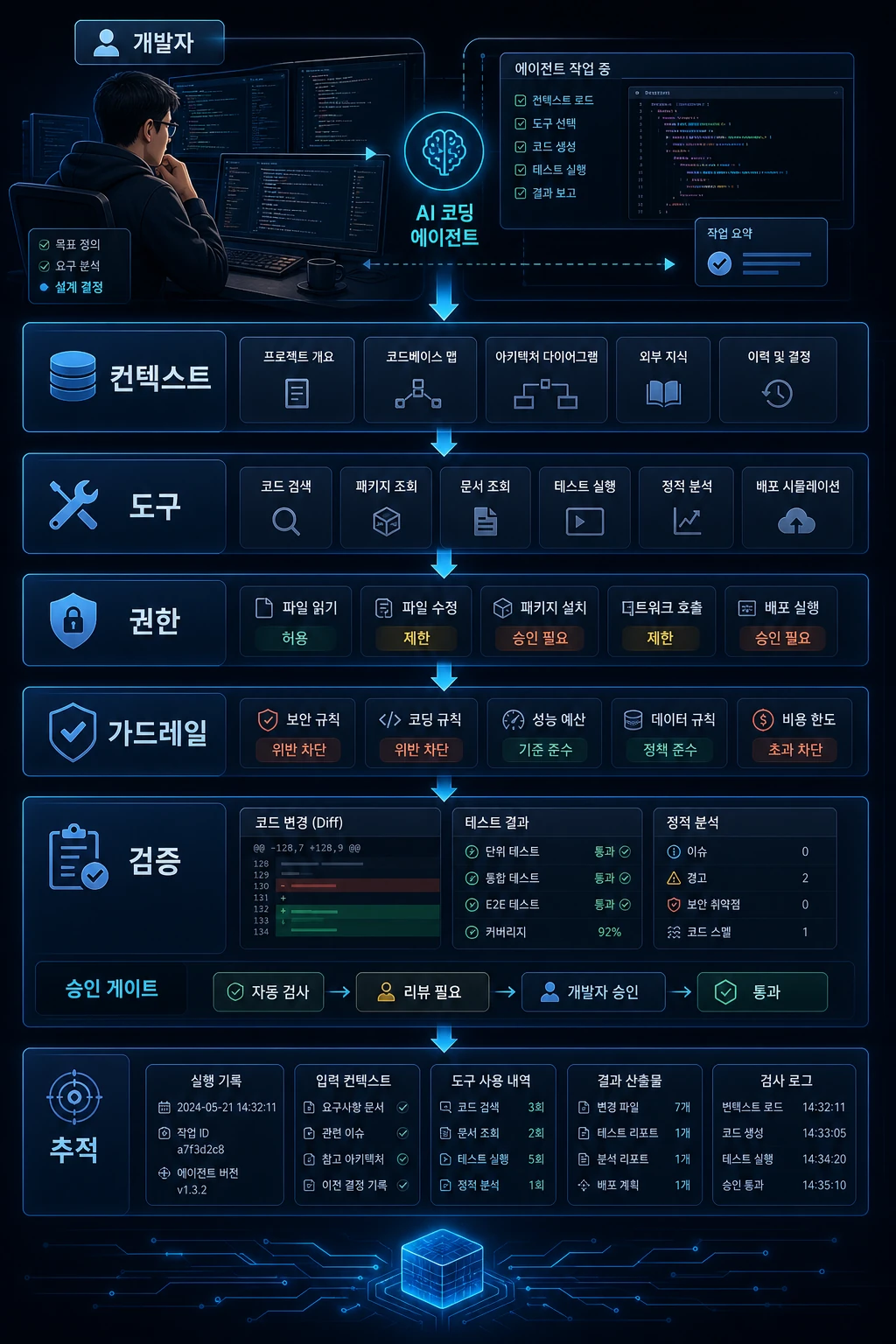
여기까지가 공식 문서에서 확인할 수 있는 사실입니다. 이 글의 해석은 그다음 단계입니다. AI가 파일과 명령을 다루는 실행 주체에 가까워질수록, 개발팀은 코드 라인 수보다 다음 여섯 가지를 먼저 설계해야 합니다.
AI가 무엇을 알고 시작하는가AI가 어떤 도구를 실행할 수 있는가AI가 어디까지 수정할 수 있는가위험한 작업을 어디서 멈출 것인가완료를 무엇으로 증명할 것인가AI가 한 일을 어떻게 추적할 것인가
이 글은 "AI에게 무엇을 맡길까"보다 한 단계 앞의 질문을 다룹니다. AI가 실패하지 않게 일의 구조를 어떻게 설계할 것인가입니다.
| 기준 | 내용 |
|---|---|
| 분석 기준일 | 2026-05-10 |
| 주요 참고자료 | Claude Code Best Practices, OpenAI Agents SDK, Model Context Protocol, A2A Protocol |
| 글의 목적 | AI 개발 도구 사용법이 아니라 AI 개발 워크플로우 설계 관점 정리 |
| 적용 대상 | AI 코딩 도구를 실무 프로젝트에 쓰기 시작한 개발자, 테크리드, 스타트업 개발팀 |
핵심 요약
- AI 코딩 도구는 점점 코드 생성기가 아니라 개발 환경 안에서 행동하는 실행 주체에 가까워지고 있습니다.
- 개발자는 프롬프트만 잘 쓰는 사람이 아니라 AI가 일할 수 있는 컨텍스트, 도구, 권한, 검증 기준을 설계해야 합니다.
- MCP는 LLM 애플리케이션이 외부 데이터와 도구에 연결되는 표준화된 방식을 정의하고, Resources, Prompts, Tools 같은 서버 기능을 다룹니다.
- OpenAI Agents SDK Guardrails와 Human-in-the-loop는 agent 실행을 검사하고, 중단하고, 사람 승인 뒤 재개하는 구조를 설명합니다.
- 결국 AI 시대의 개발자는 코드를 덜 쓰는 대신, AI가 실패하지 않게 일의 구조를 더 정교하게 설계해야 합니다.
AI 코딩의 병목은 코드 생성이 아니다
사람 개발자에게 다음처럼 요청하면 대부분 되묻습니다.
이 기능 좀 고쳐줘.성능 좀 개선해줘.코드 좀 정리해줘.테스트 좀 추가해줘.배포 오류 좀 봐줘.
사람은 보통 질문을 합니다. 어떤 기능이 문제인지, 성능 기준은 무엇인지, 어디까지 리팩터링해도 되는지, 기존 동작은 유지해야 하는지, 운영 로그는 어디 있는지 확인합니다.
AI에게는 이 질문을 생략한 채 바로 실행을 맡기는 경우가 많습니다. 그러면 AI는 빠르게 움직이지만, 빠르게 잘못된 방향으로도 갑니다.
| 요청 | AI가 자주 하는 실수 | 실제 필요한 정보 |
|---|---|---|
| 성능 개선해줘 | 측정 없이 구조를 바꿈 | 기준 지표, 측정 방법, 병목 위치 |
| 리팩터링해줘 | 공개 API나 응답 구조를 깨뜨림 | 수정 가능 범위, 보존해야 할 인터페이스 |
| 테스트 추가해줘 | 정상 케이스만 만들고 회귀 케이스를 빠뜨림 | 실패 케이스, 경계값, 기존 장애 사례 |
| 버그 고쳐줘 | 증상만 막고 원인을 남김 | 재현 절차, 로그, 기대 동작 |
| 로그 분석해줘 | 불완전한 로그를 근거로 단정함 | 기간, 요청 ID, 배포 이력, 외부 API 상태 |
실무적으로는 이렇게 봐야 합니다.
AI에게 일을 맡긴다는 것은코드 작성을 외주 주는 것이 아니라작업 실행 환경을 하나 더 운영하는 것이다.
기존 시스템 설계와 AI 작업 설계
기존 시스템 설계는 트래픽, DB, 캐시, 큐, 장애 대응을 다뤘습니다. AI 작업 설계는 여기에 실행 주체가 하나 더 생겼다고 보는 편이 정확합니다.
둘은 다른 이야기가 아닙니다. 서버, DB, API를 설계하던 사고방식을 AI가 개발 과정에서 행동하는 방식까지 확장하는 것입니다.
| 기존 시스템 설계 | AI 작업 설계 |
|---|---|
| API Gateway | AI Tool Gateway |
| DB 권한 | AI 파일/명령 권한 |
| 캐시 전략 | 컨텍스트 압축/선별 전략 |
| 큐와 재시도 | AI 작업 단계와 재시도 |
| 모니터링 | AI 실행 기록과 trace |
| 장애 대응 | AI 오작동 rollback |
| 보안 정책 | secret 접근 차단, 승인 게이트 |
Context 설계: 무엇을 보여줄 것인가
AI에게 주어진 컨텍스트는 AI가 판단하는 세계입니다. Claude Code의 동작 설명은 컨텍스트 창에 대화 기록, 파일 내용, 명령 출력, 시스템 지시 등이 포함된다는 점을 다룹니다. 컨텍스트가 많을수록 항상 좋은 것이 아니라, 관련 없는 정보가 판단을 흐릴 수 있습니다.
나쁜 컨텍스트는 이런 형태입니다.
전체 코드베이스를 무작정 읽게 한다.관련 없는 로그까지 모두 붙인다.오래된 문서와 최신 구현을 섞어 제공한다.성공 기준 없이 "알아서 개선해줘"라고 한다.수정 금지 영역을 알려주지 않는다.
좋은 컨텍스트는 목표, 범위, 금지, 검증을 분리합니다.
# TASK_CONTEXT ## 목표관리자 통계 API의 응답 시간을 줄인다. ## 현재 문제- `/admin/stats/summary` 응답이 피크 시간대에 3초 이상 걸린다.- DB CPU 사용률이 상승한다.- 프론트엔드에서 같은 API를 중복 호출하고 있다. ## 관련 파일- `src/admin/stats/**`- `src/lib/cache/**`- `tests/admin/stats/**` ## 수정 금지 범위- 로그인/세션 로직- 결제 관련 테이블- 운영 배포 설정- `.env*` ## 완료 기준- 기존 테스트 통과- 관리자 통계 API p95 응답 시간 개선- cache miss 상황에서도 기존 응답과 동일한 데이터 반환- 변경 요약과 rollback 방법 작성 ## 검증 명령npm run lintnpm run typechecknpm testnpm run test:integration
이 문서는 AI만을 위한 문서가 아닙니다. 사람 개발자에게도 작업 범위를 명확히 하고, 리뷰어에게도 변경 의도를 설명합니다.
Tool 설계: 무엇을 실행하게 할 것인가
AI에게 도구를 연결하면 강력해집니다. 파일 검색, 코드 수정, 테스트 실행, 로그 조회, 이슈 조회, PR 작성까지 자동화할 수 있습니다. 하지만 도구 연결은 곧 권한 연결입니다.
MCP specification은 MCP를 LLM 애플리케이션과 외부 데이터 소스 및 도구를 통합하기 위한 open protocol로 설명합니다. 이 글의 해석은 단순합니다. AI 도구가 외부 시스템을 호출할 수 있다면, 그 호출은 개발팀의 운영 권한 모델 안에 들어와야 합니다.
| 작업 단계 | 허용할 도구 | 막아야 할 도구 |
|---|---|---|
| 요구사항 분석 | 문서 검색, 이슈 조회 | 파일 수정, 배포 |
| 코드 탐색 | read-only 검색 | shell write 명령 |
| 구현 | 제한된 파일 수정 | 인프라 변경, secret 접근 |
| 테스트 | test, lint, typecheck | production 배포 |
| 릴리스 준비 | diff 요약, PR 작성 | DB 직접 변경 |
원칙은 이렇습니다.
AI에게 필요한 만큼만 보여주고,필요한 만큼만 실행하게 하고,위험한 일은 반드시 멈추게 한다.
Permission 설계: 어디까지 바꿔도 되는가
AI가 파일을 수정할 수 있게 되면 질문이 바뀝니다.
AI가 코드를 잘 짜는가?
보다 중요한 질문은 이것입니다.
AI가 바꾸면 안 되는 것을 바꾸지 않게 만들었는가?
권한은 허용과 차단만으로 충분하지 않습니다. 작업 위험도에 따라 계층화해야 합니다.
| 권한 레벨 | 허용 작업 | 승인 방식 |
|---|---|---|
| Level 0 | 읽기, 검색, 요약 | 자동 허용 |
| Level 1 | 테스트 실행, lint 실행 | 자동 허용 |
| Level 2 | 제한된 파일 수정 | diff 확인 |
| Level 3 | 의존성 변경, migration 작성 | 사람 승인 필수 |
| Level 4 | DB 변경, 인프라 변경 | 별도 절차 필수 |
| Level 5 | 운영 데이터 삭제, secret 접근 | 기본 금지 |
OpenAI Agents SDK의 human-in-the-loop 문서는 민감한 tool call에서 실행을 멈추고, 사람이 승인 또는 거절한 뒤 같은 run state에서 재개하는 흐름을 제공합니다. AI 코딩에서도 같은 사고방식을 적용할 수 있습니다.
ai_permissions: read: allow: - "src/**" - "tests/**" - "docs/**" write: allow: - "src/features/current-task/**" - "tests/features/current-task/**" deny: - ".env*" - "infra/**" - "migrations/**" commands: allow: - "npm run lint" - "npm run typecheck" - "npm test" require_approval: - "npm install" - "npm run db:migrate" deny: - "rm -rf" - "printenv" - "deploy production"
이 파일이 실제 런타임과 바로 연동되지 않아도 됩니다. 처음에는 팀 규칙 문서로만 있어도 효과가 있습니다.
Guardrail 설계: 언제 멈출 것인가
권한이 "무엇을 허용할 것인가"라면, guardrail은 "언제 멈출 것인가"입니다.
OpenAI Agents SDK Guardrails는 agent 실행 전후 또는 실행 중 입력과 출력을 검사하고, 문제가 감지되면 실행을 중단하는 구조를 설명합니다. 코드 작업으로 바꾸면 다음과 같습니다.
| 멈춤 조건 | 이유 | 다음 행동 |
|---|---|---|
.env 접근 시도 | secret 노출 위험 | 즉시 중단 |
| migration 생성 | 데이터 손상 위험 | 사람 승인 요청 |
| 로그인/세션 로직 변경 | 보안 영향 | 설계 설명 먼저 작성 |
| 테스트 실패 | 회귀 위험 | 실패 원인 보고 |
| 대량 파일 수정 | 리뷰 불가능 | 변경 계획 재제출 |
Guardrail은 AI에게 "조심해"라고 말하는 것이 아닙니다. 위험한 행동을 하기 전에 멈추는 조건을 두고, 위험한 결과를 완료로 처리하지 않는 구조입니다.
Evidence 설계: 완료를 무엇으로 증명할 것인가
AI가 "완료했습니다"라고 말하는 것과 실제 완료는 다릅니다. AI는 특히 설명을 잘하기 때문에 더 조심해야 합니다.
| Evidence 유형 | 예시 |
|---|---|
| 기능 증거 | 요구사항별 동작 확인 |
| 테스트 증거 | unit, integration, e2e 결과 |
| 타입 증거 | typecheck 결과 |
| 정적 분석 증거 | lint 결과 |
| 성능 증거 | before/after latency |
| 운영 증거 | 로그, 모니터링, rollback plan |
| 리뷰 증거 | diff 요약, 변경 의도 |
AI에게는 아래 형식을 요구하는 편이 좋습니다.
# VERIFY_REPORT ## 변경 파일- `src/admin/stats/service.ts`- `src/admin/stats/cache.ts`- `tests/admin/stats.test.ts` ## 요구사항 충족 여부- [x] 관리자 통계 API 응답 속도 개선- [x] cache miss 시 기존 DB 조회 fallback 유지- [x] 기존 응답 필드 유지 ## 실행한 검증- [x] npm run lint- [x] npm run typecheck- [x] npm test ## 남은 리스크- 실제 운영 트래픽 기준 p95 개선은 배포 후 모니터링 필요- Redis 장애 시 fallback 부하 증가 가능성 있음 ## 사람 확인 필요- TTL 값 300초가 비즈니스 요구사항에 맞는지 확인 필요
이 정도 보고서를 요구하면 AI 작업은 단순 코드 생성이 아니라 검증 가능한 변경 단위가 됩니다.
Trace 설계: 어떻게 추적할 것인가
AI 작업이 한두 번이면 대화창만 봐도 됩니다. 팀에서 계속 쓰기 시작하면 다음 질문에 답해야 합니다.
어떤 프롬프트로 이 코드가 바뀌었는가?AI가 어떤 파일을 읽었는가?어떤 테스트를 실행했는가?실패한 시도는 무엇인가?사람은 어디까지 승인했는가?왜 이 구조를 선택했는가?
OpenAI Agents SDK Tracing은 agent run 중 LLM generation, tool call, handoff, guardrail, custom event 등을 기록해 디버깅과 모니터링에 사용할 수 있는 구조를 설명합니다. 적용해 보면, 팀이 당장 SDK 수준의 tracing을 갖추지 못해도 PR 템플릿부터 시작할 수 있습니다.
## AI 작업 사용 여부- [ ] 사용하지 않음- [ ] 초안 작성에 사용- [ ] 코드 수정에 사용- [ ] 테스트 생성에 사용- [ ] 로그 분석에 사용 ## AI에게 제공한 컨텍스트- 이슈:- 관련 문서:- 실패 로그:- 수정 가능 범위:- 수정 금지 범위: ## AI가 실행한 검증- [ ] lint- [ ] typecheck- [ ] unit test- [ ] integration test- [ ] e2e test ## 사람이 확인한 항목- [ ] 요구사항 충족- [ ] 기존 동작 유지- [ ] 보안 영향 없음- [ ] rollback 가능- [ ] 운영 모니터링 포인트 확인
핵심은 AI를 숨기는 것이 아니라, AI가 개입한 작업을 추적 가능한 개발 이벤트로 만드는 것입니다.
실무 적용 패턴
처음부터 플랫폼을 만들 필요는 없습니다. 문서와 체크리스트만으로도 실패율을 크게 낮출 수 있습니다.
Pattern 1. AI 작업 계약서
# TASK_CONTRACT ## 목표## 배경## 수정 가능 범위## 수정 금지 범위## 완료 기준## 검증 명령## 사람 승인 필요 항목
Pattern 2. AI 전용 README
# AI_GUIDE.md ## 프로젝트 구조- src/app: 라우팅- src/features: 기능 단위 모듈- src/lib: 공통 유틸- tests: 테스트 ## 작업 규칙- 기존 API 응답 필드 제거 금지- DB migration은 사람 승인 없이 작성 금지- env 파일 읽기 금지- 테스트 없는 리팩터링 금지 ## 검증 명령npm run lintnpm run typechecknpm test
Pattern 3. 위험 작업 승인 게이트
위험도가 높은 작업은 아래처럼 자동 허용, 승인 필요, 기본 금지로 나눕니다.
자동 허용:- 파일 읽기- 테스트 실행- lint 실행- docs 수정 승인 필요:- package.json 변경- DB migration- 로그인/결제 로직 수정- shell write 명령 기본 금지:- .env 접근- secret 출력- production 배포- 데이터 삭제
Pattern 4. AI 실행 기록
# AI_WORK_LOG ## 작업 목표## 사용한 컨텍스트## 변경 파일## 실행한 명령## 실패한 시도## 최종 검증 결과## 남은 리스크
도입 체크리스트
팀에 처음 적용할 때는 아래 항목부터 점검합니다.
[ ] AI에게 줄 작업 목표가 한 문단으로 정리되어 있다.[ ] 수정 가능 범위와 수정 금지 범위가 분리되어 있다.[ ] 관련 파일과 무관한 파일이 구분되어 있다.[ ] 완료 기준이 기능, 테스트, 회귀, 운영 기준으로 나뉘어 있다.[ ] AI가 실행해도 되는 명령어 목록이 있다.[ ] 사람 승인이 필요한 명령어 목록이 있다.[ ] .env, secret, production 데이터 접근이 차단되어 있다.[ ] AI가 실행한 테스트와 생략한 테스트를 기록한다.[ ] PR에 AI 작업 사용 여부와 검증 결과를 남긴다.[ ] 실패했을 때 되돌릴 수 있는 rollback 기준이 있다.
Q&A
Q1. 좋은 프롬프트만 있으면 충분하지 않나?
부족합니다. 프롬프트는 요청이고, 작업 계약서는 운영 규칙입니다. 실무에서는 컨텍스트, 파일 접근 범위, 실행 가능한 명령, 테스트 기준, 승인 절차가 함께 있어야 합니다.
Q2. 작은 프로젝트에도 이런 구조가 필요한가?
처음부터 전부 만들 필요는 없습니다. 하지만 최소한 수정 가능 범위, 완료 기준, 검증 명령 세 가지는 있어야 합니다. 이 세 가지가 없으면 AI가 만든 결과를 검토하는 비용이 커집니다.
Q3. AI가 알아서 테스트까지 실행하면 괜찮은 것 아닌가?
테스트를 실행하는 것과 검증 기준을 이해하는 것은 다릅니다. 어떤 테스트가 충분한지, 어떤 회귀가 중요한지는 사람이 기준을 정해야 합니다.
Q4. MCP나 A2A까지 지금 당장 알아야 할까?
당장 구현하지 않아도 개념은 알아두는 것이 좋습니다. MCP는 AI가 도구와 컨텍스트를 표준화된 방식으로 다루는 방향이고, A2A는 서로 다른 AI 에이전트 시스템의 통신과 협업을 표준화하려는 방향입니다.
마무리
AI 시대의 개발자는 코드를 덜 짤 수 있습니다. 하지만 설계할 것은 오히려 늘어납니다.
AI에게 무엇을 보여줄 것인가AI에게 무엇을 실행하게 할 것인가AI가 어디까지 바꿔도 되는가위험한 작업을 언제 멈출 것인가완료를 무엇으로 증명할 것인가AI가 한 일을 어떻게 추적할 것인가
이 구조가 없으면 AI는 빠르게 코드를 만들지만, 팀은 더 많은 리뷰 비용과 운영 리스크를 떠안게 됩니다. 반대로 이 구조를 잘 만들면 AI는 단순 코드 생성기가 아니라 개발 프로세스 안에서 반복 작업을 처리하고 검증을 보조하는 실행 파트너가 됩니다.
요약 카드
이 글의 핵심을 실행 관점으로 압축하면 다음과 같습니다.
한 줄 요약:AI 시대 개발자의 핵심 역량은 코드 작성에서 AI 작업 시스템 설계로 이동한다. 가장 중요한 개념:Context, Tool, Permission, Guardrail, Evidence, Trace 가장 큰 리스크:AI가 무엇을 알고, 무엇을 실행했고, 무엇을 검증했는지 추적하지 못하는 것 지금 바로 할 일:프로젝트 루트에 AI_GUIDE.md를 만들고, 수정 금지 범위와 검증 명령부터 적는다.Let's say our hypothetical internal dashboard API is slow. Operational alerts show response delays, but the exact location of the bottleneck and performance criteria are not yet clear. The team leaves it to the AI coding tool to “improve performance.”
AI moves fast. Add a cache, create a test, and report that your response time has decreased. But the review reveals a problem. The user permission scope is missing from the cache key, and although there is a cache miss fallback, it has not been verified how the source storage load increases in case of a cache failure.
This failure is not just a matter of code generation capabilities. The problem is that execution is entrusted to AI without contracting out performance standards, scope for modification, response structure to be preserved, failure fallback, and completion evidence.
When using an AI coding tool, the first thing you notice is its code generation ability. Create components, add tests, suggest refactorings, and even run terminal commands. However, when put into a practical project, the bottleneck occurs somewhere else.
The most common reason AI fails is not because of bad code. Because work boundaries are not designed
Claude Code official document explains that Claude Code is not a simple chatbot, but an agentic coding environment that reads files, executes commands, changes code, and solves problems. The same document explains that the context window can quickly fill up with dialog, file content, and command output, and as it fills up, initial instructions can be lost or mistakes can increase.
These are the facts that can be confirmed in the official document. The interpretation of this article is the next step. As AI becomes more of an executor that handles files and commands, development teams should design the following six things before the number of lines of code:
What AI Knows and Starts withWhat tools can AI run?How much can AI fix?Where to stop dangerous workWhat will prove completion?How to track what AI has done
This article addresses the question one step further than “What should we entrust to AI?” How to design the structure of work so that AI does not fail.
| standard | detail |
|---|---|
| Analysis base date | 2026-05-10 |
| Key references | Claude Code Best Practices, OpenAI Agents SDK, Model Context Protocol, A2A Protocol |
| purpose of writing | Summary of AI development workflow design perspective rather than how to use AI development tools |
| Applicable to | Developers, tech leaders, and startup development teams who have started using AI coding tools for practical projects |
Key takeaways
- AI coding tools are increasingly becoming less like code generators and more like executors acting within a development environment.
- Developers are not just good at writing prompts; they need to design the context, tools, permissions, and verification criteria in which AI can work.
- MCP defines a standardized way for LLM applications to connect to external data and tools, and covers server features such as Resources, Prompts, and Tools.
- OpenAI Agents SDK Guardrails and Human-in-the-loop describe the structure of inspecting agent execution, stopping it, and resuming it after human approval.
- Ultimately, developers in the AI era should write less code, but design the work structure more elaborately to prevent AI from failing.
The bottleneck in AI coding is not code generation
If you ask a human developer like the following, most people will ask back.
Please fix this feature.Please improve performance.Please clean up the code.Please add some tests.Please check the deployment error.
People usually ask questions. Find out which feature is problematic, what the performance criteria are, how much can be refactored, whether existing behavior should be maintained, and where the operational logs are.
AI is often left to execute without asking this question. The AI then moves quickly, but it also quickly goes in the wrong direction.
| request | Common mistakes AI makes | Information you actually need |
|---|---|---|
| improve performance | Change structure without measurement | Baseline indicators, measurement methods, location of bottlenecks |
| Please refactor it | Breaking public API or response structures | Modifiable range, interfaces to preserve |
| add a test | Create only normal cases and omit regression cases | Failure cases, boundary values, existing failure cases |
| Please fix the bug | Prevents only symptoms and leaves the cause behind | Reproduction procedures, logs, expected behavior |
| Analyze the log | Conclusion based on incomplete logs | Duration, request ID, deployment history, external API status |
In practice, it should be viewed this way.
Leaving work to AI meansRather than outsourcing the code writingIt operates another task execution environment.
Traditional system design and AI task design
Existing system design dealt with traffic, DB, cache, queues, and failure response. It is more accurate to think of AI task design as having an additional execution agent.
The two are not different stories. It extends the way of thinking that used to design servers, DBs, and APIs to how AI behaves during the development process.
| Existing system design | AI job design |
|---|---|
| API Gateway | AI Tool Gateway |
| DB permissions | AI file/command permissions |
| cache strategy | Context compression/selection strategy |
| Queues and Retries | AI job steps and retries |
| monitoring | AI execution history and trace |
| failure response | AI malfunction rollback |
| security policy | secret access blocking, approval gate |
Context Design: What to Show
The context given to AI is the world that AI judges. [Claude Code's Operational Description] (https://code.claude.com/docs/en/how-claude-code-works) covers that the context window contains conversation history, file contents, command output, system instructions, etc. More context is not always better, and irrelevant information can cloud your judgment.
Bad context looks like this:
Forces you to blindly read the entire codebase.Paste all unrelated logs.It provides a mix of old documentation and the latest implementation.They say, “Improve it on your own” without success criteria.It does not indicate areas that are prohibited from modification.
A good context separates goals, scope, prohibitions, and verification.
# TASK_CONTEXT ## targetReduces the response time of the administrator statistics API. ## Current Problem-`/admin/stats/summary`response takes more than 3 seconds during peak times.- DB CPU usage increases.- The same API is being called repeatedly on the front end. ## Related files-`src/admin/stats/**`-`src/lib/cache/**`-`tests/admin/stats/**` ## No modification range- Login/session logic- Payment related table- Set up operational deployment-`.env*` ## Completion criteria- Pass existing tests- Improved Admin Statistics API p95 response time- Returns the same data as the existing response even in a cache miss situation- Create change summary and rollback method ## Verification commandnpm run lintnpm run typechecknpm testnpm run test:integration
This document is not just for AI. Make the scope of work clear to human developers and explain the intent of the change to reviewers.
Tool design: what will make it run
Connecting your tools to AI makes them powerful. You can automate file search, code modification, test execution, log search, issue search, and PR creation. But linking tools means linking permissions.
MCP specification describes MCP as an open protocol for integrating LLM applications with external data sources and tools. The interpretation of this article is simple. If an AI tool can call an external system, those calls must fall within the development team's operational permissions model.
| work steps | tools to allow | tool to block |
|---|---|---|
| Requirements Analysis | Document search, issue inquiry | File modification, distribution |
| Code navigation | read-only search | shell write command |
| avatar | Fix restricted files | Infrastructure changes, secret access |
| test | test, lint, typecheck | production distribution |
| Ready for release | Summary of diff, write PR | Change DB directly |
The principle is this:
Show the AI only what it needs,Let it run only as much as needed,Dangerous things must be stopped.
Permission design: How much can I change?
When AI can modify files, the question changes.
Is AI good at writing code?
The more important question is this.
Has AI made something that shouldn't be changed unchangeable?
Allowing and blocking permissions alone are not enough. Tasks should be stratified according to risk.
| Privilege level | Allow Action | Approval method |
|---|---|---|
| Level 0 | Read, search, summarize | auto allow |
| Level 1 | Run tests, run lint | auto allow |
| Level 2 | Fix restricted files | check diff |
| Level 3 | Change dependencies, create migration | Human approval required |
| Level 4 | DB change, infrastructure change | Separate procedure required |
| Level 5 | Operational data deletion, secret access | default ban |
[OpenAI Agents SDK's human-in-the-loop document] (https://openai.github.io/openai-agents-js/guides/human-in-the-loop/) provides a flow that stops execution in a sensitive tool call, approves or rejects the human, and then resumes in the same run state. The same thinking can be applied to AI coding.
ai_permissions:read:allow:- "src/**"- "tests/**"- "docs/**" write:allow:- "src/features/current-task/**"- "tests/features/current-task/**"deny:- ".env*"- "infra/**"- "migrations/**" commands:allow:- "npm run lint"- "npm run typecheck"- "npm test"require_approval:- "npm install"- "npm run db:migrate"deny:- "rm -rf"- "printenv"- "deploy production"
This file does not need to be directly linked to the actual runtime. Initially, just a team rules document can be effective.
Guardrail Design: When to Stop
If permissions are “what to allow,” then guardrail is “when to stop.”
OpenAI Agents SDK Guardrails describes a structure that checks input and output before or during agent execution, and stops execution when a problem is detected. If we translate it into working code, it looks like this:
| stopping condition | reason | next action |
|---|---|---|
Attempt to access.env | risk of secret exposure | stop immediately |
| Create migration | Risk of data corruption | Request for human approval |
| Change login/session logic | security impact | Write a design description first |
| test failed | regression risk | Report cause of failure |
| Bulk file modification | No review possible | Resubmit Change Plan |
Guardrail isn't about telling AI to "watch out." It is a structure that sets a condition for stopping before taking a risky action and does not treat a risky outcome as completion.
Evidence Design: What will prove completion?
Saying “I’m done” by AI is different than actually completing it. AI is particularly good at explaining things, so we have to be more careful.
| Evidence type | example |
|---|---|
| function proof | Check operation according to requirements |
| test evidence | unit, integration, e2e results |
| type proof | typecheck result |
| static analysis evidence | lint result |
| performance proof | before/after latency |
| operational evidence | Log, monitoring, rollback plan |
| review evidence | diff summary, change intent |
It is better to request the following format from AI.
# VERIFY_REPORT ## change file-`src/admin/stats/service.ts`-`src/admin/stats/cache.ts`-`tests/admin/stats.test.ts` ## Whether requirements are met- [x] Improved administrator statistics API response speed- [x] Maintain existing DB query fallback in case of cache miss- [x] Maintain existing response fields ## Verification performed- [x] npm run lint- [x] npm run typecheck- [x] npm test ## Remaining risks- Improvement of p95 based on actual operational traffic requires monitoring after deployment- In case of Redis failure, fallback load may increase. ## Human verification required- Need to check if the TTL value of 300 seconds meets business requirements
Requiring this level of reporting makes AI work a verifiable unit of change rather than just code generation.
Trace Design: How to Trace
If you only do AI work once or twice, you can just look at the chat window. As your team continues writing, you'll need to answer the following questions:
What prompt changed this code?What files did AI read?What tests did you run?What were the failed attempts?To what extent have people approved?Why did you choose this structure?
OpenAI Agents SDK Tracing explains the structure that can be used for debugging and monitoring by recording LLM generation, tool call, handoff, guardrail, custom event, etc. during agent run. When applied, even if the team does not have SDK-level tracing right away, it can start with a PR template.
## Whether to use AI tasks- [ ] Not used- [ ] Used for drafting- [ ] Used to modify code- [ ] Used to create tests- [ ] Used for log analysis ## Context provided to AI- Issue:- Related documents:- Failure log:- Editable range:- Modification prohibited range: ## Verification executed by AI- [ ] lint- [ ] typecheck- [ ] unit test- [ ] integration test- [ ] e2e test ## Human checked items- [ ] meets requirements- [ ] Maintain existing behavior- [ ] No security impact- [ ] rollback possible- [ ] Check operation monitoring points
The key is not to hide AI, but to make AI-involved tasks a traceable development event.
Practical application pattern
You don't need to create a platform from scratch. Documentation and checklists alone can significantly reduce your failure rate.
Pattern 1. AI work contract
# TASK_CONTRACT ## target## background## Editable range## No modification range## Completion criteria## Verification command## Items requiring human approval
Pattern 2. AI-specific README
# AI_GUIDE.md ## Project structure- src/app: routing- src/features: Function unit module- src/lib: Common utilities- tests: tests ## Work Rules- Prohibit removal of existing API response fields- DB migration is prohibited without human approval.- Prohibit reading env files- No refactoring without testing ## Verification commandnpm run lintnpm run typechecknpm test
Pattern 3. Hazardous work approval gate
High-risk operations are divided into auto-allowed, approval-required, and default-prohibited as shown below.
Auto-allow:- Read files- Run tests- Run lint- Edit docs Approval required:- Change package.json- DB migration- Modification of login/payment logic-shell write command Default Prohibition:-.env access- output secret- production distribution- Data deletion
Pattern 4. AI execution record
# AI_WORK_LOG ## Task Goal## Context used## change file## Command executed## failed attempt## Final verification result## Remaining risks
Adoption Checklist
When applying it to a team for the first time, check the items below.
[ ] The work objectives to be given to AI are summarized in one paragraph.[ ] The range that can be modified and the range that cannot be modified are separated.[ ] Related files and unrelated files are separated.[ ] Completion criteria are divided into functional, testing, regression, and operational criteria.[ ] There is a list of commands that AI can execute.[ ] There is a list of commands that require human approval.[ ] Access to.env, secret, and production data is blocked.[ ] Records tests executed and omitted by AI.[ ] Leave information on whether AI work is used and verification results in PR.[ ] There is a rollback standard that can be rolled back in case of failure.
Q&A
Q1. Aren’t good prompts enough?
It's not enough. Prompts are requests, and work contracts are operating rules. In practice, context, file access scope, executable commands, test criteria, and approval procedures must come together.
Q2. Is this structure necessary even for small projects?
You don't have to make it all from scratch. However, there must be at least three things: a modifiable scope, a completion criterion, and a verification command. Without these three, the cost of reviewing AI-generated results becomes high.
Q3. Wouldn’t it be okay if AI runs the tests on its own?
Running tests is different from understanding validation criteria. People need to decide which tests are sufficient and which regressions are important.
Q4. Do I need to know MCP or A2A right now?
Even if you don't implement it right away, it's good to know the concept. MCP is a direction in which AI handles tools and context in a standardized way, and A2A is a direction that seeks to standardize communication and collaboration of different AI agent systems.
finish
Developers in the AI era can write less code. However, the number of things to design increases.
What to show AIWhat will we let AI do?How much can AI change?When to stop doing dangerous workWhat will prove completion?How to track what AI has done
Without this structure, AI will produce code quickly, but teams will take on more review costs and operational risk. Conversely, if this structure is created well, AI becomes not a simple code generator but an execution partner that handles repetitive tasks and assists verification within the development process.
summary card
The essence of this article can be condensed into an execution perspective as follows.
One line summary:The core competency of developers in the AI era moves from writing code to designing AI work systems. The most important concepts:Context, Tool, Permission, Guardrail, Evidence, Trace Biggest risks:Failure to track what the AI knew, what it did, and what it verified. What to do right now:Create AI_GUIDE.md in the project root, and start by writing down the modification prohibition range and verification commands.
댓글
GitHub 계정으로 로그인하면 댓글을 남길 수 있습니다. 댓글은 GitHub Discussions를 통해 운영됩니다.