핵심 요약
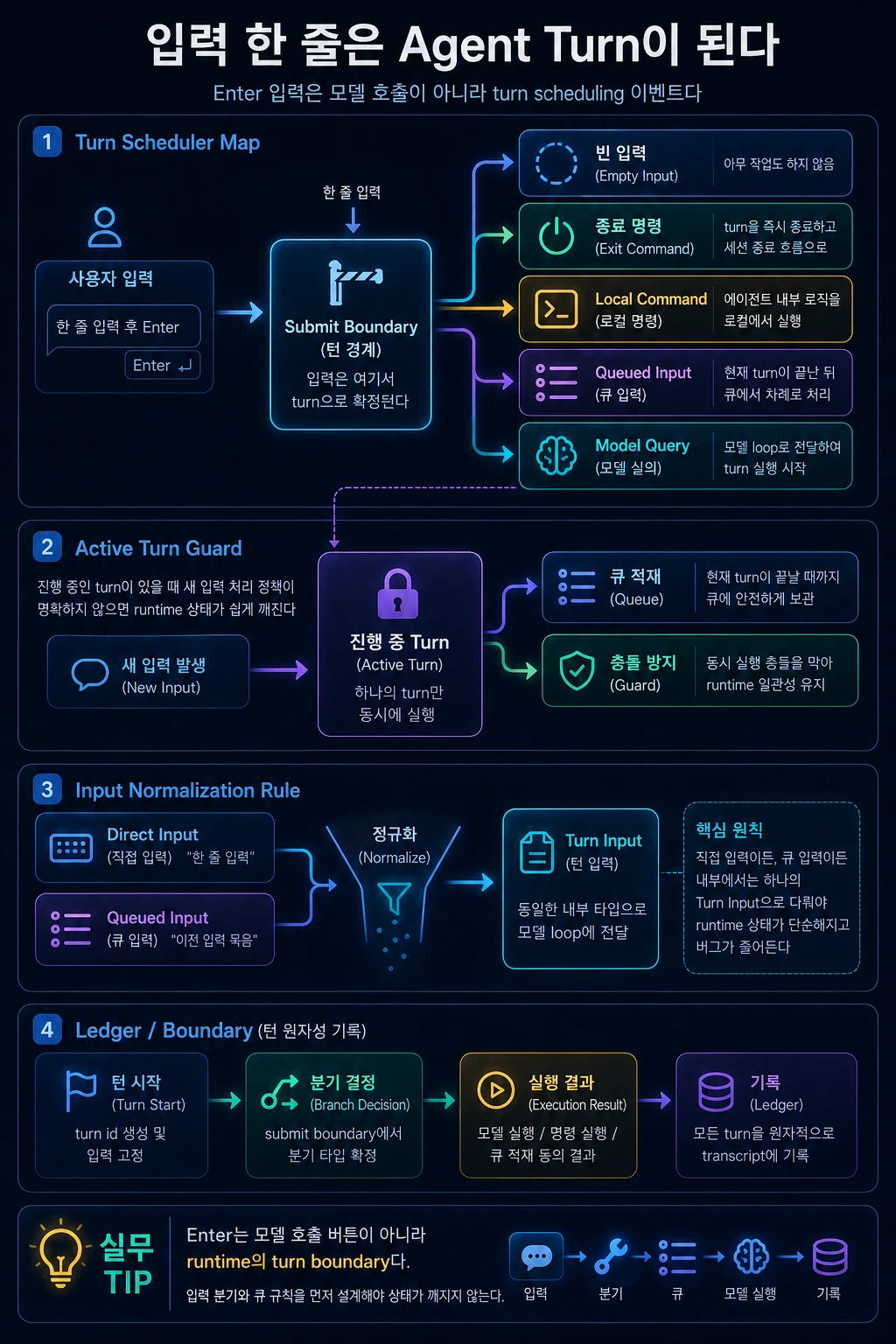
- Enter 입력은 모델 호출이 아니라 turn scheduling 이벤트다.
- submit boundary는 빈 입력, 종료 명령, local command, queued input, model query를 분기한다.
- 진행 중인 turn이 있을 때 새 입력을 어떻게 처리할지 정하지 않으면 runtime 상태가 쉽게 깨진다.
- direct input과 queued input은 같은 내부 타입으로 정규화되어야 한다.
이번 글의 주제는 Enter 키입니다. 조금 과장하면, 제품형 AI agent의 안정성은 Enter 키를 어떻게 해석하느냐에서 시작합니다.
사용자 입장에서는 “프롬프트를 입력하고 Enter를 눌렀다”가 전부입니다. 하지만 runtime 입장에서는 이 사건이 곧바로 모델 API 호출이면 안 됩니다. 먼저 이 입력이 빈 입력인지, 종료 명령인지, local command인지, 진행 중인 turn 뒤에 붙을 큐 항목인지, 아니면 새 모델 질의인지 결정해야 합니다.
이 경계를 여기서는 submit boundary라고 부르겠습니다.
1. Submit boundary가 필요한 이유
모델 스트림이 아직 진행 중인데 사용자가 새 prompt를 입력했다고 생각해봅시다. 이 입력을 바로 새 모델 호출로 보내면 두 개의 loop가 같은 message history와 screen state를 동시에 수정할 수 있습니다.
그 결과는 대개 좋지 않습니다.
- 첫 번째 모델 응답 중간에 두 번째 응답이 섞인다.
- tool request/result 순서가 깨진다.
- 사용자가 승인한 작업이 어느 turn에 속하는지 모호해진다.
- transcript가 복구 불가능한 순서로 저장된다.
따라서 submit boundary는 “지금 실행해도 되는가?”를 판단하는 gate입니다.
2. 한 턴의 원자성
agent에서 turn은 단순 사용자 메시지 하나가 아닙니다. turn에는 입력 정규화, 모델 스트림, 도구 요청, 권한 결정, 도구 결과, 최종 assistant message, 비용 기록이 포함됩니다.
# 읽는 법: 아래 항목은 동작 흐름을 빠르게 확인하기 위한 요약 예시입니다.raw prompt→ normalized turn→ model stream→ tool request→ permission decision→ tool result→ model continuation→ final answer→ ledger flush
이 흐름이 완료되기 전에 새 turn이 같은 상태를 수정하면 원자성이 깨집니다. 그래서 submit boundary는 idle, dispatching, running, finishing 같은 상태를 가져야 합니다.
3. 입력 분기 규칙
submit boundary에서 입력은 대략 다음 중 하나로 분기됩니다.
| 분기 | 예시 | 처리 방식 |
|---|---|---|
| ignore | 빈 입력 | 아무 작업도 하지 않음 |
| local action | help, clear, settings | 모델 호출 없이 처리 |
| interrupt | cancel, stop | active turn에 중단 신호 전달 |
| queued turn | 실행 중 들어온 일반 prompt | pending queue에 저장 |
| model query | 일반 prompt | input normalization 후 model loop 시작 |
이 분기를 명확히 하지 않으면 command와 prompt가 뒤섞입니다. 특히 slash-style command를 일반 prompt로 보내거나, 반대로 일반 prompt를 local command로 오해하면 사용자 경험이 깨집니다.
4. Guard와 queue 설계
submit boundary에서 가장 중요한 것은 guard입니다. guard는 “현재 runtime이 새 turn을 시작해도 되는지”를 보호합니다.
또 하나 중요한 것은 queue입니다. 진행 중인 turn이 있을 때 새 입력을 무조건 버리면 사용성이 나쁘고, 바로 실행하면 상태가 깨집니다. 따라서 queue가 필요합니다.
| 구성요소 | 역할 |
|---|---|
ExecutionGuard | 새 turn 시작 가능 여부를 결정 |
PendingTurnQueue | 진행 중 입력을 순서대로 보관 |
TurnDraft | 원본 입력, 입력 모드, 첨부, 출처를 저장 |
SubmissionRouter | local action, interrupt, model query 분기 |
5. 개념 코드로 보는 제출 흐름
아래 코드는 원본 구현이 아니라 설명용으로 새로 작성한 코드입니다.
# 읽는 법: 실제 구현 복제가 아니라 runtime 경계를 설명하는 개념 코드입니다.class ExecutionGuard: # 객체가 이후 단계에서 참조할 runtime 의존성과 상태 저장소를 초기화합니다. def __init__(self): self.state = "idle" self.owner = None # 현재 turn이 실행권을 가져갈 수 있는지 확인하고 dispatching 상태로 잠급니다. def reserve(self, turn_id): if self.state != "idle": return False self.state = "dispatching" self.owner = turn_id return True # 입력 준비가 끝난 turn을 실제 실행 중 상태로 전환합니다. def mark_running(self): self.state = "running" # 실행권을 가진 turn이 끝났을 때 guard를 idle 상태로 되돌립니다. def release(self, turn_id): if self.owner == turn_id: self.state = "idle" self.owner = None # raw 입력을 ignore, interrupt, local action, model turn 중 하나로 분기합니다.async def submit_input(raw_entry, runtime): draft = TurnDraft.from_raw(raw_entry) route = classify_submission(draft, runtime) if route.kind == "ignore": return if route.kind == "interrupt": runtime.abort_current_turn(route.reason) return if route.kind == "local_action": await runtime.local_actions.run(route.action) return if runtime.guard.state != "idle": runtime.pending_turns.append(draft) runtime.shell.notice("현재 턴이 끝난 뒤 실행합니다.") return if not runtime.guard.reserve(draft.turn_id): runtime.pending_turns.append(draft) return try: runtime.guard.mark_running() prepared = await runtime.input_pipeline.prepare(draft) await runtime.agent_loop.run(prepared) finally: runtime.guard.release(draft.turn_id) await drain_pending_turns(runtime)
여기서 중요한 부분은 reserve()가 input normalization보다 먼저 호출된다는 점입니다. 정규화 과정 자체가 비동기일 수 있기 때문입니다. 그 사이 다른 입력이 들어오면 두 turn이 동시에 시작될 수 있습니다.
6. AI 활용 개발자 관점
AI coding agent를 쓰는 개발자는 새 입력을 넣었을 때 도구가 어떤 정책을 쓰는지 확인해야 합니다.
| 상황 | 좋은 UX |
|---|---|
| 모델 응답 중 새 prompt 입력 | “대기열에 추가됨”을 표시 |
| 장기 작업 중 stop 입력 | 실행 중인 모델과 도구에 취소 신호 전달 |
| local command 입력 | 모델 context를 오염시키지 않고 처리 |
| 첨부 포함 입력이 queue됨 | 첨부 snapshot이 함께 보존됨 |
특히 첨부와 editor selection은 queue 시점에 snapshot으로 남겨야 합니다. 실행 시점의 파일 상태를 다시 읽으면 사용자가 의도한 context와 달라질 수 있습니다.
7. Agent 개발자 관점
agent를 만들 때 direct input과 queued input을 서로 다른 코드 경로로 처리하면 곧 문제가 생깁니다. 처음 입력한 prompt는 첨부를 처리하지만 queue된 prompt는 첨부를 잃어버리는 식입니다.
따라서 둘 다 TurnDraft로 변환한 뒤 같은 execute_turn()을 통과하게 만드는 것이 좋습니다.
# 읽는 법: 실제 구현 복제가 아니라 runtime 경계를 설명하는 개념 코드입니다.def to_turn_draft(text, source, attachments=None, mode="chat"): return TurnDraft( id=new_id(), text=text, source=source, attachments=list(attachments or []), mode=mode, captured_at=now(), )
또한 첫 입력과 후속 queued input의 context 범위를 구분해야 합니다. 에디터 선택 영역, 현재 diff, 임시 첨부 같은 풍부한 context를 모든 queued input에 무조건 붙이면 context 오염이 발생할 수 있습니다.
8. 실전 체크리스트
# 읽는 법: 아래 항목은 동작 흐름을 빠르게 확인하기 위한 요약 예시입니다.Submit Boundary 체크리스트 [ ] Enter 입력이 곧바로 모델 API 호출로 이어지지 않는다.[ ] 입력은 local action, interrupt, queue, model query로 분기된다.[ ] active turn이 있을 때 새 입력 처리 정책이 명확하다.[ ] direct input과 queued input은 같은 TurnDraft 타입을 사용한다.[ ] guard 예약은 비동기 정규화보다 먼저 일어난다.[ ] attachment와 editor context는 필요한 시점에 snapshot으로 보존된다.[ ] turn 종료 후 pending queue를 drain하는 로직이 있다.
실패 사례: Enter가 곧바로 model call을 만든 경우
Submit boundary가 없으면 가장 단순한 입력창도 복잡한 버그를 만듭니다. 사용자가 첫 prompt를 보내고 모델 응답이 stream되는 중에 두 번째 prompt를 입력했다고 가정해봅시다. runtime이 Enter를 곧바로 createModelCall()로 연결하면 두 개의 call이 같은 history를 동시에 읽고 씁니다. 첫 번째 call의 tool result가 아직 들어오기 전에 두 번째 call이 시작되고, 화면에는 두 응답이 섞이며, cancel 버튼은 어느 call을 멈춰야 하는지 모릅니다.
이 문제는 테스트에서 잘 안 보일 수 있습니다. 한 번에 하나씩만 입력하는 happy path는 통과하기 때문입니다. 실제 사용자는 기다리지 않고 추가 설명을 붙이거나, 잘못 보낸 prompt를 취소하거나, /status 같은 local command를 입력합니다. Submit boundary는 이런 입력을 모두 같은 사건으로 보지 않고, 현재 runtime 상태에 맞는 action으로 분기합니다.
구현 예시: submit decision table
| 현재 상태 | 입력 예 | 결정 | 이유 |
|---|---|---|---|
| idle | 일반 prompt | start_turn | 새 model turn을 시작할 수 있음 |
| idle | /status | run_local_command | model 호출이 필요 없음 |
| streaming | 일반 prompt | enqueue_turn | active turn history를 보호 |
| streaming | Escape | cancel_active_turn | 새 turn이 아니라 제어 입력 |
| awaiting_approval | 승인 버튼 | resume_turn | 기존 turn의 보류 상태 해제 |
이 표는 UI 문서가 아니라 runtime contract입니다. 입력창, command parser, model loop가 같은 결정을 공유해야 합니다. 특히 local command는 model context에 들어가지 않아야 하고, queued prompt는 필요한 context snapshot만 가져야 합니다. 그렇지 않으면 사용자가 "아까 선택한 코드 기준으로 이어서 해줘"라고 했을 때 실제로는 이미 바뀐 editor selection을 읽는 문제가 생깁니다.
체크리스트 적용 결과
Submit boundary를 리뷰할 때는 세 가지를 확인합니다. 첫째, 입력 정규화 전에 active turn guard를 예약하는지 봅니다. 둘째, queued input이 direct input과 같은 TurnDraft 타입을 통과하는지 봅니다. 셋째, cancel과 local command가 model message history를 오염시키지 않는지 봅니다. 이 세 가지가 맞으면 입력이 많아져도 agent는 순서를 잃지 않습니다.
마무리
Submit boundary는 작아 보이지만 agent runtime의 중심 경계입니다. 이 계층이 있으면 입력, command, queue, cancel, model loop가 서로 충돌하지 않습니다.
다음 글에서는 submit boundary를 통과한 raw input이 어떻게 model-visible message로 바뀌는지 보겠습니다. 이 과정이 바로 입력 정규화입니다.
Key takeaways
- The Enter input is not a model call but a turn scheduling event.
- The submit boundary branches to empty input, exit command, local command, queued input, and model query.
- If you don't decide how to handle new input when there is a turn in progress, the runtime state can easily be broken.
- Direct input and queued input must be normalized to the same internal type.
The topic of this article is the Enter key. To exaggerate a bit, the stability of a product-type AI agent begins with how the Enter key is interpreted.
For the user, all it means is “I typed the prompt and pressed Enter.” However, from the runtime perspective, this event should not be a direct model API call. First, we need to decide whether this input is an empty input, a termination command, a local command, a queue item to be appended to an ongoing turn, or a new model query.
This boundary will be called submit boundary here.
1. Why submit boundary is needed
Suppose the model stream is still in progress and the user enters a new prompt. By sending this input directly to a new model call, two loops can simultaneously modify the same message history and screen state.
The results are usually not good.
- The second response is mixed in between the first model response.
- The tool request/result order is broken.
- It becomes unclear which turn the user-approved task belongs to.
- The transcript is stored in an unrecoverable order.
Therefore, the submit boundary is a gate that determines “Can it be executed now?”
2. Atomicity in one turn
In agent, turn is not just a simple user message. The turn includes input normalization, model stream, tool request, permission decision, tool result, final assistant message, and cost history.
# How to read: The items below are summarized examples to quickly check the action flow.raw prompt→ normalized turn→ model stream→ tool request→ permission decision→ tool result→ model continuation→ final answer→ ledger flush
If a new turn modifies the same state before this flow completes, atomicity is broken. So the submit boundary should have states likeidle,dispatching,running, andfinishing.
3. Input branching rules
At the submit boundary, the input roughly branches to one of the following:
| branch | example | Processing method |
|---|---|---|
| ignore | empty input | Do nothing |
| local action | help, clear, settings | Process without model call |
| interrupt | cancel, stop | Deliver stop signal to active turn |
| queued turn | Normal prompt that appears while running | Save to pending queue |
| model query | normal prompt | Start model loop after input normalization |
If you don't make this branch clear, your command and prompt will get mixed up. In particular, sending a slash-style command as a normal prompt or, conversely, misinterpreting a normal prompt as a local command breaks the user experience.
4. Guard and queue design
The most important thing in submit boundary is guard. A guard protects “whether the current runtime can start a new turn.”
Another important thing is queue. If a new input is unconditionally discarded when there is a turn in progress, usability is bad, and if it is executed immediately, the state will be broken. Therefore, a queue is needed.
| component | role |
|---|---|
ExecutionGuard | Determines whether a new turn can be started |
PendingTurnQueue | Keep input in order while in progress |
TurnDraft | Save original input, input mode, attachment, source |
SubmissionRouter | Local action, interrupt, model query branching |
5. Submission flow through concept code
The code below is not the original implementation, but newly written code for explanation purposes.
# How to read: Conceptual code that describes runtime boundaries, not a clone of the actual implementation.class ExecutionGuard: # Initializes runtime dependencies and state storage that the object will reference in later steps. def __init__(self): self.state = "idle" self.owner = None # Checks if the current turn can take execution and locks it into the dispatching state. def reserve(self, turn_id): if self.state != "idle": return False self.state = "dispatching" self.owner = turn_id return True # Converts the turn that is ready for input to the actual running state. def mark_running(self): self.state = "running" # When the turn with execution rights ends, the guard returns to the idle state. def release(self, turn_id): if self.owner == turn_id: self.state = "idle" self.owner = None # Branches raw input to one of ignore, interrupt, local action, or model turn.async def submit_input(raw_entry, runtime): draft = TurnDraft.from_raw(raw_entry) route = classify_submission(draft, runtime) if route.kind == "ignore": return if route.kind == "interrupt": runtime.abort_current_turn(route.reason) return if route.kind == "local_action": await runtime.local_actions.run(route.action) return if runtime.guard.state != "idle": runtime.pending_turns.append(draft) runtime.shell.notice("Executes after the current turn ends.") return if not runtime.guard.reserve(draft.turn_id): runtime.pending_turns.append(draft) return try: runtime.guard.mark_running() prepared = await runtime.input_pipeline.prepare(draft) await runtime.agent_loop.run(prepared) finally: runtime.guard.release(draft.turn_id) await drain_pending_turns(runtime)
The important part here is thatreserve()is called before input normalization. This is because the normalization process itself can be asynchronous. If another input is received in the meantime, both turns can start simultaneously.
6. AI utilization developer perspective
Developers using AI coding agents must check what policy the tool uses when new input is entered.
| situation | good UX |
|---|---|
| Enter new prompt during model response | Shows “Added to queue” |
| Enter stop during long-term operation | Sending cancellation signals to running models and tools |
| Enter local command | Processed without polluting the model context |
| Input with attachments queued | Attached snapshots are kept together |
In particular, attachments and editor selections must be left as snapshots at the time of queue. If the file state at the time of execution is re-read, it may differ from the user's intended context.
7. Agent developer perspective
When creating an agent, problems quickly arise if direct input and queued input are handled through different code paths. The first prompt you enter will process the attachment, the queued prompt will lose the attachment, and so on.
Therefore, it is recommended to convert both toTurnDraftand then make them pass through the sameexecute_turn().
# How to read: Conceptual code that describes runtime boundaries, not a clone of the actual implementation.def to_turn_draft(text, source, attachments=None, mode="chat"): return TurnDraft( id=new_id(), text=text, source=source, attachments=list(attachments or []), mode=mode, captured_at=now(), )
Additionally, you must distinguish between the context scope of the first input and subsequent queued input. Context pollution can occur if you blindly attach rich context, such as editor selections, current diffs, or temporary attachments, to all queued inputs.
8. Practical checklist
# How to read: The items below are summarized examples to quickly check the action flow.Submit Boundary Checklist [ ] Enter input does not immediately lead to a model API call.[ ] Input branches to local action, interrupt, queue, and model query.[ ] When there is an active turn, the new input processing policy is clear.[ ] Direct input and queued input use the same TurnDraft type.[ ] guard reservation occurs before asynchronous normalization.[ ] Attachments and editor context are preserved as snapshots when needed.[ ] There is logic to drain the pending queue after the turn ends.
Failure case: When Enter immediately makes a model call
Without a submit boundary, even the simplest input window can create complex bugs. Let's say the user sends the first prompt and enters a second prompt while the model response is being streamed. If the runtime connects Enter directly tocreateModelCall(), two calls read and write the same history at the same time. The second call starts before the tool result of the first call has come in, the two responses are mixed on the screen, and the cancel button doesn't know which call to stop.
This problem may not be visible in testing. This is because happy paths that are entered only one at a time will pass. Actual users do not wait and add additional comments, cancel incorrectly sent prompts, or enter local commands such as/status. Submit boundary does not consider all of these inputs as the same event, but branches to an action that matches the current runtime state.
Implementation example: submit decision table
| current status | Input example | decision | reason |
|---|---|---|---|
| idle | normal prompt | start_turn | Can start a new model turn |
| idle | /status | run_local_command | No need to call model |
| streaming | normal prompt | enqueue_turn | Protect active turn history |
| streaming | Escape | cancel_active_turn | Control input, not a new turn |
| awaiting_approval | OK button | resume_turn | Release pending status of existing turn |
This table is not a UI document but a runtime contract. The input window, command parser, and model loop must share the same decision. In particular, local commands should not enter the model context, and queued prompts should only have the necessary context snapshots. Otherwise, when the user says, “Continue based on the code I selected earlier,” there will be a problem of reading the editor selection that has already changed.
Checklist application results
When reviewing submission boundaries, we check three things: First, see if we schedule an active turn guard before input normalization. Second, check whether the queued input passes the sameTurnDrafttype as the direct input. Third, check that cancel and local commands do not pollute the model message history. If these three things are correct, the agent will not lose its order even if the number of inputs increases.
finish
The Submit boundary may seem small, but it is the central boundary of the agent runtime. With this layer, input, command, queue, cancel, and model loop will not conflict with each other.
In the next article, we will see how raw input that passes the submit boundary is converted into a model-visible message. This process is input normalization.

댓글
GitHub 계정으로 로그인하면 댓글을 남길 수 있습니다. 댓글은 GitHub Discussions를 통해 운영됩니다.