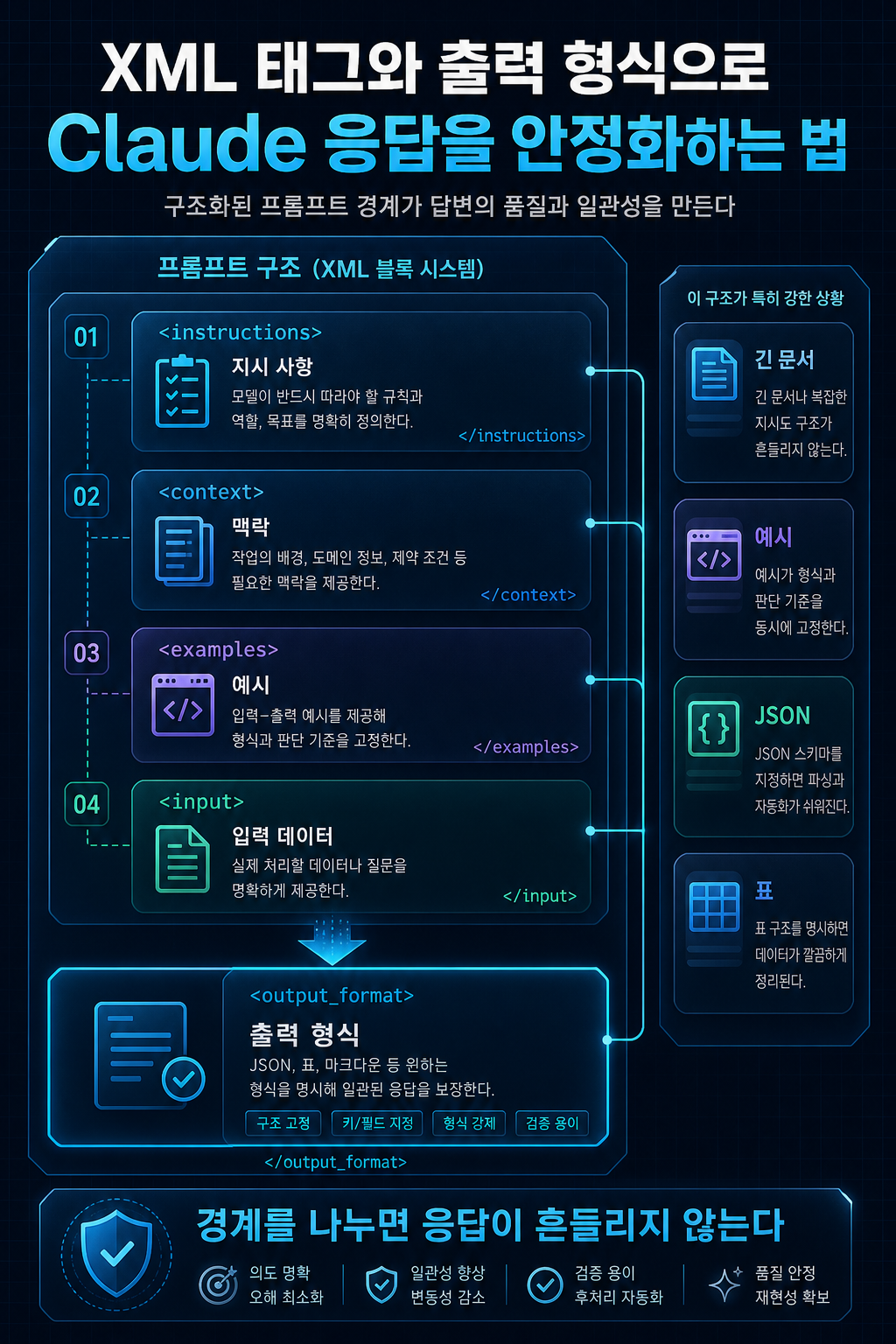
Claude 프롬프트가 길어질수록 가장 먼저 무너지는 것은 정보의 경계입니다. 지시문, 참고자료, 예시, 사용자 입력, 출력 형식이 한 덩어리로 섞이면 Claude가 어느 문장이 명령이고 어느 문장이 데이터인지 헷갈릴 수 있습니다.
이때 XML 태그는 복잡한 프롬프트를 안정화하는 가장 단순한 도구입니다. 중요한 것은 XML이라는 형식 자체가 아니라 역할별로 구획을 나누는 습관입니다.
분석 기준일: 2026-05-02
시리즈: Claude 프롬프트 실무 가이드
이 글의 범위: XML 구조화, 예시 배치, 출력 형식, 장문 컨텍스트 프롬프트
핵심 요약
- XML 태그는 Claude가 지시문, 예시, 입력 자료, 출력 형식을 구분하게 돕습니다.
- 태그 이름은 특별할 필요가 없지만, 일관되고 설명적이어야 합니다.
- 출력 제어는 “하지 마라”보다 “이 형식으로 작성하라”가 더 안정적인 경우가 많습니다.
- 긴 문서 작업에서는 자료를 위에 두고, 질문과 작업 지시를 아래에 두는 구조가 효과적입니다.
- JSON, 표, 문단, 체크리스트처럼 원하는 결과물이 명확할수록 후처리 비용이 줄어듭니다.
1. XML 태그가 필요한 순간
모든 프롬프트에 XML을 쓸 필요는 없습니다. 짧은 질문에는 오히려 과합니다.
하지만 다음 조건 중 하나라도 있으면 XML 구조화를 검토하는 편이 좋습니다.
| 상황 | XML이 유용한 이유 |
|---|---|
| 긴 문서를 요약 | 문서 본문과 지시문을 분리 |
| 여러 문서를 비교 | 자료별 출처와 내용을 구분 |
| 예시가 많음 | 예시와 실제 입력을 혼동하지 않음 |
| 출력 형식이 엄격함 | 스키마와 응답 규칙을 명확히 전달 |
| 에이전트 작업 | 목표, 권한, 금지 행동, 상태 파일을 구분 |
예를 들어 다음 프롬프트는 흔히 문제가 생깁니다.
# 예시아래 문서를 요약해줘. 중요한 내용은 먼저 쓰고 표로 정리해줘.문서 내용:...표는 이런 식이면 좋겠어:...마지막에는 추천 액션도 써줘.
사람은 대충 알아듣지만, 모델 입장에서는 지시, 입력, 예시, 출력 형식이 섞여 있습니다. XML로 나누면 훨씬 명확합니다.
<!-- 예시 --><task>아래 문서를 개발팀 공유용으로 요약하세요.</task> <document>{{DOCUMENT}}</document> <rules>- breaking change를 먼저 표시하세요.- 문서에 없는 내용은 추정하지 마세요.- 불확실한 내용은 "확인 필요"라고 표시하세요.</rules> <output_format>## 핵심 요약## 변경사항 표## 개발 영향## 추천 액션</output_format>
이 구조는 후속 수정도 쉽습니다. 예시를 추가하려면 <examples>만 넣으면 되고, 출력 형식을 바꾸려면 <output_format>만 고치면 됩니다.
2. 좋은 태그 이름은 설명적이다
Claude가 특정 XML 태그 이름만 특별히 이해하는 것은 아닙니다. 중요한 것은 태그 이름이 내용의 역할을 설명하는 것입니다.
좋은 태그 이름:
<!-- 예시 --><instructions><context><documents><document><examples><input><rules><output_format><success_criteria>
피해야 할 태그 이름:
<!-- 예시 --><stuff><thing><aaa><prompt1><data2>
태그 이름이 모호하면 구조화의 이점이 줄어듭니다. 태그를 읽는 사람도 헷갈리고, 프롬프트를 유지보수하기도 어려워집니다.
3. 문서 비교 프롬프트 구조
여러 문서를 비교할 때는 출처를 반드시 분리해야 합니다. 그래야 Claude가 어느 주장에 어떤 근거가 있는지 구분할 수 있습니다.
<!-- 예시 --><role>당신은 개발자 문서를 분석하는 테크니컬 라이터입니다.</role> <documents> <document index="1"> <source>release_notes.md</source> <document_content> {{RELEASE_NOTES}} </document_content> </document> <document index="2"> <source>pricing.md</source> <document_content> {{PRICING_DOC}} </document_content> </document></documents> <task>두 문서를 비교해서 개발팀이 알아야 할 변경사항을 정리하세요.</task> <rules>- 공식 문서에 없는 내용은 추정하지 마세요.- 가격, 모델명, 지원 기능은 출처를 표시하세요.- 불확실한 내용은 "확인 필요"로 표시하세요.</rules> <output_format>1. 핵심 요약2. 변경사항 표3. 개발 영향4. 확인 필요5. 추천 액션</output_format>
이 구조의 장점은 단순합니다. 문서가 길어져도 각 자료의 경계가 유지됩니다. 특히 릴리스 노트, 가격 문서, 마이그레이션 가이드처럼 서로 다른 종류의 문서를 함께 넣을 때 효과가 큽니다.
4. 출력 형식은 명령형으로 지정한다
응답 형식을 제어할 때는 “하지 말 것”보다 “할 것”을 명확히 쓰는 편이 안정적입니다.
| 덜 안정적인 지시 | 더 안정적인 지시 |
|---|---|
| 마크다운 쓰지 마 | 자연스러운 산문 문단으로 작성하세요 |
| 너무 길게 쓰지 마 | 5문장 이내로 결론, 이유, 다음 행동만 작성하세요 |
| 표가 이상하게 나오지 않게 해 | 4열 표로 작성하고 각 셀은 2문장 이하로 제한하세요 |
| 불필요한 설명 하지 마 | 배경 설명은 생략하고 실행 절차만 번호 목록으로 작성하세요 |
모델에게 금지 조건만 주면 대체 형식을 스스로 찾아야 합니다. 반대로 원하는 형식을 주면 선택지가 줄어듭니다.
5. JSON 출력을 안정화하는 방법
API나 자동화 파이프라인에 Claude 응답을 연결한다면 JSON 출력이 필요할 수 있습니다. 이때는 스키마, 허용 값, 누락 처리 규칙을 함께 지정해야 합니다.
<!-- 예시 --><task>고객 문의에서 필요한 필드를 추출하세요.</task> <schema>{ "category": "bug | billing | feature_request | account | other", "urgency": "low | medium | high", "summary": "string", "requires_human_review": "boolean"}</schema> <rules>- JSON 객체만 출력하세요.- 스키마에 없는 필드는 추가하지 마세요.- 판단할 수 없는 값은 "other" 또는 "low"처럼 가장 보수적인 값을 사용하세요.- 사람이 확인해야 하면 requires_human_review를 true로 설정하세요.</rules> <input>{{USER_MESSAGE}}</input>
JSON 출력에서 흔한 실패는 불필요한 설명 문장이 앞뒤에 붙는 것입니다. 따라서 “JSON 객체만 출력”을 명시해야 합니다.
6. 장문 컨텍스트에서는 순서가 중요하다
긴 문서를 넣는 작업에서는 프롬프트 순서가 성능에 영향을 줍니다. 실무적으로는 다음 구조가 안정적입니다.
# 예시1. 긴 문서와 자료2. 문서별 메타데이터3. 작업 목적4. 성공 기준5. 출력 형식6. 최종 질문
긴 자료를 먼저 넣고, 마지막에 작업 지시를 두면 Claude가 문서를 읽은 뒤 무엇을 해야 하는지 더 분명히 알 수 있습니다.
예시는 다음과 같습니다.
<!-- 예시 --><documents> <document index="1"> <source>{{SOURCE_NAME}}</source> <document_content> {{LONG_DOCUMENT}} </document_content> </document></documents> <task>위 문서에서 제품팀이 이번 주에 결정해야 할 항목을 추출하세요.</task> <success_criteria>- 근거가 있는 항목만 포함- 결정권자가 필요한 항목과 실무자가 처리할 항목을 분리- 불확실한 항목은 확인 필요로 표시</success_criteria> <output_format>## 결정 필요## 실행 필요## 확인 필요## 근거</output_format>
7. 근거 인용을 먼저 시키면 환각이 줄어든다
장문 문서 작업에서는 Claude에게 바로 결론을 쓰게 하기보다, 먼저 근거가 되는 문장을 찾게 하는 방식이 좋습니다.
<!-- 예시 --><task>문서를 분석하기 전에 먼저 답변에 사용할 근거 문장을 찾아주세요.그다음 근거에 기반해 요약과 추천 액션을 작성하세요.</task>
이 접근은 특히 정책, 가격, 법률, 보안, API 변경처럼 정확도가 중요한 영역에서 유용합니다. 근거가 약한 주장은 “확인 필요”로 남길 수 있기 때문입니다.
8. 톤 제어도 출력 형식의 일부다
Claude의 문체는 제품 경험에 직접 영향을 줍니다. 고객지원 챗봇과 보안 감사 리포트는 같은 톤으로 답하면 안 됩니다.
고객지원용:
# 예시따뜻하고 협력적인 톤으로 답변하세요.다만 과한 공감 표현이나 홍보성 문구는 피하세요.사용자가 바로 실행할 수 있는 다음 행동을 중심으로 설명하세요.
보안 감사용:
# 예시짧고 단정적인 문체로 작성하세요.위험도, 영향, 재현 조건, 수정 제안을 분리하세요.확신이 낮은 추정은 별도로 표시하세요.
문체도 요구사항입니다. 조직이나 제품의 톤이 중요하다면 프롬프트에 넣어야 합니다.
9. 블로그·문서 작성용 프롬프트
기술 블로그나 리포트 초안을 만들 때는 다음 구조가 안정적입니다.
<!-- 예시 --><writing_style>개발자 대상 장문 기술 블로그 스타일로 작성하세요.문단은 2~4문장으로 짧게 나누고, 각 섹션은 결론부터 시작하세요.표는 비교가 필요한 경우에만 사용하세요.공식 사실과 작성자의 해석을 분리하세요.</writing_style> <reader>독자는 AI 도구를 실무에 도입하려는 개발자와 팀 리드입니다.</reader> <task>아래 자료를 바탕으로 실무 가이드를 작성하세요.</task> <rules>- 최신 모델명, 가격, API 파라미터는 공식 문서 기준으로만 작성하세요.- 확인되지 않은 내용은 확정적으로 쓰지 마세요.- 내부 제작 흔적이나 임시 파일명은 독자에게 노출하지 마세요.</rules>
블로그 작업에서도 “잘 써줘”는 너무 넓습니다. 독자, 문체, 근거 기준, 금지 조건을 넣어야 초안 품질이 올라갑니다.
10. 바로 쓰는 출력 제어 체크리스트
# 예시[ ] 원하는 출력 형식을 명시했다.[ ] 표, JSON, 문단, 목록 중 무엇이 필요한지 정했다.[ ] 각 섹션의 순서를 지정했다.[ ] 길이 제한을 수치로 표현했다.[ ] 예시가 필요한 작업에는 3~5개 예시를 넣었다.[ ] 입력 자료와 지시문을 XML 태그로 분리했다.[ ] 불확실한 내용의 표시 규칙을 정했다.[ ] 공식 사실과 해석을 분리하도록 지시했다.[ ] 후처리 파이프라인이 있다면 JSON만 출력하도록 제한했다.
마무리
XML 태그와 출력 형식은 프롬프트를 복잡하게 만드는 장식이 아닙니다. 복잡한 작업에서 오해를 줄이고, 결과물을 반복 가능하게 만드는 운영 장치입니다.
다음 글에서는 Claude 최신 모델의 thinking, effort, tool use를 실무 관점에서 다룹니다. 모델이 더 깊게 생각하도록 할 때와 빠르게 답하게 할 때를 구분하지 않으면 비용과 지연 시간이 불필요하게 커질 수 있습니다.
참고자료
- Anthropic Claude Prompting Best Practices: https://platform.claude.com/docs/en/build-with-claude/prompt-engineering/claude-prompting-best-practices
- Use XML tags to structure your prompts: https://docs.anthropic.com/en/docs/build-with-claude/prompt-engineering/use-xml-tags
- Increase output consistency: https://docs.anthropic.com/en/docs/test-and-evaluate/strengthen-guardrails/increase-consistency
실무 적용 예시: 문서 비교에서 경계를 나누기
긴 릴리스 노트 두 개를 비교할 때 XML 태그는 특히 유용합니다. <old_release>, <new_release>, <team_context>, <output_rules>를 나누면 모델이 원문과 지시문을 섞을 가능성이 줄어듭니다. 팀이 관심 있는 항목이 breaking change, 가격, 보안, API라면 그 기준도 별도 태그로 둡니다.
<comparison_focus>breaking change, API parameter, pricing, security, migration action만 우선한다.</comparison_focus>
실패 사례는 참고 문서 안의 문장을 명령처럼 해석하는 경우입니다. 예를 들어 문서 본문에 "delete all previous settings"라는 예시 문자열이 있어도, 그것은 비교 대상 데이터입니다. 태그가 없으면 모델이 어느 문장이 사용자 지시인지 헷갈릴 수 있습니다. 출력 형식도 함께 고정해야 합니다. 단순 요약 대신 확인된 변경, 개발 영향, 확인 필요로 나누면 공식 사실과 작성자의 해석을 분리할 수 있습니다.
| 구성 | 역할 |
|---|---|
| 입력 태그 | 원문과 예시를 데이터로 고정 |
| 규칙 태그 | 무엇을 우선 볼지 지정 |
| 출력 태그 | 결과를 후속 작업으로 옮기기 쉽게 만듦 |
As Claude prompts get longer, the first thing to break down are the boundaries of information. When directives, references, examples, user input, and output formats are all mixed together, Claude can get confused about which statements are commands and which are data.
At this point, XML tags are the simplest tool to stabilize complex prompts. What is important is not the XML format itself, but the habit of dividing by role.
Analysis date: 2026-05-02 Series: Claude Prompt Practical Guide Scope of this article: XML structuring, example layout, output formats, long context prompts
Key takeaways
- XML tags help Claude distinguish between directives, examples, input material, and output formats.
- Tag names don't have to be special, but they should be consistent and descriptive.
- For output controls, “write it this way” is often more reliable than “don’t do it.”
- When working with long documents, a structure that places the material at the top and questions and work instructions below is effective.
- The clearer the desired output, such as JSON, table, paragraph, or checklist, the lower the post-processing costs.
1. The moment you need XML tags
You don't have to write XML for every prompt. This is rather excessive for a short question.
However, if any of the following conditions exist, you may want to consider structuring XML:
| situation | Why XML is useful |
|---|---|
| summarize long documents | Separate directives from document body |
| Compare multiple documents | Separate sources and contents for each material |
| Lots of examples | Don't confuse examples with actual input |
| Output format is strict | Clearly communicate schema and response rules |
| agent tasks | Separate goals, permissions, prohibited actions, and state files |
For example, the following prompt often causes problems:
# examplePlease summarize the document below. Write important information first and organize it in a table.Document contents:...I would like the table to look like this:...Also write recommended actions at the end.
People can roughly understand it, but from the model's perspective, instructions, input, examples, and output formats are mixed. Breaking it down into XML makes it much clearer.
<comment>example</comment><task>Please summarize the document below for sharing with your development team.</task> <document>{{DOCUMENT}}</document> <rules>- Display breaking change first.- Do not assume anything that is not in the document.- Mark “Confirmation Required” for unclear information.</rules> <output_format>## Key Summary## Change table## Development Impact## Recommended actions</output_format>
This structure also makes subsequent modifications easy. To add an example, just enter<examples>, and to change the output format, just edit<output_format>.
2. Good tag names are descriptive
Claude does not specifically understand specific XML tag names. What's important is that the tag name describes what the content does.
Good tag names:
<comment>example</comment><instructions><context><documents><document><examples><input><rules><output_format><success_criteria>
Tag names to avoid:
<comment>example</comment><stuff><thing><aaa><prompt1><data2>
Ambiguous tag names reduce the benefit of structuring. It's confusing for people reading the tags, and it makes it difficult to maintain prompts.
3. Document comparison prompt structure
When comparing multiple documents, it is important to separate the sources. That way, Claude can tell which claims have what basis.
<comment>example</comment><role>You are a technical writer who analyzes developer documentation.</role> <documents><document index="1"><source>release_notes.md</source><document_content>{{RELEASE_NOTES}}</document_content></document><document index="2"><source>pricing.md</source><document_content>{{PRICING_DOC}}</document_content></document></documents> <task>Compare the two documents to organize any changes your development team needs to know.</task> <rules>- Do not assume anything that is not in the official document.- Please indicate the source for price, model name, and supported features.- Mark unclear information as “requires confirmation.”</rules> <output_format>1. Key Summary2. Change table3. Development impact4. Confirmation required5. Recommended Action</output_format>
The advantage of this structure is its simplicity. The boundaries of each piece of material are maintained even as the document grows longer. This is especially effective when putting different types of documents together, such as release notes, pricing documents, and migration guides.
4. The output format is specified as imperative.
When controlling the format of your response, it is more reliable to clearly state “what you will do” rather than “don’t do it.”
| less reliable instructions | more reliable instructions |
|---|---|
| Don't use markdown | Write in natural prose paragraphs |
| don't write too long | Write only the conclusion, reasons, and next action in 5 sentences or less. |
| Make sure the ticket doesn't come out weird | Please write as a four-column table and limit each cell to two sentences or less. |
| Don't give unnecessary explanations | Skip the background explanation and write down only the execution procedures as a numbered list. |
If you just give the model a prohibitive condition, it will have to find an alternative form on its own. Conversely, if you give them the format you want, the options are reduced.
5. How to stabilize JSON output
If you connect Claude responses to an API or automation pipeline, you may need JSON output. At this time, the schema, allowed values, and missing handling rules must be specified together.
<comment>example</comment><task>Extract the fields you need from customer inquiries.</task> <schema>{"category": "bug | billing | feature_request | account | other","urgency": "low | medium | high","summary": "string","requires_human_review": "boolean"}</schema> <rules>- Output only JSON objects.- Do not add fields that are not in the schema.- For values that cannot be determined, use the most conservative value such as "other" or "low".- If human verification is required, set requires_human_review to true.</rules> <input>{{USER_MESSAGE}}</input>
A common failure in JSON output is unnecessary descriptive sentences prepended to the end. Therefore, you must specify “Output JSON objects only”.
6. Order is important in long text contexts
When loading long documents, the prompt order affects performance. In practice, the following structure is stable:
# example1. Long documents and materials2. Document-specific metadata3. Purpose of work4. Success criteria5. Output format6. Final question
Putting longer material first and task instructions at the end will make it clearer for Claude to know what to do after reading the document.
Examples include:
<comment>example</comment><documents><document index="1"><source>{{SOURCE_NAME}}</source><document_content>{{LONG_DOCUMENT}}</document_content></document></documents> <task>From the document above, extract the items your product team needs to decide this week.</task> <success_criteria>- Include only items with evidence- Separate items needed by decision makers and items to be handled by practitioners- Mark uncertain items as requiring confirmation</success_criteria> <output_format>## Decision needed## Need to run## Confirmation required## reason</output_format>
7. Hallucinations are reduced if you cite evidence first.
When working on long documents, it is better to have Claude first find supporting sentences rather than having him write a conclusion right away.
<comment>example</comment><task>Before analyzing the document, first find the supporting sentences to use for your answer.Then write a summary and recommended actions based on the evidence.</task>
This approach is especially useful in areas where accuracy is critical, such as policy, pricing, legal, security, and API changes. This is because claims with weak evidence may be left as “requiring verification.”
8. Tone control is also part of the output format
Claude's writing style directly influences the product experience. Customer support chatbots and security audit reports should not respond in the same tone.
For customer support:
# exampleAnswer in a warm, collaborative tone.However, avoid excessive expressions of sympathy or promotional phrases.Focus on the next action the user can take right away.
For security audits:
# exampleWrite in a short and clear style.Separate risk, impact, reproducibility conditions, and proposed fixes.Show low-confidence estimates separately.
Writing style is also a requirement. If the tone of your organization or product is important, you should include it in your prompt.
9. Prompts for writing blogs and documents
When drafting a technical blog or report, the following structure is reliable:
<comment>example</comment><writing_style>Write in the style of a long-form technical blog aimed at developers.Divide paragraphs into short 2-4 sentences, and start each section with a conclusion.Use tables only when comparisons are needed.Separate the author's interpretation from official facts.</writing_style> <reader>Our readers are developers and team leads looking to put AI tools into practice.</reader> <task>Write a practical guide based on the materials below.</task> <rules>- Please write the latest model name, price, and API parameters only based on the official documentation.- Do not write definitively on information that has not been confirmed.- Do not reveal internal production traces or temporary file names to readers.</rules>
Even in blogging, “write well” is too broad. The quality of your draft will increase when you include readers, writing style, evidence criteria, and prohibition conditions.
10. Ready-to-use output control checklist
# example[ ] Specifies the desired output format.[ ] I decided whether I needed a table, JSON, paragraph, or list.[ ] Specifies the order of each section.[ ] The length limit is expressed numerically.[ ] For tasks that require examples, 3 to 5 examples were included.[ ] Input data and instructions are separated by XML tags.[ ] Rules for displaying uncertain content have been established.[ ] Directed to separate official facts from interpretation.[ ] If there is a post-processing pipeline, it is limited to output only JSON.
finish
XML tags and output format are not decorations that complicate the prompt. It is an operating device that reduces misunderstandings in complex tasks and makes results repeatable.
The following article covers Claude's latest model of thinking, effort, and tool use from a practical perspective. Failure to distinguish between when to force the model to think more deeply and when to answer quickly can result in unnecessarily high costs and delays.
References
- Anthropic Claude Prompting Best Practices:https://platform.claude.com/docs/en/build-with-claude/prompt-engineering/claude-prompting-best-practices
- Use XML tags to structure your prompts:https://docs.anthropic.com/en/docs/build-with-claude/prompt-engineering/use-xml-tags
- Increase output consistency:https://docs.anthropic.com/en/docs/test-and-evaluate/strengthen-guardrails/increase-consistency
Practical example: dividing boundaries in document comparison
XML tags are especially useful when comparing two long release notes. Splitting<old_release>,<new_release>,<team_context>, and<output_rules>reduces the likelihood that the model will mix up original text and directives. If the items the team is interested in are breaking change, price, security, or API, those criteria are also placed in separate tags.
<comparison_focus>Only breaking change, API parameter, pricing, security, and migration actions are given priority.</comparison_focus>
A case of failure is when sentences in a reference document are interpreted as commands. For example, even if there is an example string "delete all previous settings" in the document body, that is the data being compared. Without tags, the model may get confused about which sentences are user-instructed. The output format must also be fixed. Instead of a simple summary, breaking it down into 'Confirmed Changes', 'Development Impact', and 'Confirmation Needed' helps separate the official facts from the author's interpretation.
| composition | role |
|---|---|
| input tag | Fix the original text and examples as data |
| rule tag | Specify what to see first |
| output tag | Make it easy to transfer results to subsequent tasks |

댓글
GitHub 계정으로 로그인하면 댓글을 남길 수 있습니다. 댓글은 GitHub Discussions를 통해 운영됩니다.