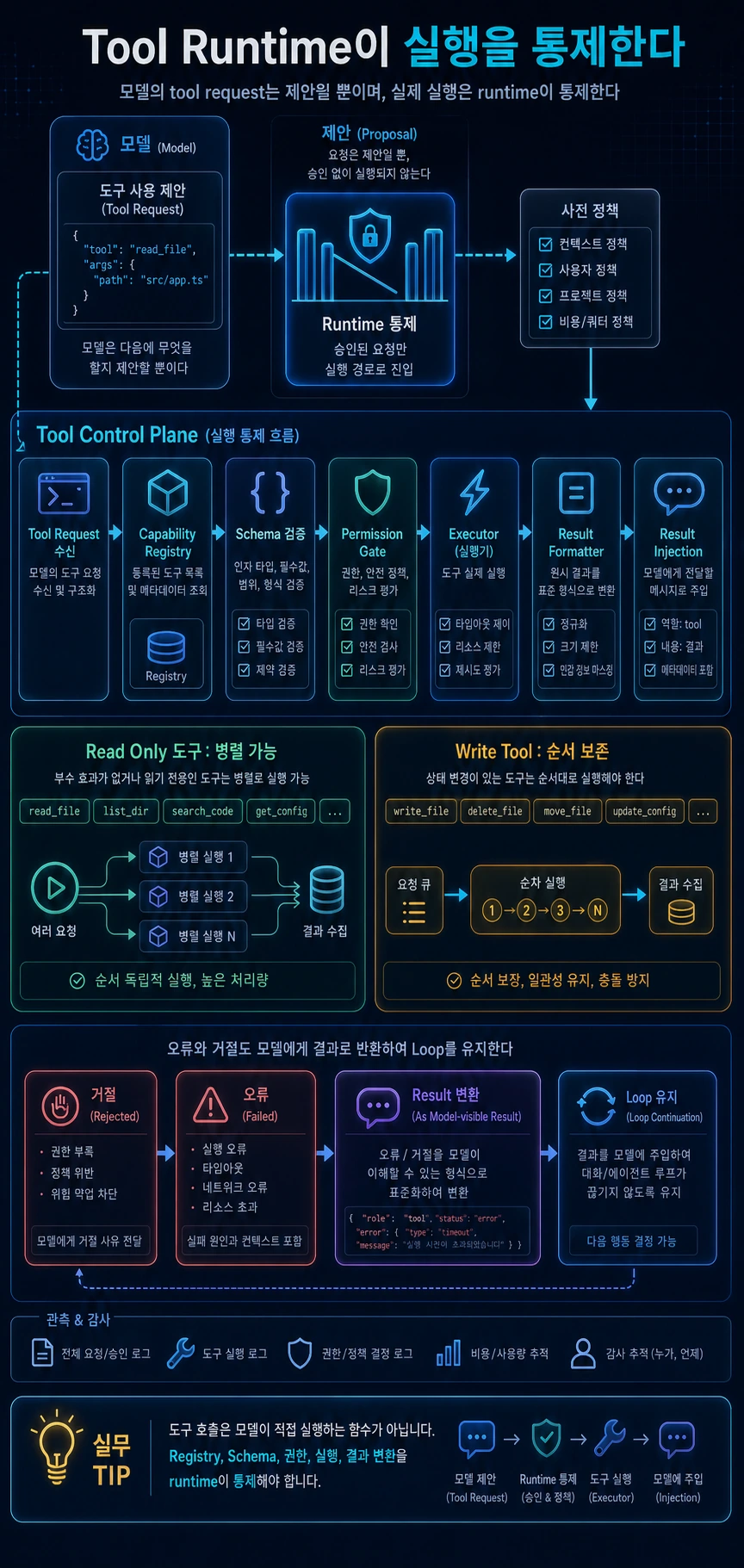
핵심 요약
- 모델의 tool request는 제안일 뿐이며 실제 실행은 runtime이 통제해야 한다.
- Tool runtime은 registry, schema validation, permission gate, executor, result formatter로 나뉜다.
- read-only 도구는 병렬화할 수 있지만 write 도구는 순서를 보존해야 한다.
- 오류와 거절도 model-visible result로 만들어 loop를 깨지 않게 해야 한다.
이번 글에서는 tool runtime을 보겠습니다.
AI agent에서 도구는 단순 함수 목록이 아닙니다. 모델이 “이 도구를 이 인자로 호출하고 싶다”고 요청하면, runtime은 그 요청이 실제로 가능한지 검증해야 합니다. 도구 이름이 맞는지, 입력 스키마가 유효한지, 현재 권한으로 실행 가능한지, 병렬로 실행해도 안전한지 확인해야 합니다.
Claude Code류의 agent를 runtime 관점으로 보면 tool execution은 모델 루프와 분리된 독립 계층입니다.
1. Tool request는 실행 명령이 아니라 제안이다
모델은 도구 호출을 “요청”할 수 있습니다. 하지만 실행 여부는 애플리케이션이 결정합니다.
모델은 다음 실수를 할 수 있습니다.
- 존재하지 않는 도구 이름을 생성한다.
- 필수 인자를 빠뜨린다.
- 위험한 shell 명령을 요청한다.
- 파일 쓰기 순서를 잘못 판단한다.
- 외부 서비스로 민감 정보를 보내려 한다.
따라서 tool request는 실행 명령이 아니라 runtime이 검토해야 할 제안입니다.
2. Capability registry 설계
registry는 “무엇을 실행할 수 있는가”를 정의합니다.
| 필드 | 설명 |
|---|---|
| public name | 모델에게 노출되는 도구 이름 |
| description | 모델이 선택할 때 참고하는 설명 |
| input schema | 인자 검증 규칙 |
| risk level | read, write, shell, network, secret 등 위험도 |
| availability | 현재 mode/workspace/policy에서 사용 가능 여부 |
| executor | 실제 실행 함수 |
| result formatter | 결과를 model-visible message로 변환 |
도구가 많아질수록 registry와 executor를 분리해야 합니다. registry는 가능한 기능의 목록이고, executor는 이번 요청을 어떻게 처리할지 담당합니다.
3. Schema validation과 오류 메시지
도구 실행 전에는 반드시 입력 검증이 필요합니다. schema validation은 단순 타입 체크가 아니라 model feedback의 일부입니다.
잘못된 입력이 들어오면 runtime은 예외로 loop를 깨지 말고, 모델이 이해할 수 있는 오류 result를 만들어야 합니다.
# 읽는 법: 아래 항목은 동작 흐름을 빠르게 확인하기 위한 요약 예시입니다.요청: file_read(path=null)→ schema validation failed→ tool result: path는 문자열이어야 합니다→ model은 다른 인자로 다시 시도 가능
4. Permission gate와 실행 순서
schema가 통과되었다고 바로 실행하면 안 됩니다. 권한 판단이 필요합니다.
권한 판단은 도구 자체의 위험도, 입력값, 현재 permission mode, workspace trust, 사용자 규칙, 조직 정책을 함께 봐야 합니다.
| 위험도 | 기본 처리 |
|---|---|
| read-only local metadata | 자동 허용 가능 |
| file read | workspace 범위 안에서 허용 가능 |
| file write | 승인 또는 명시 정책 필요 |
| shell command | 위험도 분류 후 승인 필요 |
| network send | 목적지와 데이터 범위 확인 필요 |
| secret access | 기본 거부 |
5. 병렬 실행과 직렬 실행
모든 도구를 병렬 실행하면 빠릅니다. 하지만 안전하지 않습니다. 읽기 전용 도구는 병렬화할 수 있지만, 파일 쓰기나 shell 실행은 순서가 중요합니다.
| 도구 성격 | 실행 전략 |
|---|---|
| read-only, no side effect | 병렬 실행 가능 |
| write, state mutation | 직렬 실행 권장 |
| shell command | 보수적으로 직렬 실행 |
| external API mutation | 직렬 또는 transaction 필요 |
| unknown risk | 직렬 실행 기본값 |
병렬화의 기준은 속도가 아니라 side effect입니다.
6. Result formatter와 재주입
도구 결과는 화면 출력과 model-visible message가 다릅니다. 화면에는 짧은 요약이 좋지만, 모델에게는 다음 추론에 필요한 구조화된 관찰값이 필요합니다.
도구 결과에는 최소한 다음 정보가 있어야 합니다.
- 원래 tool request id
- 성공/실패 여부
- 모델이 읽을 수 있는 결과 요약
- 오류가 있다면 원인
- 민감 정보가 제거된 content
- ledger에 남길 audit summary
7. 개념 코드로 보는 tool runtime
아래 코드는 설명용으로 새로 작성한 코드입니다.
# 읽는 법: 실제 구현 복제가 아니라 runtime 경계를 설명하는 개념 코드입니다.class CapabilitySpec: # 객체가 이후 단계에서 참조할 runtime 의존성과 상태 저장소를 초기화합니다. def __init__(self, name, schema, risk, can_run, execute, format_result): self.name = name self.schema = schema self.risk = risk self.can_run = can_run self.execute = execute self.format_result = format_result # 단일 tool request를 검증, 권한 평가, 실행, 결과 포맷 단계로 처리합니다.async def execute_tool_request(request, runtime): spec = runtime.capabilities.find(request.name) if spec is None: return ToolResult.error(request.id, "사용할 수 없는 도구입니다.") parsed = spec.schema.validate(request.arguments) if not parsed.ok: return ToolResult.error(request.id, parsed.message) if not spec.can_run(runtime.context): return ToolResult.error(request.id, "현재 실행 모드에서 비활성화된 도구입니다.") decision = await runtime.permissions.evaluate(spec, parsed.value) await runtime.ledger.write("permission_decision", decision.summary()) if not decision.allowed: return ToolResult.denied(request.id, decision.reason) try: raw_output = await spec.execute(parsed.value, runtime.execution_context) return spec.format_result(request.id, raw_output) except Exception as error: return ToolResult.error(request.id, summarize_error(error)) # 읽기 전용 도구는 병렬로, side effect가 있는 도구는 순서대로 실행합니다.async def execute_tool_batch(requests, runtime): readonly, ordered = split_by_side_effect(requests, runtime.capabilities) for result in await run_parallel(readonly, lambda req: execute_tool_request(req, runtime)): yield result for req in ordered: yield await execute_tool_request(req, runtime)
여기서 오류, 거절, 성공은 모두 ToolResult가 됩니다. loop를 깨는 것이 아니라 다음 모델 추론에 들어갈 관찰값을 만드는 것이 핵심입니다.
8. 실전 체크리스트
# 읽는 법: 아래 항목은 동작 흐름을 빠르게 확인하기 위한 요약 예시입니다.Tool Runtime 체크리스트 [ ] tool request를 실행 명령이 아니라 검토 대상 제안으로 본다.[ ] capability registry와 executor가 분리되어 있다.[ ] tool name lookup 실패도 result message를 만든다.[ ] schema validation 실패가 model-visible error로 돌아간다.[ ] permission check는 실제 실행 직전에 일어난다.[ ] read-only는 병렬화할 수 있고 write는 순서를 보존한다.[ ] tool result는 screen summary, model message, ledger summary로 나뉜다.[ ] unknown risk 도구는 보수적으로 직렬 또는 승인 필요로 처리한다.
실패 사례: 도구 이름만 맞추고 실행 정책을 빠뜨린 경우
가장 흔한 실패는 tool definition을 모델에게 넘겨주고 "이제 function calling이 된다"고 판단하는 것입니다. 초기 demo에서는 잘 작동합니다. 모델이 read_file을 고르고, 경로를 넣고, runtime이 파일을 읽어 결과를 돌려줍니다. 하지만 실제 제품에서는 곧 문제가 생깁니다. 읽기 도구와 쓰기 도구가 같은 queue에서 동시에 실행되고, permission check가 UI 버튼에만 있고 executor에는 없고, 실패한 tool call이 transcript에 남지 않습니다.
이 구조에서는 모델이 잘못된 인자를 만든 순간 runtime이 흔들립니다. 예를 들어 delete_cache 같은 도구가 optional scope 인자를 받는데 schema validation이 느슨하면 빈 scope가 전체 cache 삭제로 해석될 수 있습니다. 또는 read-only로 표시된 도구가 내부적으로 refresh token을 갱신해 side effect를 만들 수도 있습니다. 모델이 악의적이지 않아도 도구의 위험 등급이 runtime에 표현되지 않으면 운영 사고가 됩니다.
구현 예시: 실행 전 검문소를 명시하기
Tool runtime은 최소한 아래 순서를 가져야 합니다. 핵심은 모델 요청을 곧바로 함수 호출로 바꾸지 않는 것입니다.
ToolRequest -> name lookup -> schema validation -> capability policy -> permission check -> concurrency planner -> executor -> normalized ToolResult
type Risk = "read" | "write" | "external" | "destructive"; type ToolCapability = { name: string; risk: Risk; schemaVersion: string; requiresApproval: boolean;}; function canExecute(capability: ToolCapability, mode: "auto" | "review") { if (capability.risk === "destructive") return false; if (capability.requiresApproval && mode === "auto") return false; return true;}
이 정도의 작은 분리만 있어도 runtime은 도구를 병렬화할 수 있는지, 사용자 승인이 필요한지, 실패를 모델에게 어떻게 설명할지 판단할 수 있습니다. 중요한 점은 canExecute가 UI와 executor 양쪽에서 공유되는 정책이어야 한다는 것입니다. 화면에서 막았더라도 executor가 다시 확인하지 않으면 우회 경로가 생깁니다.
| 경계 | 책임 | 빠지면 생기는 문제 |
|---|---|---|
| registry | 도구 이름과 capability 확인 | hallucinated tool이 런타임 예외로 끝남 |
| schema | 입력 형식과 기본값 검증 | 위험한 기본값이 조용히 실행됨 |
| permission | 사용자·workspace 권한 확인 | UI 밖 실행 경로가 생김 |
| result formatter | 성공·실패를 같은 타입으로 정규화 | 모델이 실패 원인을 복구하지 못함 |
운영 예시: 파일 쓰기 도구를 안전하게 노출하기
코딩 에이전트에서 write_file 도구를 노출한다고 해봅시다. 이 도구는 단순히 path와 content를 받는 함수처럼 보이지만, runtime에서는 최소 네 가지 검문소가 필요합니다. 첫째, path가 workspace 안에 있는지 확인합니다. 둘째, 대상 파일이 생성인지 수정인지 구분합니다. 셋째, 현재 승인 모드에서 쓰기가 가능한지 확인합니다. 넷째, 실행 후 diff와 결과 요약을 transcript에 남깁니다.
| 검문소 | 확인 내용 | 실패 처리 |
|---|---|---|
| schema | path와 content 타입, 빈 값 여부 | model-visible validation error |
| scope | workspace 밖 경로 차단 | permission denied result |
| intent | 생성, 수정, 덮어쓰기 구분 | 사용자 승인 또는 거부 |
| audit | 변경 파일, 크기, 요약 기록 | ledger write 실패 시 경고 |
이 흐름이 없으면 모델이 실수로 절대 경로를 만들거나, 기존 파일 전체를 덮어쓰거나, 같은 작업을 두 번 실행했을 때 사용자가 원인을 찾기 어렵습니다. 특히 "도구 실행 실패"를 exception으로만 처리하면 모델은 실패 원인을 보지 못합니다. 실패도 ToolResult로 정규화해서 "권한 때문에 쓰지 못했다", "스키마가 틀렸다", "대상 파일이 workspace 밖이다"처럼 다음 판단에 필요한 관찰값을 줘야 합니다.
비교 포인트는 명확합니다. 함수 호출 목록만 있는 agent는 도구를 많이 붙일수록 위험해집니다. 반면 capability registry와 permission gate가 있는 agent는 도구가 늘어도 각 도구의 위험 등급과 실행 조건을 일관되게 관리할 수 있습니다.
마무리
Tool runtime은 agent의 외부 세계 접점입니다. 모델이 요청했다고 바로 실행하지 않고, runtime이 검증하고 승인하고 기록해야 제품 수준 신뢰도가 나옵니다.
다음 글에서는 마지막 방어선인 권한, transcript, 비용을 다룹니다. 이 셋은 부가기능이 아니라 agent 제품성을 결정하는 핵심 계층입니다.
Key takeaways
- The model's tool request is only a suggestion and the actual execution must be controlled by the runtime.
- tool runtime is divided into registry, schema validation, permission gate, executor, and result formatter.
- Read-only tools can be parallelized, but write tools must preserve order.
- Errors and rejections should also be made model-visible results so as not to break the loop.
In this article, we will look at tool runtime.
In an AI agent, a tool is not a simple list of functions. If the model requests “I want to call this tool with these arguments,” the runtime must verify that the request is actually possible. You need to verify that the tool name is correct, that the input schema is valid, that it can be run with the current permissions, and that it is safe to run in parallel.
If you look at Claude Code-type agents from a runtime perspective, tool execution is an independent layer separated from the model loop.
1. Tool request is a suggestion, not an execution command.
A model can “request” a tool call. However, it is up to the application to decide whether to run it or not.
Models can make the following mistakes:
- Create a tool name that does not exist.
- Omitting required arguments.
- Requests a dangerous shell command.
- The file writing order is misjudged.
- I am trying to send sensitive information to an external service.
So a tool request is not an execution command, but rather a suggestion for the runtime to review.
2. Capability registry design
A registry defines “what can run.”
| field | explanation |
|---|---|
| public name | Tool name exposed to model |
| description | Explanation for reference when selecting a model |
| input schema | Argument validation rules |
| risk level | Risk levels such as read, write, shell, network, secret, etc. |
| availability | Availability in current mode/workspace/policy |
| executor | actual execution function |
| result formatter | Convert results to model-visible message |
As more tools become available, the registry and executor need to be separated. The registry is a list of possible functions, and the executor is responsible for how to process this request.
3. Schema validation and error messages
Input validation is required before running the tool. Schema validation is not a simple type check but is part of model feedback.
If an incorrect input is received, the runtime should not break the loop with an exception, but should create an error result that the model can understand.
# How to read: The items below are summarized examples to quickly check the action flow.Request: file_read(path=null)→ schema validation failedto tool result: path must be a stringto model can be retried with different arguments
4. Permission gate and execution order
You should not run it immediately after the schema has passed. Authority judgment is required.
Permission judgment must look at the risk level of the tool itself, input values, current permission mode, workspace trust, user rules, and organizational policy.
| risk | default processing |
|---|---|
| read-only local metadata | Auto-acceptable |
| file read | Allowable within workspace range |
| file write | Approval or stated policy required |
| shell command | Approval required after risk classification |
| network send | Requires confirmation of destination and data range |
| secret access | default deny |
5. Parallel and serial execution
Running all tools in parallel is fast. But it's not safe. Read-only tools can be parallelized, but the order of writing files or executing shells is important.
| tool personality | execution strategy |
|---|---|
| read-only, no side effect | Can run in parallel |
| write, state mutation | Serial execution recommended |
| shell command | Conservatively run serially |
| external API mutation | Serial or transaction required |
| unknown risk | Serial execution defaults |
The criterion for parallelization is not speed, but side effects.
6. Result formatter and reinjection
The tool results have different screen output and model-visible messages. A short summary is good for the screen, but the model needs structured observations to make further inferences.
The tool results must contain at least the following information:
- Original tool request id
- Success/Failure
- Model-readable summary of results
- If there is an error, the cause
- Content with sensitive information removed
- Audit summary to leave on the ledger
7. tool runtime viewed through concept code
The code below is newly written code for explanation purposes.
# How to read: Conceptual code that describes runtime boundaries, not a clone of the actual implementation.class CapabilitySpec: # Initializes runtime dependencies and state storage that the object will reference in later steps. def __init__(self, name, schema, risk, can_run, execute, format_result): self.name = name self.schema = schema self.risk = risk self.can_run = can_run self.execute = execute self.format_result = format_result # Processes a single tool request through validation, permission evaluation, execution, and result formatting steps.async def execute_tool_request(request, runtime): spec = runtime.capabilities.find(request.name) if spec is None: return ToolResult.error(request.id, "This tool cannot be used.") parsed = spec.schema.validate(request.arguments) if not parsed.ok: return ToolResult.error(request.id, parsed.message) if not spec.can_run(runtime.context): return ToolResult.error(request.id, "The tool is disabled in the current run mode.") decision = await runtime.permissions.evaluate(spec, parsed.value) await runtime.ledger.write("permission_decision", decision.summary()) if not decision.allowed: return ToolResult.denied(request.id, decision.reason) try: raw_output = await spec.execute(parsed.value, runtime.execution_context) return spec.format_result(request.id, raw_output) except Exception as error: return ToolResult.error(request.id, summarize_error(error)) # Read-only tools run in parallel, and tools with side effects run in sequence.async def execute_tool_batch(requests, runtime): readonly, ordered = split_by_side_effect(requests, runtime.capabilities) for result in await run_parallel(readonly, lambda req: execute_tool_request(req, runtime)): yield result for req in ordered: yield await execute_tool_request(req, runtime)
Here, error, rejection, and success all becomeToolResult. The key is not to break the loop, but to create observations that can be used for the next model inference.
8. Practical checklist
# How to read: The items below are summarized examples to quickly check the action flow.tool runtime Checklist [ ] View tool requests as suggestions to be reviewed, not as execution commands.[ ] The capability registry and executor are separated.[ ] Tool name lookup failure also produces a result message.[ ] Schema validation failure returns to model-visible error.[ ] Permission check occurs immediately before actual execution.[ ] read-only can be parallelized, and write preserves order.[ ] Tool results are divided into screen summary, model message, and ledger summary.[ ] unknown risk tools are conservatively treated as requiring serialization or approval.
Case of failure: Matching only the tool name and omitting the execution policy
The most common failure is passing the tool definition to the model and deciding, "Now this is a function calling." It works fine in the initial demo. The model selectsread_file, enters the path, and runtime reads the file and returns the result. But problems soon arise in real products. The reader and writer tools run simultaneously in the same queue, permission checks are only performed on UI buttons but not on the executor, and failed tool calls are not left in the transcript.
In this structure, the runtime fluctuates the moment the model creates an invalid argument. For example, if a tool likedelete_cachetakes an optionalscopeargument and schema validation is lax, an empty scope could be interpreted as deleting the entire cache. Alternatively, tools marked as read-only may update the refresh token internally, creating a side effect. Even if the model is not malicious, if the tool's risk rating is not expressed at runtime, it becomes an operational incident.
Implementation example: Specifying pre-execution checkpoints
tool runtime must have at least the following order. The key is to not turn model requests straight into function calls.
ToolRequest-> name lookup-> schema validation-> capability policy-> permission check-> concurrency planner-> executor-> normalized ToolResult
type Risk = "read" | "write" | "external" | "destructive"; type ToolCapability = { name: string; risk: Risk; schemaVersion: string; requiresApproval: boolean;}; function canExecute(capability: ToolCapability, mode: "auto" | "review") { if (capability.risk === "destructive") return false; if (capability.requiresApproval && mode === "auto") return false; return true;}
Even this small amount of separation allows the runtime to determine whether the tool can be parallelized, whether user approval is required, and how to explain failure to the model. The important thing is thatcanExecutemust be a policy shared by both the UI and the executor. Even if you block it on the screen, if the executor doesn't check again, there will be a bypass route.
| boundary | responsibility | Problems that arise when missing |
|---|---|---|
| registry | Check tool name and capabilities | hallucinated tool ends with runtime exception |
| schema | Input format and default value validation | Dangerous defaults run silently |
| permission | Check user/workspace permissions | An execution path outside the UI appears. |
| result formatter | Normalize success and failure to the same type | Model fails to recover from failure cause |
Operational example: Securely exposing a file writer
Let's say we expose thewrite_filetool in our coding agent. Although this tool appears to simply be a function that takes a path and content, it requires at least four checkpoints at runtime. First, check if the path is in the workspace. Second, distinguish whether the target file is created or modified. Third, check if writing is possible in the current authorization mode. Fourth, after execution, the diff and result summary are left in the transcript.
| checkpoint | Confirmation details | Failure handling |
|---|---|---|
| schema | path and content types, whether empty or not | model-visible validation error |
| scope | Block paths outside the workspace | permission denied result |
| intent | Distinguish between creation, modification, and overwriting | Approve or deny user |
| audit | Changed files, size, summary history | Warning when ledger write fails |
Without this flow, it would be difficult for users to determine the cause when a model accidentally creates an absolute path, overwrites an entire existing file, or runs the same operation twice. In particular, if you only treat “tool execution failure” as an exception, the model will not see the cause of the failure. Failures should also be normalized toToolResultto provide observation values necessary for the next decision, such as "could not write due to permissions," "schema is incorrect," and "target file is outside the workspace."
The point of comparison is clear. An agent that only has a list of function calls becomes more dangerous as more tools are attached to it. On the other hand, an agent with a capability registry and permission gate can consistently manage the risk level and execution conditions of each tool even as the number of tools increases.
finish
tool runtime is the agent's point of contact with the outside world. Rather than immediately executing the model request, the runtime must verify, approve, and record product-level reliability.
The next article covers the last lines of defense: permissions, transcript, and cost. These three are not additional features but core layers that determine agent productivity.

댓글
GitHub 계정으로 로그인하면 댓글을 남길 수 있습니다. 댓글은 GitHub Discussions를 통해 운영됩니다.