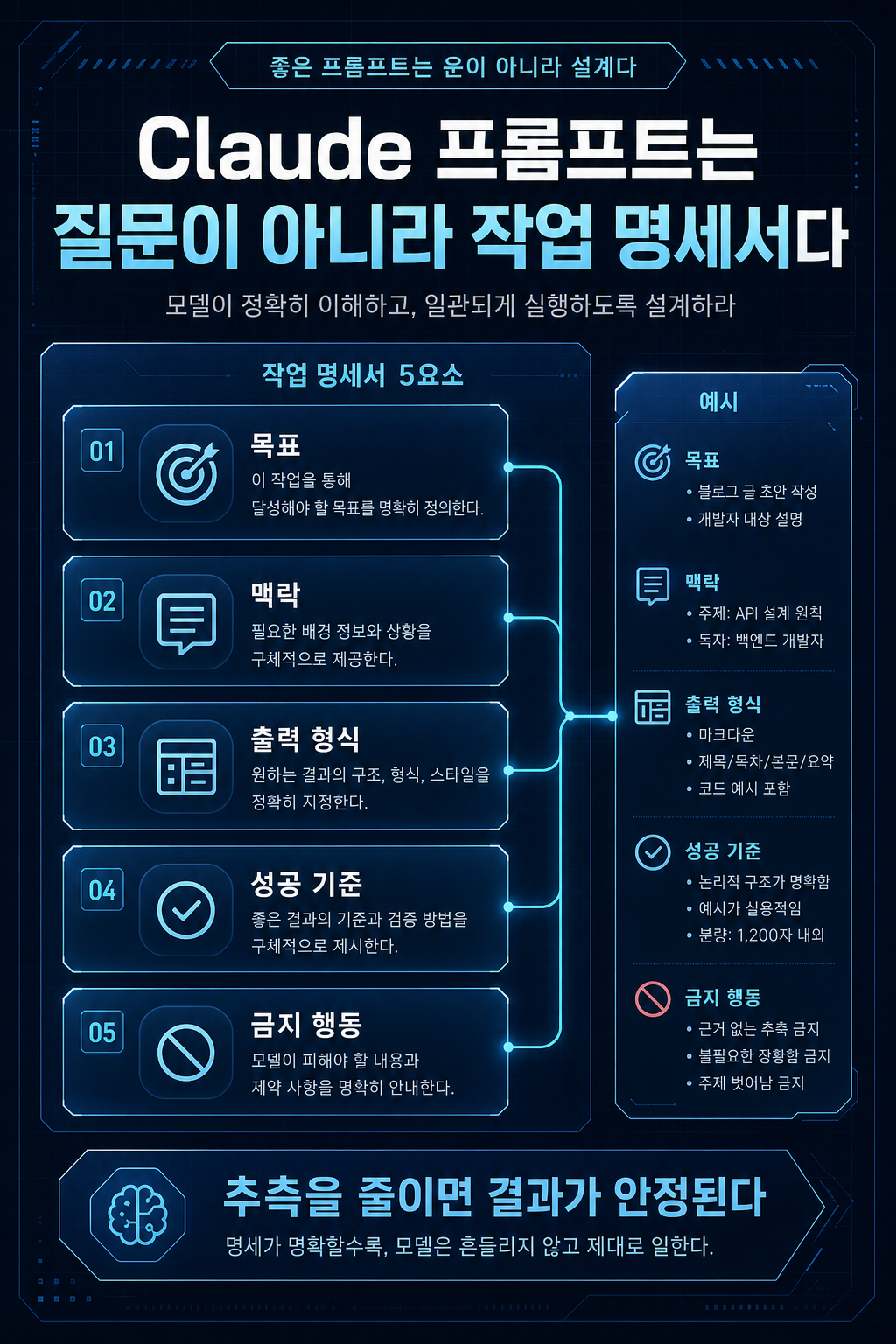
Claude 프롬프트는 질문이 아니라 작업 명세서다
메뉴

AI Development

Claude 프롬프트는 질문이 아니라 작업 명세서다

Claude를 안정적으로 쓰는 첫 번째 기준은 프롬프트를 “질문”이 아니라 작업 명세서로 작성하는 것입니다.

Claude 프롬프트는 질문이 아니라 작업 명세서다 hero image
Markdown약 1620 tokens

Claude를 안정적으로 쓰는 첫 번째 기준은 프롬프트를 “질문”이 아니라 작업 명세서로 작성하는 것입니다.

모델이 똑똑해질수록 대충 써도 어느 정도 답은 나옵니다. 하지만 실무에서는 “그럴듯한 답”보다 “반복 가능하고 검증 가능한 결과”가 중요합니다. 특히 API, 코딩 에이전트, 문서 요약, 리서치, 고객지원 자동화처럼 결과물이 실제 업무에 들어가는 경우에는 프롬프트가 곧 요구사항 문서가 됩니다.

분석 기준일: 2026-05-02
주요 참고자료: Anthropic Claude prompting best practices, Models overview, Extended thinking, Tool use 문서
시리즈: Claude 프롬프트 실무 가이드
이 글의 범위: 명확한 지시, 맥락 제공, 성공 기준, 예시 설계


핵심 요약

  • Claude 프롬프트는 짧게 쓰는 것보다 오해할 여지를 줄이는 것이 중요합니다.
  • 좋은 프롬프트는 작업 목적, 독자, 출력 형식, 성공 기준, 금지 행동을 함께 제공합니다.
  • “알아서 잘 해줘”는 모델에게 추측을 맡기는 요청입니다. 실무 프롬프트는 추측을 줄이는 명세여야 합니다.
  • 예시는 출력 형식과 판단 기준을 동시에 고정하는 가장 강력한 방법입니다.
  • 복잡한 작업일수록 프롬프트 안에 “무엇을 하지 말아야 하는지”가 필요합니다.

1. 왜 프롬프트를 작업 명세서로 봐야 하나

Claude는 맥락을 잘 읽지만, 사용자의 조직, 코드베이스, 고객, 문서 규칙, 품질 기준을 자동으로 알지는 못합니다. 이 점이 핵심입니다.

예를 들어 다음 요청은 표면적으로는 간단합니다.

# 예시이 코드 개선해줘.

하지만 실제로는 해석이 너무 많습니다.

해석 가능성Claude가 할 수 있는 일문제
성능 개선알고리즘이나 캐시를 바꿈동작 변경 위험
가독성 개선함수와 변수명을 바꿈불필요한 diff 증가
안정성 개선검증 로직을 추가함기존 호출자가 깨질 수 있음
테스트 보강테스트 파일을 추가함사용자가 원한 범위가 아닐 수 있음
구조 개선모듈을 나눔과한 리팩터링 가능

“개선”이라는 단어는 사람 사이에서도 애매합니다. 모델에게도 마찬가지입니다. 좋은 프롬프트는 개선의 방향을 좁힙니다.

# 예시아래 TypeScript 함수의 런타임 오류 가능성을 줄여줘. 범위:- 함수 시그니처는 바꾸지 말 것- 외부 라이브러리는 추가하지 말 것- 기존 테스트가 깨지지 않게 할 것- 주변 코드 리팩터링은 하지 말 것 출력:1. 문제가 되는 지점 요약2. 수정된 코드3. 변경 이유4. 추가하면 좋은 테스트 케이스

이 프롬프트는 훨씬 안정적입니다. 작업 목적, 제약, 출력 순서를 모두 제공합니다. Claude가 “어디까지 해도 되는지”를 추측하지 않아도 됩니다.

2. 명확한 지시의 최소 구성

실무 프롬프트는 보통 다섯 가지를 포함하면 품질이 안정됩니다.

구성질문예시
목표무엇을 해야 하나“릴리스 노트를 개발 영향 중심으로 요약”
맥락결과물이 어디에 쓰이나“이번 주 스프린트 계획 회의용”
형식어떤 모양이어야 하나“표 1개, 리스크 3개, 액션 3개”
기준성공을 어떻게 판단하나“breaking change를 먼저 표시”
경계무엇은 하지 말아야 하나“문서에 없는 내용은 추정하지 않음”

이 다섯 가지는 길게 쓸 필요가 없습니다. 중요한 것은 빠짐없이 쓰는 것입니다.

# 예시이 문서를 임원 보고용으로 요약하세요. 목표:- 전체 번역이 아니라 의사결정에 필요한 쟁점을 뽑는다. 맥락:- 독자는 기술 세부 구현보다 비용, 일정, 리스크에 관심이 있다. 출력:- 핵심 요약 5- 의사결정 필요 항목 3- 리스크와 대응책 표 경계:- 문서에 없는 수치나 일정을 만들지 않는다.- 추정은 “추정”이라고 표시한다.

이 정도만 넣어도 결과물은 크게 달라집니다.

3. 맥락은 장식이 아니라 판단 기준이다

맥락은 모델을 친절하게 대하기 위한 설명이 아닙니다. 애매한 순간에 어떤 선택을 해야 하는지 알려주는 판단 기준입니다.

예를 들어 “짧게 답변해줘”라는 요청은 충분하지 않습니다. 짧아야 하는 이유가 없기 때문입니다.

# 예시이 답변은 모바일 앱의 도움말 툴팁에 들어갑니다.사용자가 5초 안에 읽어야 하므로 2문장 이내로 작성하세요.전문 용어는 피하고, 사용자가 다음 행동을 바로 알 수 있게 쓰세요.

이 프롬프트는 “짧게”의 의미를 정합니다. 단순히 글자 수를 줄이는 것이 아니라 모바일 UI에 맞는 정보 밀도를 선택하게 만듭니다.

맥락은 특히 다음 작업에서 중요합니다.

작업필요한 맥락
문서 요약독자, 사용 목적, 생략 가능한 정보
코드 리뷰배포 환경, 호환성, 테스트 기준
고객지원제품 정책, 금지 표현, 에스컬레이션 조건
리서치날짜 기준, 신뢰 가능한 출처, 판단 기준
프론트엔드 생성사용자, 도메인, 브랜드 톤, 밀도

4. 성공 기준을 넣으면 결과가 검증 가능해진다

성공 기준이 없는 프롬프트는 결과를 평가하기 어렵습니다. 모델은 답을 냈지만, 그 답이 좋은지 나쁜지 판단할 기준이 없습니다.

<!-- 예시 --><task>아래 릴리스 노트를 개발팀 공유용으로 요약하세요.</task> <context>목적은 전체 내용을 완벽히 번역하는 것이 아니라,이번 주 스프린트에 영향을 줄 수 있는 변경사항을 빠르게 파악하는 것입니다.</context> <success_criteria>- breaking change를 먼저 보여줄 것- API 변경, 인증 변경, 비용 변경을 분리할 것- 확인이 필요한 항목은 "확인 필요"라고 표시할 것- 추정과 공식 사실을 섞지 말 것</success_criteria> <output_format>마크다운으로 작성하세요.섹션은 "핵심 요약", "개발 영향", "확인 필요", "추천 액션" 순서로 구성하세요.</output_format>

이 구조는 팀에서 반복 사용하기 좋습니다. 같은 문서를 여러 사람이 요약하더라도 결과물의 기준이 비슷하게 유지됩니다.

5. 예시는 설명보다 강하다

Claude는 예시에 강합니다. 출력 형식, 톤, 판단 기준을 말로 설명하는 것도 필요하지만, 실제 예시를 주면 더 안정적으로 따라옵니다.

고객 문의 분류 작업을 예로 들면 다음과 같습니다.

<!-- 예시 --><instructions>다음 고객 문의를 분류하세요.분류는 bug, billing, feature_request, account, other 중 하나만 사용하세요.</instructions> <examples>  <example>    <input>결제했는데 영수증을 받을 수 없습니다.</input>    <output>billing</output>  </example>  <example>    <input>로그인하면 화면이 하얗게 멈춥니다.</input>    <output>bug</output>  </example>  <example>    <input>팀별 권한 관리 기능이 있으면 좋겠습니다.</input>    <output>feature_request</output>  </example></examples> <input>{{USER_MESSAGE}}</input>

예시는 단순한 샘플이 아닙니다. 모델에게 “이런 판단을 이런 형식으로 하라”는 패턴을 전달합니다. 분류, 추출, 코드 리뷰, 정책 판정, 고객지원 응답처럼 일관성이 중요한 작업에서는 예시가 거의 필수입니다.

6. 예시를 넣을 때의 기준

좋은 예시는 세 가지 조건을 만족합니다.

조건설명
관련성실제 입력과 비슷해야 함
다양성정상 케이스와 경계 케이스를 함께 포함
구조화입력과 출력을 명확히 구분

나쁜 예시는 오히려 품질을 낮춥니다. 예를 들어 모든 예시가 너무 짧으면 Claude는 긴 입력에서도 짧은 답만 하려 할 수 있습니다. 모든 예시가 긍정 사례이면 거절하거나 에스컬레이션해야 하는 상황을 놓칠 수 있습니다.

실무에서는 3–5개 예시부터 시작하는 편이 좋습니다. 너무 적으면 패턴이 약하고, 너무 많으면 프롬프트가 비대해집니다.

7. “하지 말 것”도 명세의 일부다

AI 작업에서 사고는 대개 “무엇을 하라”보다 “어디까지 해도 되는지”가 모호할 때 생깁니다.

코딩 에이전트에게는 다음 경계가 필요합니다.

# 예시금지:- 요청 범위를 벗어난 리팩터링 금지- 테스트 삭제 또는 약화 금지- 비밀키, 토큰, 개인정보 출력 금지- 사용자 확인 없는 force push, reset, 배포 금지- 실패를 감추기 위한 하드코딩 금지

문서 요약 작업에서도 경계는 필요합니다.

# 예시금지:- 문서에 없는 가격, 일정, 모델명을 추정하지 말 것- 공식 사실과 작성자의 해석을 한 문단에 섞지 말 것- 불확실한 내용을 확정적으로 쓰지 말 것

좋은 경계는 모델을 답답하게 만드는 것이 아니라, 결과물을 업무에 넣을 수 있게 만듭니다.

8. 바로 쓰는 기본 템플릿

아래 템플릿은 대부분의 분석 작업에 바로 쓸 수 있습니다.

<!-- 예시 --><role>당신은 이 주제를 실무 관점에서 분석하는 시니어 컨설턴트입니다.</role> <context>이 분석은 {{AUDIENCE}}가 의사결정에 사용할 예정입니다.목적은 단순 요약이 아니라 실행 가능한 판단 기준을 만드는 것입니다.</context> <input>{{CONTENT}}</input> <task>입력 내용을 분석해서 핵심 쟁점, 실무 영향, 리스크, 추천 액션을 정리하세요.</task> <rules>- 확인된 사실과 해석을 분리하세요.- 불확실한 내용은 "확인 필요"라고 표시하세요.- 과장된 표현을 피하고 근거 수준에 맞게 말하세요.</rules> <output_format>## 핵심 요약## 확인된 사실## 실무 영향## 리스크## 추천 액션## 확인 필요</output_format>

핵심은 태그 자체가 아닙니다. 목표, 맥락, 입력, 규칙, 출력 형식을 분리하는 것입니다. XML은 그 분리를 눈에 보이게 만드는 도구입니다.

마무리

Claude 프롬프트의 출발점은 마법 문장을 찾는 것이 아닙니다. 모델이 추측해야 하는 부분을 줄이고, 결과물을 평가할 기준을 넣는 것입니다.

다음 글에서는 복잡한 프롬프트에서 XML 태그와 출력 형식을 어떻게 써야 하는지 더 구체적으로 다룹니다. 지시문, 예시, 긴 문서, 변수 입력이 섞일 때 Claude가 덜 헷갈리게 만드는 구조가 핵심입니다.

참고자료

실무 적용 예시: 작업 명세서로 바꾼 프롬프트

나쁜 요청은 "이 코드 리뷰해줘"처럼 짧습니다. 좋은 요청은 짧더라도 작업 목적과 성공 기준을 같이 줍니다. 예를 들어 "결제 callback handler의 중복 결제 가능성을 리뷰해줘. 변경 파일은 A와 B이고, idempotency key 누락, retry, transaction 경계를 우선 봐줘. 출력은 severity 순서 표로 줘"라고 쓰면 Claude가 봐야 할 판단 기준이 생깁니다.

빠진 정보모델이 흔히 하는 실수
변경 목적스타일 리뷰로 흐름
독자나 사용자설명 수준이 맞지 않음
성공 기준결과 검증이 어려움
금지 조건범위 밖 리팩터링 제안

경계 사례는 최신 문서나 가격처럼 변하는 정보입니다. 프롬프트에 "최신 기준으로"라고만 쓰면 모델은 기억에 의존할 수 있습니다. 작업 명세서에는 "공식 문서를 확인하고, 확인하지 못한 내용은 확인 필요로 표시하라"처럼 정보 출처 조건을 넣어야 합니다. 명확한 프롬프트는 긴 프롬프트가 아니라, 모델이 판단을 멈춰야 할 지점까지 정한 프롬프트입니다.

The first criterion for writing Claude reliably is to write your prompts as statements of work rather than “questions.”

As the model becomes smarter, even if you roughly use it, you will get some answers. However, in practice, “repeatable and verifiable results” are more important than “plausible answers.” Especially when the output goes into actual work, such as APIs, coding agents, document summarization, research, and customer support automation, the prompts become requirements documents.

Date of analysis: 2026-05-02 Key references: Anthropic Claude prompting best practices, Models overview, Extended thinking, Tool use Document series: Claude prompting practice guide Scope of this article: Clear instructions, providing context, success criteria, example designs


Key takeaways

  • Claude When it comes to prompts, it's more important to reduce the possibility of misunderstanding than to keep them short.
  • A good prompt brings together the purpose of the task, audience, output format, success criteria, and prohibited actions.
  • “Take care of it” is a request that leaves the guessing to the model. Practical prompts should be specifications that reduce guesswork.
  • Examples are the most powerful way to fix both output format and judgment criteria.
  • More complex tasks require “what not to do” within the prompt.

1. Why should you view a prompt as a statement of work?

Claude is good at reading context, but it doesn't automatically know your organization, codebase, customers, documentation conventions, and quality standards. This is key.

For example, the following request is simple on the surface:

# examplePlease improve this code.

But in reality, there are too many interpretations.

InterpretabilityWhat Claude Can Doproblem
Performance improvementsChange algorithm or cacheRisk of change in behavior
Improved readabilityChange function and variable namesUnnecessary increase in diff
Stability improvementsAdded verification logicExisting callers may break
Test enrichmentAdded test fileMay not be in the range desired by the user
structural improvementSharing modulesExcessive refactoring possible

The word “improvement” is ambiguous even among people. The same goes for models. Good prompts narrow the path for improvement.

# exampleReduce the chance of runtime errors in the TypeScript functions below. range:- Do not change function signatures- Do not add external libraries- Prevent existing tests from breaking- Do not refactor surrounding code output of power:1. Summary of problematic points2. Modified code3. Reason for change4. Test cases that are good to add

This prompt is much more reliable. It provides both task objectives, constraints, and output order. Claude doesn’t have to guess “how far you can go.”

2. Minimum composition of clear instructions

Practical prompts usually have a stable quality when they contain five.

compositionquestionexample
targetwhat to do“Summary of release notes focusing on development impact”
contextWhere are the results used?“For this week’s sprint planning meeting.”
formwhat should it look like“1 table, 3 risks, 3 actions”
standardHow do you judge success?“Show breaking changes first”
boundaryWhat not to do“We do not assume anything that is not in the document.”

There is no need to write about these five things at length. The important thing is to write everything thoroughly.

# exampleSummarize this document for executive reporting. target:- Select the issues necessary for decision-making rather than translating the entire translation. Context:- Readers are interested in cost, schedule, and risk rather than technical details of implementation. output of power:- 5 key takeaways- 3 items that require decision making- Risk and countermeasure table boundary:- Do not create figures or schedules that are not in the document.- Estimation is indicated as “estimate.”

Just adding this amount will make a big difference in the results.

3. Context is not a decoration, but a criterion for judgment.

Context is not a description to be kind to the model. It is a judgment standard that tells us what choice to make in an ambiguous moment.

For example, a request to “give me a short answer” is not enough. Because there is no reason it has to be short.

# exampleThis answer goes into the help tooltip of the mobile app.Users need to read it within 5 seconds, so keep it to 2 sentences or less.Avoid jargon and write in a way that lets users know right away what to do next.

This prompt sets the meaning of “short.” Rather than simply reducing the number of characters, it allows you to choose the information density that suits your mobile UI.

Context is especially important in the following tasks:

workcontext needed
Document SummaryAudience, purpose of use, information that can be omitted
code reviewDeployment environment, compatibility, testing criteria
Customer SupportProduct policies, prohibited expressions, and escalation conditions
researchBased on dates, reliable sources, and judgment criteria.
Create frontendUsers, Domains, Brand Tone, Density

4. Inserting success criteria makes the results verifiable.

Prompts without success criteria make it difficult to evaluate the results. The model gives an answer, but there is no standard to judge whether the answer is good or bad.

<comment>example</comment><task>Please summarize the release notes below to share with your development team.</task> <context>The goal is not to translate the entire content perfectly;The idea is to quickly identify any changes that may impact this week's sprint.</context> <success_criteria>- Show breaking change first- Separate API changes, authentication changes, and cost changes- Items that require confirmation should be marked as “Confirmation Required”- Do not mix estimates with official facts.</success_criteria> <output_format>Write in Markdown.Organize the sections in that order: “Key Summary,” “Development Impact,” “Confirmation Required,” and “Recommended Action.”</output_format>

This structure is great for repeated use across teams. Even when multiple people summarize the same document, the standards for the results remain similar.

5. Examples are stronger than explanations

Claude is strong on examples. Although it is necessary to explain the output format, tone, and judgment criteria verbally, providing actual examples makes it easier to follow along.

An example of a customer inquiry triage task would be:

<comment>example</comment><instructions>Categorize your next customer inquiry.For classification, use only one of bug, billing, feature_request, account, or other.</instructions> <examples><example><input>I made a payment but did not receive a receipt.</input><output>billing</output></example><example><input>When I log in, the screen turns white.</input><output>bug</output></example><example><input>It would be nice to have a permission management function for each team.</input><output>feature_request</output></example></examples> <input>{{USER_MESSAGE}}</input>

Examples are not just samples. A pattern is sent to the model: “Make this judgment in this format.” Examples are almost essential for tasks where consistency is important, such as classification, extraction, code review, policy ruling, and customer support response.

6. Standards for including examples

A good example satisfies three conditions:

conditionexplanation
relevanceShould resemble actual input
manifoldIncludes both normal and borderline cases
structuredClearly distinguish between input and output

Bad examples actually lower the quality. For example, if all the examples are too short, Claude may only try to give short answers even with long input. If every example is a positive one, you may miss situations that require rejection or escalation.

In practice, it is better to start with 3 to 5 examples. Too few and the pattern will be weak, too much and the prompt will be bloated.

7. “Don’ts” are also part of the specification

Accidents in AI work usually occur when “how far you can go” is more ambiguous than “what to do.”

Coding agents require the following boundaries:

# exampleprohibition:- No refactoring outside the scope of the request- Do not remove or weaken tests- Prohibition of printing secret keys, tokens, or personal information- Force push, reset, distribution without user confirmation prohibited- No hard coding to hide failures

Even document summarization requires boundaries.

# exampleprohibition:- Do not assume prices, schedules, or model names that are not in the document.- Do not mix official facts and the author's interpretation in one paragraph.- Do not write uncertain information definitively.

Good boundaries don't make models frustrating, they make the output workable.

8. Basic template to use right away

The templates below are ready to use for most analysis tasks.

<comment>example</comment><role>You are a senior consultant analyzing this topic from a practical perspective.</role> <context>This analysis will be used by {{AUDIENCE}} for decision making.The goal is to create actionable judgment criteria rather than a simple summary.</context> <input>{{CONTENT}}</input> <task>Analyze input to summarize key issues, practice implications, risks, and recommended actions.</task> <rules>- Separate confirmed facts from interpretation.- Mark “Confirmation Required” for unclear information.- Avoid exaggerated expressions and speak according to the level of evidence.</rules> <output_format>## Key Summary## Confirmed facts## Practice implications## Risk## Recommended actions## Confirmation required</output_format>

The key isn't the tag itself. It's about separating goals, context, inputs, rules, and output formats. XML is a tool that makes that separation visible.

finish

The starting point for Claude's prompts is not to find a magic sentence. The idea is to reduce the parts the model has to guess and provide criteria for evaluating the results.

The next article will cover more specifically how to use XML tags and output formats in complex prompts. The key is a structure that makes Claude less confusing when mixing directives, examples, long documents, and variable input.

References

Practical example: Prompt converted to statement of work

Bad requests are as short as “Please review this code.” A good request, even if it is short, provides a purpose for the task and criteria for success. For example, if you write, "Review the possibility of duplicate payments in the payment callback handler. The changed files are A and B, first look at the missing idempotency key, retry, and transaction boundaries. Provide the output as a severity order table." This creates a judgment standard for Claude to look at.

missing informationCommon mistakes models make
Purpose of changeFlow to style review
readers or usersDescription level is incorrect
success criteriaDifficult to verify results
prohibition conditionOut-of-scope refactoring suggestions

Boundary cases are information that changes, such as updated documents or prices. Simply writing “as of best current” in the prompt allows the model to rely on memory. The statement of work should include information source conditions, such as "Check the official documentation and mark any unconfirmed information as needing confirmation." A clear prompt is not a long prompt, but rather a prompt that sets the point at which the model must stop judging.

댓글

GitHub 계정으로 로그인하면 댓글을 남길 수 있습니다. 댓글은 GitHub Discussions를 통해 운영됩니다.

TOP