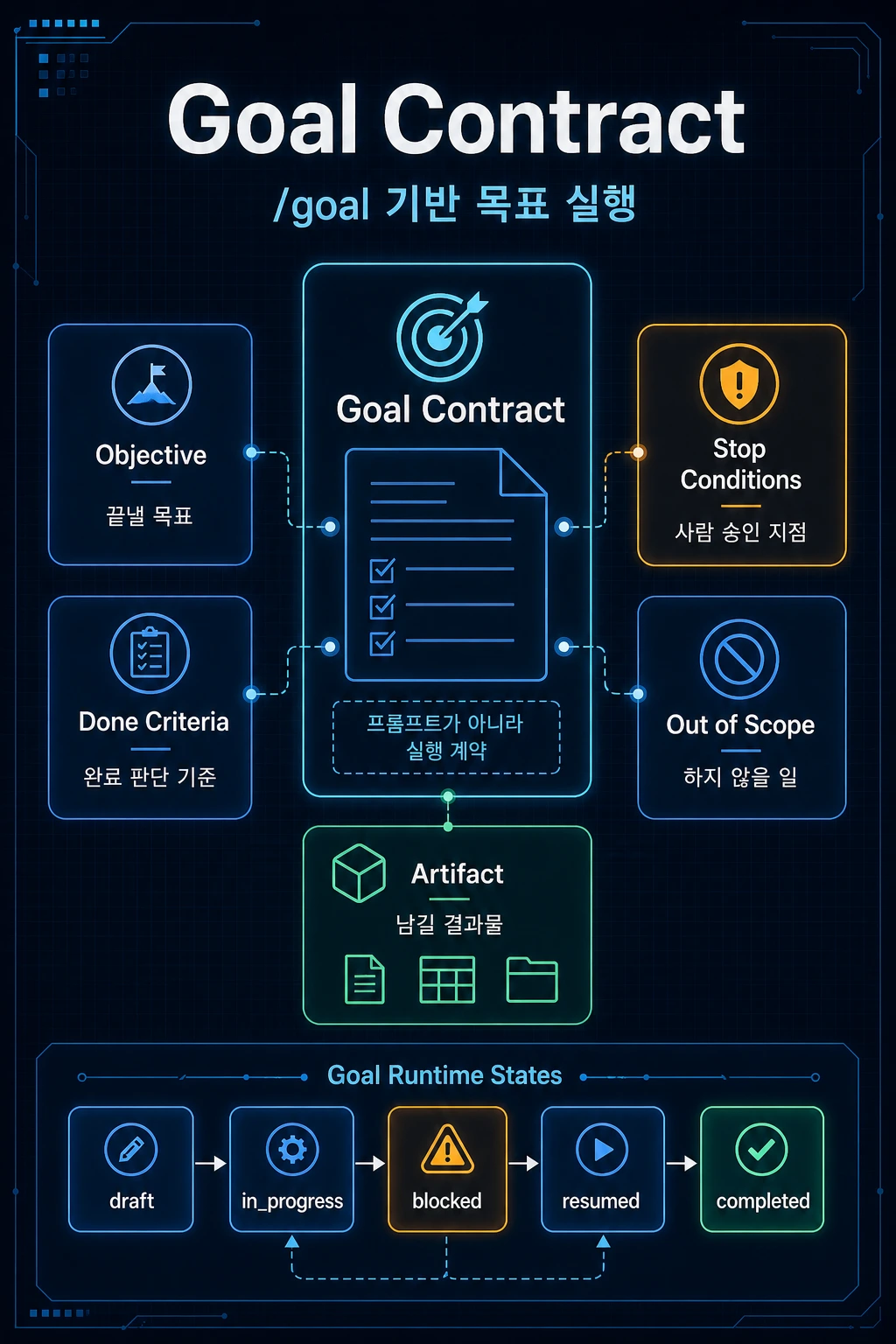
AI에게 “이 작업 해줘”라고 말하면 모델은 다음 한 턴의 답을 만듭니다. 하지만 “이 목표를 끝낼 때까지 맡아줘”라고 말하면 이야기가 달라집니다. 목표가 오래 유지되는 만큼, 잘못된 목표도 오래 실행될 수 있습니다.
그래서 목표 기반 개발의 핵심은 /goal 명령어 자체가 아닙니다. 중요한 것은 목표를 어떤 계약으로 표현하고, 무엇을 완료로 보며, 어디서 사람에게 되물어야 하는지입니다.
1편에서는 코딩 에이전트를 런타임으로 봐야 하는 이유를 정리했습니다. 이번 2편에서는 그중에서도 Goal Contract를 다룹니다.
핵심 요약
- Prompt는 요청이고, Goal은 실행 상태를 가진 목표입니다.
- Plan Mode는 “어떻게 할 것인가”에 가깝고, Goal Runtime은 “무엇을 끝낼 것인가”에 가깝습니다.
- 장시간 작업에는
Objective,Done Criteria,Stop Conditions,Out of Scope,Artifact Contract가 필요합니다. - Goal이 오래 유지될수록 잘못된 목표도 오래 실행될 수 있으므로 중단 조건이 중요합니다.
- 개발 하네스에서는
goal.md를 1급 runtime state로 다루는 것이 좋습니다.
Prompt, Task, Goal은 다르다
AI 코딩 도구를 사용할 때 가장 흔한 단위는 prompt입니다.
이 컴포넌트 리팩터링해줘.
조금 더 발전하면 task가 됩니다.
프로필 수정 폼의 validation을 추가하고 테스트까지 작성해줘.
하지만 goal은 다릅니다.
사용자 프로필 수정 기능을 안정적으로 제품에 추가한다.
세 문장은 비슷해 보이지만 범위가 다릅니다.
| 구분 | 의미 | 예시 |
|---|---|---|
| Prompt | 지금 모델에게 전달하는 요청 | “이 함수 고쳐줘” |
| Task | 수행 가능한 하위 작업 | “validation 테스트 작성” |
| Goal | 여러 task를 묶는 완료 목표 | “프로필 수정 기능 출시 가능 상태 만들기” |
Goal은 단순 문장이 아니라 상태를 가져야 합니다.
현재 어디까지 진행됐는가?무엇을 완료로 볼 것인가?어디서 멈춰야 하는가?무엇을 결과물로 남길 것인가?
그래서 goal은 프롬프트보다 작업 티켓에 가깝습니다.
Codex /goal이 보여주는 신호
OpenAI Codex CLI 0.128.0 릴리스는 persisted /goal workflow, app-server API, model tool, runtime continuation, TUI의 create/pause/resume/clear 제어를 포함합니다.
이 변화는 단일 요청 처리에서 장시간 목표 실행과 재개를 고려하는 방향을 보여줍니다. OpenAI의 Codex harness 글 역시 Codex core를 agent loop와 thread persistence를 관리하는 runtime으로 설명합니다.
하네스 관점으로 바꾸면 goal은 생성, 실행, 중단, 재개, 검증을 거치는 상태 흐름이 됩니다.
- Goal 생성
- Plan 생성
- Task 분해
- 실행
- 중단
- 승인 요청
- 재개
- 검증
- 산출물 정리
여기서 goal이 단순 텍스트라면 재개가 어렵습니다. 반대로 goal이 구조화되어 있으면 에이전트가 멈췄다가 다시 시작해도 무엇을 끝내야 하는지 복구할 수 있습니다.
{ "goalId": "profile-update-20260506", "objective": "사용자 프로필 수정 기능을 안정적으로 추가한다", "status": "in_progress", "doneCriteria": [ "이름과 소개를 수정할 수 있다", "unit test와 e2e test를 통과한다", "실패 케이스를 사용자에게 표시한다" ], "stopConditions": [ "DB schema 변경 필요 시 승인 요청", "인증 로직 변경 필요 시 계획만 제시" ], "artifacts": [ "changed-files", "test-result", "risk-summary" ]}
Plan Mode와 Goal Runtime의 차이
Plan Mode는 유용합니다. 하지만 Plan Mode와 Goal Runtime은 같지 않습니다.
| 구분 | Plan Mode | Goal Runtime |
|---|---|---|
| 핵심 질문 | 어떻게 할 것인가? | 무엇을 끝낼 것인가? |
| 산출물 | 계획 | 지속 상태 |
| 실패 대응 | 계획 수정 | 상태 복구, 재시도, 승인 요청 |
| 완료 기준 | 단계 수행 | Done Criteria 충족 |
| 저장 필요성 | 낮음 또는 중간 | 높음 |
| 하네스 반영 | 선택 사항 | 핵심 |
Plan은 지도입니다. Goal은 작업 티켓입니다.
지도는 길을 보여줍니다. 티켓은 무엇을 완료해야 하는지, 어디까지 했는지, 누가 승인해야 하는지, 어떤 산출물이 필요한지를 남깁니다.
Goal Contract의 기본 구조
실무에서 바로 쓸 수 있는 goal.md 기본형은 heading 문법보다 필드 계약으로 쓰는 편이 안전합니다.
Goal: Objective: 사용자 프로필 수정 기능을 안정적으로 추가한다. Context: 현재 settings/profile 페이지는 조회만 가능하다. 사용자는 이름과 소개를 수정할 수 있어야 한다. Done Criteria: - 이름과 소개를 수정할 수 있다. - 기존 API contract를 깨지 않는다. - unit test와 e2e test를 통과한다. - 실패 케이스는 toast로 표시한다. - 마지막에 변경 파일과 검증 명령을 요약한다. Stop Conditions: - DB schema 변경이 필요하면 먼저 승인 요청한다. - 인증 로직 변경이 필요하면 구현 전 계획만 제시한다. - 외부 API 비용이 발생하면 중단 후 확인한다. Out of Scope: - 디자인 시스템 전체 변경 - 인증 플로우 재설계 - production data 직접 접근 Artifact Contract: - 변경 파일 목록 - 핵심 변경 내용 - 실행한 검증 명령 - 실패한 검증과 이유 - 남은 리스크
이 문서는 길어 보이지만 에이전트에게 매우 중요한 경계입니다. 특히 Stop Conditions가 중요합니다. 목표가 오래 유지될수록 잘못된 판단도 오래 실행될 수 있기 때문입니다.
Done Criteria 작성법
Done Criteria는 완료를 정의하는 문장입니다.
나쁜 예시는 이렇습니다.
프로필 기능을 잘 구현한다.
좋은 예시는 이렇게 바뀝니다.
settings/profile에서 이름과 소개를 수정할 수 있다.저장 실패 시 사용자에게 에러 메시지를 표시한다.pnpm test profile 명령이 통과한다.변경 파일과 검증 결과를 마지막에 요약한다.
Done Criteria는 가능하면 관찰 가능해야 합니다.
| 나쁜 기준 | 좋은 기준 |
|---|---|
| 안정적으로 동작한다 | 테스트 명령이 통과한다 |
| UX를 개선한다 | loading, error, empty state를 표시한다 |
| 코드 품질을 높인다 | 중복 로직을 shared validation으로 분리한다 |
| 문서화한다 | docs/profile-update.md를 추가한다 |
완료 기준이 명확하면 에이전트의 종료 조건도 명확해집니다.
Stop Conditions 작성법
Stop Conditions는 에이전트가 멈춰야 하는 조건입니다. 이것은 보안과 운영 안정성에 직접 연결됩니다.
Stop Conditions: - DB migration 파일 생성이 필요하면 먼저 승인 요청 - auth/session 로직 수정이 필요하면 구현 전 계획만 제시 - env 파일 접근이 필요하면 중단 - 외부 유료 API 호출이 필요하면 중단 - production 배포 명령은 실행 금지
GitHub의 Copilot coding agent 문서는 자율 에이전트가 코드 접근과 push 권한을 가질 때의 리스크와 완화책을 설명합니다. 예를 들어 권한 제한, branch 제한, workflow 승인, human review 같은 계층이 필요합니다.
즉, “프롬프트에 하지 말라고 쓰기”만으로는 충분하지 않습니다. Stop Conditions는 instruction이면서 동시에 permission layer와 연결되어야 합니다.
개발 하네스에 반영하는 방법
개발 하네스에서는 goal을 단순 파일이 아니라 runtime state로 다루는 것이 좋습니다.
가벼운 MVP 구조는 다음과 같습니다.
.agent-runtime/ goals/ profile-update/ goal.md plan.md run-ledger.md artifacts/ changed-files.md test-result.md risk-summary.md
조금 더 발전시키면 SQLite나 JSON state를 함께 사용할 수 있습니다.
runtime-state.sqlite- goals- tasks- attempts- artifacts- approvals- memory_candidates
처음부터 복잡한 DB가 필요하지는 않습니다. 하지만 최소한 goal과 run ledger는 분리해야 합니다.
| 파일 | 역할 |
|---|---|
goal.md | 무엇을 끝낼 것인가 |
run-ledger.md | 실제로 무엇을 했는가 |
이 구분이 없으면 에이전트의 계획, 실행, 실패, 결과가 모두 대화에 섞입니다.
체크리스트
Goal을 파일이나 런타임 상태로 만들기 전에 아래 항목을 먼저 확인하면 됩니다.
[ ] Objective가 한 문장으로 명확한가?[ ] Done Criteria가 관찰 가능한가?[ ] Stop Conditions가 위험 작업을 포함하는가?[ ] Out of Scope가 명확한가?[ ] 마지막에 남길 Artifact가 정의되어 있는가?[ ] 재개 시 현재 상태를 복구할 수 있는가?[ ] 사람이 승인해야 할 작업이 분리되어 있는가?
이번 편에서 가져갈 기준
Goal은 긴 프롬프트가 아니라 작업 티켓입니다. 에이전트에게 목표를 맡기기 전에는 Objective, Done Criteria, Stop Conditions, Artifact Contract를 먼저 분리해야 합니다. 이 네 가지가 없으면 목표 기반 실행은 자동화가 아니라 방치에 가까워집니다.
다음 편
3편에서는 여러 에이전트가 함께 일하는 구조로 넘어갑니다. 주제는 A2A와 MCP입니다. MCP는 도구 접근의 축이고, A2A는 에이전트 간 작업 위임의 축입니다.
시리즈 이어 읽기
- 1편: 코딩 에이전트는 왜 런타임이 되는가
- 2편: Codex
/goal로 보는 목표 기반 개발 - 3편: A2A와 MCP로 보는 멀티 에이전트 개발 워크플로우
- 4편: AI Memory는 RAG가 아니다
- 5편: 개발 하네스에 적용하는 AI 코딩 에이전트 문서 세트
참고자료
- Release 0.128.0 - openai/codex
- Unlocking the Codex harness: how we built the App Server
- About GitHub Copilot coding agent
실무 적용 예시: 목표 계약이 멈춤 조건을 만든다
예를 들어 "블로그 검색 품질을 개선한다"는 목표는 너무 넓습니다. Goal Contract로 바꾸면 "검색어 정규화에서 한국어 조사 제거를 개선하고, 기존 ranking test를 통과하며, 새 테스트 하나를 추가한다"처럼 완료 기준이 생깁니다. 여기에는 하지 않을 일도 같이 들어가야 합니다. UI redesign, 검색 엔진 교체, 색인 구조 변경은 이번 goal 밖이라고 적으면 agent가 범위를 넓히기 어렵습니다.
| 항목 | 좋은 예 |
|---|---|
| 목표 | 한국어 검색 ranking 회귀 수정 |
| 완료 기준 | 새 fixture가 제목 match를 excerpt match보다 높게 평가 |
| 중단 조건 | 색인 schema 변경이 필요하면 사용자 확인 |
| 검증 | npm run test와 검색 단위 테스트 |
실패 사례는 goal 없이 긴 작업을 이어가는 경우입니다. agent는 중간에 발견한 문제를 모두 고치려 하고, 사용자는 어떤 기준으로 끝났는지 알기 어렵습니다. Stop Condition은 포기 선언이 아니라 작업을 안전하게 끊는 장치입니다. 예산, 권한, 테스트 실패, 외부 계정 blocker처럼 agent가 혼자 해결할 수 없는 조건은 goal에 들어가야 합니다.
You can tell the AI, “Do this,” and the model will create the answer for the next turn. But if you say, “Take care of me until I finish this goal,” it’s a different story. The longer a goal lasts, the longer the wrong goal can run.
So the key to goal-based development is not the/goalinstruction itself. What matters is what kind of contract you express your goals in, what you see as completion, and where you ask people back.
In Part 1, we summarized the reasons why coding agents should be viewed as runtime. In this second part, we will cover Goal Contract among others.
Key takeaways
- Prompt is a request, and Goal is a goal with execution status.
- Plan Mode is closer to “how to do it,” and Goal Runtime is closer to “what to get done.”
- Long-time operation requires
Objective,Done Criteria,Stop Conditions,Out of Scope,artifact contract. - The stopping condition is important because the longer a goal is maintained, the longer an incorrect goal can run.
- It is recommended that
goal.mdbe treated as a first-class runtime state in the development harness.
Prompt, Task, and Goal are different
The most common unit when using AI coding tools is the prompt.
Please refactor this component.
If it develops a little further, it becomes a task.
Add validation to the profile modification form and even write a test.
But the goal is different.
The user profile editing function is reliably added to the product.
The three sentences may seem similar, but their scope is different.
| division | meaning | example |
|---|---|---|
| Prompt | Request to model now | “Fix this function” |
| Task | Subtasks that can be performed | “Writing validation tests” |
| Goal | Completion goal that ties together multiple tasks | “Make profile editing feature available for release” |
Goals should have a state, not just a statement.
How far has it progressed so far?What will be considered complete?Where should I stop?What will be the result?
So a goal is more of a task ticket than a prompt.
Signs shown by Codex /goal
[OpenAI Codex CLI 0.128.0 release] (https://github.com/openai/codex/releases/tag/rust-v0.128.0) includes persisted/goalworkflow, app-server API, model tool, runtime continuation, and TUI's create/pause/resume/clear controls.
This change demonstrates a shift away from single request processing to considering long-running goal execution and resumption. OpenAI's [Codex harness article] (https://openai.com/index/unlocking-the-codex-harness/) also describes Codex core as a runtime that manages agent loop and thread persistence.
When converted to a harness perspective, a goal becomes a state flow that goes through creation, execution, abort, resume, and verification.
- Goal creation
- Create Plan
- Task decomposition
- execution
- interruption
- Request for approval
- resumption
- verification
- Organizing deliverables
Here, if the goal is simple text, it is difficult to resume. Conversely, if the goal is structured, the agent can recover what needs to be done even if it stops and restarts.
{ "goalId": "profile-update-20260506", "objective": "Reliably add user profile editing function", "status": "in_progress", "doneCriteria": [ "You can edit your name and introduction", "Passes unit test and e2e test", "Display failure cases to the user" ], "stopConditions": [ "Request approval when DB schema change is required", "Only present a plan when authentication logic changes are required" ], "artifacts": [ "changed-files", "test-result", "risk-summary" ]}
Difference between Plan Mode and Goal Runtime
Plan Mode is useful. However, Plan Mode and Goal Runtime are not the same.
| division | Plan Mode | Goal Runtime |
|---|---|---|
| key questions | What to do? | What will you end up with? |
| output | plan | persistent state |
| response to failure | change plan | State recovery, retry, approval request |
| Completion criteria | Take the steps | Done criteria met |
| storage necessity | low or medium | height |
| harness reflection | optional | core |
A plan is a map. Goal is a task ticket.
A map shows the way. A ticket tells you what needs to be done, where you are, who needs to approve it, and what deliverables are needed.
Basic structure of Goal Contract
It is safer to use the basic formgoal.md, which can be used immediately in practice, as a field contract rather than heading grammar.
Goal:Objective:Stable addition of user profile editing function. Context:Currently, the settings/profile page can only be viewed.Users should be able to edit their name and introduction. Done Criteria:- You can edit the name and introduction.- Does not break existing API contracts.- Passes the unit test and e2e test.- Failure cases are displayed as toast.- At the end, summarize the changed files and verification commands. Stop Conditions:- If DB schema changes are necessary, request approval first.- If authentication logic changes are required, only a pre-implementation plan is presented.- If external API costs occur, stop and check. Out of Scope:- Entire design system change- Authentication flow redesign- Direct access to production data artifact contract:- List of changed files- Core changes- Verification command executed- Failed verification and reasons- Remaining risks
This document may seem long, but it is a very important boundary for agents. EspeciallyStop Conditionsis important. This is because the longer a goal is maintained, the longer incorrect judgments can be made.
How to Write a Done Criteria
Done Criteria is a sentence that defines done.
A bad example is this:
The profile function is implemented well.
A good example goes like this:
You can edit your name and introduction in settings/profile.If saving fails, an error message is displayed to the user.The pnpm test profile command passes.Changed files and verification results are summarized at the end.
Done Criteria should be observable whenever possible.
| bad standards | good standards |
|---|---|
| Operates stably | test command passes |
| Improve UX | Displays loading, error, and empty state |
| Increase code quality | Separate redundant logic into shared validation |
| document | Add docs/profile-update.md |
If the completion criteria are clear, the agent's termination conditions will also be clear.
How to Write Stop Conditions
Stop Conditions are conditions under which the agent must stop. This is directly linked to security and operational stability.
Stop Conditions:- If DB migration file creation is necessary, request approval first.- If auth/session logic needs to be modified, only the plan before implementation is presented.- Stop if access to env file is required- Stops when an external paid API call is required- Production distribution commands are prohibited from being executed.
[Copilot coding agent documentation] (https://docs.github.com/en/copilot/concepts/coding-agent/about-copilot-coding-agent) on GitHub describes the risks and mitigations when autonomous agents have code access and push permissions. For example, layers such as permission restrictions, branch restrictions, workflow approval, and human review are needed.
In other words, “writing DON’T to the prompt” isn’t enough. Stop Conditions are both instructions and must be connected to the permission layer.
How to reflect in development harness
In a development harness, it is better to treat goals as runtime state rather than simple files.
The lightweight MVP structure is as follows:
.agent-runtime/goals/profile-update/goal.mdplan.mdrun-ledger.mdartifacts/changed-files.mdtest-result.mdrisk-summary.md
If you develop it a little further, you can use SQLite or JSON state together.
runtime-state.sqlite- goals- tasks- attempts- artifacts- approvals- memory_candidates
You don't need a complicated DB from the beginning. But at least the goal and run ledger must be separated.
| file | role |
|---|---|
goal.md | what to end |
run-ledger.md | What did you actually do? |
Without this distinction, the agent's plans, actions, failures, and results are all mixed up in the conversation.
checklist
Before putting Goal in file or runtime state, you can check the items below first.
[ ] Is the Objective clear in one sentence?[ ] Is the Done Criteria observable?[ ] Do Stop Conditions include hazardous operations?[ ] Is the Out of Scope clear?[ ] Is the artifact to be left at the end defined?[ ] Can the current state be restored upon resumption?[ ] Are there separate tasks that require human approval?
Standards to be taken in this episode
A Goal is not a long prompt, but a ticket to action. Before entrusting a goal to an agent, you must first separate the Objective, Done Criteria, Stop Conditions, and artifact contract. Without these four, goal-based execution becomes less about automation and more like neglect.
Next time
In Part 3, we move on to a structure where multiple agents work together. The topic is A2A and MCP. MCP is the axis of tool access, and A2A is the axis of task delegation between agents.
Continue reading the series
- Part 1: Why are coding agents runtime?
- Part 2: Goal-based development through Codex
/goal - Part 3: Multi-agent development workflow from A2A and MCP perspective
- Part 4: AI Memory is not RAG
- Part 5: AI Coding Agent Document Set for Application to Development Harness
References
- Release 0.128.0 - openai/codex
- Unlocking the Codex harness: how we built the App Server
- About GitHub Copilot coding agent
Practical Application Example: Target Contract Creates a Stopping Condition
For example, the goal of “improving blog search quality” is too broad. If you change it to a Goal Contract, you will have completion criteria such as "Improve the removal of Korean particles in search term normalization, pass the existing ranking test, and add one new test." This also includes things you won't do. If you write that UI redesign, search engine replacement, and index structure change are outside of this goal, it will be difficult for the agent to expand its scope.
| item | good example |
|---|---|
| target | Korean search ranking regression correction |
| Completion criteria | The new fixture rates the title match higher than the excerpt match |
| stopping condition | User confirmation if index schema changes are required |
| verification | Search unit testing withnpm run test |
A case of failure is when a long task continues without a goal. The agent tries to fix all the problems found in the middle, and it is difficult for the user to know by what standard it was finished. A Stop Condition is not a declaration of abandonment, but rather a device to safely break off a task. Conditions that the agent cannot solve alone, such as budget, authority, test failure, and external account blocker, must be included in the goal.

댓글
GitHub 계정으로 로그인하면 댓글을 남길 수 있습니다. 댓글은 GitHub Discussions를 통해 운영됩니다.