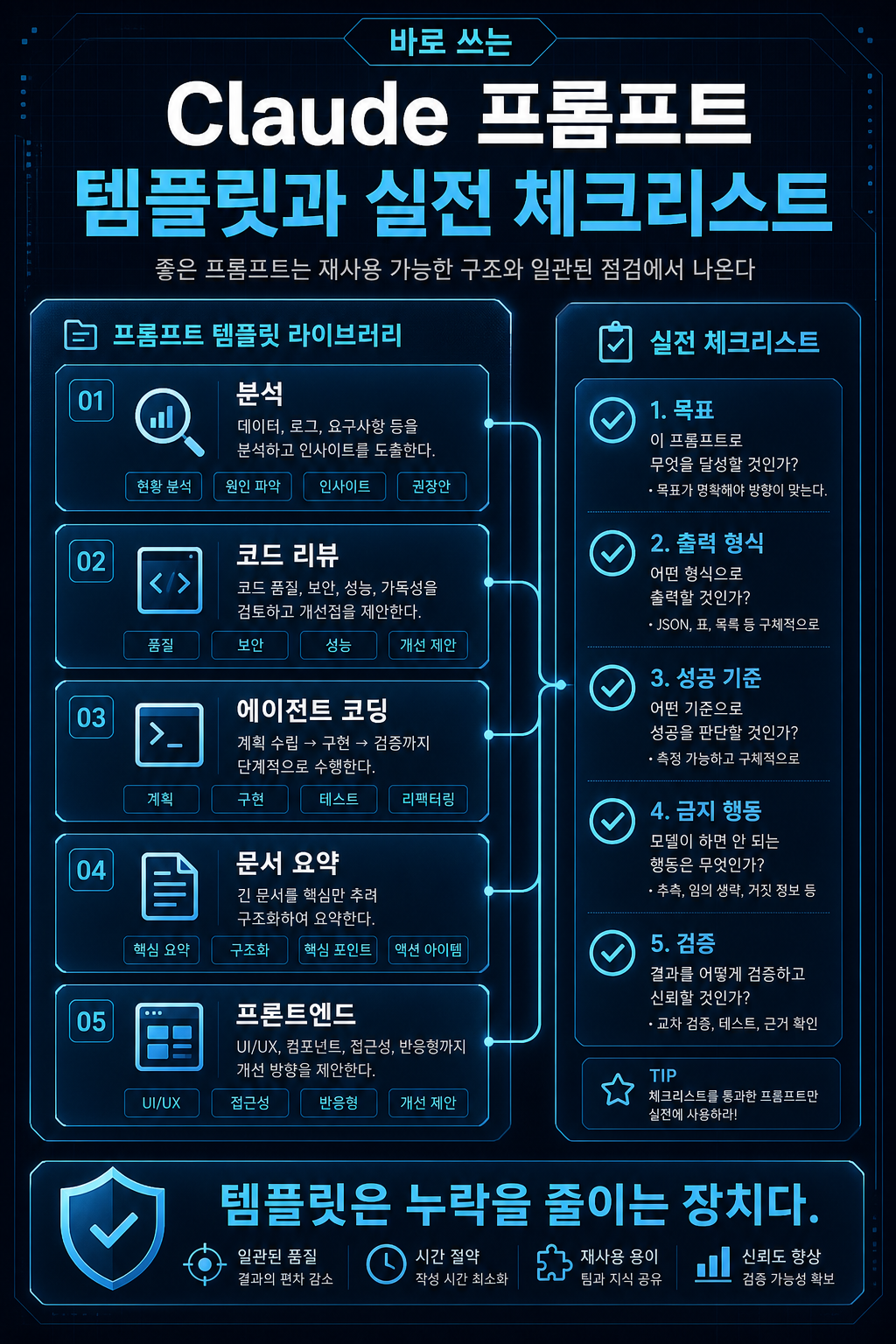
바로 쓰는 Claude 프롬프트 템플릿과 실전 체크리스트
메뉴

AI Development

바로 쓰는 Claude 프롬프트 템플릿과 실전 체크리스트

프롬프트 품질을 안정화하려면 개인의 감각에 맡기면 안 됩니다. 자주 하는 작업은 템플릿으로 만들고, 작업 전 체크리스트로 빠진 조건을 확인해야 합니다.

바로 쓰는 Claude 프롬프트 템플릿과 실전 체크리스트 hero image
Markdown약 2006 tokens

프롬프트 품질을 안정화하려면 개인의 감각에 맡기면 안 됩니다. 자주 하는 작업은 템플릿으로 만들고, 작업 전 체크리스트로 빠진 조건을 확인해야 합니다.

이 글은 Claude를 실무에서 반복 사용하기 위한 템플릿 모음입니다. 분석, 코드 리뷰, 에이전트 코딩, 문서 요약, 프론트엔드 생성 작업에 바로 붙여 쓸 수 있도록 구성했습니다.

분석 기준일: 2026-05-02
시리즈: Claude 프롬프트 실무 가이드
이 글의 범위: 복사용 템플릿, 운영 체크리스트, 트러블슈팅


핵심 요약

  • 템플릿은 프롬프트를 길게 쓰기 위한 도구가 아니라 누락을 줄이는 장치입니다.
  • 작업 유형별로 목표, 입력, 규칙, 출력 형식, 검증 기준을 고정하면 결과가 안정됩니다.
  • 코드 리뷰와 코딩 에이전트 프롬프트는 테스트 약화, 하드코딩, 범위 밖 리팩터링을 명시적으로 막아야 합니다.
  • 문서 요약과 리서치 프롬프트는 공식 사실과 해석을 분리해야 합니다.
  • 프론트엔드 생성 프롬프트는 “예쁘게”보다 사용자, 도메인, 밀도, 금지 패턴을 구체적으로 지정해야 합니다.

1. 일반 분석 프롬프트

문서, 회의록, 리서치 노트, 시장 자료를 분석할 때 쓰는 기본 템플릿입니다.

<!-- 예시 --><role>당신은 이 주제를 실무 관점에서 분석하는 시니어 컨설턴트입니다.</role> <context>이 분석은 {{AUDIENCE}}가 의사결정에 사용할 예정입니다.목적은 단순 요약이 아니라 실행 가능한 판단 기준을 만드는 것입니다.</context> <input>{{CONTENT}}</input> <task>입력 내용을 분석해서 핵심 쟁점, 실무 영향, 리스크, 추천 액션을 정리하세요.</task> <rules>- 확인된 사실과 해석을 분리하세요.- 불확실한 내용은 "확인 필요"라고 표시하세요.- 과장된 표현을 피하고 근거 수준에 맞게 말하세요.- 최신 정보가 필요한 항목은 공식 출처 확인이 필요하다고 표시하세요.</rules> <output_format>## 핵심 요약## 확인된 사실## 실무 영향## 리스크## 추천 액션## 확인 필요</output_format>

이 템플릿의 핵심은 “요약”이 아니라 “판단 기준”입니다. 임원 보고, 제품 의사결정, 기술 검토에 모두 응용할 수 있습니다.

2. 코드 리뷰 프롬프트

코드 리뷰에서는 스타일 취향보다 실제 버그, 보안 위험, 테스트 실패 가능성을 먼저 찾아야 합니다.

<!-- 예시 --><role>당신은 프로덕션 코드 리뷰를 수행하는 시니어 소프트웨어 엔지니어입니다.</role> <review_goal>이 단계의 목표는 가능한 문제를 폭넓게 발견하는 것입니다.중요도나 확신이 낮은 문제도 보고하고, 각 항목에 confidence와 severity를 표시하세요.</review_goal> <rules>- 코드를 보기 전에 추측하지 마세요.- 실제 버그, 테스트 실패 가능성, 잘못된 결과, 보안 위험을 우선하세요.- 단순 스타일 취향은 별도로 minor로 분리하세요.- 테스트를 약화하거나 삭제하는 제안은 하지 마세요.- 라인 번호와 파일 경로를 근거로 제시하세요.</rules> <output_format>| 위치 | 문제 | 영향 | 제안 수정 | severity | confidence ||---|---|---|---|---|---|</output_format>

리뷰 프롬프트에서 “중요한 것만 말해”라고 너무 강하게 지시하면 모델이 낮은 확신의 이슈를 누락할 수 있습니다. 초기 탐색 단계에서는 발견 범위를 넓히고, 다음 단계에서 우선순위를 정하는 편이 낫습니다.

3. 에이전트 코딩 프롬프트

파일 수정이 필요한 작업에는 권한과 검증 루프가 필요합니다.

<!-- 예시 --><task>{{FEATURE_OR_BUGFIX}}를 구현하세요.</task> <constraints>- 요청 범위를 벗어난 리팩터링은 하지 마세요.- 함수 시그니처와 공개 API는 필요한 경우에만 변경하세요.- 기존 테스트를 삭제하거나 약화하지 마세요.- 새 의존성은 명확한 이점이 있을 때만 추가하세요.- 임시 파일을 만들면 작업 끝에 삭제하세요.</constraints> <workflow>1. 프로젝트 구조와 관련 파일을 확인하세요.2. 수정 계획을 짧게 세우세요.3. 필요한 파일만 수정하세요.4. 가능한 경우 테스트와 린트를 실행하세요.5. 실패가 있으면 원인을 분석하고 수정하세요.6. 변경사항, 테스트 결과, 남은 리스크를 요약하세요.</workflow> <safety>삭제, force push, reset, DB 변경, 배포는 사용자 확인 없이 하지 마세요.비밀키와 개인정보를 출력하지 마세요.테스트 케이스에만 맞춘 하드코딩을 하지 마세요.</safety>

이 템플릿은 “제안”이 아니라 “실행”을 전제로 합니다. 반대로 아직 설계만 보고 싶다면 “아직 파일을 수정하지 말 것”을 명확히 넣어야 합니다.

4. 문서 요약 프롬프트

릴리스 노트, 정책 문서, 가격 문서, API 변경 문서를 요약할 때는 사실과 해석을 분리해야 합니다.

<!-- 예시 --><task>아래 문서를 개발팀 공유용으로 요약하세요.</task> <summary_goal>팀이 이번 주 작업에 영향을 받을 변경사항을 빠르게 파악하는 것이 목적입니다.</summary_goal> <document>{{DOCUMENT}}</document> <rules>- 먼저 중요한 근거 문장을 찾으세요.- breaking change, 가격, 보안, API 변경을 우선하세요.- 문서에 없는 내용은 추정하지 마세요.- 확인되지 않은 내용은 "확인 필요"라고 표시하세요.- 공식 사실과 작성자의 해석을 분리하세요.</rules> <output_format>## 핵심 요약## 근거 문장## 개발 영향## 리스크## 추천 액션## 확인 필요</output_format>

긴 문서에서는 요약부터 시키기보다 근거 문장을 먼저 찾게 하는 편이 안전합니다.

5. 프론트엔드 생성 프롬프트

Claude는 프론트엔드 생성에도 강하지만, “깔끔하고 모던하게” 같은 요청은 결과를 흔하게 만듭니다. 시각 방향과 금지 패턴을 구체적으로 줘야 합니다.

<!-- 예시 --><task>{{PRODUCT_NAME}}의 {{PAGE_TYPE}}를 구현하세요.</task> <audience>주 사용자는 {{TARGET_USER}}입니다.이 화면의 목적은 {{USER_GOAL}}입니다.</audience> <visual_direction>- 분위기: {{MOOD}}- 배경: {{BACKGROUND}}- 색상: {{COLOR_PALETTE}}- 타이포그래피: {{TYPOGRAPHY}}- 레이아웃: {{LAYOUT}}- 정보 밀도: {{DENSITY}}- 모션: {{MOTION}}</visual_direction> <controls_and_states>- 로딩 상태- 빈 상태- 에러 상태- 모바일 레이아웃- 키보드 접근성</controls_and_states> <avoid>- 일반적인 AI SaaS 카드 레이아웃- 보라색 그라디언트 남용- 맥락 없는 장식 이미지- 텍스트가 버튼이나 카드 밖으로 넘치는 레이아웃</avoid> <output>{{HTML_CSS_OR_REACT}}</output>

프론트엔드 프롬프트에서는 “기능”과 “경험”을 같이 써야 합니다. 화면은 코드만 맞으면 끝나는 것이 아니라 사용자가 반복적으로 쓸 수 있어야 합니다.

6. 프롬프트 적용 전 체크리스트

# 예시[ ] 작업 목적을 한 문장으로 정의했다.[ ] 독자 또는 사용자를 지정했다.[ ] 입력 자료와 지시문을 분리했다.[ ] 원하는 출력 형식을 명시했다.[ ] 성공 기준을 적었다.[ ] 금지 행동과 범위 밖 작업을 명시했다.[ ] 공식 사실과 해석을 분리하도록 지시했다.[ ] 최신 정보가 필요한 항목은 공식 출처 확인 조건을 넣었다.[ ] 예시가 필요한 작업에는 3~5개 예시를 넣었다.[ ] 긴 입력은 XML 태그로 구획을 나눴다.[ ] 복잡한 작업에는 적절한 effort 수준을 선택했다.[ ] 도구 사용 조건과 위험 작업 금지 조건을 명시했다.[ ] 코딩 에이전트 작업에서는 git 상태와 테스트 전략을 확인했다.[ ] 결과물을 검토하고 프롬프트를 반복 개선할 루프가 있다.

체크리스트는 번거로워 보이지만, 반복 작업에서는 오히려 시간을 줄입니다. 빠진 조건을 나중에 수정하는 비용이 더 큽니다.

7. 트러블슈팅

Claude가 답변을 너무 길게 한다

길이 기준과 생략 기준을 같이 줍니다.

# 예시5문장 이내로 답변하세요.배경 설명은 생략하고 결론, 이유, 다음 행동만 포함하세요.예시는 1개만 제공하세요.

Claude가 제안만 하고 직접 수정하지 않는다

실행 의도를 명확히 씁니다.

# 예시제안만 하지 말고 코드를 직접 수정하세요.수정 후 변경한 파일, 변경 이유, 테스트 결과를 요약하세요.

반대로 제안만 원한다면 “아직 수정하지 마세요”를 넣어야 합니다.

Claude가 도구를 너무 많이 쓴다

도구 사용 조건을 제한합니다.

# 예시입력에 충분한 정보가 있으면 도구를 사용하지 말고 직접 답변하세요.가격, 법률, 릴리스 노트, 최신 문서처럼 변할 수 있는 정보가 필요할 때만 공식 출처를 확인하세요.

Claude가 도구를 너무 적게 쓴다

확인이 필요한 항목을 명시합니다.

# 예시코드에 대해 주장하기 전에 관련 파일을 반드시 열어 확인하세요.최신 모델명, 가격, API 파라미터는 공식 문서에서 확인하세요.테스트 실행이 가능하면 수정 후 테스트를 실행하세요.

XML 태그를 꼭 써야 하나

간단한 질문에는 필요 없습니다. 하지만 지시문, 예시, 긴 입력, 출력 형식, 금지 조건이 섞이는 순간 XML 태그가 유용해집니다.

코딩 에이전트가 과하게 리팩터링한다

작업 범위와 금지 조건을 더 구체적으로 지정합니다.

# 예시요청된 버그 수정에 필요한 최소 변경만 하세요.주변 코드 정리, 구조 변경, 새 추상화 추가는 하지 마세요.변경하지 않은 코드에는 주석, 타입, 문서화를 추가하지 마세요.

테스트만 통과하는 하드코딩을 막고 싶다

테스트가 요구사항 전체가 아니라는 점을 명시합니다.

# 예시테스트 케이스에만 맞춘 하드코딩을 하지 마세요.모든 유효 입력에 대해 동작하는 일반적인 해결책을 구현하세요.테스트가 잘못되었다고 판단되면 우회하지 말고 문제를 보고하세요.

8. 팀에서 프롬프트를 관리하는 방식

개인 사용자는 템플릿 몇 개만 있어도 충분합니다. 하지만 팀에서 Claude를 업무에 붙인다면 프롬프트를 개인 노하우로 두면 안 됩니다.

팀 단위에서는 다음을 문서화하는 편이 좋습니다.

항목관리 이유
작업 유형별 템플릿결과물 일관성
모델과 effort 기본값비용과 품질 예측
도구 사용 정책보안과 운영 안정성
금지 행동사고 방지
검증 절차품질 기준 유지
변경 이력프롬프트 회귀 추적

프롬프트도 운영 자산입니다. 코드처럼 버전 관리하고, 변경 이유를 남기고, 실패 사례를 반영해야 합니다.

9. 실무 적용 예시: 코드 리뷰 템플릿을 운영 규칙으로 바꾸기

템플릿을 실제 팀 규칙으로 올릴 때는 "좋은 답변을 해줘"가 아니라 입력, 판단 기준, 금지 행동, 출력 형식을 함께 고정해야 합니다. 예를 들어 백엔드 PR 리뷰를 Claude에 맡긴다면 다음처럼 작업 단위를 나눌 수 있습니다.

단계프롬프트에 넣을 내용실패하면 생기는 문제
입력diff, 관련 테스트, 변경 목적모델이 주변 맥락을 추측함
판단 기준버그, 보안, 데이터 손실, 테스트 누락 우선스타일 지적만 많이 나옴
금지 행동테스트 삭제, 무관한 리팩터링, 추정 결론 금지리뷰가 구현 제안으로 흐름
출력위치, 영향, 수정 방향, 확신도개발자가 바로 처리하기 어려움

실무 예시는 이렇게 쓸 수 있습니다. 먼저 PR 설명, 변경 파일 목록, 실패한 테스트 로그를 <context>로 넣습니다. 그 다음 <review_rules>에는 "실제 동작 버그와 회귀 가능성을 먼저 보고, 근거가 없는 보안 주장은 확인 필요로 표시하라"고 적습니다. 마지막으로 <output_format>에는 표를 요구하되, 각 행에 파일 경로와 line reference를 반드시 포함하게 합니다. 이렇게 해야 리뷰 결과가 회의용 의견이 아니라 티켓으로 옮길 수 있는 작업 항목이 됩니다.

실패 사례도 명확합니다. 템플릿에 "꼼꼼히 리뷰해줘"만 있으면 모델은 코드 스타일, 네이밍, 주석 같은 낮은 위험 항목을 길게 말할 수 있습니다. 반대로 "중요한 것만 말해"라고만 쓰면 낮은 확신이지만 실제 장애로 이어질 수 있는 경계 조건을 누락할 수 있습니다. 그래서 초기 탐색 프롬프트와 최종 정리 프롬프트를 분리하는 편이 안전합니다. 첫 번째 프롬프트는 발견 범위를 넓히고, 두 번째 프롬프트는 severity와 재현 가능성 기준으로 정렬합니다.

10. 비교 포인트: 개인 템플릿과 팀 템플릿

개인 템플릿은 빠른 반복이 중요합니다. 본인이 결과를 바로 읽고 고칠 수 있으므로 약간 모호해도 괜찮습니다. 하지만 팀 템플릿은 다른 사람이 같은 입력으로 비슷한 결과를 얻어야 하므로 버전, 소유자, 적용 범위, 검증 방법이 필요합니다.

구분개인 사용팀 운영
목적반복 입력 절약결과 품질 표준화
관리노트나 스니펫저장소 문서와 변경 이력
검증본인 감각샘플 PR, 실패 사례, 회귀 체크
업데이트필요할 때 수정변경 이유와 영향 기록

팀에서 바로 적용하려면 템플릿마다 "언제 쓰지 않는가"도 적어야 합니다. 예를 들어 장애 대응 중에는 긴 분석 템플릿보다 로그, 최근 배포, 재현 조건을 먼저 묻는 짧은 템플릿이 낫습니다. 반대로 아키텍처 결정에는 빠른 답변 템플릿보다 대안 비교표와 rollback 조건을 요구하는 템플릿이 맞습니다. 템플릿의 품질은 문장 길이가 아니라 작업 상황과 맞는지로 판단해야 합니다.

마무리

좋은 Claude 프롬프트는 긴 문장이 아닙니다. 작업 목표, 맥락, 성공 기준, 출력 형식, 도구 사용 조건, 안전 경계를 반복 가능하게 담은 운영 템플릿입니다.

개인이라면 자주 쓰는 작업 3–5개부터 템플릿화하면 됩니다. 팀이라면 프롬프트를 공식 문서와 함께 관리하고, 모델·effort·도구 정책까지 같이 운영해야 합니다. 그래야 Claude를 “가끔 도움 되는 챗봇”이 아니라 실제 업무 시스템의 일부로 쓸 수 있습니다.

참고자료

Stabilizing the quality of your prompts shouldn't be left to your personal taste. Frequently performed tasks should be created as templates, and missing conditions should be checked with a checklist before starting the task.

This article is a collection of templates for repeated use of Claude in practice. It is designed so that it can be used directly for analysis, code review, agent coding, document summarization, and front-end creation tasks.

Analysis date: 2026-05-02 Series: Claude Prompt Practical Guide Scope of this article: Copy templates, operational checklists, troubleshooting


Key takeaways

  • Templates are not a tool for writing longer prompts, but rather a device for reducing omissions.
  • Fixing the goals, inputs, rules, output formats, and verification criteria for each task type ensures stable results.
  • Code reviews and coding agent prompts should explicitly discourage test weakening, hardcoding, and out-of-scope refactoring.
  • Document summaries and research prompts should separate formal facts from interpretation.
  • Frontend creation prompts should be more specific about users, domains, densities, and banning patterns than just being “pretty”.

1. General analysis prompt

This is a basic template used when analyzing documents, meeting minutes, research notes, and market data.

<comment>example</comment><role>You are a senior consultant analyzing this topic from a practical perspective.</role> <context>This analysis will be used by {{AUDIENCE}} for decision making.The goal is to create actionable judgment criteria rather than a simple summary.</context> <input>{{CONTENT}}</input> <task>Analyze input to summarize key issues, practice implications, risks, and recommended actions.</task> <rules>- Separate confirmed facts from interpretation.- Mark “Confirmation Required” for unclear information.- Avoid exaggerated expressions and speak according to the level of evidence.- For items that require up-to-date information, indicate that you need to check official sources.</rules> <output_format>## Key Summary## Confirmed facts## Practice implications## Risk## Recommended actions## Confirmation required</output_format>

The key to this template is not “summary” but “judgment criteria.” It can be applied to executive reporting, product decision-making, and technical reviews alike.

2. Code review prompt

Code reviews should look for actual bugs, security risks, and possible test failures before style preferences.

<comment>example</comment><role>You are a senior software engineer performing production code reviews.</role> <review_goal>The goal of this step is to broadly discover possible problems.Report issues of low importance or confidence, and indicate confidence and severity for each item.</review_goal> <rules>- Don't guess before you see the code.- Prioritize actual bugs, possible test failures, incorrect results, and security risks.- For simple style preferences, separate them into minor.- Please do not suggest weakening or eliminating tests.- Provide evidence based on line number and file path.</rules> <output_format>| location | problem | Impact | Edit Proposal | severity | confidence ||---|---|---|---|---|---|</output_format>

If your review prompt tells you to “just say what’s important” too strongly, your model may miss low-confidence issues. It is better to broaden the scope of discovery in the initial exploration phase and then prioritize it in the next phase.

3. Agent coding prompt

Operations that require modifying files require permissions and verification loops.

<comment>example</comment><task>Implement {{FEATURE_OR_BUGFIX}}.</task> <constraints>- Do not refactor outside the scope of the request.- Change function signatures and public APIs only when necessary.- Do not delete or weaken existing tests.- Add new dependencies only when there is a clear benefit.- If you create temporary files, delete them at the end of the task.</constraints> <workflow>1. Check the project structure and related files.2. Make a short revision plan.3. Modify only the files you need.4. Run tests and lints if possible.5. If there is a failure, analyze the cause and correct it.6. Summarize changes, test results, and remaining risks.</workflow> <safety>Do not delete, force push, reset, change DB, or distribute without user confirmation.Do not print out your private key or personal information.Don't hard code just for test cases.</safety>

This template is based on “execution” rather than “suggestion”. Conversely, if you still want to see the design, you should clearly indicate “Do not modify the file yet.”

4. Document summary prompt

When summarizing release notes, policy documents, pricing documents, and API change documents, you need to separate facts from interpretation.

<comment>example</comment><task>Please summarize the document below for sharing with your development team.</task> <summary_goal>The goal is to quickly identify changes that will impact your team's work this week.</summary_goal> <document>{{DOCUMENT}}</document> <rules>- First, find important supporting sentences.- Prioritize breaking changes, pricing, security, and API changes.- Do not assume anything that is not in the document.- Mark “confirmation required” for unconfirmed content.- Separate official facts from the author's interpretation.</rules> <output_format>## Key Summary## supporting sentence## Development Impact## Risk## Recommended actions## Confirmation required</output_format>

In long documents, it is safer to ask people to find supporting sentences first rather than asking them to summarize first.

5. Frontend creation prompt

Claude is also strong in front-end creation, but requests like “clean and modern” result in generic results. Visual directions and prohibition patterns must be specifically given.

<comment>example</comment><task>Implement {{PAGE_TYPE}} of {{PRODUCT_NAME}}.</task> <audience>The primary user is {{TARGET_USER}}.The purpose of this screen is {{USER_GOAL}}.</audience> <visual_direction>- Mood: {{MOOD}}- Background: {{BACKGROUND}}- Color: {{COLOR_PALETTE}}- Typography: {{TYPOGRAPHY}}- Layout: {{LAYOUT}}- Information density: {{DENSITY}}- Motion: {{MOTION}}</visual_direction> <controls_and_states>- Loading status- empty state- Error status- Mobile layout- Keyboard accessibility</controls_and_states> <avoid>- Typical AI SaaS card layout- Overuse of purple gradients- Decorative images without context- Layouts where text spills over buttons or cards</avoid> <output>{{HTML_CSS_OR_REACT}}</output>

In the frontend prompt, you must use “feature” and “experience” together. The screen doesn't just end with the correct code; it must be something that users can use repeatedly.

6. Checklist before applying prompts

# example[ ] The purpose of the work was defined in one sentence.[ ] The reader or user is specified.[ ] Input data and instructions are separated.[ ] Specifies the desired output format.[ ] I wrote down the success criteria.[ ] Specifies prohibited actions and out-of-scope operations.[ ] Directed to separate official facts from interpretation.[ ] For items requiring up-to-date information, conditions for confirming official sources were added.[ ] For tasks that require examples, 3 to 5 examples were included.[ ] Long input is divided into XML tags.[ ] An appropriate effort level was selected for complex tasks.[ ] Conditions for using tools and prohibiting hazardous work are specified.[ ] In the coding agent work, we checked the git status and testing strategy.[ ] There is a loop to review the output and iteratively improve the prompt.

Checklists may seem cumbersome, but they actually save time on repetitive tasks. The cost of correcting missing conditions later is greater.

7. Troubleshooting

Claude's answer is too long

Both length standards and omission standards are provided.

# examplePlease answer in 5 sentences or less.Skip the background and include only the conclusion, reasons, and next action.Please provide only one example.

Claude only makes suggestions and does not edit them himself.

Clearly state your intention to execute.

# exampleDon't just make suggestions - edit the code yourself.After editing, summarize which files you changed, why you changed them, and the results of your tests.

Conversely, if you just want a suggestion, you should add “Don’t edit yet.”

Claude uses too many tools

Restrict the terms of use of the tool.

# exampleIf there is enough information in your input, answer directly instead of using a tool.Check official sources only when you need information that may change, such as pricing, legal, release notes, or up-to-date documentation.

Claude uses too few tools

Specifies the items that require confirmation.

# exampleBe sure to open and verify the relevant files before making any claims about the code.Please check the official documentation for the latest model name, price, and API parameters.If you can run the test, make the modifications and then run the test.

Do I have to use XML tags?

Not necessary for simple questions. But the moment you mix directives, examples, long input and output formats, and prohibition conditions, XML tags become useful.

Coding agent refactors excessively

Be more specific about the scope of work and prohibitive conditions.

# exampleMake only the minimum changes necessary to fix the requested bug.Don't clean up the surrounding code, change the structure, or add new abstractions.Avoid adding comments, types, or documentation to unmodified code.

I want to prevent hard coding that only passes tests.

Specifies that the test is not exhaustive of the requirements.

# exampleDon't hard code just for test cases.Implement a generic solution that works for all valid inputs.If you think a test is wrong, don't bypass it and report the problem.

8. How your team manages prompts

For individual users, a few templates are sufficient. But if your team puts Claude on task, he shouldn't leave the prompts as personal know-how.

As a team, it's a good idea to document the following:

itemManagement reasons
Templates by task typeOutput Consistency
Model and effort defaultsCost and quality forecasts
Tool usage policySecurity and operational stability
prohibited behavioraccident prevention
Verification ProcedureMaintain quality standards
Change historyPrompt regression tracking

Prompts are also operational assets. Like code, you must version it, leave reasons for changes, and reflect failures.

9. Practical example: Turning code review templates into operational rules

When you turn your template into actual team rules, you need to lock together the inputs, judgment criteria, prohibited actions, and output format, not just "give me a good answer." For example, if you were to entrust Claude with back-end PR reviews, you could divide the work into units like this:

stepWhat to put in the promptProblems that arise when failure occurs
inputdiff, related tests, purpose of changeThe model infers the surrounding context
Judgment criteriaPrioritize bugs, security, data loss, missing testsThere are a lot of style comments
prohibited behaviorNo dropping tests, no irrelevant refactoring, no extrapolating conclusions.Reviews flow into implementation suggestions
output of powerLocation, Impact, Direction of Correction, ConfidenceDifficult for developers to handle immediately

A practical example could be written like this: First, put the PR description, change file list, and failed test log as<context>. Next,<review_rules>writes, "Look at actual operational bugs and possible regressions first, and mark unsubstantiated security claims as Needs Verification." Lastly,<output_format>requires a table, but be sure to include the file path and line reference in each line. This ensures that the review results are action items that can be moved to tickets rather than just comments for a meeting.

Cases of failure are also clear. All you need to do is “review it thoroughly” on your template, and the model can talk at length about low-risk items like code style, naming, and comments. Conversely, if you just say "just tell me what's important," you may miss boundary conditions that have low confidence but can lead to real failures. So it is safer to separate the initial navigation prompt and the final cleanup prompt. The first prompt expands the scope of discovery, while the second prompt sorts by severity and reproducibility.

10. Comparison point: personal template and team template

Quick iteration is important with personal templates. It's okay if it's a bit vague, since you can read and correct the results right away. However, team templates require a version, an owner, coverage, and a validation method because others need to get similar results from the same input.

divisionpersonal useteam management
purposeSave repetitive inputStandardize result quality
managementNotes or snippetsRepository documentation and change history
verificationsense of selfSample PRs, failure cases, regression checks
updateFix when neededRecord the reason and impact of the change

In order for your team to apply it right away, you must also write down “when not to use” for each template. For example, during failure response, a short template that asks for logs, recent deployments, and reproducibility conditions first is better than a long analysis template. Conversely, for architectural decisions, a template that requires alternative comparison tables and rollback conditions is more appropriate than a quick answer template. The quality of a template should be judged by whether it fits the task at hand, not by its sentence length.

finish

A good Claude prompt is not a long sentence. An operational template that repeatably contains task objectives, context, success criteria, output formats, tool usage conditions, and safety boundaries.

If you are an individual, you can template 3 to 5 frequently used tasks. If you are a team, you must manage prompts along with official documents and operate model, effort, and tool policies together. That way, Claude can be used as part of a real work system rather than just an “occasionally helpful chatbot.”

References

댓글

GitHub 계정으로 로그인하면 댓글을 남길 수 있습니다. 댓글은 GitHub Discussions를 통해 운영됩니다.

TOP