Retrieving document chunks and embeddings in PostgreSQL
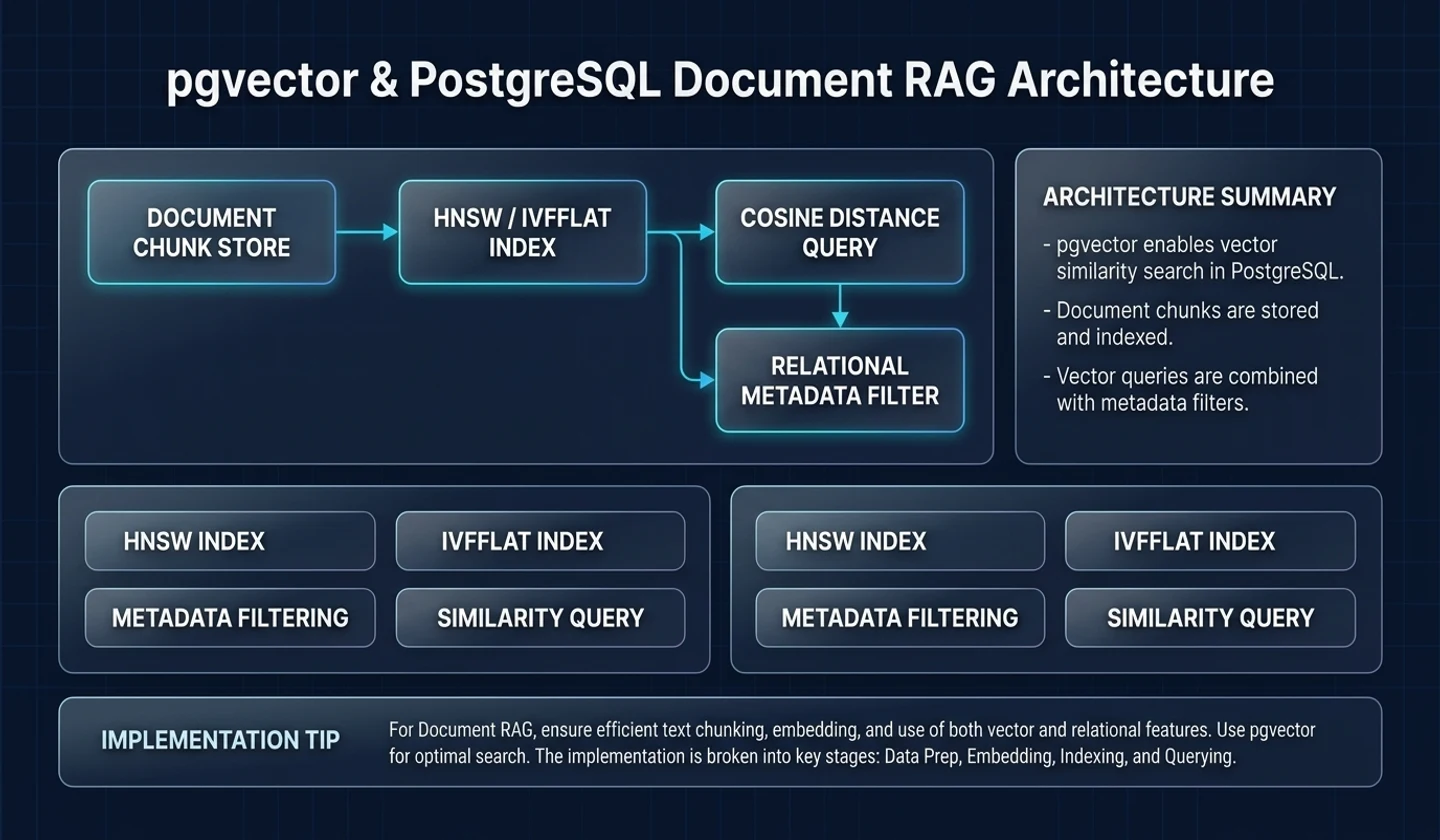
In this article, we will create a basic search structure for a document-type RAG service using PostgreSQL and pgvector.
Although it is possible to adopt a dedicated vector DB right away, for training and initial service, the choice to start vector search within PostgreSQL is quite practical. This is because if users, documents, question history, and index status are already stored in PostgreSQL, embeddings can also be managed in the same DB.
Analysis base date: 2026-05-12 Practice environment: PostgreSQL 16+, pgvector, Python, FastAPI Main reference materials: pgvector GitHub, Supabase pgvector Docs, RAG Paper
Key takeaways
- pgvector is an extension that enables vector similarity search in PostgreSQL.
- In document type RAG, the tables
documents,document_chunks,embeddings, andindex_jobsare basic. - Search queries must apply not only vector similarity but also metadata filters and permission conditions.
- chunk_id is a key identifier linked to citation and eval.
- Initially, we start with an exact search, and as the data grows, we review the index strategy.
1. Why pgvector
The advantage of pgvector is its operational simplicity.
| Choice | merit | Things to note |
|---|---|---|
| PostgreSQL + pgvector | Can be operated with existing DB | Large-scale vector-only optimization is limited |
| Dedicated vector DB | Rich large-scale search capabilities | Separate operational complexity |
| search engine + vector | Advantageous for hybrid search | Increased learning costs |
For initial learning projects, pgvector is good. This is because you can understand the data model and search together with SQL.
2. RAG data model
The basic table is as follows:
# This is an example.documents- id- title- source_type- source_url- version- created_at- updated_at document_chunks- id- document_id- chunk_index- content- token_count- metadata- embedding- created_at index_jobs- id- document_id- idempotency_key- status- error_code- created_at- updated_at3. Install pgvector and activate extension
/* This is example SQL.*/CREATE EXTENSION IF NOT EXISTS vector;Assuming the embedding dimension is 1536, you can create a column like this:
/* This is example SQL.*/CREATE TABLE document_chunks ( id UUID PRIMARY KEY, document_id UUID NOT NULL, chunk_index INT NOT NULL, content TEXT NOT NULL, token_count INT NOT NULL, metadata JSONB NOT NULL DEFAULT '{}', embedding vector(1536), created_at TIMESTAMPTZ NOT NULL DEFAULT now());The embedding dimension should match the embedding model you use.
4. Document and chunk table design
The original document and chunk must be separated.
| table | role |
|---|---|
documents | Document-level metadata and version management |
document_chunks | Searchable body fragments |
index_jobs | Manage index operation status |
questions | User question history |
answers | Save model answers and citations |
The chunk must containdocument_id,chunk_index,content,metadata, andembedding.
5. Save Embedding
Embedding creation flow:
# This is an example.Upload documentto text extraction→ chunkingto create embeddingSave to document_chunksPython example:
# This is example code.async def index_chunks(document_id: str, chunks: list[str]): for idx, content in enumerate(chunks): embedding = await create_embedding(content) await repo.insert_chunk( document_id=document_id, chunk_index=idx, content=content, embedding=embedding, )6. Similarity Search query
In pgvector, you can find similar vectors using the distance operator.
/* This is example SQL.*/SELECT id, document_id, content, metadata, embedding <-> :query_embedding AS distanceFROM document_chunksORDER BY embedding <-> :query_embeddingLIMIT 5;A lower distance value means closer. The distance method used should be selected according to the embedding model and search strategy.
7. metadata filter and Permissions
In actual services, you should not search for vector similarity alone. You need to filter document permissions and scope.
/* This is example SQL.*/SELECT c.id, c.document_id, c.content, c.embedding <-> :query_embedding AS distanceFROM document_chunks cJOIN documents d ON d.id = c.document_idWHERE d.source_type = :source_type AND d.visibility = 'public'ORDER BY c.embedding <-> :query_embeddingLIMIT :limit;If there are user-specific permissions, they must be joined with the ACL table.
8. Citation connection
To provide a citation in a RAG answer, a chunk_id must be associated with the answer.
// This is an example JSON structure.{ "answer": "Cache Aside is a pattern that searches the cache first and then searches the DB when there is a miss.", "citations": [ { "document_id": "doc_123", "chunk_id": "chunk_456", "quote": "check Redis first, return cached data on a hit..." } ]}Citations should not be randomly generated by the model. You should only select from the list of chunks provided as search results.
9. Operational indicators and limitations
| characteristic | meaning |
|---|---|
retrieval_latency_ms | retrieval delay |
retrieval_top_k | Number of search results |
retrieval_empty_result_count | Number of search failures |
chunk_count_per_document | Number of chunks per document |
embedding_generation_latency | Embedding creation delay |
index_job_failure_rate | Index failure rate |
pgvector is good for initial RAG implementation, but as the data grows and search requirements become more complex, you should consider a dedicated vector DB, hybrid search, or reranker.
10. Practical checklist
# This is an example.[ ] Have you separated documents and chunks?[ ] Do you save the document version?[ ] Is chunk_id connected to citation?[ ] Are the embedding model and dimensions recorded?[ ] Do you apply metadata filter?[ ] Are user rights enforced during the retrieval step?[ ] Do you track index job status?[ ] Are search failure cases saved as eval dataset?Failure example: RAG that searches but fails to explain the basis for the answer
The first failure you encounter after attaching pgvector is the situation of “Similar documents were found, but the quality of the answer cannot be explained.” All you need is an embedding column and a similarity query to create a demo quickly. When a user sends a question, the nearby chunk is retrieved, and the model answers based on that chunk. However, when operators start asking “Why did you pick this document?”, “Are there any unauthorized documents mixed in?”, or “What exactly is the chunk used in the answer?”, a simple vector search falls short.
The cause of failure is usually the late entry of metadata and citation design. If you only savecontentandembedding, you can search, but you cannot track document version, tenant, permission, source URL, chunk order, and embedding model version. Even if a hallucination report comes in later, it is difficult to find which chunk entered the prompt.
Implementation example: citation-driven table design
The RAG table must consider auditability before answer generation.
create table document_chunks ( id uuid primary key, document_id uuid not null, tenant_id text not null, source_url text, chunk_index integer not null, content text not null, content_hash text not null, embedding_model text not null, embedding vector(1536), created_at timestamptz not null default now()); create index document_chunks_tenant_idx on document_chunks (tenant_id, document_id);Search queries should not only look at similarity, but also consider tenant and document status.
select id, document_id, source_url, chunk_index, contentfrom document_chunkswhere tenant_id = $1order by embedding <=> $2limit 8;This example is simple, but adds two values. First, you can leave the chunk id you used in your answer as a citation. Second, put the permission conditions within the same query, not outside the vector search. In an actual service, the document disclosure scope, deletion status, and latest version should also be included in the filter.
Checklist application results
| item | confirmation question | Operational implications |
|---|---|---|
| authority | Are tenants and ACL filters included in the search query? | Prevent exposure of internal documents |
| version | Do you store the embedding model and content hash? | Determine whether reindex is necessary |
| citation | Do you leave chunk id and source URL in the response log? | Report and eval reproduction |
| quality | Do you measure top-k, threshold, and rerank results? | Improve search quality |
If you pass this table, you go up one level from “pgvector attached” to “can operate document-type RAG service.”
Operational comparison: pgvector alone vs. RAG product
The decision to adopt pgvector does not end with search engine selection. In actual products, it is more important to “find explanatory evidence within a document visible to the user, within a time limit” than to “find a nearby vector.”
| aspect | Simple pgvector demo | Operational document RAG |
|---|---|---|
| Search criteria | Based on embedding distance | Combining permissions, document status, version, and distance |
| Save results | Save only the answer text | Save answer, chunk_id, source_url, trace_id |
| response to failure | No results message | Isolate empty results, low confidence, need to reindex |
| quality improvement | Edit prompt | retrieval eval, chunk policy, reranker comparison |
For example, in your company policy document RAG, let's say a user asks "vacation carryover criteria." A vector search can find similar paragraphs, but if the document is an obsolete old regulation, you should not use it in your answer. Therefore, conditions such asdocuments.status = 'active',documents.effective_from <= now(), andtenant_id = current_tenantmust be applied together with the similarity query. You should leave the usedchunk_idanddocument.versionin the answer log so that you can find out which answers are outdated when the regulations change in the future.
Conversely, a failure case is when a metadata filter is added later. First, put all your documents in one table and see if they are searchable. After gaining permission, we try to filter the search results at the application layer. This method may result in empty results after filtering, since top-k is already filled with unauthorized documents. Permission conditions must be included in the query itself to select candidates, not after the search. This will reduce situations where “the search is successful, but the user does not receive any response.”
11. Q&A
Q1. Is pgvector alone enough?
This may be sufficient for initial learning and small services. However, when large-scale searches, complex hybrid searches, and high-performance requirements arise, a separate search engine or vector DB must be considered.
Q2. What is the appropriate chunk size?
There is no right answer. It depends on the document type, question pattern, and embedding model. Usually you need to experiment with different sizes and compare them with retrieval eval.
Q3. What if I change the embedding model?
If the dimension or semantic space is different from the existing embedding, re-indexing is required. You must save embedding_model_version.
12. References and uncertainty
References
- pgvector GitHub:https://github.com/pgvector/pgvector
- Supabase pgvector Docs:https://supabase.com/docs/guides/database/extensions/pgvector
- RAG Paper:https://arxiv.org/abs/2005.11401
uncertainty
- The embedding dimension and distance operator depend on the model you use.
- Index strategies require experimentation depending on data size and latency requirements.
댓글
GitHub 계정으로 로그인하면 댓글을 남길 수 있습니다. 댓글은 GitHub Discussions를 통해 운영됩니다.