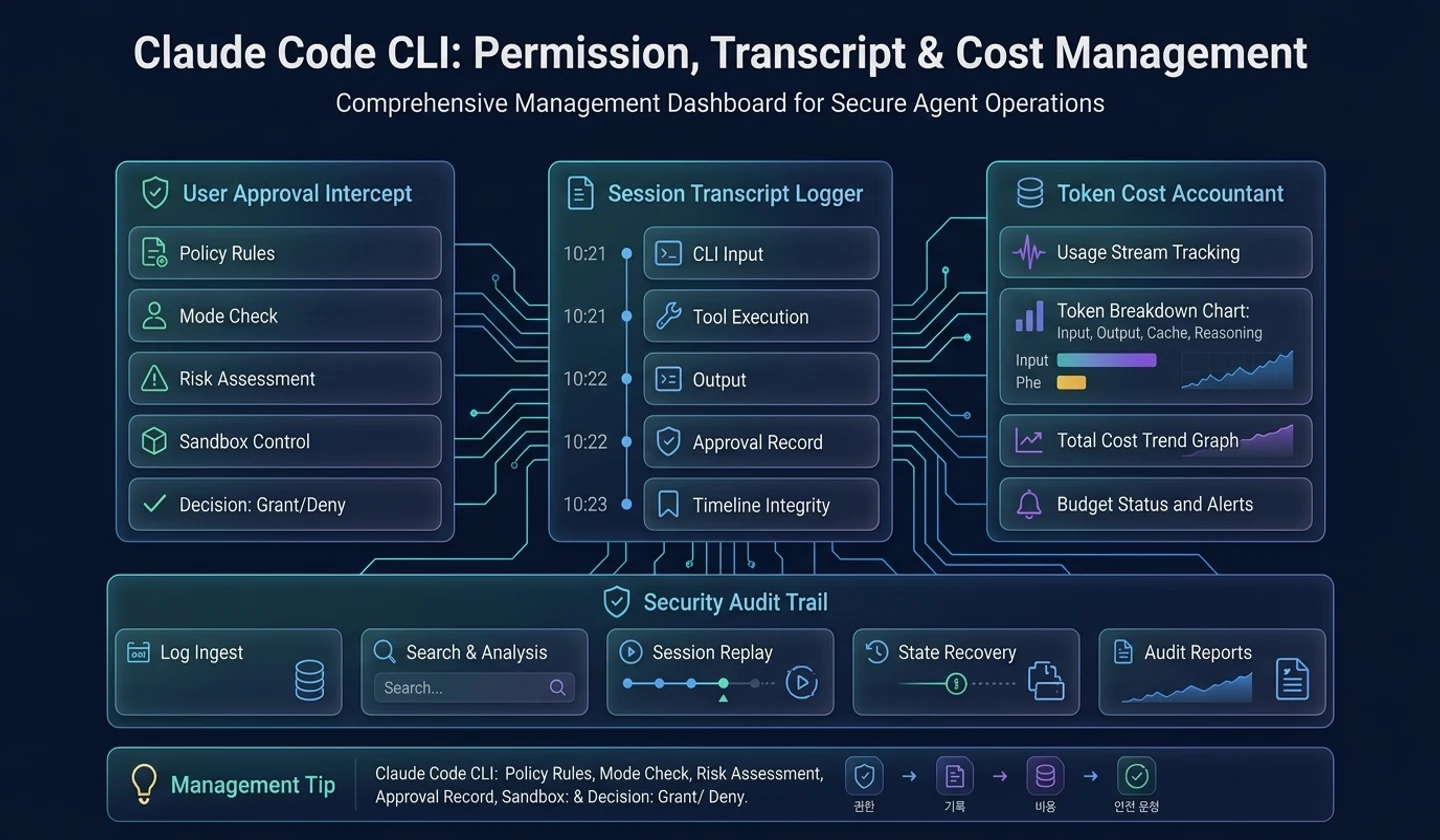
Key takeaways
- The agent's risk is greater from a wrong execution than from a wrong answer.
- Permission gate is not a single if statement, but a layer that looks at rule, mode, tool risk, sandbox, and user approval.
- Transcript is not a chat log, but a reproducible record of events.
- Usage and cost should be tracked from mid-stream in long-running agents.
The final article addresses the last line of defense of agent productivity. Permission, transcript, cost.
The risk of AI agents does not come only from the model giving wrong answers. A greater risk occurs when the model replaces the user's files, executes shell commands, or sends data to external systems. So permission, transcript, and cost accounting are not add-on functions added later, but are the core of the runtime.
If we look at Claude Code-type agents from an analytical perspective, these three view the same event in different ways. When a tool request comes in, the permission gate makes a decision, the ledger records the decision, and accounting tracks model and tool usage.
1. Why authority is the last line of defense
The model infers the intent, but the responsibility for execution lies with the runtime. The model can say “let’s edit this file,” but the runtime must decide whether to actually allow writing to the file.
Weak permission design leads to the following problems:
- Modifying files without user permission
- Executing dangerous shell commands
- Exposure of secret keys or environment variables
- Sensitive data transfer to external networks
- Unable to explain why something was done
Security Note: Before applying an AI agent to a company's codebase, you must check the permission mode, log storage scope, data transmission scope, confidential information masking, and rollback procedures.
2. Layered permission design
A good permission gate is not a single boolean check. View multiple layers in order.
| order | hierarchy | explanation |
|---|---|---|
| 1 | explicit deny | Block explicitly prohibited actions |
| 2 | policy rule | Apply organization/project/user rules |
| 3 | tool risk | Check the risk of the tool |
| 4 | argument risk | Determination of risk of input value itself |
| 5 | sandbox mode | Check if quarantine is feasible |
| 6 | auto-allow | Automatically allowed only under safe conditions |
| 7 | interactive approval | Ask the user |
| 8 | decision record | Record decisions and reasons |
The important thing is that auto-acceptance must come after safety checks. Automation is a convenience feature, not a safety feature.
3. Approval UI and decision record
Prompting the user is part of a permission gate, but UI and policy decisions must be separated.
The policy engine returns one of the following:
- allowance
- refusal
- User confirmation required
The UI turns “user confirmation required” into a human-understandable dialog. And the user's choice should remain in the ledger.
| record entry | reason |
|---|---|
| capability name | Identify which tool it is |
| argument summary | explain what you were trying to do |
| decision | Allow/Deny/Always Allow |
| reason | Policies, user choices, risk |
| approver | Is it approved by a human or automatically? |
| turn id | Connect to which agent turn it belongs to |
4. Why transcripts should not be viewed as chat logs
Transcript is not a “save transcript”. Event log to reproduce agent execution.
A good transcript should be able to answer the following questions:
- What input did the user send?
- What tools did the model request?
- What permission decisions did runtime make?
- What did the user approve?
- What were the tool results?
- What decision did the model make after looking at the results?
- At what point did costs and tokens increase?
Failure to answer these questions makes debugging, auditing, and recovery difficult.
5. Usage and cost accounting
A long-running agent can call a model multiple times, put back tool results, compress context, and perform retry. If you calculate the cost once at the end, the error will increase.
Therefore, usage and cost must be accumulated at the stream event stage.
| event | accounting processing |
|---|---|
| model request start | Request metadata history |
| usage update | Merge token/cache/reasoning usage |
| tool execution | Tool call count, external API cost recording |
| retry/fallback | Connect as a separate request |
| cancel | Confirmed usage to date |
| final | Create turn summary |
6. Safety layer in conceptual code
The code below is newly written code for explanation purposes.
# How to read: Conceptual code that describes runtime boundaries, not a clone of the actual implementation.class PermissionDecision: # Initializes runtime dependencies and state storage that the object will reference in later steps. def __init__(self, allowed, reason, requires_user=False): self.allowed = allowed self.reason = reason self.requires_user = requires_user # Whether or not it can be executed is determined in the order of policy, risk, automatic permission conditions, and user approval.async def evaluate_permission(tool, args, runtime): if runtime.policy.denies(tool, args): return PermissionDecision(False, "explicit_deny") risk = classify_risk(tool, args, runtime.workspace) if risk.level == "blocked": return PermissionDecision(False, risk.reason) if runtime.policy.auto_allows(tool, args, risk): return PermissionDecision(True, "auto_allow") user_choice = await runtime.shell.ask_approval( title=f"Approve execution of {tool.name}", body=build_risk_explanation(tool, args, risk), ) if user_choice == "deny": return PermissionDecision(False, "user_denied") return PermissionDecision(True, f"user_{user_choice}") # Permission decisions are left on the ledger and only permitted tools are actually executed.async def guarded_tool_execution(request, runtime): decision = await evaluate_permission(request.tool, request.args, runtime) await runtime.ledger.write("permission", { "tool": request.tool.name, "decision": decision.allowed, "reason": decision.reason, "turn": runtime.current_turn_id, }) if not decision.allowed: return ToolResult.denied(request.id, decision.reason) result = await runtime.tools.execute_without_rechecking(request) await runtime.ledger.write("tool_result", result.audit_summary()) return resultAlthough the authority judgment and record are separate, they share the same event. This will allow you to later explain “why it was done”.
7. AI utilization developer perspective
Developers using AI tools should ensure that:
| question | reason |
|---|---|
| Do you require approval before writing files? | Prevent unwanted changes |
| Does it display and execute shell commands? | Confirm critical command |
| Can you manage always-allow rules? | Avoid excessive automation |
| Can I check the transcript? | Auditing and Debugging |
| Can I see costs/token usage? | budget management |
| Is it easy to rollback after failure? | Practical stability |
If your team introduces it, these questions will soon become the adoption criteria.
8. Agent developer checklist
# How to read: The items below are summarized examples to quickly check the action flow.Permission / Transcript / Cost Checklist [ ] Authorization judgment is designed as a layered gate rather than a single if.[ ] explicit deny and sensitive operation checks are run before auto-allow.[ ] The approval UI and policy engine are separated.[ ] Permission denial also returns to model-visible tool result.[ ] transcript connects user input, model response, tool request, permission decision, and result.[ ] usage/cost is updated even in the middle of the stream.[ ] Accounting is maintained even in cancel/retry/fallback situations.[ ] When restoring a session, the transcript and cost state are restored together.9. Operational example: Binding approvals and costs to the same run ledger
In long agent operations, it is easy to miss the cause if you look at permission decisions and cost records separately. For example, if the agent modified 3 files, ran the test 4 times, and even used a provider fallback, it is not possible to know why the cost increased based on the final answer alone. In run ledger, permission decision, tool call, transcript checkpoint, and usage snapshot must be tied to the same trace ID.
| record | Questions to check later |
|---|---|
| permission decision | What write operations have the user approved? |
| transcript checkpoint | What observations did the model make its next decision? |
| usage snapshot | At what turn did the cost increase? |
| cost limit event | Did you stop before you went over budget? |
A failure example is a structure that leaves cost tracking only to the billing dashboard. You can know the total amount at the end of the month, but it is difficult to find out which task, prompt version, or tool retry created the cost. Conversely, if you store the full text of the token or sensitive prompt in the run ledger, a security problem arises. What should be saved is not the entire original text, but summary values that can be judged, such as model, prompt version, input/output token, cached token, and tool retry count.
10. Closing Q&A
Q1. Wouldn’t asking for permission too often deteriorate usability?
you're right. So layered permission is needed. Safe read-only operations can be automatically allowed, while dangerous write/shell/network operations must be approved.
Q2. Should the transcript save all contents as is?
no. Sensitive information should be masked or summarized. The important thing is not to unconditionally save the original, but to leave the sequence of events and reasons for decisions recoverable.
Q3. Can cost tracking be left out of MVP?
This is possible for a personal demo, but if you are considering introducing a long-running agent or a team, it is better to include a minimum usage snapshot at the beginning. If you attach it later, it is difficult to restore the connection of request, retry, and cancellation.
final summary
When analyzing Claude Code-type agents from a runtime perspective, there is only one final question.
Can this agent be automated, or can it be automated safely?
Permissions, transcript, and cost are the key layers to answer this question. Without these three, the agent may be fast, but it is unreliable. Conversely, if these three are designed from scratch, even a small agent can grow to product level.
댓글
GitHub 계정으로 로그인하면 댓글을 남길 수 있습니다. 댓글은 GitHub Discussions를 통해 운영됩니다.