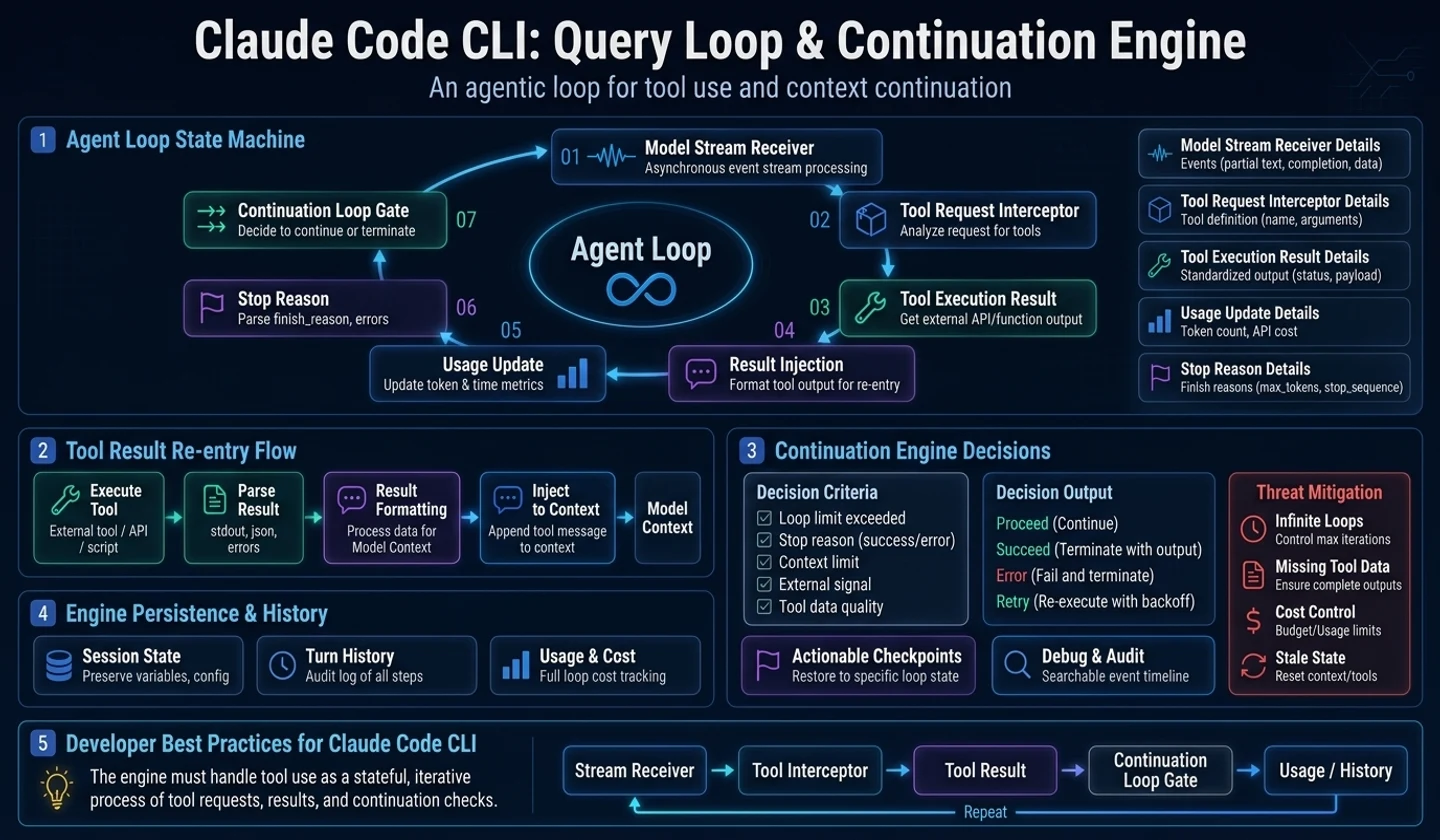
Key takeaways
- Agent loop is a repeatable state machine rather than a one-time model API call.
- The model can create a tool request while generating text, and the runtime injects the result back into a message.
- Stream events, usage updates, stop reasons, and tool calls must all be handled as runtime events.
- The continuation condition must be clear to prevent infinite loops, missing tool results, and runaway costs.
In this article, we cover the query loop, the heart of agent runtime.
Many LLM apps think of model calls as “one request, one response.” But agents are different. The model may request the use of a tool in the middle of a response, and the runtime must execute the tool and send the result back to the message to allow the model to continue making inferences.
In other words, the agent loop is not a model call function but a state machine that repeats streaming events and tool result injection.
1. Why an agent cannot be created with just one model call
Once the model requests a tool, the response is not over. Rather, agent execution begins from then on.
# How to read: The items below are summarized examples to quickly check the action flow.messages→ model streamto assistant text Some outputto tool request occursrun to tool runtimeCreate to tool result messageReinject to messagesto model stream resume→ final answerIf you fail to handle this iteration, your tool calls will just be one-off function executions. The model cannot make its next decision based on observations of the external world.
2. Query loop status
The agent loop manages the following states:
| situation | explanation |
|---|---|
| messages | Conversation snapshot to send to current model |
| turn_count | How many times was the model re-called after the tool result? |
| tool_context | Information on tools and permissions available in the current turn |
| usage | Token/cost information accumulated during streaming |
| compaction | Summary or compressed state when context becomes long |
| cancellation | User interruption or timeout condition |
| pending_tool_results | Result messages to be reinjected after execution is complete |
These states do not end with a single provider call. It must be continued when inserting the tool result and calling the model again.
3. Convert stream event to runtime event
If the event name given by the provider API is spread throughout the app, it is difficult to change the provider. Therefore, the query loop must convert the provider stream into an internal runtime event.
| Provider event personality | Runtime event example |
|---|---|
| message start | assistant_started |
| text delta | assistant_text_delta |
| tool call delta/done | tool_request_ready |
| usage update | usage_updated |
| message stop | assistant_message_finished |
| error | model_stream_failed |
This way, the session shell, ledger, and cost tracker do not need to know the provider SDK type.
4. Tool result reinjection
The tool result is not a simple output string. Observations that will be used in the next model call.
Even if the tool fails, you must create a result message. If the model does not have a corresponding result for the requested tool call, the next inference may become unstable.
# How to read: The items below are summarized examples to quickly check the action flow.tool request id: T-17→ schema validation failed→ permission denied→ execution failed→ success resultIn all four cases above, it is a “result”. In addition to viewing success as an outcome, failure must also be viewed as an observation that the model can read.
Practical Tips Instead of treating tool errors only as Python exceptions, try changing them to model-visible error results. The agent can choose different strategies on its own.
5. Continuation condition design
It must be clear when the agent loop continues running and when it stops.
| condition | treatment |
|---|---|
| No tool request | End with final answer |
| There is a tool request | After executing the tool runtime, result is injected into messages |
| max turn exceeded | Create turn limit final event |
| context exceeded | Continue after compaction or inform user |
| cancel request | End after recording the result of the interruption |
| budget exceeded | Request suspension or approval according to policy |
If these conditions are scattered, the agent may run infinitely, tool results may be missing, or costs may be greater than expected.
6. Agent loop viewed through concept code
The code below is newly written code for explanation purposes.
# How to read: Conceptual code that describes runtime boundaries, not a clone of the actual implementation.class LoopState: # Initializes runtime dependencies and state storage that the object will reference in later steps. def __init__(self, messages, tool_context): self.messages = list(messages) self.tool_context = tool_context self.turn_count = 0 self.usage = UsageSnapshot() self.cancelled = False # It reads the model stream, executes a tool request, and injects the results back into a model message.async def run_agent_loop(initial_messages, runtime): state = LoopState(initial_messages, runtime.tool_context) while True: if state.turn_count >= runtime.limits.max_model_rounds: await runtime.ledger.write("turn_limit_reached", state.turn_count) return FinalAnswer(reason="turn_limit") if runtime.abort_signal.requested: return FinalAnswer(reason="cancelled") request = runtime.provider_adapter.build_request(state.messages, state.tool_context) tool_requests = [] async for event in runtime.provider_adapter.stream(request): if event.type == "assistant_text_delta": runtime.shell.publish(event) elif event.type == "tool_request_ready": tool_requests.append(event.tool_request) elif event.type == "usage_updated": state.usage.merge(event.usage) runtime.accounting.update(state.usage) if not tool_requests: return FinalAnswer(reason="assistant_done", usage=state.usage) async for result in runtime.tools.execute_batch(tool_requests, state.tool_context): state.messages.append(result.to_model_message()) runtime.shell.publish(result.to_screen_event()) await runtime.ledger.write("tool_result", result.summary()) state.turn_count += 1In this architecture, the provider adapter and tool runtime do not know each other's internal implementation. A query loop connects the two.
7. AI utilization developer perspective
When using an AI coding agent, it is good to observe how long tasks progress.
- Does the screen indicate that the model has requested the tool?
- Do you see a summary of the results of running the tool?
- Does the agent try a different strategy for a failed tool?
- Are there limits when iterative execution becomes too long?
- Are costs/tokens updated mid-term?
An agent without this information being visible may seem convenient, but it makes auditing and debugging difficult in a team environment.
8. Agent developer checklist
# How to read: The items below are summarized examples to quickly check the action flow.Query Loop Checklist [ ] The model call is designed as a repeatable loop.[ ] The provider stream is converted to an internal runtime event.[ ] Tool requests are collected and then passed to the tool runtime.[ ] The tool result is reinjected as a model-visible message.[ ] A failed tool request also creates a result message.[ ] The conditions for max turn, cancel, budget, and context compaction are clear.[ ] usage/cost is also updated in mid-stream events.Failure case: Moving to the next call without entering the tool result
One of the most dangerous bugs in the agent loop is when the model issues a tool request, but the runtime does not correctly put the result back into the message history. On the screen it looks like the tool ran, but the next model call is missing the results. The model then requests the same tool again, responds by imagining the outcome, or continues an operation that has already failed as if it had succeeded.
This issue occurs more often with streaming UI. The screen moves based on the token stream, the backend moves based on tool events, and the ledger can store only the final message. If the three layers do not share the same turn ID and tool call ID, a ghost state will occur that is difficult to reproduce. The user says “I just read the file,” but the model replies that it hasn’t read it, and so on.
State transition example
This failure can be reduced by having the query loop as a state machine.
idle-> streaming_model-> collecting_tool_requests-> executing_tools-> injecting_tool_results-> streaming_model-> doneFor each state, the events that can enter and the events that can exit must be determined. To start a new model stream inexecuting_toolsstate, you must check whether all required tool results have been entered into history. Conversely, optional telemetry events do not need to be included in model history. Without this distinction, the context becomes unnecessarily large and important results are missed.
| Event | Model history | UI stream | Ledger |
|---|---|---|---|
| assistant token | yes | yes | yes |
| tool request | yes | yes | yes |
| tool progress | no | yes | optional |
| tool result | yes | yes | yes |
| usage update | no | yes | yes |
Checklist application results
When reviewing an actual implementation, look at “where the repetition conditions are” rather than “how many times do you call the model?” max turn, max tool calls, cancel signal, budget exceeded, and provider stop reason must all be determined in the same loop controller. If each adapter retries randomly, the agent becomes difficult to stop. Especially for products with high costs, even if the usage update arrives late, the budget must be recalculated before the next turn.
Implementation comparison: simple while loop and operational loop controller
When first creating an Agent loop, thewhile tool_calls:format seems sufficient. However, in production, conditions such as outage, cost, tool failure, context compression, and user approval are introduced. A simple while loop would easily spread these conditions to each handler.
| item | simple loop | Operational loop controller |
|---|---|---|
| interruption | Depends on provider exception | Separate cancel signal and final event |
| expense | Count only the last usage | Budget reassessed every turn |
| tool failure | exit with exception | Inject failure result into history |
| context | Failure if exceeded | compaction or user guidance |
| thanks | Save only the final answer | Records all turns, tool requests, and results |
For example, let's say a file search tool fails. In the operational loop, the failure reason is put intool_resultand passed back to the model. The model may try a different path, or it may reply to the user that "current file cannot be read". In a simple loop, an exception may pop out and only a generic error may remain on the screen.
There are also borderline cases. What should I do if there are more than two tool requests, one is successful and one is permission denied? All results must be collected and put into observations of the same turn. If only successful results are entered, the model may mistakenly think that a rejected operation is successful, and if only rejections are entered, the information already obtained is discarded. The loop controller should be a layer that checks whether the history is complete before calling the next model.
finish
Understanding the agent loop reveals the essence of an AI agent. The model does not run alone. The runtime reads the stream, executes the tool, puts the results back, and decides when to stop.
In the next article, we will look at the provider API boundary. How should we design model call boundaries so that our product logic is not tied to the provider SDK type?
댓글
GitHub 계정으로 로그인하면 댓글을 남길 수 있습니다. 댓글은 GitHub Discussions를 통해 운영됩니다.