Key takeaways
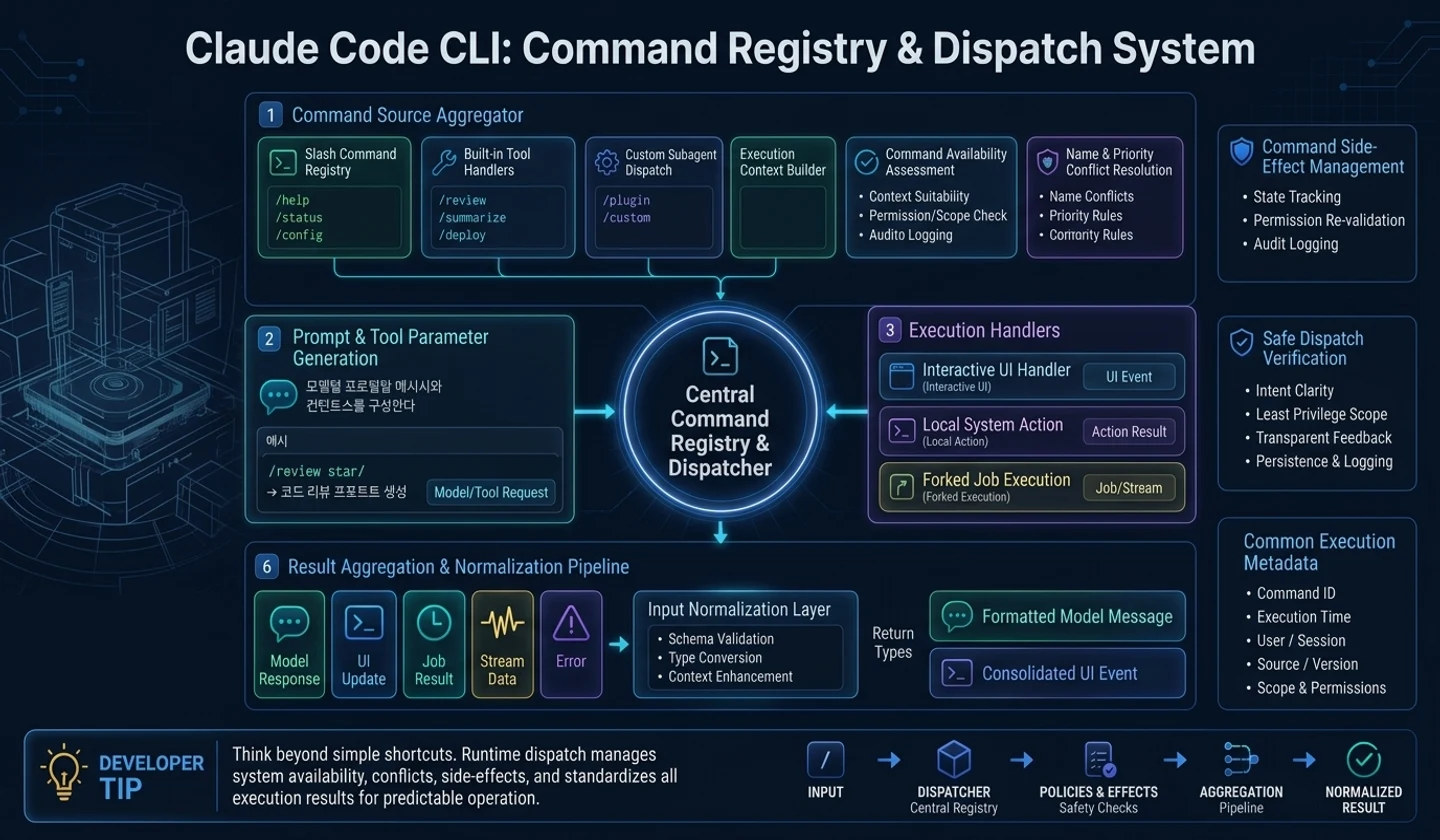
- The Agent's command is not a string shortcut but a runtime dispatch with side effects.
- A command can create a model prompt, execute a local action, or open a UI overlay.
- Availability and conflict resolution are required when combining built-in, user-defined, and plugin commands.
- The command result must be aligned with the common return type of the input normalization layer.
In this article, we will look at the slash command. In CLI agents like Claude Code, commands are not just shortcuts.
Inputs such as/help,/review, and/statusall start from the same input window, but their execution methods are different. Some commands create a model prompt, some only show local status, some open the settings UI, and some can branch to a separate agent task.
So the command system is not a parser but a runtime dispatch layer.
1. Why Commands should not be viewed as shortcuts
In regular CLI, a command is a function call. However, in AI agents, commands are also connected to the model loop. For example, the slash command “Review the code” may not be a local function, but rather a flow that reads the current diff, creates a prompt for review, and sends it to the model.
Conversely, commands like “Show status” do not need to call a model. Just show the runtime status on the screen.
If you handle these two with the same callback, a problem arises.
| command | model call | side effect | Things to note |
|---|---|---|---|
| help | no | UI output | model context pollution prevention |
| review | yes | context collection | Clarify the scope of prompt creation |
| settings | no | overlay open | Queue processing and conflict prevention |
| spawn job | Yes in some cases | run separately | Separation of permissions and transcripts |
2. Four command execution types
It is better to divide commands into at least four types.
| type | explanation | example |
|---|---|---|
| prompt command | Convert command to model-visible message | Review, summary, test plan |
| local command | Change or output local state without a model | help, clear, status |
| interactive command | Open overlay or selection UI and wait for user response | settings, model select |
| forked command | Copies part of the current session and executes a separate agent task | background review, isolated analysis |
This type must be associated with a runtime policy, not just a label. For example, a prompt command may restrict allowed tools, and a forked command may require a separate transcript.
3. Command registry and availability
Product-type agents do not only have built-in commands. User-defined commands, project commands, plugin commands, and workflow commands can be entered.
The registry should have the following responsibilities, not just a simple array:
- Resolving conflict of commands with the same name
- Only commands available in the current mode are exposed.
- Hiding or restricting commands according to permission policy
- Maintain default command when plugin fails
- Provide command description and argument schema
caution: It is dangerous to unconditionally trust internal project commands. You must distinguish whether the command only creates a prompt template, executes a local side effect, or calls an external tool.
4. Difference between prompt command and local command
The prompt command creates a message to send to the model. Local commands only change the screen or local state. If you do not distinguish between the two, there will be a problem where the user's/statusresult enters the model context, or conversely,/reviewends without a model call.
# How to read: The items below are summarized examples to quickly check the action flow.slash text→ command registry lookup→ availability checkcheck to command kindSelect the path to prompt/local/interactive/forkedNormalize to PreparedTurn or RuntimeEvent5. Cutting context of forked command
Be especially careful with forked commands. If you copy the entire current session and pass it on to a separate agent task, context contamination and permission confusion may occur.
For separate execution, only what is needed should be passed.
| something that can be passed over | What to watch out for |
|---|---|
| Required message subset | Copy the entire transcript unconditionally |
| workspace metadata | sensitive local state |
| Allowed tools list | Temporary approval status for current session |
| cancellation policy | interactive overlay state |
6. Dispatch as a concept code
The code below is for illustration purposes only, not the original implementation.
# How to read: Conceptual code that describes runtime boundaries, not a clone of the actual implementation.class CommandSpec: # Initializes runtime dependencies and state storage that the object will reference in later steps. def __init__(self, name, kind, available, handler): self.name = name self.kind = kind self.available = available self.handler = handler # Find slash text in the command registry and send it to local execution or model message creation.async def dispatch_command(text, runtime): parsed = parse_slash_text(text) if parsed is None: return None spec = runtime.command_registry.find(parsed.name) if spec is None: return make_local_notice(f"Unknown command: {parsed.name}") if not spec.available(runtime.context): return make_local_notice("This command cannot be used in the current mode.") if spec.kind == "prompt": message_bundle = await spec.handler.build_messages(parsed.args, runtime) return PreparedTurn.from_messages(message_bundle) if spec.kind == "local": event = await spec.handler.run_local(parsed.args, runtime) return PreparedTurn.local_only(event) if spec.kind == "interactive": overlay = await spec.handler.open_panel(parsed.args, runtime) return PreparedTurn.local_only(overlay) if spec.kind == "forked": job = await start_isolated_agent_job(spec, parsed.args, runtime) return PreparedTurn.local_only(make_job_event(job))The key is that even after the command is executed, it is normalized into a form that downstream can understand.
7. AI utilization developer perspective
When using AI tools, it is good to know what type the command is.
- Does this command call a model?
- Are there any side effects in the file or shell?
- How much context do you use in the current conversation?
- Are the command execution results left in the transcript?
- Does it indicate whether it is a plugin command or a built-in command?
Especially in a team environment, it is important to distinguish whether a custom command only generates a prompt or actually executes a local action.
8. Agent developer checklist
# How to read: The items below are summarized examples to quickly check the action flow.Command System Checklist [ ] The command kind is specified as prompt/local/interactive/forked, etc.[ ] The command registry merges built-in, user, and plugin commands.[ ] There are command conflicts and availability filters.[ ] The command result is normalized to PreparedTurn or RuntimeEvent.[ ] Local command results do not enter the model context unnecessarily.[ ] The forked command copies only the necessary context.[ ] A plugin command failure does not kill the base command.Failure case: When the slash command is processed only as a string alias
It is convenient at first if you only create/reviewas a prompt alias that says "Read and review the current diff." However, in actual agents, the command is wider than the prompt alias./statusshould only show the local status,/logincan open the authentication UI,/initcan create a file, and/reviewcan branch to a separate agent or read-only workflow. If you handle all of this with string substitution, side effects are hidden for each command.
In particular, the problem becomes bigger when plugin commands come in. Commands with the same name can exist in both built-in and user config, and depending on workspace permissions, some commands must be hidden, and some commands must end without a model call. Without conflict rules and availability filters, users would end up entering the same/deploy, but different things would happen in different environments.
Comparison table: Execution method by command type
| Kind | yes | Model call | Side effect | recording method |
|---|---|---|---|---|
| prompt | /review | Yes | Usually none | Record as prepared turn |
| local | /status | doesn't exist | None or Read | Recorded as runtime event |
| interactive | /login | doesn't exist | Authentication status can be changed | UI actions and audit logs |
| forked | /fix-ci | Yes | Limited work available | child run summary |
Dispatching becomes simpler if you decide on the command kind first, as shown in this table. The parser converts the string into a command id, the registry finds the command definition, and the dispatcher selects an executor that matches the kind. Only the prompt command goes into the model loop, the local command only updates the screen state, and the forked command copies only the necessary context.
Implementation example: Normalizing command results
type CommandResult = | { type: "prepared_turn"; prompt: string; contextRefs: string[] } | { type: "local_event"; title: string; details: string } | { type: "interactive"; view: "login" | "settings" | "picker" } | { type: "forked_run"; task: string; allowedPaths: string[] };By having this result union, the submit boundary can consistently determine the next step no matter what the command executor returns. The important thing is not to unconditionally put the entire command execution result into the model context. Sending all long logs of/statusto the model only increases costs and may cause sensitive local states to be mixed in the transcript.
Practical application example: Sending/reviewand/statusthrough different routes
The two commands start from the same input window, but their runtime processing must be different./reviewcompiles current diffs, related tests, and review criteria to prepare for model turn./statusends by showing local status such as current branch, dirty file count, and running job on the screen.
| command | dispatch result | Whether to include model context |
|---|---|---|
/review | prepared turn | Contains only the diffs and criteria you need |
/status | local event | Not included by default |
/settings | interactive view | Not included |
/fix-ci | forked run | Only limited context is passed to the child run. |
The failure case is structured to include all command results in the transcript. If/statusoutputs a long log and the log is included in the next model call, the cost increases and local information that the user did not intend is mixed into the model context. Conversely, if/reviewis treated like a local event, the model does not receive a diff and only speaks in general terms.
Therefore, the command registry must contain not only a name but also kind, required context, and allowed side effects. The same standards apply when a plugin command comes in. For example, if the workspace command registers/deploy, you must indicate whether this command only creates a prompt, runs a shell, or calls an external API. The key to a command system is not quick input, but clearly dividing the execution path.
finish
The slash command clearly shows the hidden complexity of the agent runtime. It starts from the same input window, but some commands call the model, some commands only change the local UI, and some commands create separate agent tasks.
In the next article, we will look at the query loop, the center of the agent. A model call doesn't just happen once. It is a state machine that repeats streaming response, tool request, and result injection.
댓글
GitHub 계정으로 로그인하면 댓글을 남길 수 있습니다. 댓글은 GitHub Discussions를 통해 운영됩니다.