Key takeaways
- Agent CLI's bootstrap is not simple argument parsing.
- Before actual execution, settings, authentication, organizational policies, working directories, extensions, and execution modes must be organized.
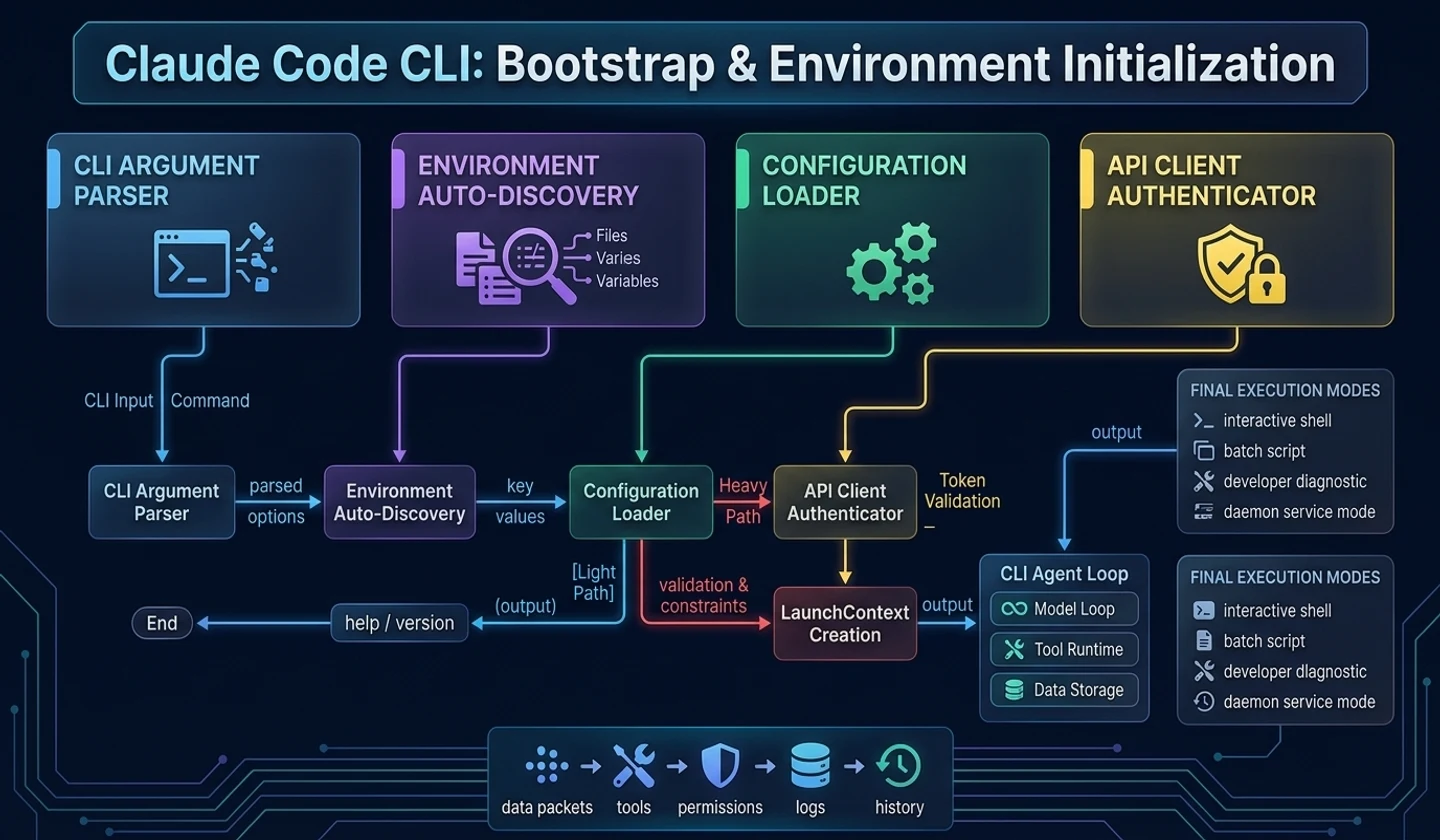
- The initialization cost should be different between the lightweight path such as help/version output and the actual agent execution path.
- When creating an agent, it is stable to create
LaunchContextfirst and pass it on to the downstream layer.
When analyzing Claude Code-type CLI agents, an interesting point emerges. The starting point for execution is more important than you might think.
Usually, when creating a CLI, it is easy to think of bootstrap as readingargvand selecting a command. But in an AI coding agent, the startup phase determines much more. This sets out what permissions this process will run with, what working directory it will trust, what tools it will expose, and what models and policies it will use.
1. Why Agent CLI bootstrap is important
AI agents can handle local files, shells, networks, and external APIs. Therefore, as soon as the process begins, you need to organize “what can be done in what environment”.
If this step is messed up, subsequent model loops and tool runtimes start off with already incorrect assumptions. For example, an externally received repository may affect the execution policy if the project settings are read before being trusted. If you expose a list of tools when authentication status is unclear, users will see functions that appear executable.
caution: The most dangerous mistakes in agent bootstrapping are “doing all initialization from the beginning” and “going straight to the conversation screen without any verification.” The former ruins usability, the latter blurs security boundaries.
2. Divide light and heavy paths
The CLI has several paths, such as help, version check, diagnostics, batch execution, and interactive execution. If you impose the same initialization cost on all paths, the tool becomes heavy.
| execution path | Required initialization | Reset to avoid |
|---|---|---|
| help/version | Parser configuration, text output | Network, authentication storage, and extension loading |
| diagnostic | Read settings, check some environment | Run the entire agent loop |
| batch prompt | Policies, models, tools, records | Interactive UI overlay |
| interactive shell | Most runtime contexts | Unnecessary remote refresh blocking |
In practice, we need to separate “initializations that should prevent execution” from “initializations that can continue even if they fail.”
3. Create trust boundaries before execution
The agent views project internal settings, user global settings, organizational policies, environment variables, and command line options. The important question here is not priority, but trust.
Files inside a project are part of the current working directory. This may be fine if it is a project created by the user, but it may also be a repository cloned from an external source. In these situations, you need to ask yourself, “Can I trust this location?” before reading the project settings.
# How to read: The items below are summarized examples to quickly check the action flow.Global settingsto Verify job location trustto decide whether to reflect project settingsto apply organization/security policyto confirm execution modeThis flow is also important for developers who use AI. If an AI tool automatically applies internal settings as soon as you open a project, you should check to see what those settings change.
4. Launch context design
It is better for bootstrap's output to be a single context rather than scattered global variables.
| field | meaning |
|---|---|
mode | Execution modes such as interactive, batch, diagnostic, server, etc. |
workspace | Working directory, trust status, project metadata |
policy | Permission mode, organization rules, risk options allowed |
model_options | Model selection, token limits, output mode |
capability_set | List of activated tools, extensions, and commands |
ledger_config | Transcript storage location, cost tracking settings |
By passing this context to the downstream layer, the session shell, model loop, and tool runtime do not have to search their environments again.
5. Bootstrap flow viewed through concept code
The example below is not the original implementation, but new code to illustrate the agent CLI bootstrap.
# How to read: Conceptual code that describes runtime boundaries, not a clone of the actual implementation.class LaunchContext: # Initializes runtime dependencies and state storage that the object will reference in later steps. def __init__(self, mode, workspace, policy, model_options, capabilities): self.mode = mode self.workspace = workspace self.policy = policy self.model_options = model_options self.capabilities = capabilities # Split the CLI launch request into a lightweight output path and an actual agent runtime path.async def start_agent_process(argv): command = parse_cli_request(argv) if command.is_help_or_version: return print_lightweight_output(command) base_config = read_user_config(command) workspace = inspect_workspace(command.cwd) if not workspace.is_trusted: workspace.project_config = None policy = build_runtime_policy(base_config, workspace, command) await policy.require_blocking_checks() capabilities = load_capabilities_safely(policy, workspace) context = LaunchContext( mode=command.mode, workspace=workspace, policy=policy, model_options=resolve_model_options(base_config, command), capabilities=capabilities, ) schedule_non_blocking_refresh(context) return await route_launch_mode(context, command)The point of this code isschedule_non_blocking_refresh(). Tasks that do not immediately prevent execution even if they fail, such as remote policy updates or recommended settings updates, are sent to the background, and absolutely necessary checks, such as authentication or explicit prohibition policies, are processed as blocking.
6. Checkpoints from the perspective of AI tool users
Developers using AI coding agents must check the following:
- Does the tool see the current working directory as a trusted workspace?
- Do project configuration files affect execution policy?
- If there are organizational policies or team settings, do they take precedence over local settings?
- Are the permission policies different in batch mode and interactive mode?
- Aren't simple commands like help/version performing excessive initialization?
These questions are not just usage questions. This becomes your security review checklist as your team adopts AI tools.
7. Checkpoints from the agent developer’s perspective
If you are creating your own agent, you should confirm the “execution mode” in bootstrap as soon as possible. If interactive, batch, diagnostic, and server modes continue to be mixed within one function, later layers take over exception handling.
Also, you must distinguish between fail-open and fail-closed.
| situation | Recommended processing |
|---|---|
| Authentication failed | fail-closed, execution aborted |
| Explicit violation of organizational policy | fail-closed, execution aborted |
| Remote recommendation settings query failed | fail-open, use local default |
| Some extension commands failed to load | fail-open, maintain basic functionality |
| Failed to prepare transcript repository | Conservatively limit execution or clearly notify users |
8. Practical checklist
# How to read: The items below are summarized examples to quickly check the action flow.CLI Agent Bootstrap Checklist [ ] help/version ends without heavy initialization.[ ] Passes authentication and policy checks before actual execution.[ ] Workspace trust is determined before project settings are reflected.[ ] interactive/batch/diagnostic/server mode is initially confirmed.[ ] blocking initialization and background refresh are separated.[ ] Extension loading failure does not kill basic conversation functionality.[ ] Passes execution conditions to the downstream layer with one LaunchContext.Practical example: failures that should be pre-filtered in bootstrap
For example, let's say you run the agent CLI from your on-premise repository. Rather than calling the model immediately after startup, you should first check that the current directory is a git repository, that it is a writable workspace, that any necessary environment variables exist, and that the authentication token has not expired. If a failure is caught at this stage, the user will receive a immediately correctable message, such as "The current path is outside the workspace" rather than "The model gave a strange answer."
| Check items | Results to be processed by bootstrap | Problems that occur when passing through the model loop |
|---|---|---|
| workspace path | Record allowed roots and writability | Model keeps requesting inaccessible files |
| Authentication Status | Interrupted by login required event | provider error looks like a plain failure |
| permission mode | Fixed read/write/shell policy | Approval standards waver during implementation |
| project profile | Load rule file and command list | Commands operate differently depending on the environment |
There are also borderline cases. Requests executed in non-interactive mode, such as--print, cannot open the interactive approval UI. At this time, if bootstrap does not confirm the mode, it may stop in the "waiting for user approval" state mid-execution. Therefore, at the startup stage, possible input methods, output methods, and approval possibilities must be organized into one launch context.
finish
Agent CLI's bootstrap is a small starting point, but it is actually the first safety boundary of the runtime. This is where you organize your settings, authentication, policies, and execution modes so that the back layers can focus on their responsibilities.
In the next article, we will look at the interactive terminal screen. Claude Code-type screens are not simple UIs, but are closer to runtime shells that contain messages, inputs, approvals, and execution status.
댓글
GitHub 계정으로 로그인하면 댓글을 남길 수 있습니다. 댓글은 GitHub Discussions를 통해 운영됩니다.