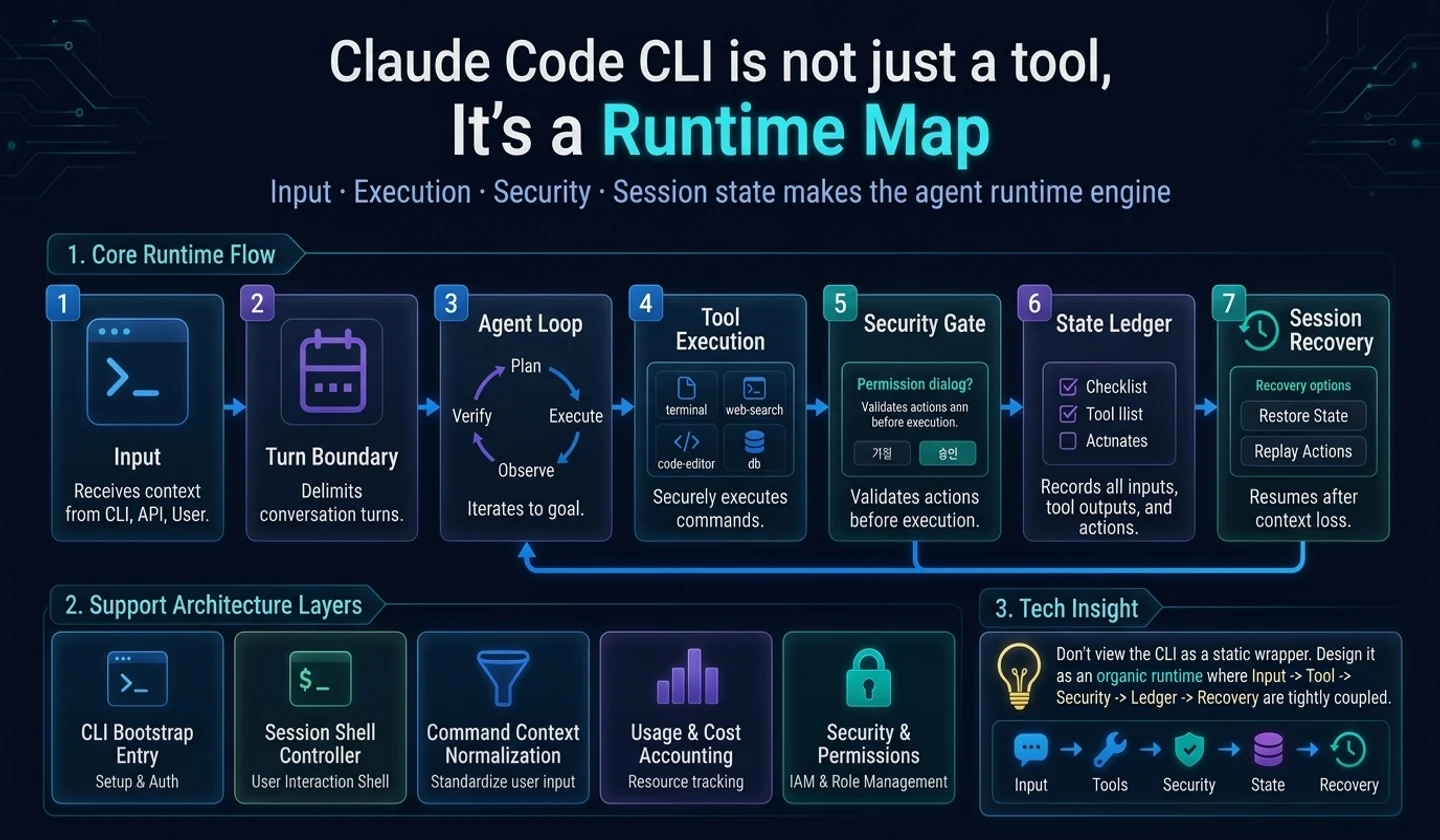
Key takeaways
- A product-type AI coding agent like Claude Code is not a simple model API wrapper.
- The user's input does not go directly to the model, but passes through a turn boundary and input normalization.
- Product-level stability occurs when the model loop, tool runtime, permission gate, and transcript ledger are separated.
- By knowing this structure, developers who use AI can more accurately judge the pros and cons of the tool, and developers who create agents can set the minimum design boundary.
In this article, we will read Claude Code not as an “AI tool that is good at coding,” but as a product-level AI agent runtime.
The first thing that many developers think of when creating an AI agent is a model API call. If you createmessages, send it to the model, and print the response, it appears to be an agent. In the demo, this is somewhat correct. But for it to become a tool that real developers use all day, it's a different story.
If you look at Claude Code-type CLI agents from a runtime perspective, the key is not the model call. More important are when to confirm user input into a turn, how to coordinate new input with ongoing model streams, with what permissions to run tools requested by the model, and how to record and recover all events.
1. Why is the frame “Claude Code Analysis” effective?
Claude Code has a very familiar surface to developers. From the terminal, you can ask questions, explore the codebase, modify files, and ask to run tests. On the outside, it looks like a “chatbot attached to a terminal,” but it is a much more complex system from a runtime perspective.
The point of this article is not to replicate a specific implementation. Quite the opposite. The goal is to explain what boundaries a product-level agent should have without directly showing the original code.
What makes this frame great is that it takes the reader straight to action questions.
| reader | What you should get from reading this article |
|---|---|
| Developer using AI tools | I understand why the agent I use sometimes stops, why an approval window appears, and why costs increase. |
| Developer who creates AI agent | Identify the necessary runtime boundaries before and after model calls. |
| Team Lead/Platform Engineer | Establish standards for permissions, records, costs, and security when introducing it to your team. |
2. 7 layers that make up agent runtime
The layers that make up a product-type agent can be broadly divided into seven.
| hierarchy | responsibility | Problems that arise when it collapses |
|---|---|---|
| CLI bootstrap | Determine settings, authentication, policies, and execution modes | Runs with incorrect permissions and environment from the start |
| Session shell | Screen status, input window, message, approval queue | Difficult to recover because UI and model state are mixed |
| Submit boundary | Immediately execute/queue/branch input to command | Two turns modify the same state at the same time |
| Input normalization | Convert raw input to model-visible message | Information that should not be shown to the model is mixed in. |
| Model loop | Streaming response and tool request repetition | Inference does not follow the tool results |
| tool runtime | Tool discovery, verification, permissions, execution | Invalid requests made by the model are executed as is. |
| Ledger/accounting | transcript, usage, cost, restore | Can't explain why it was implemented or how much was spent |
The point here is not that there are many layers. Each layer prevents different failure modes. Failure of the input layer leads to redundant execution, failure of the tools layer leads to dangerous side effects, and failure of the history layer leads to auditability and unrecoverability.
3. Points that developers using AI should look at
Developers who use AI coding agents usually only see the results. Focus on whether the code was well modified, whether the tests passed, and whether the response was quick. However, in actual work, the following questions become more important.
- Does this tool ask me before modifying the file?
- Is there a record of what commands were executed?
- In case of failure, is it possible to return to the previous state?
- Can I know the cost and token usage in the middle of a long task?
- When I enter new input during a conversation, doesn't it conflict with previous operations?
If you read Claude Code from a runtime perspective, you will see that these questions are not “usability” issues but “architecture” issues. A good agent is not only good because the model is smart, but also the way the runtime handles the request when the model makes a risky request.
4. Points that developers creating Agents should look at
If you create the agent yourself, you will want to create a model provider wrapper first. But scaling to a product requires a different order.
The first thing we need to define isturn. It must be determined when user input begins and ends, which tool requests and results belong to that turn, and what state is recorded when interrupted.
Next ismessage projection. The message displayed on the screen, the message sent to the model, and the message left in the transcript are different. If you don't separate these three from the beginning, things will get messy later when you add permission UI, cost display, and resume functionality.
Lastly iscapability execution. Just because your model calls a tool doesn't mean you should run it right away. The runtime must determine whether the name is correct, the arguments are correct, whether the permissions are executable, and whether it can be executed in parallel.
5. Abstracted execution flow
The code below is not the original implementation. This is a newly written concept code to understand the structure of a product-type AI agent.
# How to read: Conceptual code that describes runtime boundaries, not a clone of the actual implementation.class AgentRuntime: # Initializes runtime dependencies and state storage that the object will reference in later steps. def __init__(self, shell, model, capabilities, policy, ledger): self.shell = shell self.model = model self.capabilities = capabilities self.policy = policy self.ledger = ledger self.active_turn = None self.waiting_inputs = [] # Confirms one user input as a turn and sends it to one of local processing, queue, or model loop.async def handle_prompt(runtime: AgentRuntime, raw_prompt: str): draft = create_turn_draft(raw_prompt, runtime.shell.snapshot()) if runtime.active_turn is not None: runtime.waiting_inputs.append(draft) runtime.shell.notice("Processing continues after the current task is finished.") return prepared = await normalize_turn_input(draft, runtime) if prepared.local_only: await run_local_effect(prepared, runtime) return runtime.active_turn = prepared.turn_id try: await drive_agent_until_done(prepared.messages, runtime) finally: await runtime.ledger.flush_turn(prepared.turn_id) runtime.active_turn = NoneThe key point in this code is thathandle_prompt()does not call the model directly. The input is first a draft, the draft is normalized, and the result is branched into whether it is a local action or a model query. If there is a turn in progress, new input is put into the queue.
6. Design patterns for product-level agents
The first pattern is to separate the turn boundary from the UI event handler. Invoking a model immediately after pressing Enter makes it difficult to handle cancellation, queuing, retries, remote input, and acknowledgment queues.
The second pattern is to separate the model loop and tool runtime. The model simply asks you to use the tool. Runtime must determine whether it is actually executed. This boundary allows permission, sandbox, schema validation, and progress events to be improved independently.
The third pattern is to view the ledger as a function rather than a log. The agent is non-deterministic and long-running. Without transcript and usage records, it is impossible to know what the user approved or what tool results led to the next decision.
Practical Tips When first creating an agent, design the
Turn,RuntimeEvent,CapabilityResult, andLedgerEventtypes first rather than the model wrapper. If these four things are caught, the structure will be less shaken even if you change the provider or add tools.
7. How to apply it to my agent
If you're starting small, the following five types will suffice.
| type | Information to include |
|---|---|
TurnDraft | Original input, attachment, input source, execution mode |
PreparedTurn | Message to be sent to model, local processing, permission tools |
RuntimeEvent | assistant text, tool request, usage update, final state |
CapabilityResult | Tool request ID, success/failure, summary, model-visible content |
LedgerEvent | Time, turn id, visible scope, model scope, cost information |
If you do this, even if the agent grows, it will be clear where each function should be attached. For example, a new slash command goes into the input normalization or command dispatch layer, a new tool goes into the capability runtime, and a cost display goes into the ledger/accounting layer.
8. Practical checklist
# How to read: The items below are summarized examples to quickly check the action flow.agent runtime inspection checklist [ ] Input submission and model call are separated.[ ] It is determined how to handle new input when there is a turn in progress.[ ] The message displayed on the screen and the message sent to the model are separated.[ ] The tool requested by the model passes schema validation before execution.[ ] Dangerous tools must pass the permission gate.[ ] Tool failures are also reinjected as model-visible results.[ ] The transcript records user input, tool requests, permission decisions, and costs.[ ] Abort signals are sent to both the model stream and the tool execution.finish
If you read Claude Code from a runtime perspective, your standard for viewing AI agents changes. You are no longer just looking at “what model are you using?” Instead, you see how input is rotated, what permissions the tool runs with, and how failures and hangs are logged.
In the next article, we'll see what this runtime cleans up first at the start of the process. Agent CLI's bootstrap is not simple argument parsing, but is a step in creating a trust boundary before execution.
댓글
GitHub 계정으로 로그인하면 댓글을 남길 수 있습니다. 댓글은 GitHub Discussions를 통해 운영됩니다.