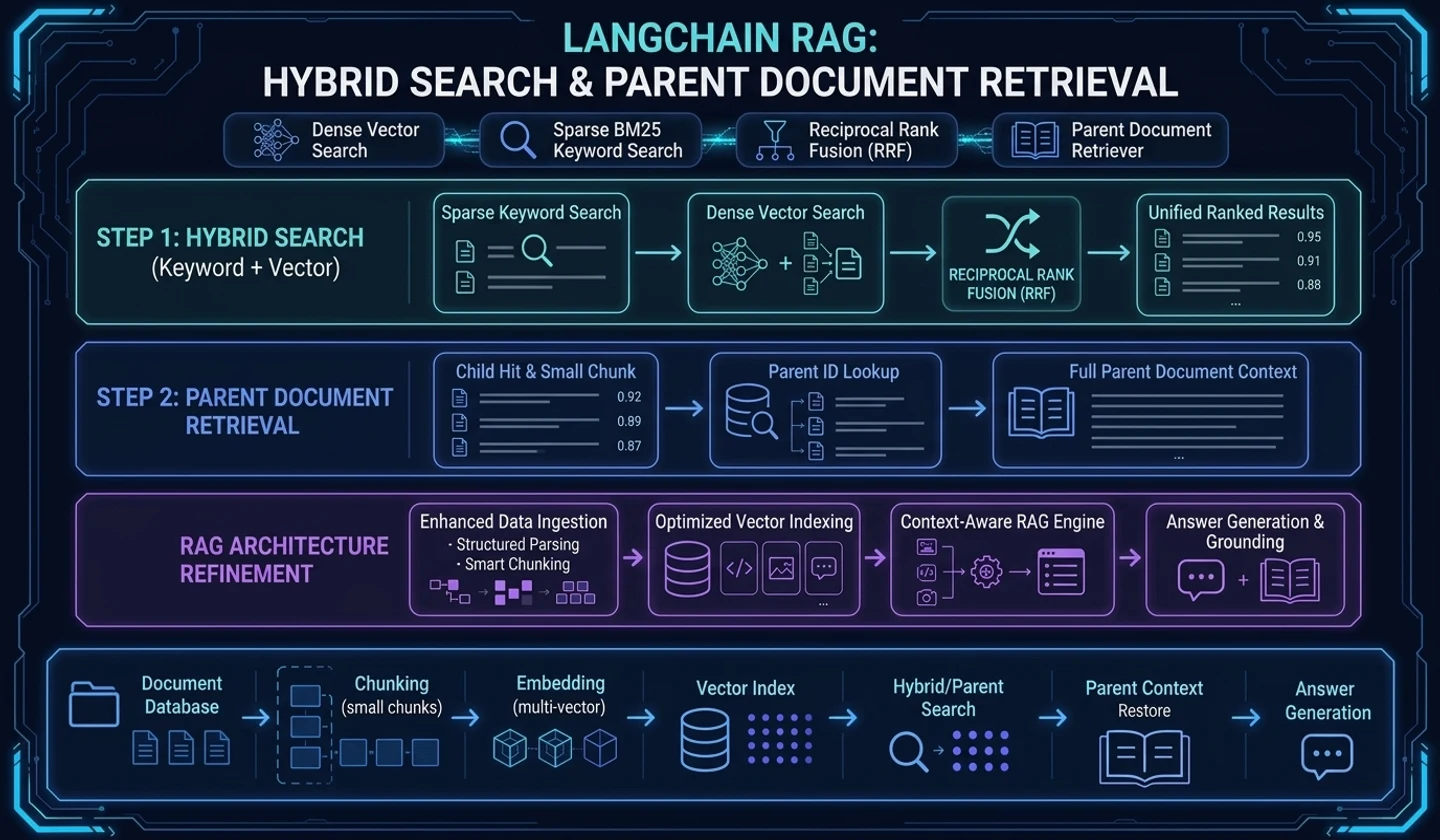
The moment when a small chunk is not enough
In part 3, we looked at the flow of narrowing down candidates through metadata filter, multi-query retrieval, context compression, and reranking, rather than simply believing the retriever results. Once you've reached that stage, you're somewhat ready to choose the context to put in the prompt.
However, there are times when the answer is awkward even though you have narrowed down the search candidates well. This time, we will use the virtual learning documentsample-office-guide.mdfrom Part 1. This is not an actual internal document, but an example created to explain the search flow. A user asks:
# The user's question asks about conference room reservation conditions and equipment rental conditions.Where can I rent a monitor for use in the conference room, and when should I make a reservation?This question is not contained in just one section. “Meeting room” and “Reservation” are inreservation, while “Monitor” and “Rent” are close toequipment. Each sentence can be easily searched if you only look at small chunks, but when creating an answer, you should read both sections together.
At this time, the problem is divided into three parts.
| problem | symptoms | Search design needed |
|---|---|---|
| expression difference | The document says ‘rental of equipment’, and the question says ‘rental of a monitor’. | See keyword search and semantic search together |
| lack of context | Small chunks are correct, but the surrounding conditions are missing. | Search in small chunks and retrieve by parent document |
| difference in perspective | I want to find the same document differently by using the title, summary, and body expression. | Index a document into multiple vector representations |
Part 4 follows these three issues. The key is not to make the search more complicated, but to separate "what units to look for and what units to read".
The application criteria I will leave behind in this article are simple. If you miss the question expression, review hybrid search, if there is insufficient answer context with only a small chunk, review parent document retrieval, and if you need to find the same document from multiple perspectives, review multi-vector retrieval.
Keyword search and semantic search produce different failures.
Semantic search is strong at finding sentences with similar meaning. Conversely, keyword search is strong at finding documents that necessarily contain specific words. If you use either one, the failure method will be different.
Let's expand the example document a bit.
from langchain_core.documents import Document # Divide the same in-house guidance document into section chunks and compare search differences.docs = [ Document( page_content="Meeting room reservations can be made up to 1 hour before the start of use.", metadata={"source": "sample-office-guide.md", "section": "reservation"}, ), Document( page_content="Large monitors and video conferencing equipment can be used after recording rental at the information desk.", metadata={"source": "sample-office-guide.md", "section": "equipment"}, ), Document( page_content="Visitors must obtain a temporary access card after security desk approval.", metadata={"source": "sample-office-guide.md", "section": "security"}, ),]If the question is ‘renting a monitor’, keyword search can directly catch the word ‘monitor’. However, if a user asks ‘screen sharing device’, the keyword alone can be missed. Semantic search reduces expression differences, but conversely, you can upload reservation chunks first by only looking at the large topic of “meeting room.”
So hybrid search looks at both results together.
# After combining the keyword results and semantic results, duplicates are removed and scored again.keyword_hits = keyword_retriever.invoke("Rent a Monitor")semantic_hits = semantic_retriever.invoke("How do I use screen sharing equipment in a conference room?") candidate_docs = merge_unique_docs( keyword_hits, semantic_hits, key=lambda doc: (doc.metadata["source"], doc.metadata["section"], doc.page_content),)The important thing is not “it gets better if you use a hybrid.” The document captured by keyword and the document captured by semantic must be viewed side by side. If both point to the same section, it is a good sign. If they point to completely different sections, it may mean that the question contains multiple intentions or that the search criteria are too broad.
Hybrid search requires combining the results and rereading them.
The mistake with hybrid search is to simply concatenate the two search results. Doing so only increases the number of candidates and does not improve the prompt context.
Compare the results as below.
| Search method | top results | points to read |
|---|---|---|
| keyword | equipment: Large monitor and video conferencing equipment | I directly captured the equipment expression in the question. |
| semantic | reservation: Conference room reservations must be made 1 hour in advance | Context of conference room use |
| hybrid merge | equipment+reservation | Both sections are needed in the answer |
This question requires both results. This is because “Where do I rent a monitor?” and “How long can I make a reservation?” are included in one question. Conversely, if the only question is ‘Where can I rent a monitor?’, it is better to leave out the reservation chunk.
After hybrid search, leave at least the following items.
- Document captured by keyword
- Document captured by semantic
- Two overlapping documents
- Final document to put in prompt
- Documents excluded and reasons for exclusion
Without this record, hybrid search does not improve quality, but becomes similar to increasing thekvalue. This is because the number of search candidates has increased, but it is impossible to explain why it has improved.
parent document retrieval divides the search unit into the reading unit.
Small chunks are good for searching. If the sentence is short and clear in focus, it becomes easier to compare similarity to the question. But answers often require context. At this time, parent document retrieval appears.
The idea is simple.
# The search starts in small units and the answer context returns to larger parent units.Search by small child chunkFind the parent document id to which the to child chunk belongs.Enter the parent document or parent section in the to prompt.For example, let's say there are three sentences below in sectionequipment.
Large monitors and video conferencing equipment can be used after recording rental at the information desk.
Equipment must be turned off after use and returned to its original location.
If there is any breakdown or loss, you must immediately notify the general affairs team.
If the question is ‘Where can I rent a monitor?’, searching just the first sentence seems sufficient. However, the response may need to include return conditions or contact criteria if a problem arises. Putting only small chunks into the prompt will make the answer seem short and precise, but may not be enough as actual guidance.
In this case, the parent ID is left in the child chunk.
# The search is done in small chunks, and the answer context is returned to the parent section.child_chunk = Document( page_content="Large monitors and video conferencing equipment can be used after recording rental at the information desk.", metadata={ "source": "sample-office-guide.md", "section": "equipment", "parent_id": "sample-office-guide.md#equipment", },) parent_section = Document( page_content=( "Large monitors and video conferencing equipment can be used after recording rental at the information desk." "Equipment must be turned off after use and returned to its original location." "If there is any breakdown or loss, you must immediately notify the general affairs team." ), metadata={ "source": "sample-office-guide.md", "section": "equipment", "parent_id": "sample-office-guide.md#equipment", },)Using parent document retrieval separates the roles of search and answer. The child chunk provides “where to look”, and the parent section provides “what to read and respond to”.
If you set the parent large, the noise also increases.
parent document retrieval is not always a good choice. If the parent unit is too large, many unnecessary sentences will be included in the prompt. You may have found it well with a small chunk, but you can revive unnecessary context by bringing back a large parent.
The parent unit is determined based on the following criteria.
| parent unit | suitable case | danger |
|---|---|---|
| same section | When section meaning is clear, such as in-house guidance or product documentation | Noise occurs when multiple topics are mixed within a section. |
| same page | When one FAQ or documentation page covers one topic | The longer the page, the higher the prompt cost. |
| Same heading subtree | When the H2/H3 structure of the Markdown document is stable | If the heading parsing is broken, the parent shakes. |
| full text | Short policy documents or short notices | Too broad for most technical documentation |
Insample-office-guide.md, the section unit is appropriate. This is because conference rooms, equipment, and security are different work flows. If a question spans more than one section, you only need to import multiple parent sections. There is no need to include the entire document.
multi-vector retrieval finds multiple perspectives on a document
If parent document retrieval is “search small and read large”, multi-vector retrieval is closer to “find the same document in multiple representations.”
If you only embed one section in the text, it may not match the question expression. So you can create multiple search expressions for the same parent.
# Indexes one parent section with multiple search expressions.index_docs = [ Document( page_content="Large monitor and video conferencing equipment rental", metadata={"parent_id": "sample-office-guide.md#equipment", "view": "title"}, ), Document( page_content="If you want to use screen sharing equipment in a conference room, leave a record of equipment rental at the information desk.", metadata={"parent_id": "sample-office-guide.md#equipment", "view": "summary"}, ), Document( page_content="Large monitors and video conferencing equipment can be used after recording rental at the information desk.", metadata={"parent_id": "sample-office-guide.md#equipment", "view": "body"}, ),]If the user asks for ‘screen sharing device’, a summary expression may be appropriate. When a user asks ‘rental of a monitor’, the title or body expression may be taken into account. Although the searched expressions are different, the final answer context returns to the same parent section.
What is important in multi-vector retrieval is metadata. There must remain a connection where multiple vectors point to the same parent. Otherwise, the title, summary, and body of the same document may be entered repeatedly in the prompt as if they were different documents.
Don't turn on all three strategies at once
Hybrid search, parent document retrieval, and multi-vector retrieval can all improve search quality. However, if you turn it on all at once, it is difficult to know which strategy changed what.
Create a small experiment with the same question.
# Add search strategies one by one with the same question and compare the changes in results.question: Where can I rent a monitor for use in the conference room, and when should I make a reservation? baseline:- semantic search top 3 experiment 1:- keyword + semantic hybrid search experiment 2:- hybrid search- child hit -> parent section fetch experiment 3:- parent section fetch- title/summary/body multi-vector indexThe indicators seen in each experiment are simple.
| characteristic | question |
|---|---|
| Are the necessary sections included? | Arereservationandequipmentall captured? |
| Have unnecessary sections been reduced? | Issecuritymissing? |
| Is the answer context sufficient? | Are any return or reservation conditions missing? |
| Are there any duplicates? | Didn’t the same parent come in multiple times? |
If you look at it this way, search design becomes a comparison rather than a feeling. What strategy is needed can be explained through question patterns and document structure.
An example of application can be found like this. In the in-house document search chatbot, the question 'rental of a conference room monitor' comes in, and if onlyreservationis found, turn on hybrid search and check if candidateequipmentcomes in as well. Conversely, if theequipmentparent is set too large and security, visitor, and return information are all mixed together, it will be left as a cautionary tale. In this case, the parent unit should be reduced to a section or heading subtree rather than the entire document.
Criteria for moving on to the next post
When you come to this article, RAG's search flow expands considerably. The document is divided into chunks, the chunks go into the vector store, the retriever retrieves candidates, and the search candidates go through filter, multi-query, compression, and reranking to become prompt context candidates. If hybrid search, parent document retrieval, and multi-vector retrieval are added here, the search unit and answer unit can be viewed separately.
The next step is to create an answer. Now, it is not enough to simply enter{context}in the prompt. You need to decide what source the context comes from, what source to indicate in the answer, and how to set conditions for saying you don't know if you don't know.
In the next article, we look at the boundary where search candidates turn into answer grounds from the perspective of evaluation and source indication. The moment the searched context changes into an answer sentence, RAG moves from “A search was made” to “An answer with evidence was created.”
Frequently Asked Questions
Q. Is using hybrid search always better than using only semantic search?
A: No. This may be better when the questions only have different semantic expressions, but if keyword results pull in a lot of unnecessary documents, the prompt context becomes messy. Hybrid results must go through merge, dedup, and rerank stages.
Q. How big should the parent be in parent document retrieval?
A. It is best to include the surrounding conditions necessary for the answer, but not mix many other topics. For in-house guidance documents, section units can be the starting point, and for long technical documents, heading subtrees or small page units are better.
Q. Does multi-vector retrieval duplicate a document?
A. Rather than duplicating an answer document, it is closer to adding multiple search expressions. Different views such as title, summary, and body must point to the same parent, and the final context must remove duplicates based on the parent.
When applying this article to an actual project, first save the baseline semantic search results, and then add hybrid, parent fetch, and multi-vector one by one. At each stage, if you check whether the necessary sections have increased, unnecessary sections have decreased, and the same parent is not included repeatedly, you will have a standard for moving on to the evaluation and source indication stages of the next article.
댓글
GitHub 계정으로 로그인하면 댓글을 남길 수 있습니다. 댓글은 GitHub Discussions를 통해 운영됩니다.