What you see in this series
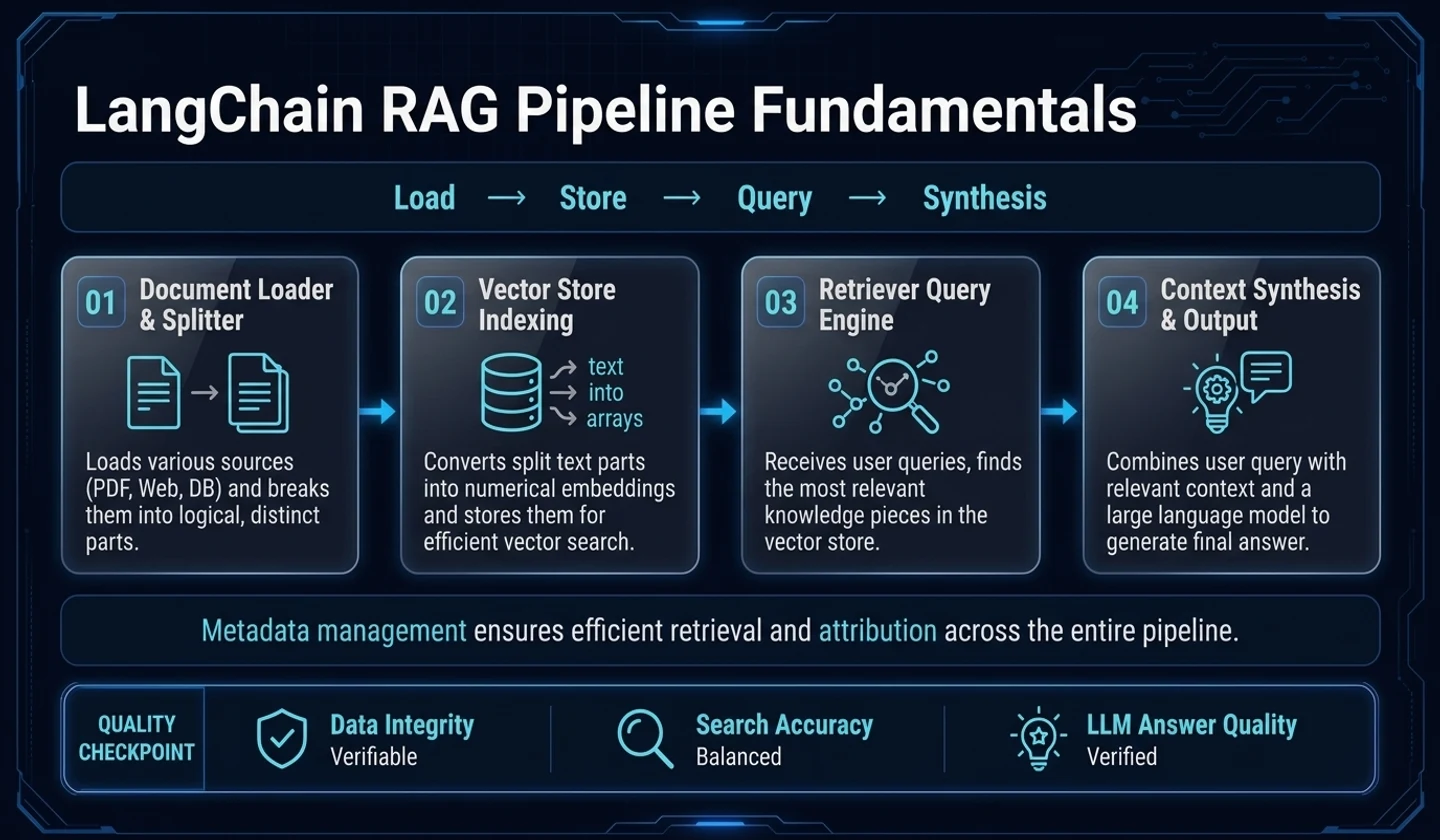
‘LangChain RAG learning flow summary’ does not start from the completed chatbot screen. In the first article, we start by following how one example document changes into the RAG pipeline.
The example is a hypothetical in-house knowledge document calledsample-office-guide.md. You can think of it as a document containing short instructions such as conference room reservations, equipment rental, and security access. It is not an actual internal document, but rather a learning material to see how the same artifact changes from document loading to search.
A reply is not created in the first post. It is still too early to see questions being asked and the model answering them. First, the document must beDocument, and thenDocumentmust be divided into searchable chunks. If you combine these two steps, you can see the most important criteria at the beginning of RAG. “What did you read?”, “Has the source been lost?”, and “Does the meaning remain even if you cut it into search units?”
What to leave before answering
When you first see RAG, the questions and answers catch your eye. However, the starting point of the actual flow is not a question but a document. You need to read the document, take out the main text, and add source information to create a form that can be taken over by the next step.
The unit frequently seen in LangChain at this time isDocument.Documentis not a box that only contains text.page_contentcontains the text to be searched, andmetadatacontains information to later trace the source.
from langchain_core.documents import Document raw_text = """Example in-house knowledge document Meeting room reservations can be made up to 1 hour before the start of use.Please check the condition of the equipment after using the conference room. Equipment rentals are recorded at the information desk and then returned.Secure access cards can only be applied for by approved entities.""".strip() doc = Document( page_content=raw_text, metadata={ "source": "sample-office-guide.md", "source_type": "markdown", "section": "office-guide", "version": "2026-06", },) print(doc.page_content)print(doc.metadata)The first thing to look at in this output is not whether the sentence looks pretty. The text and tracking information were left together. If there is onlypage_contentandmetadatais empty, it is difficult to explain where this piece came from even when looking at the search results later. Conversely, if only the metadata is plausible and the line breaks in the text are broken, the title and text may be divided incorrectly in the split step.
Check in the document output
Once you've createdDocument, you need to read the small output immediately before moving on to the next step.
| Check items | Reason to watch |
|---|---|
| text | Check that the document content is not missing or broken. |
| source | It is necessary to trace the source of each file in the search results later. |
| section | Distinguish between which area a sentence comes from even within the same file |
| version | Old indexes can be suspected when documents are updated. |
| source_type | Distinguish between inputs with different processing methods, such as Markdown, PDF, and web documents. |
This check may seem small, but it makes a big difference behind the scenes. Even if the retriever successfully retrieves the conference room reservation sentence, without metadata, it is difficult to leave information about “which section of the document the answer was based on.” In RAG, source indication is not a function that is suddenly added at the last stage, but becomes possible when the initial metadata is alive.
Why not embed it as is?
Nowsample-office-guide.mdhas becomeDocument. Even if you embed it right here, it can run. However, if a single document contains all information on conference room reservations, equipment rentals, and security access, the search unit is too coarse.
If the question is “How long can I reserve a meeting room?” the equipment rental paragraph and the security access paragraph are not necessary for the answer. If you make the entire document into one vector, unrelated content can be searched together. On the other hand, if you cut it too small, only the sentence “Reserve a meeting room” will remain and the point of use or caution sentences may be left out.
So splitting is not simply an operation to shorten the length. This is the process of dividing the document into units that can be used as answering material when a question is asked.
Running example: Divide Document into chunks
The example below is a flow that divides theDocumentcreated earlier into chunks and checks what the actual output looks like.
from langchain_text_splitters import RecursiveCharacterTextSplitter splitter = RecursiveCharacterTextSplitter( chunk_size=95, chunk_overlap=20, separators=["\n\n", "\n", " ", ""],) chunks = splitter.split_documents([doc]) for index, chunk in enumerate(chunks): print(f"chunk-{index}") print(chunk.page_content) print(chunk.metadata)The first thing to look at before the numberchunk_size=95is the contents of the output chunk. To answer the conference room reservation question, the condition "1 hour before start of use" must be in the same chunk. However, if the security access card sentence is included in the same chunk, unnecessary noise is mixed in the search results.
Chunk size and overlap are determined by output.
chunk_sizeandchunk_overlapare not values for memorizing the correct answer. It should be viewed differently depending on the sentence length of the document, title structure, and nature of the question.
| point of view | good signal | signal to watch again |
|---|---|---|
| chunk size | The context needed for the question remains in one piece. | A lot of unrelated topics are mixed together in one piece. |
| boundary | Title and text move together | The title is missing or the sentence is cut off in the middle. |
| overlap | Context near the border continues | Almost the same chunk is repeated |
| metadata | The originalDocumentsource is maintained | Source or section disappears from chunk |
When you read the output, you can quickly see whether the split was successful. If only the title appears separately, you need to look at the separator or chunk size again. If a sentence is cut in the middle, there may be insufficient overlap or the division criteria may not match. If the chunk is too long, the retriever is more likely to retrieve sentences that are unrelated to the question in the next step.
Cautionary example: Catch failure signals early
Problems with document loading and chunking appear to be behind-the-scenes search quality issues. So, we need to look at the failure signals at this stage separately.
- The body is empty: Check for loader or encoding problems first.
- Line breaks are broken: Markdown structure may have changed to be unfavorable to splits.
- No metadata: This makes attribution and debugging difficult later.
- The chunk contains only the title: it has little meaning as a search unit.
- The same sentence is repeated too many times: overlap may be creating duplication.
- Different topics are mixed in one chunk: search results are followed by unnecessary context.
It will be too late to find an answer to this problem after creating an answer through LLM. This is because the model covers it up with plausible sentences. At the beginning of the RAG, you should not look at the answers, but at the intermediate output.
Results to be passed on to the next article
Now the material to move on to the next step is not the answer but the chunk list. Each chunk has a body and metadata with clues such assample-office-guide.md, section, and version.
This state is the starting point of the next article. The next step is to convert these chunks into embeddings and place them in the vector store. And when the user asks a question, check which chunk the retriever retrieves.
To see if the search is successful, you must first check whether the materials you want to search for are correct.
Practical comparison: When to cut chunks into smaller and larger chunks
Chunk size is not the answer but a trade-off. If you cut it too small, the search results will look accurate, but the context needed to answer your answer may be missing. If you cut it too large, multiple topics will be mixed in one chunk, resulting in ambiguous search scores and prompt tokens increasing quickly.
| strategy | merit | failure signal |
|---|---|---|
| small chunk | Good for searching specific sentences | The answer is missing |
| big chunk | Good for context preservation | Unrelated content included |
| No overlap | token saving | Loss of paragraph boundary information |
| There is overlap | Boundary context preservation | Increased duplicate chunks |
For example, in a RAG asking for “vacation carryover criteria,” if the chunk is too small, only the “vacation carryover possible” sentence will be searched and the exclusion conditions may be omitted. Conversely, if the chunk is too large, vacation, sick leave, and compensatory leave are lumped together, making the answer unclear. So in the first pipeline, you need to visually check the chunk results and record whether each chunk can be used on an independent basis. This record becomes the basis for the next stage of retriever evaluation.
Operations isn't just about looking at a few chunk samples. Create a representative question for each document type and check whether the sentences required for the question remain in the same chunk. Because company regulations, FAQs, and tutorial documents have different sentence lengths and title structures, processing them with the same split value may fail. It is safer to compare small document batches first, collect failed chunks separately, and adjust splitter settings.
For example, an internal guide document may have a short title and a long body. In contrast, API documentation alternates between titles, parameter tables, and example code. If the same splitter is used, the in-house guide may be tied to too large a context, and the API documentation may have separated code and explanation. In this case, it is better to have different separator priorities or chunk sizes for each document type.
The initial log leaves the number of chunks, average length, and number of missing metadata. Before looking at the quality of the answers, you can check whether the search material is uniform. In RAG, “the model is wrong” often means “the search material is already broken.”
Lastly, the original text and chunks should be kept together. If only chunks are left, it is difficult to compare with previous results when the split criteria is changed later. If you leave the original version, splitter settings, and creation time in metadata, you can check what has changed when re-indexed with the same question.
Frequently Asked Questions
Q. If the document is short, can I omit split?
A. If it is a very short document, it can be omitted. However, if several topics are mixed, even if the length is short, it can be difficult as a search unit. Whether or not to omit is better judged by whether the context required for the question remains naturally within one unit rather than by the length of the document.
Q. How much metadata should be kept?
A. At least the source must be left. If possible, leave clues such as section, page, and version that can be used to review the search results later. Metadata is not decoration, but the basis for explaining search results.
Q. Can I start by deciding on the chunk size first?
A. The starting value can be determined. However, the decision must be made by reading the output chunk. Even if the numbers look good, if the title and body are separated or the same sentences are repeated, they need to be readjusted.
댓글
GitHub 계정으로 로그인하면 댓글을 남길 수 있습니다. 댓글은 GitHub Discussions를 통해 운영됩니다.