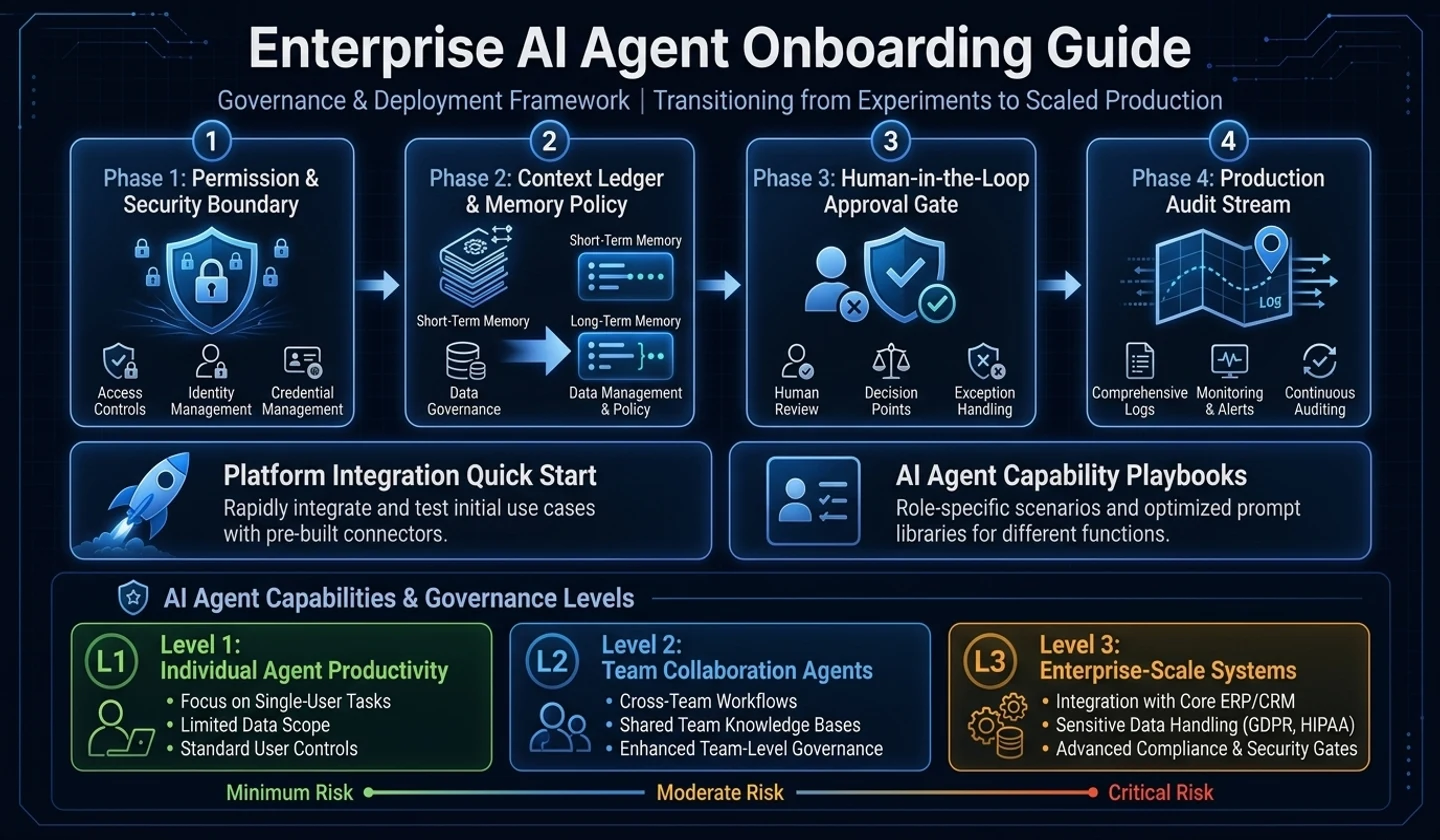
Suppose you are preparing an internal AI agent onboarding guide. You might start by collecting approved tools, prompt examples, and security instructions.
But in reality, another problem soon arises.
This automation requires administrator privileges.Where do I get an API key?Can I include the original text of the customer inquiry?Can operation logs be read by AI?Can I immediately distribute code created by AI?Which team budget covers expenses?When this question starts to come up, onboarding is no longer just “how-to” training. It becomes the operational design that determines which tasks the organization will entrust to AI, which data will be blocked, and which results will be verified by humans.
An AI agent onboarding guide shouldn't just be a collection of prompts. The key is to answer the following questions:
What tasks can be entrusted to AI agents?What data should not be included?Which practices must be approved?How will humans verify AI results?How will you change your team's workflow?| standard | detail |
|---|---|
| Analysis base date | 2026-05-13 |
| Analysis scope | In-house AX introduction, AI agent onboarding, security/authority/cost guardrail, practical application by job category |
| Key references | OpenAI Agents SDK, OpenAI agent construction guide, NIST AI RMF, Microsoft Work Trend Index, Google Cloud GenAI security guide, Atlassian AI Demo Playbook |
| Applicable to | AX representative, development team leader, platform/security representative, in-house AI introduction program operator |
Key takeaways
- Your in-house AI agent onboarding guide should be a task transformation playbook, not a how-to document.
- AI agents can handle more tools and permissions than regular chatbots, so permissions/data/cost/verification criteria must be designed together.
- The introduction flow can be divided into
Harbor -> Spark -> Harness -> Route. First create formal operating boundaries, demonstrate small success stories, add secure guardrails, and then operate with continuously updated standards. - It is better to separate onboarding documents into three sets:
Quick Start Guide,Role-based Playbook, andGovernance & Safety Guide. - Operational metrics should be viewed in terms of reduced repetitive work, reusable workflows, approved automation rates, and quality improvements rather than number of accounts or prompts.
Why is AI agent onboarding necessary?
This is how most AI tools start when introduced for the first time.
Try ChatGPT.Try Claude.Try using Copilot.Try using Cursor.Try Claude Code.This approach alone will not increase overall organization utilization. People want to know how to use a tool in their work rather than the name of the tool.
Developers are interested in PR reviews and test code generation. QA is concerned with test cases and reproducibility. Planners are interested in organizing requirements and drafting policy documents, while Operations/CS is interested in triaging customer inquiries and drafting responses.
| Traditional training methods | Onboarding Playbook Approach |
|---|---|
| Tool Function Description | Description of work flow changes |
| Provide example prompts | Provides use cases for each occupation |
| one-time training | Repeatable hands-on program |
| Rely on personal capabilities | Share stories with team champions |
| Security standards are ambiguous | Clarification of allowable/prohibited data standards |
| Usage-driven | Focus on reducing work time and improving quality |
Microsoft 2026 Work Trend Index explains that as AI and agents take over execution, the role of humans in directing and judging work increases. The interpretation in this article is clear. Internal onboarding should not be a document telling individuals to “try AI well,” but rather an operational document for the organization to absorb AI safely and repeatably.
Differences between AI agents and regular chatbots
This difference should be explained briefly and clearly at the beginning of onboarding.
Regular chatbots mainly answer questions. An AI agent receives a goal, finds the necessary information, calls a tool, and goes through several steps to produce a result.
OpenAI Agents SDK Documentation describes agents as LLM execution units that can be composed of runtime elements such as instructions, tools, handoffs, guardrails, and Structured Outputs. OpenAI's agent construction guide also explains that agents are suitable for workflows with complex decisions, rules that are difficult to maintain, and a lot of unstructured data.
| division | General chatbot | AI agent |
|---|---|---|
| default behavior | answer your questions | carry out the goal |
| input | prompt | Goals, data, tools, constraints |
| How it runs | Single response center | Multi-step task-oriented |
| Use tools | limited | API, files, browser, code, search, etc. |
| risk factors | incorrect answer | Running the wrong tools, misusing privileges, and increasing costs |
| care needed | prompt guide | Permissions, security, logs, costs, verification criteria |
Your onboarding guide should include the following sentences:
AI agents are action tools, not answer tools.Therefore, as execution authority grows, verification standards and guardrails must also grow.AX introduction methodology: Harbor, Spark, Harness, Route
This article divides internal AI adoption into four steps: define permitted use, share examples, manage permissions, and update the guidance.
Read the diagram as text
Harbor establishes the official operating boundary. It leads to Spark, the first success story, then Harness with guardrails and performance standards, then Route, a continuously updated playbook. Route feeds learning and cases back to Spark, rather than to Harbor.
Harbor: Management creates the harbor
Organizational transformation will not occur if AI use remains at the level of individual stealth. First, the company must make it official.
| decision item | question |
|---|---|
| expense | Which AI tools will be supported at company expense? |
| data | What data can AI be applied to? |
| authority | Which tasks will allow tool calls or automation? |
| responsibility | Who is in charge of AX operations? |
| security | What are the standards for sensitive information, customer information, and source code? |
| characteristic | What will be the results of using AI? |
Harbor defines what the company permits so individuals do not have to guess.
Spark: Show Colleagues a Useful Example
To get people to use AI, you don't need to explain the LLM principles first. Even stronger is the actual example of the team next door.
A person on the next team used AI to reduce work that used to take 2 hours to 20 minutes each week.Atlassian AI Use Case Demo Playbook suggests concrete use case demos as one way to encourage AI adoption. Live demos, especially ones that solve real-world problems, make colleagues think, "I could write like that."
Your onboarding guide should have more Before/After examples than tooltips.
| Before | After |
|---|---|
| Have people read the meeting minutes and organize decisions | AI drafts decisions/persons in charge/deadlines and human reviews |
| Reviewer goes through PR diff from the beginning | AI organizes change summaries/risk points/test candidates first |
| Operators manually classify customer inquiries | AI drafts type/priority/answer and operator confirms |
| Prepare weekly reports in different formats | AI organizes risks/decisions/next actions into a common template |
Harness: Creating guardrails that accelerate freedom
As AI usage begins to take off, permission requests will increase. At this time, if you block everything, the spread will die, but if you open everything, an accident will occur.
So what you need is a Harness.
Harness is not a control that prevents the use of AI, but a guardrail that safely allows more use. NIST AI RMF Core divides AI risk management into Govern, Map, Measure, and Manage functions. In-house AI agents should be viewed in the same way.
| Harness area | device needed |
|---|---|
| data | Input Prohibited/Conditionally Allowed Data Table |
| authority | File, browser, API, DB, distribution permission level |
| expense | Cost basis per model, repeat execution limit, limit per team |
| verification | What people need to check, testing criteria |
| log | Who performed what tasks with what tools |
| incident response | Procedure when incorrect input/output/tool execution occurs |
Route: Standards keep changing
AI tools and models change rapidly. Today's best practice may be outdated next month. That’s why your onboarding guide should be a living document, not a finished document.
Route reviews successful and failed uses and updates the operating rules.
Collect new use casesto risk classificationto be reflected in each team’s practiceto failure cases and guardrail updatesto be reflected in the following onboarding materialsThe onboarding guide is divided into three sets.
Separate introductory, role-based, and security guidance so readers can find the instructions they need.
| document | Target | purpose |
|---|---|---|
| Quick Start Guide | former employee | Create your first success in 30 minutes |
| Role-based Playbook | Users by Occupation | Provides examples that can be applied directly to my work |
| Governance & Safety Guide | Leader, AX representative, security officer | Organize permissions, data, costs, and audit standards |
Quick Start Guide
The success criterion for an introductory document is not the amount of explanation, but the first work product.
target:First-time user within 30 minutesIt makes you handle one of your tasks with an AI agent.| section | detail |
|---|---|
| What is an AI agent? | Differences from chatbots |
| available tools | List of in-house approval tools |
| Apply for an account | approach |
| first practice | Meeting minutes summary, document organization, code explanation, etc. |
| prohibited data | Information that should not be entered |
| Results Verification | What people will check |
Role-based Playbook
Role-based Playbook must be divided by job category. Even with the same AI tool, the first success experience is different for each job.
| Occupation | Representative use cases |
|---|---|
| development | Code descriptions, PR summaries, test case creation, refactoring drafts |
| QA | Summary of test scenarios, edge cases, and reproducibility procedures |
| planning | Draft requirements, user stories, and policy documents |
| design | User guide, screen text, accessibility check |
| Operations/CS | Categorize customer inquiries, draft responses, and issue summaries |
| Data/Analysis | Indicator definition, SQL draft, report summary |
| leader | Weekly reports, decision risks, meeting summaries |
Governance & Safety Guide
This document doesn't need to be long. But it shouldn't be ambiguous.
| item | Things that must be organized |
|---|---|
| data grade | Public/Internal/Sensitive/Customer/Confidential |
| tool permissions | File, browser, code, API, DB access |
| expense | Pay attention to team limits, cost per model, and repeat execution. |
| log | What usage records will be left behind? |
| approval | Which requests require separate approval? |
| incident response | Procedure when incorrect input or output occurs |
OpenAI Enterprise Privacy explains the ownership and control of business data in enterprise products and API Platform, whether model learning is used, and access control within the organization. However, in-house guides should not rely solely on specific vendor policies. Data processing standards for each tool actually used by the company must be organized in a separate table.
Design your first success experience
The most important thing about onboarding is experiencing your first success. If you try to automate something grandiose from the beginning, it will fail. It requires small exercises that can be completed in 15 to 30 minutes.
| Target | first practice | expected effect |
|---|---|---|
| former employee | Extract action items after summarizing long documents | Feel it immediately |
| developer | Create PR diff summary and review points | Save code review time |
| QA | Requirements-based test case creation | Missing case discovered |
| planner | Convert meeting minutes into draft policy documents | Speed up documentation |
| designer | Convert screen descriptions into user guides | Reduce repetitive document tasks |
| CS | Categorize customer inquiries by type | Uniform response quality |
| leader | Summarize weekly work details into risks/decisions | decision aid |
The important thing here is that the subject of the practice should be “Solving one of my tasks,” not “Experience AI functions.”
| bad practice | good practice |
|---|---|
| Let AI write a self-introduction | Have this week's meeting minutes tabulate decisions, personnel, and deadlines. |
| Let AI summarize any text | Extract next actions and missing decisions from real team documents |
| Prompt Engineering Glossary | Have your team reduce one task they repeat each week |
Use cases are created with cards for each occupation.
Good use case cards show workflow rather than prompts. Cards for developers can be created like this:
# Use case card: Summary of PR changes ## TargetDeveloper, Tech Lead ## Conventional methodCheck PR diff to Read changed files to Write review points to Organize items needed for testing ## AI application methodEnter PR diffs and related issues to Change Summary to Risk Points to Generate Test Recommendations ## Input data- PR diff- Related Jira/GitHub Issues- Some changed files- Existing test code ## Output format- 5 line summary- Major changes- Danger Points- Items required for testing- Review Questions ## caution- Check that secret keys, tokens, and customer information are not included in the diff.- Do not approve AI results as is- The final merge decision is made by a human.For QA cards, the input and verification criteria are different.
# Use case card: Requirements-based test case creation ## TargetQA, planner, developer ## Conventional methodReading requirements documents to organizing normal flow to manually deriving exception cases ## AI application methodEnter requirements and screen policies to create normal/exception/boundary test drafts ## Output format- Test purpose- Prerequisites- test data- procedure- Expected results- Priority ## Verification criteria- Are there any cases that conflict with business policies?- Were any security/permission related cases left out?- Is the procedure actually executable by humans?AI agent use is classified into three stages:
Summarizing meeting minutes and automating access to operational databases have completely different risks. All uses of AI should not be managed at the same level.
| level | type of use | example | Approval Criteria |
|---|---|---|---|
| Level 1 | personal productivity | Abstracts, translations, drafts, minutes, code comments | Allow immediately |
| Level 2 | Team work assistance | QA scenario, PR summary, report automation, log analysis | Team leader or representative review |
| Level 3 | System linkage/automatic execution | DB inquiry, API call, distribution script, customer information processing | Security/Development/AX Review |
Google Cloud's Generative AI Security Guide covers generative AI workloads from the perspectives of infrastructure, data management, and application control. Google Cloud Production-Ready AI Learning Path also divides agents into development, security, deployment, evaluation, and production patterns.
Your in-house guides should be the same way. The starting point is not “Use AI,” but “First classify what level of work it is.”
Security/data/permission standards should be written on 1 page.
Summarize permitted and prohibited data in a one-page table, with links to detailed policies.
Data prohibited from entering
First, prohibited data must be displayed directly in a checklist.
What you should not input into an AI agent [ ] Customer personal information[ ] Resident registration number, account number, card number[ ] Authentication token, API Key, Secret Key[ ] Original text of non-disclosure agreement[ ] Documents from other teams that you do not have access to[ ] Operation DB original data[ ] Security vulnerability details[ ] Source code prohibited from being disclosed externallyConditionally accepted data
Anonymization and masking standards must be written down so that users can immediately judge them.
Conditionally available [ ] Anonymized logs[ ] Masked customer inquiry[ ] Part of code that can be made public[ ] Summary of internal policies[ ] Dummy data for testing[ ] Sample API responsePermission request criteria
Once AI agents start calling tools, permission management becomes important.
| Permission Type | example | default policy |
|---|---|---|
| read file | Document summary, code analysis | limited permission |
| edit file | Code changes, documentation modifications | Allow after checking diff |
| Browser Access | Web browsing, screen capture | public information focus |
| API call | Internal system inquiry | Approval required |
| DB access | Operational data inquiry | default ban |
| Run Deployment | Run script, call CI/CD | High risk approval required |
Operates as a 4-week onboarding program
The proposed four-week program adds exercises and feedback to the written guidance.
| parking | target | What's going on | output |
|---|---|---|---|
| Week 1 | Basic user experience | Account setup, first practice, banned data training | Individual practice results |
| Week 2 | Application to work by job group | One representative task per team is processed with AI | Before/After cases |
| Week 3 | Agent-type business expansion | Use tools, work based on documents/code/logs | Team workflow template |
| Week 4 | Sharing and standardization | Case presentation, failure case summary, guide update | In-House Playbook v1 |
The advantages of this approach are clear.
- People actually use it.
- There are success stories.
- Failure cases are also reflected in the documentation.
- The guide becomes a living document.
Practical template
At the end of your onboarding guide, you should include a template that you can copy and use right away.
AI agent request template
# AI agent request template ## 1. GoalWhat needs to be done? ## 2. BackgroundWhy is this necessary? ## 3. Input dataWhat documents, logs, code, issues, and policies should AI refer to? ## 4. ConstraintsWhat should not be done, what rules should be followed, and what are the formalities? ## 5. Output formatWill you receive it as a table, Markdown, JSON, checklist, code, or email draft? ## 6. Verification criteriaWhat must a person confirm to be considered complete?The quality of the request significantly changes the quality of the result.
| bad request | good request |
|---|---|
| Please fix this code | Please suggest a modification in the Node.js API code below to return 401 instead of 500 when authentication fails. Maintain the existing response schema and suggest change file candidates and test cases. |
| Organize the documents | In the meeting minutes below, organize the decisions, people in charge, deadlines, and unconfirmed issues in a table. Mark items where the facts are unclear as “requires confirmation.” |
| Automate it | First organize the current manual procedures, input data, whether permission is required, and how to revert in case of failure, and then classify the scope of automation into Level 1/2/3. |
AX Automation Request Form
For work above Level 2, it is better to receive a request form.
# AX Automation Request ## 1. Problem you are trying to solve-What tasks are currently repeated?- How long does it take to process once?- How many times per month does it occur? ## 2. Current work flowBefore:1.2.3. ## 3. Expected flow after applying AIAfter:1.2.3. ## 4. Data used- Public data:- Internal general data:- Sensitive data:- Customer/Personal Information:- Whether source code/private key is included: ## 5. Required permissions- File access:- API access:- DB access:- External service integration:- Requires administrator privileges: ## 6. Result- document- code- Report- alarm- Web service- Auto-run script ## 7. Risk classification- Level 1: Personal productivity- Level 2: Team work automation- Level 3: System/data linkage ## 8. Verification criteria- Items for humans to check:- How to revert in case of failure:- Logs or evidence:Checklist before personal use
# Checklist before using AI agent ## Input data[ ] Does it contain customer personal information?[ ] Are the API Key, Secret, and Token included?[ ] Does it contain any contracts/policies/source code that cannot be disclosed externally?[ ] Has it been anonymized or masked where necessary? ## Scope of work[ ] Is the task to be entrusted to AI clear?[ ] Are the items for human final judgment separate?[ ] Did you specify the output format?[ ] Is it possible to turn back in case of failure? ## verification[ ] Have you confirmed the facts created by AI?[ ] Has the AI-generated code been tested?[ ] Have you checked for security/permissions impacts?[ ] Are there excessive costs? ## share[ ] Can this use case be reused by my team?[ ] Was it organized into a workflow rather than a prompt?[ ] Are success/failure stories posted on internal channels?Operational indicators are viewed as changes in business rather than usage.
To encourage active use of AI agents, you must also have good metrics. Many organizations first look at usage.
Number of accounts issuedNumber of prompts per monthNumber of users accessing AI toolsHowever, it is difficult to know the actual effect from this alone. A more important indicator is the change in workflow.
| bad indicator | good indicator |
|---|---|
| Number of AI accounts issued | Save time on repetitive tasks |
| Prompt Share Count | Number of reusable workflows |
| Number of training attendees | Number of actual application cases |
| monthly usage | Cost-effective savings |
| Chatbot calls | Output quality improvement rate |
| Number of automation | Safely approved Level 1/2 duty ratio |
The goal of your onboarding guide should not be to increase usage, but to answer the questions below:
How has this team changed their workflow with AI agents?Is the change safe?Is it repeatable?Can other teams also use it?Order of operation starting immediately
There is no need to create a huge AX organization from scratch. You can start small.
1. Collect three tasks that each team repeats every week.2. Classify each task into Level 1/2/3.3. Create a 30-minute practice with one Level 1 task.4. Leave before/after cases on a card.5. Include prohibited data and permission standards on one page.6. After 4 weeks, update the playbook to reflect actual cases and failure cases.Choose one recurring task and define its inputs, the AI work, and the human review step.
Keep the role-based example, introductory exercise, and permission rules available for the next person who attempts the same task.
summary card
| item | detail |
|---|---|
| one line summary | AI agent onboarding is not a how-to training, but a workflow transformation playbook. |
| Recommended for | AX manager, in-house AI introduction manager, development team leader, security/platform manager |
| the most important structure | Quick Start Guide + Role-based Playbook + Governance & Safety Guide |
| biggest risk | Opening permissions/API/DB access without security standards |
| the most important device | First success experiences and before/after cases for each job group |
| What to do right now | Collect 3 repetitive tasks for each team and organize them into use case cards |
댓글
GitHub 계정으로 로그인하면 댓글을 남길 수 있습니다. 댓글은 GitHub Discussions를 통해 운영됩니다.