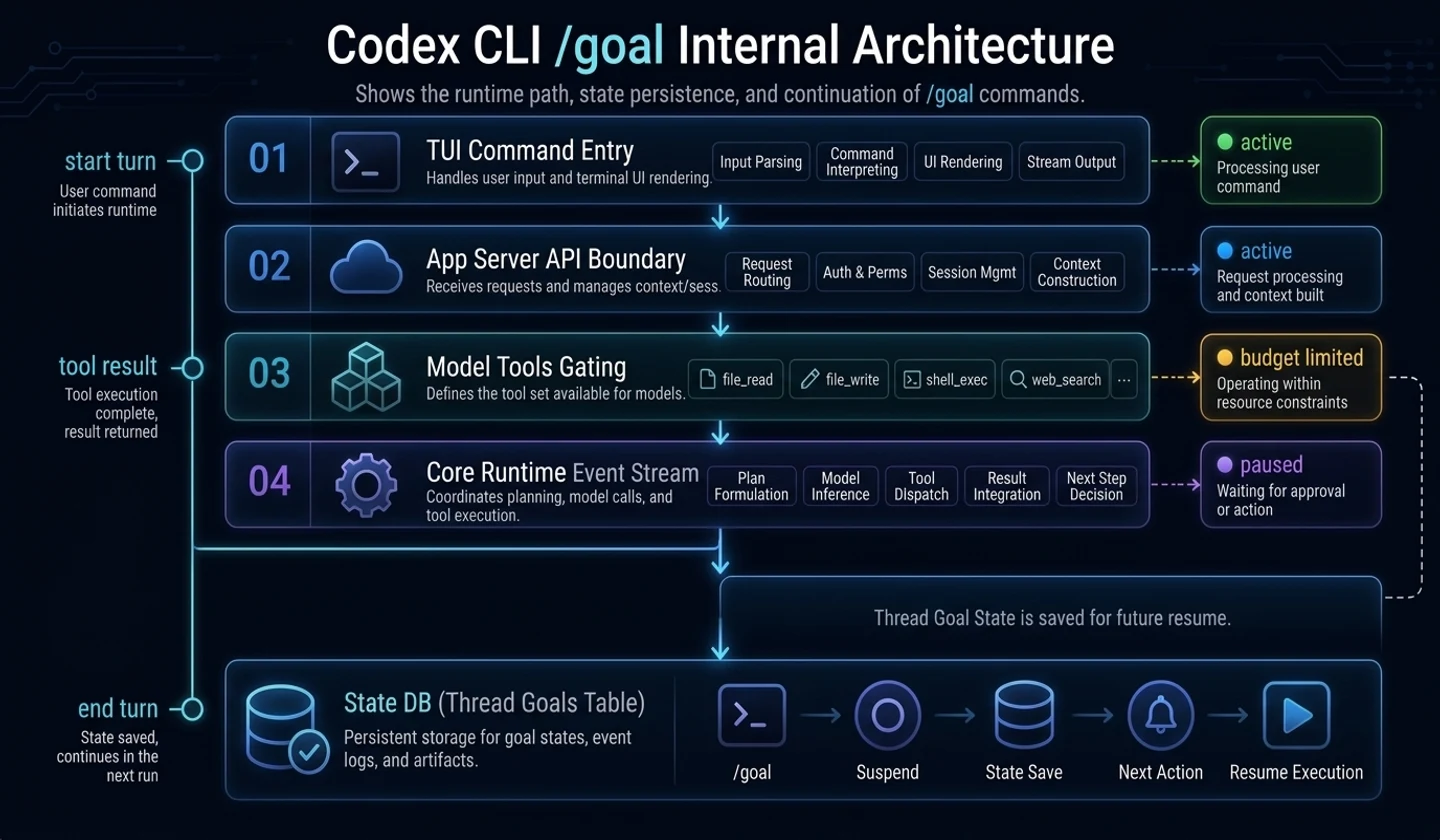
Viewthread_goals, continuation runtime, and completion audit at the code level
In Part 1, we looked at Codex CLI/goalfrom the user's perspective. In this article, we look at the internal structure.
The key is simple.
# Reading Guide: The blocks below are examples of commands, state flows, or templates./goal is not a single command.It is a function that combines target state storage, app-server API, model tool, runtime continuation, and TUI control.This article was written based on Codex GitHub PR and publicly available source files. This is a soon-to-be-released feature, so actual implementation may vary in future versions.
Analysis base date: 2026-05-02 Base version: Codex CLI
0.128.0Main reference materials: OpenAI Codex changelog, GitHub PR #18073–#18077,thread_goalsmigration,continuation.md,budget_limit.md
Key takeaways
/goalis a five-layer function leading to TUI command to app-server API to model tools to core runtime to state DB.- The goal status is stored in the
thread_goalstable, and the status is limited toactive,paused,budget_limited, andcomplete. - The model tool cannot manipulate goals arbitrarily.
update_goalis limited to completion processing, and pause/resume/clear/budget-limited transitions remain under user or runtime control. - The core runtime processes turn start, tool completion, turn finish, interrupt, resume, and idle continuation through
GoalRuntimeEvent. - The continuation prompt asks you to perform a completion audit based on the “current actual state” before completion.
- From a good agent design perspective, the key to
/goalis evidence event-driven continuation + audit + budget guard, notwhile true.
1. Overall structure: View in 5 layers
Based on the code,/goalis close to the structure below.
# Reading Guide: The blocks below are examples of commands, state flows, or templates.TUI /goal command↓app-server thread/goal API↓model tools: get_goal / create_goal / update_goal↓core runtime: continuation / accounting / interrupt / resume↓state DB: thread_goals tableEach layer has a different role.
| layer | role | key points |
|---|---|---|
| TUI | UI for users to create, stop and erase/goal | Command and status display |
| app-server | API where the client controls the thread goal state | get/set/clear, notification, resume snapshot |
| model tools | A tool that allows the model to view, create, and complete goals | Permission restrictions are important |
| core runtime | Continue, accounting, interrupt, resume processing | Central to creating real “keeps going” |
| state DB | Save goal objective/status/usage | Thread-level persistence |
Looking at this structure, it is clear that/goalis not simply a “prompt telling the model to continue.” The target state is in the DB, and the runtime updates the state according to the turn life cycle.
2. State DB:thread_goalstable
At the very bottom is thethread_goalstable. On a public migration basis, this table stores the following information:
| column | meaning |
|---|---|
thread_id | Thread identifier with goal |
goal_id | Identifier of the goal itself |
objective | User-specified goals |
status | One ofactive,paused,budget_limited,complete |
token_budget | Optional token budget |
tokens_used | Cumulative token usage during goal execution |
time_used_seconds | Accumulated time during goal execution |
created_at_ms | creation time |
updated_at_ms | update time |
If you write it as a pseudo type, you can see it like this.
// Reading Guide: This is not an actual API, but pseudocode that explains the structure.type ThreadGoal = { thread_id: string goal_id: string objective: string status: "active" | "paused" | "budget_limited" | "complete" token_budget?: number tokens_used: number time_used_seconds: number created_at_ms: number updated_at_ms: number}The important thing here isthread_id. A goal is not a simple memory flag, but is attached to thread state. So it can be connected to functions like resume, reconnect, and app-server snapshot.
Another important one isgoal_id. According to the description of PR #18073, stale update protection has been included. In other words, it is a device that prevents old goal updates from overwriting new goals.
# Reading Guide: The blocks below are examples of commands, state flows, or templates.problem:- Goal A is in progress.- The user replaces it with goal B.- The goal A update that arrives late overwrites the state of goal B. solve:- Check expected goal_id when updating.- If it is different from the current goal_id, it is considered a stale update and blocked.This protection is important in AI agent runtime. This is because when multiple async tasks, tool results, and user mutations are mixed, “late-arriving updates” can break the state.
3. App-server API: thread goal control plane
The second layer is the app-server API. PR #18074 explains that the following RPC and notification were added to the v2 API.
# Reading Guide: The blocks below are examples of commands, state flows, or templates.RPC:- thread/goal/get- thread/goal/set- thread/goal/clear Notification:- thread/goal/updated- thread/goal/clearedThe reason this API is needed is because the client needs to reliably read and control the goal state.
| API elements | role |
|---|---|
thread/goal/get | Check the goal status of the current thread |
thread/goal/set | Set goal or change state |
thread/goal/clear | remove goal |
thread/goal/updated | Notify the client of goal changes |
thread/goal/cleared | Notify the client of goal deletion |
| resume/snapshot wiring | Allows the reconnected client to view the current goal status. |
With this layer, not only TUI but also other clients can see the same goal status. In other words,/goalis not a TUI-specific hack, but a structure that handles materialized thread goals through the app-server.
4. Model tools: Limited model permissions
The third layer is the model-facing tool. According to PR #18075, there are three goal-related tools:
# Reading Guide: The blocks below are examples of commands, state flows, or templates.get_goalcreate_goalupdate_goalThis is where the design gets interesting. The model does not allow unlimited manipulation of the goal.
| Tool | Allowed Roles | limits |
|---|---|---|
get_goal | Check current goal | read center |
create_goal | Create an explicitly requested goal | Restrict creation to only when there is no existing goal |
update_goal | Goal completion processing | Limited to center on completion |
The PR description explains that thepause,resume,clear, andbudget_limitedtransitions are not handled by the model at will, but are left user- or runtime-controlled.
This design is important.
Giving all state control to the model can cause problems like this.
# Reading Guide: The blocks below are examples of commands, state flows, or templates.- The model pauses itself to avoid work.- The model arbitrarily releases the budget exceeding state.- The model clears the goal created by the user.- Marked as complete even though it is not completed.So/goalallows the model to perform tasks and declare completion, but separates user control from runtime control.
# Reading Guide: The blocks below are examples of commands, state flows, or templates.Model permissions: lookup, explicit creation, completion processingUser permissions: pause, resume/unpause, clear, replacementruntime permissions: budget_limited, accounting, continuation schedulingThis separation of rights is worth referring to when creating an agent system.
5. Core runtime: continuation state machine
The fourth layer is the most important. PR #18076 views long-running goals as a core runtime concern, not as a client. This is because the core manages turn lifecycle, tool completion boundaries, interruptions, resume behavior, and token usage.
Looking at thegoals.rsannotation in the public code, this module connects the core session and the state DB goal table and is responsible for goal mutation verification, protocol conversion, goal-update event issuance, and lifecycle hook.
Key events can be viewed as follows:
# Reading Guide: The blocks below are examples of commands, state flows, or templates.GoalRuntimeEvent- TurnStarted- ToolCompleted- ToolCompletedGoal- TurnFinished- MaybeContinueIfIdle- TaskAborted- ExternalMutationStarting- ExternalSet- ExternalClear- ThreadResumedSummarized in pseudocode, it is as follows.
// Reading Guide: This is not an actual API, but pseudocode that explains the structure.on TurnStarted: capture token usage baseline if current thread has active goal: mark goal active for this turn on ToolCompleted: account token/time usage reset no-tool continuation suppression if token budget exceeded: mark goal as budget_limited inject budget wrap-up steering on TurnFinished: account final usage if this was a continuation turn and tool_calls == 0: suppress next automatic continuation on MaybeContinueIfIdle: if session is idle and active goal exists: start continuation turn on TaskAborted with interrupt: account usage pause active goal on ThreadResumed: reactivate paused goal outside plan modeHere, the true nature of/goalis revealed. The reason Codex “appears to continue working” is not because the model runs in an infinite loop by itself, but because it schedules a continuation turn while the core runtime is idle.
# Reading Guide: The blocks below are examples of commands, state flows, or templates.active goal exists+ session is idle+ not suppressed+ budget not exhausted= start continuation turn6. Continuation prompt: The key to completion auditing
continuation.mdtemplate is the key to/goalquality.
This prompt instructs you to continue executing the active thread goal first. At the same time, it specifies that the objective should be treated as “user-provided data.” In other words, the goal statement is not promoted like a system instruction.
Also, the following information is included in each continuation.
# Reading Guide: The blocks below are examples of commands, state flows, or templates.Time spent pursuing goalTokens usedtoken budgetTokens remainingThe most important part is the completion audit. The prompt asks you to do the following before declaring completion:
| request | meaning |
|---|---|
| Reorganize objectives into concrete deliverables/success criteria | Convert your goals into testable form |
| Mapping all explicit requirements to evidence checklist | Avoid missing requirements |
| View real evidence including files, command output, test results, PR status, etc. | Judge based on current status, not words |
| Do not complete with proxy signal alone | “Passing the test” is only evidence if it covers the entire goal |
| If you are uncertain, keep working instead of completing. | Prevent premature completion in ambiguous states |
This part is very important in AI agent design.
This is how a bad agent loop ends:
# Reading Guide: The blocks below are examples of commands, state flows, or templates.One test passedto It's probably okay→ completeA good goal runtime should end like this.
# Reading Guide: The blocks below are examples of commands, state flows, or templates.List your target requirementsto map each requirement to actual evidenceto Check missing/unverified itemsto complete if all are metto or select the next concrete actionThis is the difference between/goaland a simple repeat prompt.
7. Budget limit: soft stop design
/goalhas the concept of token budget. Public migrations includetoken_budgetandtokens_used, and runtime PR explains that token budget exhaustion is treated as a soft stop.
The important thing is that active turns are not forced to abort when the budget is reached. Instead, we mark the goal asbudget_limitedand inject wrap-up steering.
The intention ofbudget_limit.mdis as follows:
# Reading Guide: The blocks below are examples of commands, state flows, or templates.- The active thread goal has reached the token budget.- Objective is treated as user-provided data.-Do not start new substantive work.- Organize progress, remaining tasks, blockers, and next steps.- Do not call update_goal complete unless it is actually completed.This is a good design. Just because the budget is over doesn't mean the goal is complete.
# Reading Guide: The blocks below are examples of commands, state flows, or templates.budget exhausted!= goal completeIf the budget limit is designed incorrectly in a practical agent, two problems arise.
| bad design | problem |
|---|---|
| Immediate hard abort when budget is exceeded | Remaining tasks and status are not communicated to users |
| Treat budget exceedance as complete | Unfinished tasks appear complete |
Codex's direction is somewhere in between.
# Reading Guide: The blocks below are examples of commands, state flows, or templates.over budgetto budget_limited state transitionto prevent starting new tasksto Summary of progress and reporting of remaining workto complete only when it is actually completed8. Loop guard and safety device
The most dangerous thing about long-running goals is endless repetition./goalcontains devices to reduce this.
8.1 No-tool continuation suppression
PR #18076 explains that automatic continuations are suppressed when the continuation turn ends without a tool call.
The meaning is this:
# Reading Guide: The blocks below are examples of commands, state flows, or templates.Start continuation turnThe to model just talks without actually reading/editing files/executing commands.→ tool_calls == 0to suppress next automatic continuationThis device is important. Otherwise, your model can get stuck in a loop where it just says things like “I’ll keep going.”
8.2 Interrupt pause
When the user stops, the active goal is paused. This is a structure to prevent the goal from continuing even if the user stops.
# Reading Guide: The blocks below are examples of commands, state flows, or templates.user interrupt→ active goal accounting→ goal status paused8.3 Resume auto-reactivation
According to the description of PR #18076, when thread resumes, an action has been taken to automatically reactivate paused goals if they are not in plan mode. In other words, it treats interruption and resumption as part of the goal lifecycle.
8.4 Stale goal_id protection
In the state layer, there is stale update protection based ongoal_id. Prevents old updates from overwriting new goals.
8.5 Objective privilege separation
The continuation prompt treats the objective as user-provided data rather than a “higher-priority instruction”. This is a structure to prevent it from being promoted to a system/developer instruction even if the user enters a strong command in the goal.
9. Apply to your own Agent design
The most important thing to learn from/goalis the separation of “auto-repeat” into runtime events.
Bad implementations usually end up like this.
// Reading Guide: This is not an actual API, but pseudocode that explains the structure.while (true) { const result = await agent.run(goal) if (result.done) break}This method is simple but risky.
# Reading Guide: The blocks below are examples of commands, state flows, or templates.- The completion judgment is weak.- Cost restrictions are poor.- Difficult to stop/resume.- Difficult to handle user input priorities.- It is difficult to prevent repetition without tool calls.- A previous goal update may overwrite the new goal.A better structure would be like this:
// Reading Guide: This is not an actual API, but pseudocode that explains the structure.interface GoalRuntime { state: GoalStateStore scheduler: ContinuationScheduler auditor: CompletionAuditor accounting: UsageAccounting controls: UserControls guards: LoopGuards}The responsibilities of each component are separated.
| component | responsibility |
|---|---|
GoalStateStore | Save objective, status, usage, timestamps |
ContinuationScheduler | Next turn starts only in idle state |
CompletionAuditor | Mapping requirements and evidence to determine completion |
UsageAccounting | token/time budget accumulation |
UserControls | pause, resume, clear, replace |
LoopGuards | no-tool suppression, stale update protection, interrupt handling |
The actual implementation pseudocode can be captured as follows.
// Reading Guide: This is not an actual API, but pseudocode that explains the structure.async function maybeContinueIfIdle(session: Session) { if (!session.isIdle()) return if (session.hasPendingUserInput()) return const goal = await goalStore.get(session.threadId) if (!goal || goal.status !== "active") return if (goalRuntime.isContinuationSuppressed(goal.goal_id)) return if (goal.token_budget && goal.tokens_used >= goal.token_budget) return await session.startContinuationTurn({ prompt: renderContinuationPrompt(goal), goal_id: goal.goal_id, })}It is recommended that completion judgments be separated by a separate auditor.
// Reading Guide: This is not an actual API, but pseudocode that explains the structure.async function auditCompletion(goal: Goal, evidence: Evidence[]) { const checklist = buildChecklist(goal.objective) const coverage = mapEvidenceToChecklist(checklist, evidence) if (coverage.hasMissingItems()) { return { complete: false, nextAction: coverage.suggestNextAction() } } if (coverage.hasWeakVerification()) { return { complete: false, nextAction: "collect stronger evidence" } } return { complete: true }}The key is not whether the agent worked hard, but whether the requirements were met with actual evidence.
10. Implementation Checklist
If you are creating your own goal-based agent, it is recommended to check the following.
# Reading Guide: The blocks below are examples of commands, state flows, or templates.Goal State[ ] Place goal_id.[ ] Save the objective.[ ] Limit status to active/paused/budget_limited/complete, etc.[ ] Accumulate token/time usage.[ ] Enable stale update protection. Runtime[ ] separates the turn started/finished events.[ ] Count usage from tool completed events.[ ] The continuation starts only in idle state.[ ] User input takes precedence over continuation.[ ] Pauses the active goal when interrupted.[ ] Restores the goal state when resumed. Completion Audit[ ] Reorganize objectives into success criteria.[ ] Make requirements into a checklist.[ ] Map each item to a file/command/test result.[ ] Do not complete processing with proxy signal alone.[ ] If uncertain, proceed with continue rather than complete. Budget[ ] A token budget can be set.[ ] If the budget is exceeded, it is not processed as complete.[ ] Provides wrap-up in budget_limited state.[ ] Steering so as not to start a new substantive task. User Controls[ ] pause is supported.[ ] Supports resume or unpause.[ ] Clear is supported.[ ] When replacing, distinguish between the existing goal and the new goal. Loop Guards[ ] A continuation without a tool call is not repeated.[ ] Set a long-running command timeout.[ ] Record history to avoid repeating the same failure.[ ] Limit permissions and writable scope.11. References and uncertainty
References
- OpenAI Codex changelog:https://developers.openai.com/codex/changelog
- OpenAI Codex GitHub repository:https://github.com/openai/codex
- PR #18073 — goal persistence foundation:https://github.com/openai/codex/pull/18073
- PR #18074 — app-server goal API:https://github.com/openai/codex/pull/18074
- PR #18075 — model-facing goal tools:https://github.com/openai/codex/pull/18075
- PR #18076 — core runtime goal loop:https://github.com/openai/codex/pull/18076
- PR #18077 — TUI goal UX:https://github.com/openai/codex/pull/18077
thread_goalsmigration:https://raw.githubusercontent.com/openai/codex/main/codex-rs/state/migrations/0029_thread_goals.sqlcontinuation.md:https://raw.githubusercontent.com/openai/codex/main/codex-rs/core/templates/goals/continuation.mdbudget_limit.md:https://raw.githubusercontent.com/openai/codex/main/codex-rs/core/templates/goals/budget_limit.md- Issue #19910 — User report regarding compaction:https://github.com/openai/codex/issues/19910
- Issue #20536 —
/goalDocumentation Request:https://github.com/openai/codex/issues/20536
confirmed facts
- The
thread_goalstable storesthread_id,goal_id,objective,status,token_budget,tokens_used,time_used_seconds, timestamps. statusis limited toactive,paused,budget_limited,complete.thread/goal/get,thread/goal/set,thread/goal/clearRPC and goal updated/cleared notification have been added to app-server.- The model-facing tools are
get_goal,create_goal, andupdate_goal, andupdate_goalis limited to the center of completion. - The core runtime handles idle continuation, usage accounting, budget limit, interrupt pause, resume reactivation, and no-tool suppression.
Author's interpretation
/goalcan be seen as an example of incorporating the “goal-based runtime” of an AI coding agent into a popular product.- The most important design point is the completion audit rather than the continuation scheduler.
- This structure can be applied not only to Codex CLI but also to its own AI Agent, CI repair bot, and long-running coding assistant.
uncertainty
- As this is a feature immediately after release, CLI help, command alias, and documentation may be subject to change.
- The compaction failure mode mentioned in GitHub issue #19910 is based on user reports and may be modified in the future.
- This is based on open source analysis, so internal runtime details or product behavior may vary across versions.
finish
In summary, Codex CLI/goalis not a simple slash command, but a function that configures the agent runtime around the goal state.
The most important lesson is this:
# Reading Guide: The blocks below are examples of commands, state flows, or templates.If you want to run the AI Agent for a long time, do not create a while loop first,Status, events, auditing, budget, and user controls must be designed first./goalshows that direction well. It stores goals, continues with runtime events, audits completion with actual evidence, and handles budgets and interrupts as state transitions.
If you are creating your own AI coding agent, this structure is worth referring to. In particular, theGoal State + Evidence Checklist + Continuation Scheduler + Budget Stop + User Controlcombination is a much safer starting point than simple repetition.
댓글
GitHub 계정으로 로그인하면 댓글을 남길 수 있습니다. 댓글은 GitHub Discussions를 통해 운영됩니다.