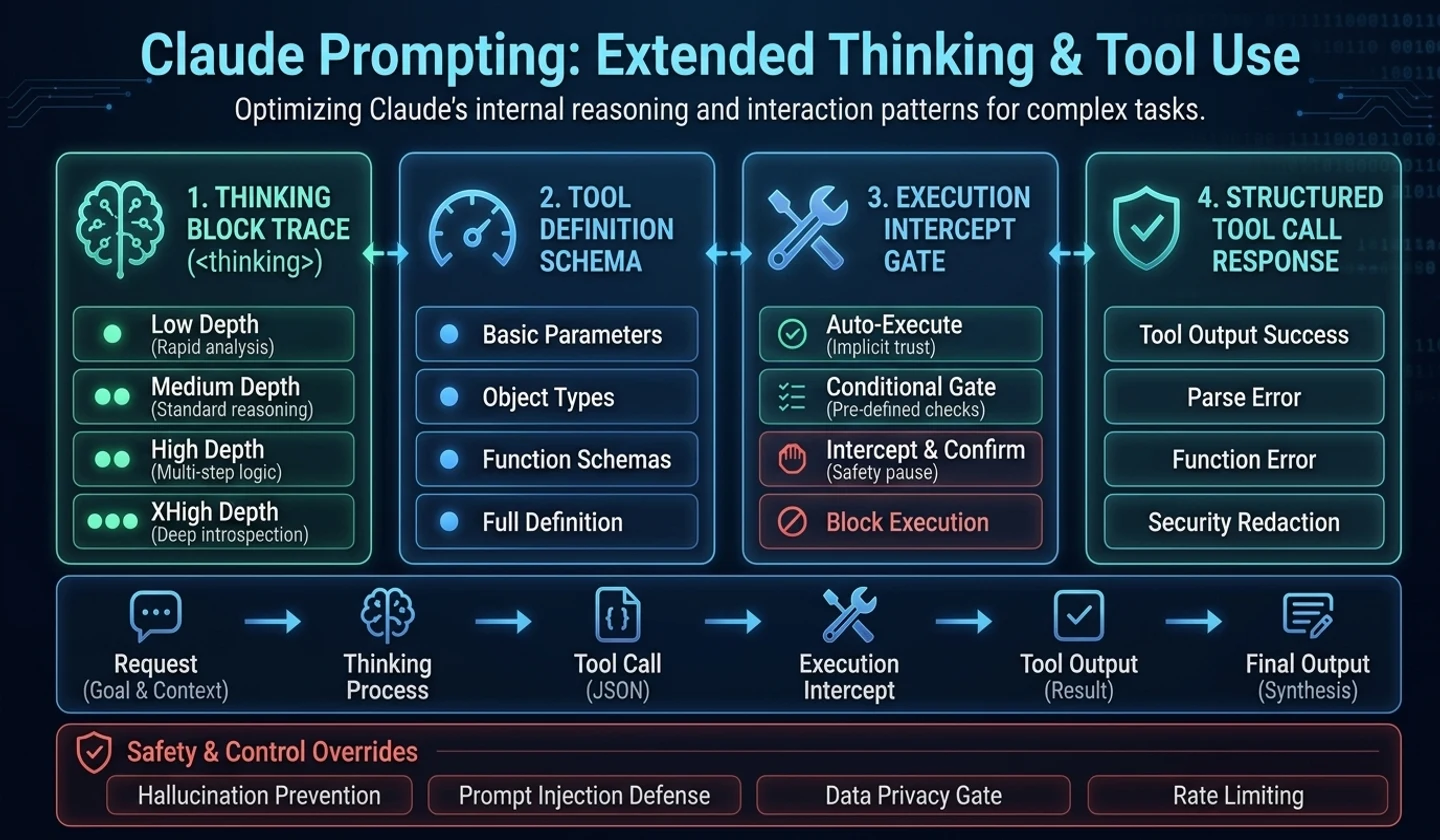
Claude When running a modern model, inference depth and tool usage policy are just as important as the prompt content. Complex tasks require deeper thinking, but spending high effort on every request increases costs and delays. Conversely, loose tool usage conditions may cause the model to search more than necessary or attempt risky actions.
This article outlines how to use thinking, effort, and tool use as operational criteria when applying Claude to APIs, coding agents, and research automation.
Analysis date: 2026-05-02 Series: Claude Prompt Practical Guide Scope of this article: Claude Opus 4.7, adaptive thinking, effort, tool use, agent safeguards
Key takeaways
- Based on the official documentation, Claude Opus 4.7 is guided by a model that is strong in complex reasoning and agentic coding.
- Adaptive thinking is key in Opus 4.7, and thinking-related settings need to be checked to see how each model is supported.
- effort is an operational parameter of quality, cost, and latency. Spending the highest level on every task is inefficient.
- Tool use should specify “when, under what conditions, and what is prohibited,” rather than “use it when necessary.”
- When working with coding agents, permissions, status, and verification loops can be a bigger risk than prompts.
1. Thinking is an operational choice, not a performance option
In complex problems, it is helpful to have models think more deeply. However, applying deep thinking to every request may not be cost-effective.
For example, the following task does not require deep reasoning:
| work | Recommended direction |
|---|---|
| short sentence correction | low effort |
| simple classification | low to medium effort |
| Filling out a given template | low to medium effort |
| brief summary | medium effort |
Conversely, the next task requires deeper reasoning.
| work | Recommended direction |
|---|---|
| code review | high effort |
| Failure cause analysis | high effort |
| Compare multiple documents | high effort |
| long time coding agent | high effort or xhigh |
| Security, authority, and cost judgment | high effort |
In practice, it is not “the higher the better,” but “use according to the risk of the task.”
2. Claude Opus 4.7 and adaptive thinking
Based on the Anthropic model document, Claude Opus 4.7 is guided by the latest top model that is strong in complex tasks and agentic coding. Opus 4.7 also supports adaptive thinking, but you must specifythinking: {type: "adaptive"}in your request to turn on thinking. Sendingthinking: {type: "enabled", budget_tokens: N}as before no longer works in Opus 4.7.
This information may change over time. Model name, price, context length, and thinking support method must be confirmed against official documentation. Be especially careful when hardcoding it into operational code.
The practice standards are as follows:
# exampleModel name, price, context window, max output, and thinking support method areOfficial model documents and API responses are used as truth sources, not blog posts or memories.For requests that require thinking in Opus 4.7, check thinking.type=adaptive and output_config.effort together.Because thinking behavior may differ for each model, a migration check is required when moving existing Claude 4.5 or 4.6 settings to Opus 4.7.
3. Judgment criteria for effort settings
Effort is an operating lever that determines how deeply the model should solve the problem.
| effort level | Recommendation situation | merit | Things to note |
|---|---|---|---|
| low | short and repetitive tasks | Fast and cost-saving | Under-reasoning in complex problems |
| medium | General Summary/Category | Balanced | May not be sufficient for code/policy judgment |
| high | Research, code review, policy judgment | Improved quality and stability | Overkill for simple tasks |
| xhigh | Long agent/complex design | Induce deep inferences | Increased cost and latency |
| max | Very difficult verification task | Advantageous for some challenges | Excessive accidents and costs possible |
If you're running Claude on a team, it's a good idea to set defaults for each type of task.
# exampleSentence conversion: lowDocument summary: mediumPolicy judgment: highCode review: highExtended coding agent: xhighFailure cause analysis: high or xhighSetting these defaults makes it easier to predict costs and makes it clear where to make adjustments if quality issues arise.
4. Tool use is a permission model
Tool use is not simply a function of a model calling an external function. In actual operation, it is a permission model.
As the tools available to Claude increase, so do the following risks:
| equipment | risk |
|---|---|
| web search | Outdated information, unofficial sources, excessive searching |
| read file | Sensitive files exposed |
| edit file | unintentional change |
| shell execution | Destructive commands, expensive operations |
| Browser operation | Wrong click, dependent on login status |
| DB/API call | actual data changes |
Therefore, the prompt must include a condition for using the tool and a prohibited action.
<comment>example</comment><tool_policy>- Check official sources for the latest information, pricing, legal and release notes.- If there is enough information in your input, don't search.- Before modifying a file, read the related file first and summarize the scope of the change.- If it is possible to run a test, run the test after making modifications.- Do not delete, force push, reset, distribute, or change the DB without user confirmation.</tool_policy>This policy is not intended to slow down the model. This is the minimum boundary for safe execution in actual work.
5. The problem of using too many tools
If Claude overuses his tools, it will cost him more money and more time. Especially in research or code exploration, you may repeat searches or read files even when you already have enough information.
In this case, the terms of use are narrowed down.
# exampleIf there is enough information in your input, answer directly instead of using a tool.Check official sources only when you need up-to-date information or facts that are likely to change.Don't search twice for the same facts.The key to reducing tool use is not to “ban tools,” but to be clear about “what tools are needed for.”
6. The problem of using too few tools
Conversely, if the model answers without confirmation, it is more risky. Be sure to check for information that may change, such as the latest model name, pricing, API parameters, legislation, security advisories, and deployment status.
# examplePlease do not rely on memory for the following information; please check official sources.- model name- price- API parameters- Release notes- Security advisory- Changes in laws and policiesThe same goes for working with code.
# exampleBe sure to open and verify the relevant files before making any claims about the code.After fixing, run any possible tests.If you failed to run a test, please indicate why.Without this criterion, Claude may give a plausible answer, but it may be out of sync with the actual code or current documentation.
7. Minimum safeguards for agent coding prompts
Coding agents can read files, modify them, and run tests. So it requires stricter boundaries than regular chatbot prompts.
<comment>example</comment><task>Implement {{FEATURE_OR_BUGFIX}}.</task> <constraints>- Do not refactor outside the scope of the request.- Change function signatures and public APIs only when necessary.- Do not delete or weaken existing tests.- If you create temporary files, delete them at the end of the task.</constraints> <workflow>1. Check the project structure and related files.2. Make a short revision plan.3. Modify only the files you need.4. Run tests and lints if possible.5. Summarize changes, test results, and remaining risks.</workflow> <safety>Do not delete, force push, reset, change DB, or distribute without user confirmation.Do not print out your private key or personal information.</safety>This prompt tells the model something more important than “write code well.” How much can be modified, how should it be verified, and what actions are prohibited.
8. Tasks that require a state file
In long operations, Claude may lose intermediate states. In this case, using an external state file can be helpful.
| file | purpose |
|---|---|
| progress.md | What's going on, what's next, what's stuck |
| tests.json | List of tests and whether they pass or fail |
| decisions.md | Design decisions and reasons |
| rollback.md | How to revert |
| git log | Actual change history |
Examples include:
# exampleBefore starting work, create progress.md and tests.json.After each change, record which files you changed and why in progress.md.Update the state of tests.json every time you add or run a test.Deleting or weakening the test is not permitted.However, forcing a state file for short tasks is overkill. It is only recommended for tasks involving multiple files, multiple steps, and multiple tests.
9. How to prevent hard coding that only passes tests
Just telling the coding agent to “make the tests pass” can lead to poor optimization. This is because you can create hard-coded or workaround implementations tailored only to your tests.
The prompt must contain the following conditions:
# exampleDon't hard code just for test cases.Implement a generic solution that works for all valid inputs.If you think a test is wrong, don't bypass it and report the problem.Tests are part of the requirements, not all of them. Explicitly specifying this statement will reduce the model's goal of only passing the test.
10. Operational Checklist
# example[ ] Check the official document for the latest model name and API parameters.[ ] Opus 4.7 thinking requests specified thinking.type=adaptive.[ ] Default effort values were set for each task type.[ ] Do not use excessive thinking on simple tasks.[ ] Use high effort and verification loops for risky tasks.[ ] The conditions for using the tool have been clarified.[ ] Tools specify prohibited actions.[ ] The principles of searching before modifying a file and testing after modifying it have been added.[ ] Destructive actions were prohibited without user confirmation.[ ] Prohibition on printing private keys and personal information is specified.[ ] A condition to prohibit test hard coding was added.finish
Claude's thinking, effort, and tool use are operational design issues, not model performance issues. If you don't decide which tasks to use deep inference for, when to use the tools, and which actions to prohibit, both costs and risks increase.
In the next article, we will organize prompt templates and checklists that you can copy and use right away. This is a practical template for making analysis, code review, document summarization, front-end creation, and agent coding tasks repeatable.
References
- Models overview:https://platform.claude.com/docs/en/about-claude/models/overview
- Building with extended thinking:https://platform.claude.com/docs/en/build-with-claude/extended-thinking
- Tool use with Claude:https://docs.anthropic.com/en/docs/agents-and-tools/tool-use/overview
- Claude Prompting Best Practices:https://platform.claude.com/docs/en/build-with-claude/prompt-engineering/claude-prompting-best-practices
댓글
GitHub 계정으로 로그인하면 댓글을 남길 수 있습니다. 댓글은 GitHub Discussions를 통해 운영됩니다.