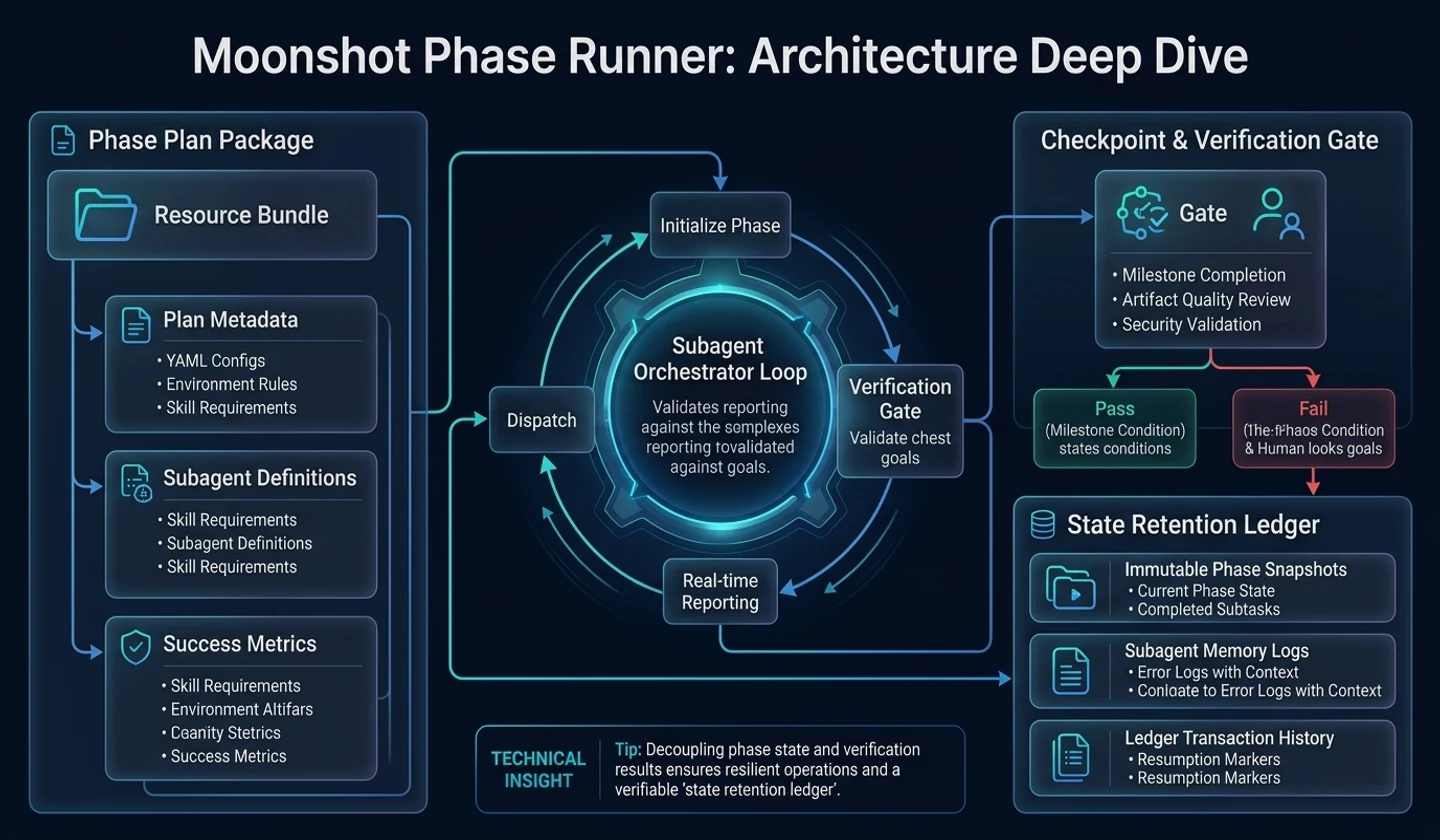
Structure summary
Moonshot Phase Runner doesn't implement big tasks right away. First, choose a planning directory to store your work in and read the master plan and step documents within it. It then prepares a file that tracks the current state and step-by-step execution output and passes it to the execution loop.
On the surface, the user enters a single command.
/moonshot-phase-runner docs/implementation --autonomousInside, the flow below continues.
requestto determine the planning directoryto check the master plan and step documentsto prepare state fileto prepare execution outputto check uncertainty or autonomously processto determine execution modeto execute, review, verify, and record step by stepto All executable steps end or an explicit abort condition is reachedWhy do we need a separate structure?
The difficult part of any long AI task is boundary management rather than the implementation itself. You need to keep track of what stage you are in, what failed in previous attempts, whether reviews were actually conducted and whether the verification results were incorporated into the next attempt.
Phase Runner does not leave this matter to verbal progress reports. Instead, separate plans, states, and deliverables.
| Area | Role |
|---|---|
| Planning document | Defines overall goals and scope for each phase. |
| Status file | Records which phases are in pending, progressing, completed, or retry status. |
| Execution output | Leaves contracts, QA results, handover details, and scorecards for each stage. |
| Execution mode | Decide whether to coordinate in the current session or run for a long time in a separate loop. |
| Gate | Do not move to completion without review and verification. Block. |
Thanks to this structure, tasks that cannot be completed in one sitting can be viewed in succession. You don't have to reread the entire conversation to answer the question, "Where did we go last time?"
Commands the user sees
A common starting point is the command below:
/moonshot-phase-runnerIt is clearer if you specify the plan directory directly.
/moonshot-phase-runner docs/implementationIf you want to push through a long task without intervening questions, use autonomous mode.
/moonshot-phase-runner docs/implementation --autonomousWhen you only want to prepare without executing, use prepare-only.
/moonshot-phase-runner docs/implementation --prepare-onlySpecify an execution mode if you want to coordinate directly with the current conversation session, but separate each execution attempt from a new context.
/moonshot-phase-runner docs/implementation --execution-mode in-session-coordinatorThe important point here is that Phase Runner is not just a plan builder. Unless prepare-only is specified, the default behavior is to prepare followed by execution.
Planning Directory Determination
The Phase Runner first decides which plan bundle to execute. If the user passes a path, that path takes precedence. If the path is not found, it checks for the active plan recorded in the current state file, or if that is not found, it looks in the default implementation plan directory.
The decision sequence can be roughly viewed like this.
| Priority | Decision |
|---|---|
| Path specified by user | Use first. |
| Active state file | Reuse current plan left by previous execution. |
| Default implementation plan | Find where implementation plans usually gather. |
| Single candidate | If only one is found, use it safely. |
| Create a new plan | If no safe candidate is found, move on to plan creation. |
If there are multiple candidates and it's unclear which one to implement, it's better to stop and ask. The most dangerous mistake in any long task is to confidently execute a wrong plan.
The role of planning documents
Inside our planning directory we have master plans and step-by-step documents that explain the big picture. The master plan contains the purpose, scope, and sequence of work, while the phase documents more narrowly define what will actually change in each round.
Completed step documents should be removed from the active list. So, completed documents are moved to a closed history area, and a status file records where those steps were stored. This way, the next run will not re-candidate already completed steps.
This method is a device for treating documents not as simple records but as lists of actions to be taken.
What a state file does
At the heart of Phase Runner is the state file. This file records which plan the current execution is looking at, what mode it is running in, what state each step is in, and what the output path for each step is.
The state file usually contains this information:
masterPlan: "Master Plan from the Planning Directory"executionMode: "delegated-terminal or in-session-coordinator"executionRoot: "Location where step-by-step execution output is gathered"phases:- number: 1title: "First steps"status: pendingplanConfirmed: trueattempts:total: 0lastOutcome: pendingsprintContract: "The execution contract for that step"qaReport: "QA result of that step"handoff: "Handover document for that step"By looking at the status file, you can find out "what stage is this task at?", "did previous attempts fail", and "what output should I look at next?" So for long tasks, state files and artifacts are often more important than the final answer.
Four execution artifacts
At each stage, deliverables are prepared to continue execution. The name may sound like a developer, but the role is clear.
| Output | Role |
|---|---|
SPRINT_CONTRACT.md | Determine the scope, rules, and verification standards to be observed in this step. |
QA_REPORT.md | Records what was checked and what failed. |
HANDOFF.md | Leaves content for the next attempt or the next operator. |
SCORECARD.md | Check items and judgments are provided so that completion is not judged by intuition. |
These four are the memories of step execution. Especially for operations that require retries,QA_REPORT.mdandHANDOFF.mdare important. The reason for the failure and the next action should remain so you don't repeat the same mistake.
SCORECARD.mdis a device that prevents “roughly okay”. Make completion declarations conservative by defaulting to a retry roll until the target score or required items are met.
Uncertainty handling
Phase Runner doesn't push you through every task. If you haven't given--autonomous, you can review the plan to find any ambiguities and ask questions.
For example, if information like the one below is missing, you will be asked questions.
- It is unclear which screen needs to be modified.
- You don't know if you need to preserve your existing data.
- It has not been determined whether the verification criteria is testing or browser verification.
- There is no standard for whether to retry or stop in case of failure.
Conversely, if you give--autonomous, they will ask fewer questions and make rational decisions on their own to proceed. However, autonomous does not mean that things proceed randomly. It is more of a forward mode, leaving the basis for decisions in plans and deliverables.
Two execution modes
Phase Runner has two main execution modes:
| Mode | Use |
|---|---|
delegated-terminal | Suitable for performing long tasks without interruption through a separate execution loop. |
in-session-coordinator | Ideal for coordinating the current conversation session but managing each attempt separately. |
delegated-terminalis closer to long autonomous execution. After preparing the plan, the dispatcher and agent loop continue execution. It works better when the user expects, “Please proceed to the end.”
in-session-coordinatoris the current session's coordinator. However, even in this mode, implementation attempts should not be dragged into the same conversation context. Each attempt must start anew, with phase documentation, execution agreements, latest QA results, and handover documentation as input.
step execution loop
Each step usually proceeds in the following order:
ready/isolate-> execute-> review-> verify-> finish/handoffready/isolatechecks the working premise and isolation status. This is the stage to check whether the current work space is safe, whether the necessary rules and contracts have been entered, and whether the verification standards are sufficient.
Inexecute, actual implementation or document modification occurs. These include tasks such as test-driven flow, implementation execution, simplification, build error resolution, and failure analysis.
Atreviewwe look at the results critically. If there is a code change, a code review must be included, and if work requires security, accessibility, or design standards, a review from that perspective is also included.
Atverify, we look at evidence, not words. There must be a basis for testing, builds, browser verification, QA flow, and completion verification.
finish/handoffcloses the record. We update documents, keep session records and handovers, and commit only when explicitly requested.
What is not considered complete
An important rule in Phase Runner is "Never speak of partial completion as complete completion." The items below may be useful intermediate results, but they are not termination conditions alone.
- One step is over.
- A QA report has been created.
- A handover document has been created.
- There is a checkpoint left.
- Only the documentation has been updated.
- Some implementations passed.
If there are still pending or retryable steps in the active plan directory, you must proceed. Don't say you're done if a review is missing or the completed deliverables don't match.
Graceful shutdown and abort conditions
Graceful termination is possible when all executable steps are completed and the state files, artifacts, and verification results match each other. The review and validation grounds should be closed, especially if there are code changes.
Interruption is natural only in the following situations:
- The user explicitly told us to stop.
- The retry limit or hard blocker has been reached.
- There is a dangerous missing input that will result in incorrect results if you proceed.
- The execution runtime cannot proceed any further.
Without this distinction, long tasks can easily fall into the problem of “producing interim reports as if they are final.”
Good for users to check
Users of Phase Runner do not need to memorize all internal files. Instead, you can judge your progress pretty accurately by just looking at the three things below.
- The current and remaining steps are visible in the state file
- The QA report has separate passed and failed checks
- There is content left in the handover document that will be visible on the next attempt
When entrusting a task, it is a good idea to ask like this.
/moonshot-phase-runner docs/implementation --autonomous Proceed until all steps are completed.At the end of each stage, we leave QA results and handover details,Please do not mark it as complete without review and verification.If you want to see more detail in the current session, you can request it like this:
/moonshot-phase-runner docs/implementation --execution-mode in-session-coordinator Each attempt takes place in a new context,Results are summarized by changes to files, failed confirmations, and next actions.finish
Moonshot Phase Runner is more of an execution structure that prevents long tasks from being lost rather than a “command to tell AI to do something.” A plan directory holds scope, a state file records the current location, execution artifacts enable retries and handovers, and review and verification gates prevent premature declarations of completion.
When it comes to big jobs, it's not just about getting started quickly. It's about moving forward while leaving a basis for saying it's over.
댓글
GitHub 계정으로 로그인하면 댓글을 남길 수 있습니다. 댓글은 GitHub Discussions를 통해 운영됩니다.