The first question encountered when applying AI coding tools to practice is not “whether it generates code.” The question is whether the generated code is fully verified within the product repository, provides reasons for failures, and stops in the face of dangerous changes.
For short functions and test drafts, the model alone is good enough. But actual product development doesn’t end with just one answer. You need to read the file, determine the scope of the change, run tests, interpret the failure log, and fix it again.
So what teams need to prepare is not “longer prompts,” but an execution environment where agents can work safely and for long periods of time.
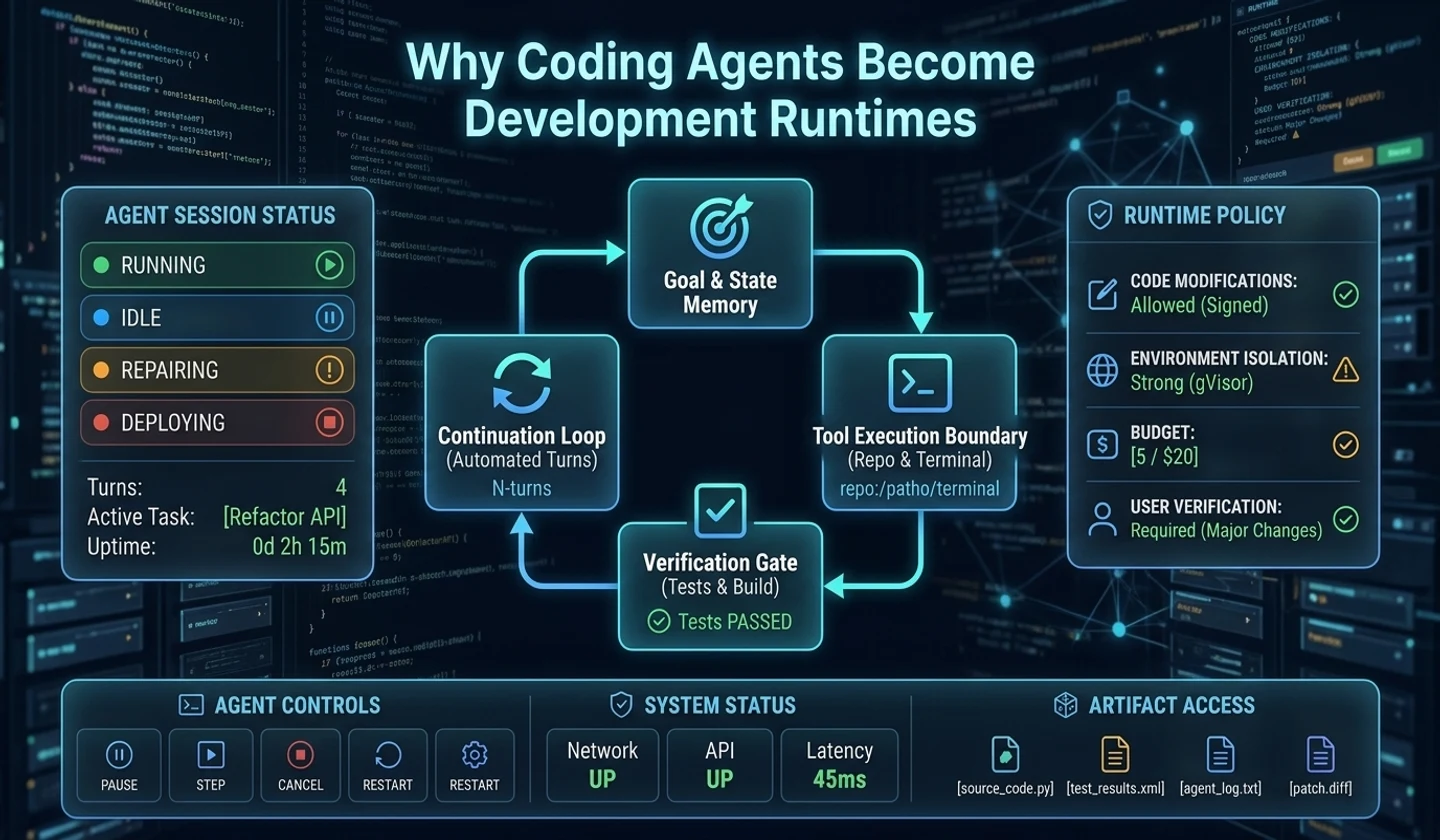
This article is part 1 of the “Coding agent runtime Design” series. Bottom line: Coding agents should no longer be viewed as prompt responders, but as development runtimes with goals, state, permissions, and validation.
Key takeaways
- The basic unit of existing AI coding tools was
prompt. - Actual development tasks are longer and more state-dependent than a single prompt.
- SWE-bench and SWE-agent demonstrate the importance of an environment that allows browsing repositories, modifying files, and running tests.
- The OpenAI Codex harness and App Server structure show that the underlying agent loop and thread state are becoming more important than various UIs.
- In practice, what you need is not a collection of prompts, but a work contract that is safe for agents to work with for a long time.
Development cannot be completed with prompts alone
Early AI coding tools were simple to use.
Please refactor this function.To be more specific, I requested this:
Write auth module test code and fix failing tests.These requests are still valid. It's effective enough for small function modifications, single component improvements, and test code drafts.
But actual product development usually doesn't end with this single request. For example, let's say you replace the payment module with another PG. This work includes analyzing existing payment flows, replacing API clients, modifying webhooks, managing environment variables and secrets, modifying tests, verifying before deployment, and even planning rollback in case of failure.
The actual flow is more of an iterative execution loop than a single response. If the test fails, we go back to editing. If it passes, we move on to review and documentation.
- Understand the requirements
- Codebase navigation
- Estimate scope of change/implementation plan
- edit file
- run test
- Failure cause analysis
- re-edit
- review
- documentation
- Job status updates
The important thing here is not “one prompt” but “task status”.
Actual development work has state
Developers keep a lot of state in their heads while they work.
| situation | example |
|---|---|
| target | Why change this feature? |
| range | What files and modules can be touched |
| pharmaceutical | Is it possible to change DB schema? |
| verification | What tests do I need to pass? |
| failure history | Which Approaches Failed? |
| output | Final diff, test log, review notes |
AI coding agents also need to be able to handle this state to properly perform their development tasks. The state here is not just a record of a conversation. Conversation records are long, noisy, and difficult to review.
What your development workflow needs is a separate, structured state like the one below.
Ultimately, the coding agent becomes more of a task executor than a response generator.
Difficulty level shown by SWE-bench
SWE-bench is a benchmark that evaluates software engineering problems extracted from actual GitHub issues and pull requests. It deals with bugs and function correction issues that occurred within the actual repository, not simple algorithm issues.
The key to SWE-bench is that it gives the model a code base and issues, and asks it to create patches that pass actual tests. [Princeton's Introduction to SWE-bench] (https://pli.princeton.edu/blog/2023/swe-bench-can-language-models-resolve-real-world-github-issues) describes the task as a problem that requires finding problems in files of thousands of lines and making fixes that interact with many parts.
This point is important.
The reason why coding agents are difficult is not because they “don’t know code.” LLM is pretty good at generating short code snippets. What's difficult is which files to read, which tests to run, and how to interpret failure logs within the context of the entire repository.
In other words, it's not just model intelligence that's the problem, but the execution environment.
The importance of the interface shown by SWE-agent
SWE-agent paper looks at this problem from the Agent-Computer Interface perspective. The argument is that just as humans need an IDE, language model agents also need a dedicated interface for navigating code, editing files, and running tests.
Princeton's paper page explains that SWE-agent's custom interface improves the ability to create and edit code files, navigate repositories, and run tests. The practical conclusions are clear.
A good coding agent isn't made by just good prompts. You need a good execution interface and a working contract.
Harness is not just a wrapper that calls a model. It is an environment that provides agents with an execution interface and a work contract.
Changes implied by Codex harness
OpenAI's [Codex harness and App Server article] (https://openai.com/index/unlocking-the-codex-harness/) shows this flow from a product structure perspective. Codex runs on multiple surfaces such as web apps, CLI, IDE extensions, and macOS apps, but shares the same harness and agent loop below.
In that article, Codex core is described as a library with agent code and a runtime that manages one Codex thread with persistence. App Server hosts the core thread as a long-running process and provides a JSON-RPC API that allows client requests and server notifications to flow in both directions.
From a developer's perspective, it can be interpreted this way.
UI is not the point.The core elements are agent loop, thread state, workspace access, diff event, and approval request.VS Code, CLI, web app, and desktop app are surface. What's really important is the runtime layer underneath, which holds goals, stores job state, controls tool execution, and leaves verification results.
the question changes
When evaluating AI coding tools, the questions you ask must also change.
| old question | Now the question we need to ask |
|---|---|
| Are you good at writing code? | Can you maintain your goal for a long time? |
| Is the response fast? | Can I restore my work status? |
| Are you planning a test? | Do you interpret and retry test failures? |
| Do I edit the file? | Do you leave diff and verification results as output? |
| Do you remember? | What is promoted to memory and what is discarded? |
Model performance is important. But models alone are not enough. In long-running development work, there is a risk in running on the wrong goal for too long, and there is also a risk in saying “done” without verification.
So runtime design is needed.
What do you need to prepare practically?
The conclusion of this series is not to create a massive multi-agent system from scratch. Quite the opposite. You have to start small.
However, your starting point should be a task contract, not a set of prompts.
| document | role |
|---|---|
goal.md | Goals, completion conditions, stopping conditions |
run-ledger.md | Unit of work execution history |
artifact-contract.md | Final result format |
memory-policy.md | Standards for what to remember and what to discard |
permission-policy.md | Actions that require approval and actions that are blocked |
These five documents alone will make a difference in the quality of your coding agent. Prompts communicate requests. But work contracts create boundaries within which agents can safely work for long periods of time.
Application Checklist
When checking your team's current coding agent operation method, you can start by checking the items below.
[ ] Are the work goals summarized in one sentence?[ ] Can the completion conditions be confirmed through tests or artifacts?[ ] Are there conditions for stopping hazardous work?[ ] Do you leave failed attempts as records rather than conversations?[ ] Does it leave an artifact that can be reviewed rather than a final response?[ ] Do you distinguish between repeated knowledge and one-time logs?Standards to be taken in this episode
When introducing a coding agent, the first question should be not “What model should I use?” but “What runtime contract will this agent work within?” At a minimum, goals, tolerances, stopping conditions, verification instructions, and deliverable formats should be separated before operation.
Next time
Part 2 covers goal-based development, starting with Codex/goal. The key is not how to use the command, but the Goal Contract.
Continue reading the series
- Part 1: Why are coding agents runtime?
- Part 2: Goal-based development through Codex
/goal - Part 3: Multi-agent development workflow from A2A and MCP perspective
- Part 4: AI Memory is not RAG
- Part 5: AI Coding Agent Document Set for Application to Development Harness
댓글
GitHub 계정으로 로그인하면 댓글을 남길 수 있습니다. 댓글은 GitHub Discussions를 통해 운영됩니다.