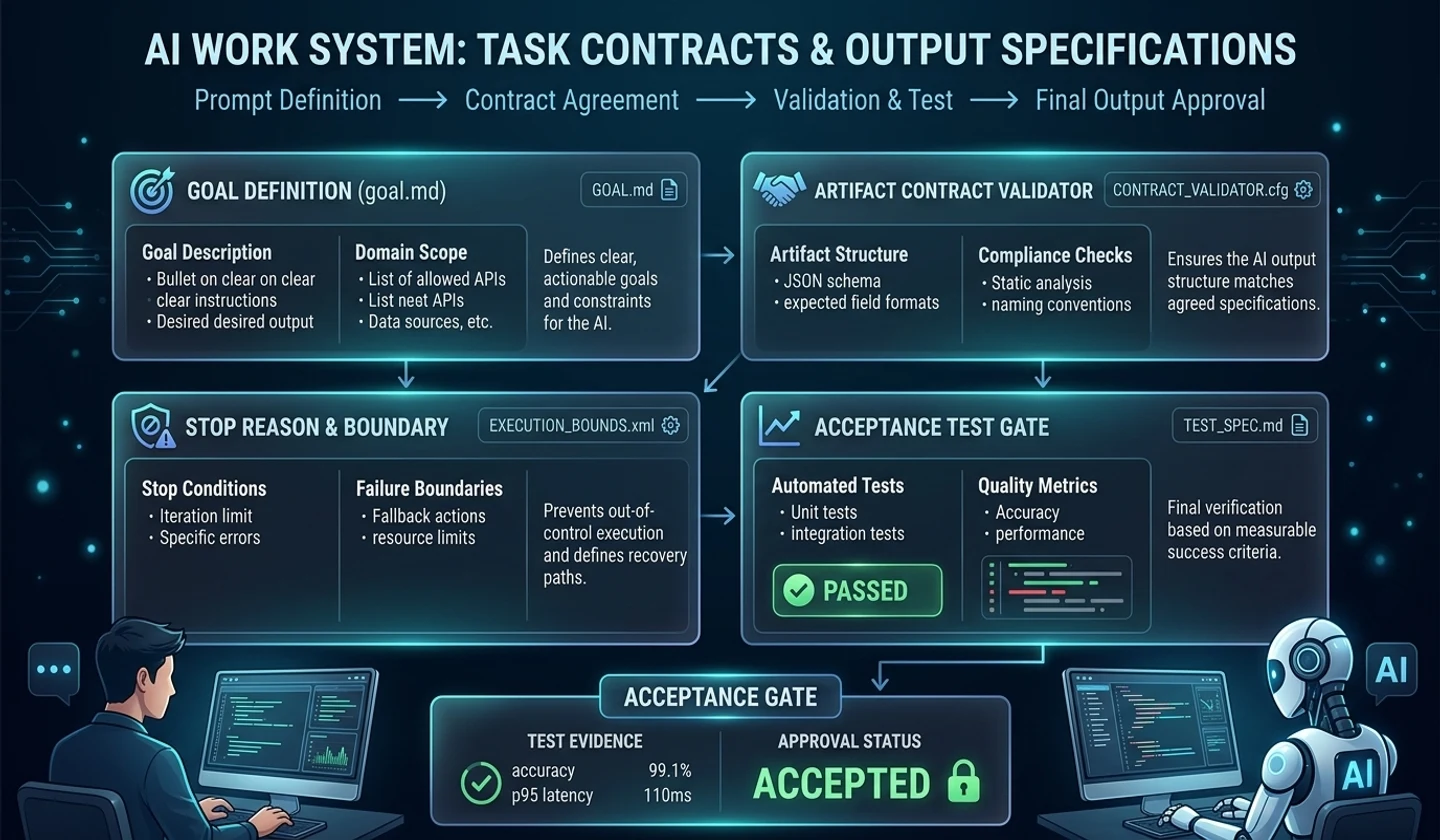
Let’s say two people on a team entrust the same bug to AI. One person said, “Please fix the slow admin statistics API,” and the other person gave a failure log, editable path, no-edit area, and verification command.
The first job was completed quickly, but the review revealed missing cache keys and lack of testing. The second task took a little longer, but left the PR with the scope of changes, failed attempts, validations run, and remaining risks.
The difference was not the wording of the prompt, but the presence or absence of a work contract.
As you use AI coding tools, you will want to get better at writing prompts. I worry about how to tell people to make better code, how to ask people to write better tests, and how to request refactoring safely.
Prompts are important. However, when teams start using AI coding tools, prompts alone are not enough. This is because each developer has a different way of speaking, the information they provide to AI is different, and the standards for completion are different.
As a result, AI task quality is swayed more by the quality of task input than by model performance.
What your team needs isn't a genius prompt. This is a repeatable work contract.
What to entrust to AIHow much can AI change?What should AI verify?What evidence should AI leave behind?Where should a person approveIn this article, we outline five documents you need to incorporate AI coding tools into your team development workflow.
| standard | detail |
|---|---|
| Analysis base date | 2026-05-10 |
| Key references | Claude Code Docs, OpenAI Agents SDK, MCP Specification |
| purpose of writing | Designing a document structure to treat AI coding tools as a team development process rather than an individual experiment |
| key document | AI_GUIDE.md, TASK_CONTRACT.md, VERIFY_REPORT.md, AI_WORK_LOG.md, PR_TEMPLATE.md |
Key takeaways
- For your team to use AI coding tools reliably, you need a Work Agreement before a prompt.
- A work contract is a document that clearly tells the AI the goals, scope, off-limits areas, completion criteria, and verification orders.
- Claude Code Document deals importantly with persistence rule documents such as
CLAUDE.md, validation criteria, permission settings, and context management. - MCP Prompts describes a structure in which the server provides a prompt template and the user can explicitly select it.
- The fact of the official document is "the functionality provided by the tool", and the interpretation of this article is "the team should operationalize that functionality as a repeatable contract document."
- For teams, just five documents can significantly stabilize the quality of AI work.
Why work contracts come before prompts
A prompt is a request. The work contract is the standard.
| division | prompt | work contract |
|---|---|---|
| purpose | request this task | Define work criteria |
| range | It varies from conversation to conversation. | reused repeatedly |
| stability | Depends on author competency | Standardize with team rules |
| verification | easy to fall out | Included in completion criteria |
| review | Buried in chat window | Remains in PR and documentation |
It’s not enough to tell AI, “Please improve the performance of the admin statistics API.” AI doesn't know performance criteria, which files can be modified, which response fields should be maintained, whether caches are allowed, whether the DB schema can be changed, and what testing criteria are.
This is what happens if you turn the same request into a work contract:
# TASK_CONTRACT ## targetReduces the p95 response time of the administrator statistics API. ## Editable range-`src/admin/stats/**`-`tests/admin/stats/**` ## No modification range- Login/session logic- Payment logic- DB migration-`.env*` ## Completion criteria- Maintain existing response fields- Maintain DB fallback in case of cache miss- lint/typecheck/unit test passed- Create change summary and rollback methodThis document is good for AI, but it's also good for people. The scope of the work becomes clear and it becomes clear what the reviewer should be looking for.
Flow connecting 5 documents
The five documents are not played separately. It leads to one development event.
Project basic rules
This work contract
Record of judgment and failure
Proof of Completion
Team approval
| step | document | role |
|---|---|---|
| Project basic rules | AI_GUIDE.md | Rules to Always Follow |
| start working | TASK_CONTRACT.md | contract for this work |
| working | AI_WORK_LOG.md | Judgment and Attempt Record |
| After work | VERIFY_REPORT.md | proof of completion |
| review | PR_TEMPLATE.md | team approval |
Once you create this structure, AI work no longer happens inside the chat window. This becomes a development event for the project.
Document 1: AI_GUIDE.md
AI_GUIDE.mdis a task guide for AI placed in the project root. While a README for human developers explains how to run a project,AI_GUIDE.mdexplains how an AI should work within a project.
[Claude Code Documentation] (https://code.claude.com/docs/en/best-practices) explains that rules that need to be kept persistent should be placed in files such asCLAUDE.md, and that unnecessarily long always-loaded documents should be avoided.
What the official documentation confirms is that Claude Code supports persistence rules and context management. The interpretation of this article is to not tie the functionality to a specific tool file name, but to reorganize it into the team's repeatableAI_GUIDE.mdconcept.
# AI_GUIDE.md ## Project OverviewThis project is a static blog service based on Next.js.Content is managed with markdown, and builds are distributed to Cloudflare Pages. ## Directory structure-`src/app`: App Router page-`src/components`: UI component-`src/content/posts`: Blog post-`src/lib`: Common utility-`tests`: test code ## Working Principle- Do not change the existing URL structure.- SEO-related meta fields are not deleted.- Maintain frontmatter when editing the text of the post.- The`.env*`file is not read or modified.- Do not change build settings without human approval. ## Verification commandnpm run lintnpm run typechecknpm run build ## Requires human approval- Add/delete dependency- Change deployment settings- Change Cloudflare settings- Changes to login/payment related codes ## Prohibited operations- Access`.env*`- output secret- Run the production deployment command- Bulk file deletionWriting principles should be short and clear.
| item | How to write |
|---|---|
| Project Overview | Short, 3 to 5 lines |
| directory structure | Focus on paths that AI will frequently explore |
| working principles | Focus on team conventions and prohibitions |
| verification command | Only actual executable commands |
| Approval required | High-risk tasks only |
| prohibited work | Focus on secret, distribution, and deletion |
AI_GUIDE.md's goal is not to make AI smarter. It's about making sure AI doesn't do things it shouldn't do.
Document 2: TASK_CONTRACT.md
TASK_CONTRACT.mdis a contract written for each individual task. It tells you what the task is, what its scope is, and what needs to be met to complete it.
# TASK_CONTRACT ## task nameApply Admin Statistics API Cache ## targetReduces the response time of the statistics API called from the administrator's home screen. ## backgroundCurrently,`/admin/stats/summary`API performs DB aggregation for every request.Response times are increasing to over 3 seconds during peak hours. ## Current symptoms- p95 response time is over 3 seconds- DB CPU usage increased- The same API is called repeatedly from the frontend. ## Editable range-`src/admin/stats/**`-`src/lib/cache/**`-`tests/admin/stats/**` ## No modification range-`src/auth/**`-`src/payment/**`-`migrations/**`-`.env*` ## Completion criteria- [ ] Maintain existing response fields- [ ] Redis response when cache hit- [ ] DB fallback in case of cache miss- [ ] In case of Redis failure, fallback to existing DB inquiry- [ ] lint pass- [ ] typecheck passed- [ ] Unit test passed- [ ] Create change summary- [ ] Write rollback method ## Verification commandnpm run lintnpm run typechecknpm test -- admin/stats ## Requires human approval- Redis TTL policy change- DB schema change- Add dependencyThere are five key points.
targetrangeprohibitionverificationapprovalHaving these five things will greatly reduce the chances of your AI task failing.
Document 3: VERIFY_REPORT.md
The most dangerous moment when entrusting a task to AI is the moment when you literally believe that it is “done.” Explanation is not verification.
# VERIFY_REPORT ## Task summaryA cache aside structure was added to the administrator statistics API.In case of Redis failure, fallback to existing DB inquiry was handled. ## change file-`src/admin/stats/service.ts`-`src/admin/stats/cache.ts`-`tests/admin/stats/cache.test.ts` ## Whether requirements are met- [x] Maintain existing response fields- [x] Redis response when cache hit- [x] DB fallback in case of cache miss- [x] DB fallback in case of Redis failure- [x] Create change summary ## Verification command executednpm run lintnpm run typechecknpm test -- admin/stats ## Verification result- lint: Pass- typecheck: passed- unit test: passed ## Items that failed- Initial test failed due to missing Redis mock reset- Solved after mock initialization in`beforeEach` ## Remaining risks- Improvements to actual operational p95 require monitoring after deployment.- Need to check if TTL 300 seconds meets business requirements ## Human verification required-TTL policy- Possibility of increased DB load in case of Redis failure- Operational monitoring indicators| item | meaning |
|---|---|
| change file | review range |
| Are requirements met? | Contrast with work contract |
| Verification performed | actual evidence |
| Items that failed | Information that should not be hidden |
| remaining risk | operational judgment |
| Human verification required | Final approval criteria |
With this documentation, reviewers don't have to dig through the entire chat window.
Document 4: AI_WORK_LOG.md
AI_WORK_LOG.mdis a log that records what decisions AI made during work. If your task is simple, you may not need it. But as the task becomes more complex, it becomes more important.
[OpenAI Agents SDK Tracing] (https://openai.github.io/openai-agents-js/guides/tracing/) explains that it can be used for debugging and monitoring by recording LLM generation, tool call, handoff, guardrail, etc. during agent run. To paraphrase the example, even without tool-level tracing, the team can start with a document-level execution history.
# AI_WORK_LOG ## Task GoalImproved administrator statistics API response speed ## Referenced context-`TASK_CONTRACT.md`-`src/admin/stats/service.ts`-`tests/admin/stats/service.test.ts`- Recent slow query log ## Work plan1. Check the current API response structure2. Check Redis cache wrapper3. Add cache aside structure4. Add unit test5. Run lint/typecheck/test6. Create VERIFY_REPORT ## Main judgment- DB schema change is not required- The cache key must include the date and administrator privilege range.- DB fallback is safer than API failure in case of Redis failure ## failed attempt- Initially, the cache key did not include a permission range, so additional test cases were needed.- Test failed due to missing Redis mock initialization ## Final result- Edit cache key- Pass the test- VERIFY_REPORT completedAI run history is a document that answers the question, “Why did this change?”
Document 5: PR_TEMPLATE.md
Ultimately, PR is where AI work enters the actual codebase. It should be possible to check whether AI is used in PR and the verification results.
## Summary of changes ## Related issues ## Whether to use AI- [ ] Not used- [ ] Used to organize requirements- [ ] Used for code navigation- [ ] Used to modify code- [ ] Used to create tests- [ ] Used for log analysis- [ ] Used to create PR summary ## Context provided to AI- [ ] TASK_CONTRACT- [ ] AI_GUIDE- [ ] Failure log- [ ] Related files- [ ] Test results ## Verification result- [ ] lint pass- [ ] typecheck passed- [ ] Unit test passed- Pass the [ ] integration test- [ ] Manual QA completed ## AI Change Review Items- [ ] The modification prohibition range was not touched.- [ ] The existing API response field was not removed.- [ ] Security-sensitive files were not read or modified.- [ ] There is no dependency change.- [ ] There is a rollback method. ## Remaining risks ## What reviewers should focus onThis template is not a document for monitoring AI. This document is for officially incorporating AI into the team development process.
How to operate by team rules
Creating a document is not the end. Must operate by team rules.
1. When AI participates in code modification, it is indicated in PR.2. For medium or higher tasks, create TASK_CONTRACT.3. Login/payment/distribution/DB change are prohibited from automatic AI execution.4. Code created by AI is also subject to the same review standards as human code.5. AI changes without test results are not merged.You can adjust the documents you need according to the size of your work.
| job size | Documents Required |
|---|---|
| small crystal | PR_TEMPLATE only |
| General feature fixes | TASK_CONTRACT + VERIFY_REPORT |
| Refactoring | TASK_CONTRACT + AI_WORK_LOG + VERIFY_REPORT |
| Performance improvements | TASK_CONTRACT + Metric + VERIFY_REPORT |
| Login/Payment/Change DB | Human approval required + full document |
Forcing every document on every task from the beginning is cumbersome. Depending on the size and risk of the job, applying it will last longer.
Roadmap for each stage of application
Step 1: Personal Project
In my personal projects, I start with just three things.
AI_GUIDE.mdTASK_CONTRACT.mdVERIFY_REPORT.mdStep 2: Team Project
In a team project, you add a PR template.
Whether AI is usedContext provided to AIAI-executed verificationHuman verified itemsStep 3: Organizational units
Organizational units require permissions and approval gates.
secret access prohibitedOperational distribution prohibitedDB change approval requiredSensitive domain code modification approval required[OpenAI Agents SDK's human-in-the-loop] (https://openai.github.io/openai-agents-js/guides/human-in-the-loop/) provides a flow that sets approval requirements for sensitive tool calls, stops execution before approval, and resumes after approval. The interpretation of this article is that the organizational AI coding environment should have the same boundaries.
checklist
Check the items below before adding them as team rules.
[ ] AI_GUIDE.md is in the project root.[ ] There is a modification prohibition range in AI_GUIDE.md.[ ] There is a verification command in AI_GUIDE.md.[ ] For medium or higher tasks, create TASK_CONTRACT.[ ] There is a completion standard in TASK_CONTRACT.[ ] TASK_CONTRACT contains an item that requires human approval.[ ] Write VERIFY_REPORT after AI work.[ ] VERIFY_REPORT contains the executed verification command and results.[ ] Leave failed attempts and major decisions in AI_WORK_LOG.[ ] PR_TEMPLATE determines whether to use AI.[ ] Login/payment/DB/distribution changes are not automatically executed by AI.[ ] The reviewer checks the AI change review items.Q&A
Q1. Wouldn't it actually be slow because there are too many documents?
You can adjust it according to the size of your work. Small CSS modifications don't need to require all documentation. However, dangerous tasks such as performance improvement, refactoring, and login/payment/DB changes require documentation.
Q2. What is the difference between AI_GUIDE.md and README?
README is a document for human developers to understand and run a project. AI_GUIDE is the rules that AI must follow when working on a project. If README is “How to run this project,” AI_GUIDE is closer to “What should AI not do in this project?”
Q3. Is this the same concept as Claude Code's CLAUDE.md?
Recommended file names may vary depending on the tool. In Claude Code, you can useCLAUDE.mdas a persistence rule document.AI_GUIDE.mdhere is a generalized concept that is not dependent on any specific tool.
Q4. Don't need a prompt template?
You need it. MCP Prompts explains the structure in which the server provides a prompt template and the user can explicitly select and use it. The interpretation of this article is that the prompt template should run on top of the work contract.
Set standards with a work contract,Standardize repeated execution with prompt templates.Q5. Should all AI operations be logged?
There is no need to record every conversation. However, it is better to leave behind AI work that influenced code changes. In particular, you should leave out files you modified, contexts you provided, validations you ran, failed attempts, and human approval required.
finish
Teams that use AI coding tools well don’t just use prompts well.
Document your work. Set permissions. Establish verification standards. Leave evidence available for review. Make what the AI does into trackable development events.
A prompt is a request.The work contract is the standard.The verification report is evidence.The PR template is the team's approval process.Teams that use AI create code quickly. Teams running AI can create it quickly while explaining what has changed, why it has changed, and how it has been verified.
summary card
The essence of this article can be condensed into an execution perspective as follows.
One line summary:When applying AI coding tools to a team, a work contract comes first before a prompt. Key documents:AI_GUIDE.md, TASK_CONTRACT.md, VERIFY_REPORT.md, AI_WORK_LOG.md, PR_TEMPLATE.md Biggest risks:The scope and verification basis of changes made by AI do not remain in PR. What to do right now:Create AI_GUIDE.md in the project root and add a checkbox for whether to use AI in PR_TEMPLATE.
댓글
GitHub 계정으로 로그인하면 댓글을 남길 수 있습니다. 댓글은 GitHub Discussions를 통해 운영됩니다.