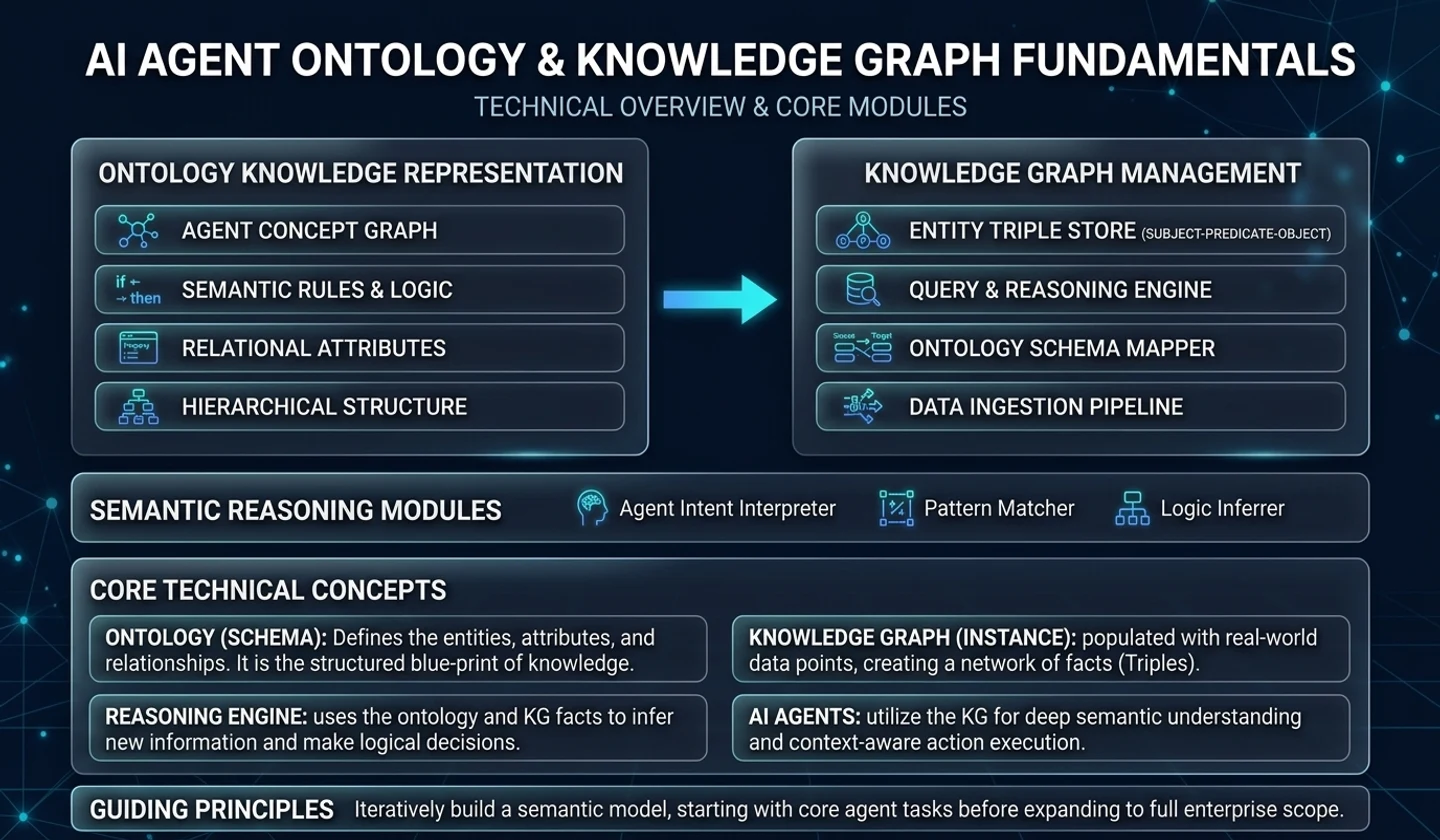
When introducing AI Agents and Large Language Models (LLMs) to enterprise environments, the biggest challenge is "how to process massive volumes of unstructured documents (PDFs, policy books, academic papers) into trusted knowledge and connect them to operational systems in real time."
Relying solely on basic RAG (Retrieval-Augmented Generation)—storing document chunks in a Vector DB and performing similarity search—exposes fundamental limitations like hallucinations and context disconnection when documents are complex or require precise multi-entity relational reasoning.
Palantir's "Speedrun: Your First AIP Workflow" course addresses this challenge using the full-stack components of Foundry AIP (AI Platform). It covers an end-to-end workflow to build a complete digital "Summer Intern" in 60–90 minutes, spanning unstructured PDF ingestion, LLM entity extraction, Ontology objectification, Vertex Knowledge Graph visualization, AIP Logic Functions, and interactive Workshop applications.
This guide summarizes all concepts, engineering architectures, data pipeline setups, Ontology bindings, AIP Logic authoring, and UI app construction from the Palantir AIP Speedrun course.
1. End-to-End Pipeline Architecture (E2E Architecture)
The Palantir AIP architecture ingests unstructured PDF media, converts data into semantic Ontology objects step-by-step, and enables real-time reasoning and visualization through AIP Logic and Workshop UI.
2. Module-by-Module Detailed Master Guide (Modules 1 – 9)
Module 1. Course Introduction (Use Case & Goals)
1.1 Use Case Background & Objectives
- Primary Goal: Build a "Digital Summer Intern" app capable of extracting key entities and relationships from enterprise libraries (PDF policy books, research papers, patents) and answering user queries with explicit citations.
- Key Advantage over Basic RAG: Connects document chunks and extracted entities into a semantic graph before feeding them into the LLM, eliminating hallucinations at the architectural level.
1.2 Prerequisites
- Palantir Foundry Account (Enterprise account or free Developer Tier account
BUILD_WITH_AIP).
Module 2. Setting Up Your Project and Folder
Organize and isolate data resources and Ontology definitions inside Foundry for governance and security.
- Create a Foundry Learning Project:
- Navigate to
Projects & Filesin the Foundry header and createAIP Speedrun - Learning Project. - Set project scopes to ensure datasets and Ontologies render strictly within the Sandbox.
- Create Training Folder:
- Create
Training_PDF_AIP_Workflowinside the project. - Structure subfolders:
01_Ingestion,02_Pipeline,03_Ontology,04_AIP_Logic,05_Workshop_App.
Module 3. Uploading the Data (Raw Data Ingestion)
Ingest unstructured PDF documents into the Foundry platform infrastructure.
- Create Media Set:
- Inside
01_Ingestion, clickNew -> Media Set. - Upload target PDF file sets (e.g., aerospace engineering technical manuals or legal casebooks).
- Index Media Set Files:
- Foundry Media Set infrastructure automatically handles OCR and binary stream parsing, converting raw PDFs into pipeline-readable unstructured media references.
- [Optional] Deploy via Marketplace:
- Deploy pre-cleaned reference dataset templates directly from Marketplace for accelerated walkthroughs.
Module 4. Transforming Data & LLM Extraction Pipeline
Convert unstructured PDFs into 3 structured datasets (Chunks, Entities, Join Table) using Pipeline Builder.
[Raw Media Set PDF] │ ┌────────┴────────┐ ▼ ▼[Text Chunking] [Embedding Vector] │ │ ▼ │[Chunk Dataset] ◄───────┘ │ ▼[LLM Batch Entity Extraction] │ ├─────────────────┐ ▼ ▼[Entities Dataset] [Join Table (Chunk-Entity M:N)]Step 4.1. Text Chunking
- Split raw PDF text streams into uniform semantic context blocks (Text Chunks).
- Principle: Each chunk contains a complete "Single Point of Information" aligned with paragraph/sentence boundaries.
- Primary Key (
chunk_id): Assign a unique Hash PK combining document title and text contents.
Step 4.2. Vector Embeddings
- Run embedding models over chunk text to attach vector dimension fields (
embedding_vector) to the dataset schema.
Step 4.3. LLM Batch Entity Extraction
- Attach an LLM Batch Node inside Pipeline Builder and define extraction prompt specs:
Prompt: | Analyze the following text chunk and extract core entities (people, organizations, technical terms, products, locations). Output valid JSON array with fields: entity_name, entity_type, description. - Entity Resolution: Standardize variations (e.g., "Palantir Technologies", "Palantir Corp", "Palantir Inc") to canonical
entity_idkeys and deduplicate.
Step 4.4. Join Table (M:N Relationship Table)
- Construct the
Chunk_Entity_Joindataset to represent relationships between Chunks and Entities. - Schema:
join_id,chunk_id,entity_id,extraction_confidence.
Step 4.5. Deploy Pipeline
- Execute the Pipeline Builder graph to generate the 3 backing datasets.
Module 5. Configuring Ontology (Ontology Object Mapping)
Map structured datasets to the Foundry Semantic Layer (Ontology) to construct business-centric object models.
5.1 Chunk Object Type
- Object Type Name:
Chunk - Backing Dataset:
Chunks Dataset - Primary Key:
chunk_id(String) - Properties:
text_content(String),source_doc(String),embedding_vector(Vector)
5.2 Entity Object Type
- Object Type Name:
Entity - Backing Dataset:
Entities Dataset - Primary Key:
entity_id(String) - Properties:
entity_name(String),entity_type(String),description(String)
5.3 Object Link Types (M:N Relation Binding)
- Link Type Name:
ChunkToEntity/EntityToChunk - Relation Pattern:
Many-to-Many (M:N)viaChunk_Entity_Join - Effect: Allows dynamic graph traversal between any
Entityand allChunkobjects where it appears.
Module 6. Exploring Object Relations (Vertex Knowledge Graph)
- Open Vertex Explorer and add
EntityandChunkobject types to the visual canvas. - Graph Traversal: Select a central node (e.g., "Palantir AIP") and click
Expand Linksto reveal connected Chunks and linked Entities. - Save Vertex Template: Save visual layout as
Knowledge_Graph_Explorer_Templatefor dynamic embedding inside Workshop apps.
Module 7. Creating an AIP Logic Function
Author AIP Logic Functions in Prompt Studio or TypeScript Functions to power LLM reasoning.
7.1 AIP Logic Input/Output
- Inputs:
user_query(String),selected_entities(List of Entity) - Outputs:
response_text(String),referenced_chunks(List of Chunk)
7.2 Grounded Prompt & Guardrails
System Prompt: | You are an expert AI knowledge agent powered by Palantir AIP. Answer user questions ({user_query}) strictly using the provided Knowledge Graph Context objects. [Context Objects] - Related Entities: {selected_entities} - Grounded Chunks: {retrieved_chunks_text} [Rules] 1. Never extrapolate beyond provided Context objects (Strict Anti-Hallucination). 2. Append explicit chunk citations at sentence ends in format [Chunk: {chunk_id}]. 3. If context is insufficient, state "The provided knowledge base does not contain enough information to answer this query."7.3 Function Publish
- Run unit tests and execute
Publish Versionto deploy production artifacts.
Module 8. Building an App (Workshop Interactive Application)
Use Palantir Workshop to construct a responsive, reactive web application for enterprise users.
┌─────────────────────────────────────────────────────────────────────────┐│ [Header Bar] AIP Speedrun Knowledge Explorer App │├───────────────────────────────┬─────────────────────────────────────────┤│ [Search & Input Panel] │ [Vertex Graph Component] ││ > Search Entity: "AIP" │ ││ > User Question: "AIP Specs" │ (Entity: AIP) ─── (Chunk #102) ││ │ │ │ ││ [Object List Panel] │ (Chunk #105) ─── (Entity: Ontology) ││ - Entity: Palantir AIP │ ││ - Chunk #102: "AIP is..." ├─────────────────────────────────────────┤│ - Chunk #105: "Ontology..." │ [AIP Response Panel] ││ │ > "Palantir AIP integrates..." ││ [Button: Run AIP Logic] │ [Source: Chunk #102, #105] │└───────────────────────────────┴─────────────────────────────────────────┘8.1 Workshop Layout Design
- Left Navigation Panel: Entity search box and object list tables.
- Top-Right Main Canvas: Embedded Vertex Graph Widget bound to selected entities.
- Bottom-Right Response Panel: AIP Response Card with query input,
AIP Logic Functioncall button, and deep-linked citation cards.
8.2 Event & State Binding
On Search Submit->Filter Entity Objects->Update Vertex Graph Selection->Invoke AIP Logic Function->Render Response & Citation Links.
Module 9. Conclusion & Advanced Patterns
- Speedrun Outcomes: Constructed a complete E2E AI solution spanning PDF parsing, LLM entity extraction, Ontology relation binding, Knowledge Graph exploration, AIP Logic reasoning, and Workshop UI in 60–90 minutes.
- Production Scale-Up Principles:
- RBAC & Governance: Enforce object-level security (Markings & Role Access) to trim graph nodes based on user permissions.
- Incremental Data Pipelines: Use incremental Spark processing for new PDF ingestions without re-running full historical extractions.
3. Comparison: Basic RAG vs GraphRAG vs Palantir Ontology AIP
| Dimension | Basic RAG | GraphRAG | Palantir Foundry AIP |
|---|---|---|---|
| Knowledge Representation | Text Chunks + Vectors | Graph Nodes & Edges | Ontology Object Model (Objects + Links) |
| Retrieval Mechanism | Top-K Similarity Search | Community Summaries & Semantic Traversal | Knowledge Graph + Actions + AIP Logic |
| Hallucination Defense | Moderate (Text snippets) | High (Relational context) | Highest (Ontology Grounding + Citations) |
| App Integration | Custom Frontend Required | External Dashboard Required | Native Workshop & Vertex Integration |
| Operational Integration | Read-Only | Read-Only | Bi-directional Actions (Write-Back) |
Conclusion & Engineering Takeaways
Palantir AIP Speedrun demonstrates how enterprise data engineering elevates raw LLM APIs into reliable organizational knowledge systems.
- Unstructured Data to Semantic Assets: Converts raw PDFs into first-class
ChunkandEntityOntology objects. - Contextual Accuracy via Knowledge Graphs: Feeds rich structural context into LLM prompts using Vertex Knowledge Graphs.
- Controlled AI Workflows: Integrates AIP Logic and Workshop UI to deliver secure, cited, reactive enterprise AI applications.
댓글
GitHub 계정으로 로그인하면 댓글을 남길 수 있습니다. 댓글은 GitHub Discussions를 통해 운영됩니다.