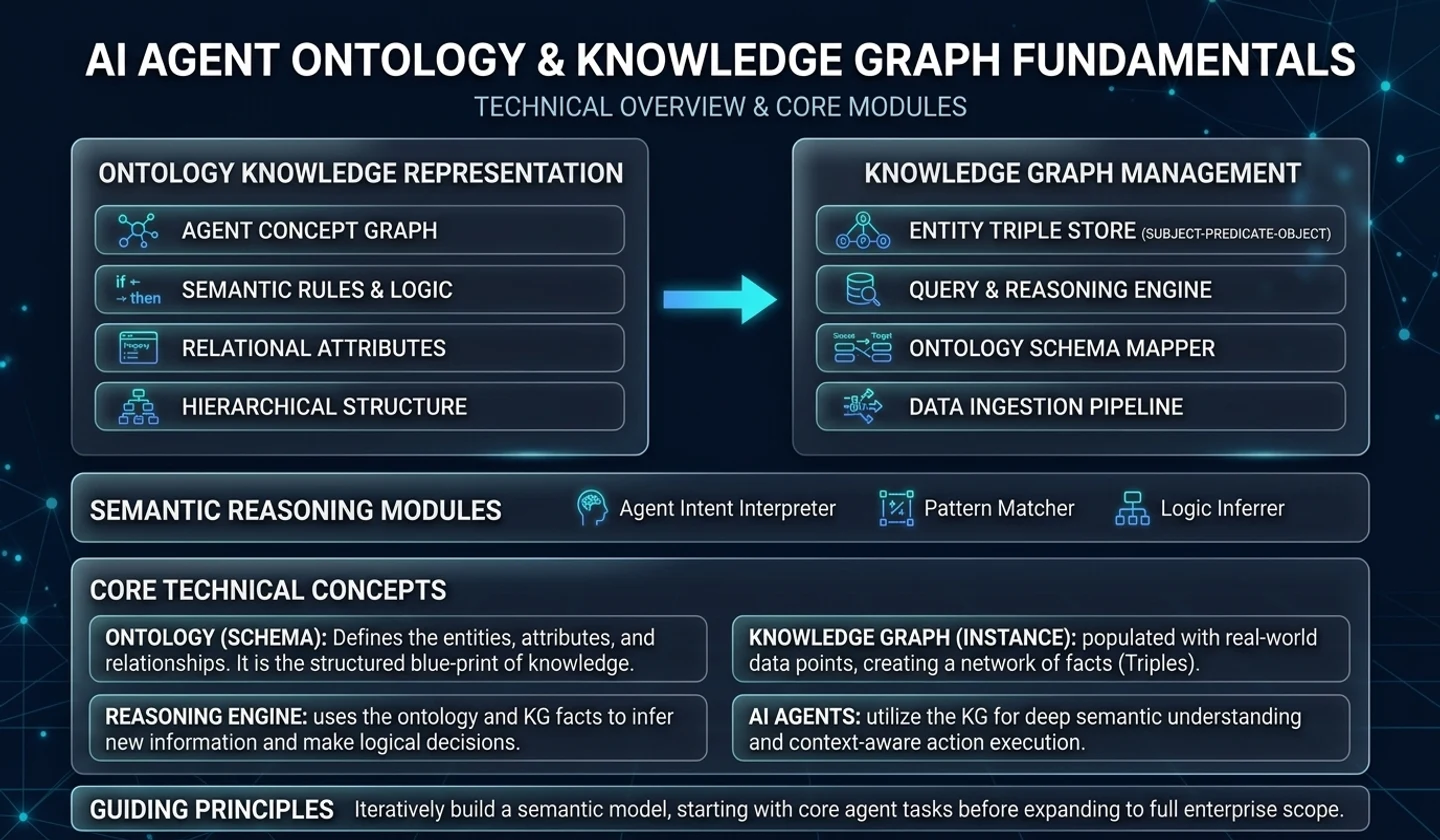
When talking about AI Agent, words such as ‘ontology’, ‘knowledge graph’,GraphRAG, and ‘policy engine’ appear together at some point.
But this is where a misunderstanding arises.
Does it need ontology because it is an AI Agent? Or are ontologies needed because organizational automation is becoming more complex?
The conclusion of this article is closer to the latter.
Because it is an AI Agent, ontology and knowledge graph are not required. In individual work or small team automation, prompts, templates, RAGs, and clear tool calls are often sufficient.
But the moment the scope of automation grows to include multiple teams, multiple systems, multiple business rules, and multiple approval flows, things change. The same word is used differently in each department, the same customer is managed with a different ID in each system, and even the same action can be executed differently depending on permissions and policies.
From then on, ontology and knowledge graph are not optional decorations, but become semantic-based infrastructure for stable operation of organizational-level AI automation.
Date of analysis: 2026-05-01 Key references: OpenAI Practical Guide to Building Agents, Anthropic Building Effective Agents, W3C OWL/SHACL document Scope of analysis: Rather than explaining the AI Agent concept, Why Ontology/KG is needed when team automation extends to organization automation
Key takeaways
- AI Agent itself does not require ontology/KG. Prompts, RAGs, tool calls, and checklists may be sufficient for simple task automation.
- Where Ontology/KG becomes powerful is in Organizational Unit Automation. This becomes necessary when terminology, permissions, business rules, and data sources from multiple teams begin to conflict.
- Ontology is a blueprint of concepts and relationships used in an organization, and the knowledge graph is a network of actual business data connected according to the blueprint.
- There is no need to create a transcription ontology from scratch. It is more realistic to create and expand a minimal conceptual model from one core repetitive task.
- The criteria for practical judgment are simple. Rather than “Do you want to be good at searching?”, you should first ask “Do you need to consistently interpret the meaning of the task and verify authority and rules?”
1. Misunderstandings that arise when directly connecting AI Agent and Ontology
These days, when you look at articles or seminars explaining AI Agents, they often directly connect the agent to ontology or knowledge graph.
Of course, the direction itself is not wrong. In corporate business automation, ultimately, objects such as customers, contracts, products, policies, approvals, permissions, documents, and systems must be connected to each other. To properly model this connection, ontologies and knowledge graphs become powerful tools.
However, the order is important.
Ontology/KG is not needed because it is an AI Agent, but it is needed because semantic inconsistency, authority, rules, and data connection problems increase in organizational unit automation.
OpenAI's agent guide also explains that rather than creating a complex structure from scratch, start with an agent with clear tools and guardrails, and consider prompt templates, policy variables, multi-agent structures, etc. when complexity increases. When explaining agent implementation, Anthropic also presents a flow that starts fromaugmented LLMand gradually expands to a complex agent through a simple combination workflow.
The practical interpretation is as follows.
# Example structureWe do not create a warrior ontology from scratch.First, see if a single task can be automated.Then, when problems with semantic inconsistency, authority verification, and rule verification are repeated,Introduce ontology and knowledge graph.This perspective is important. If ontology and knowledge graph are introduced too early, the project will grow into a data modeling business. Conversely, if it is introduced too late, misunderstandings and authority issues will accumulate from the moment the AI Agent connects multiple systems.
In the end, the key question is not “Do I need it?” but “When do I need it?”**
2. What is the difference between personal automation, team automation, and organizational automation?
AI automation requires different structures depending on its scope.
In private practice, an LLM can be valuable just to help you summarize documents, draft code, and iterate. All you need is good prompts, templates, examples, and simple checklists.
If you go by team, it gets a little more complicated. Meeting minutes, tickets, code, documents, and deployment records are linked. This is where RAGs, team knowledge bases, workflow definitions, and tool registries become necessary.
When we go to organizational units, the problem changes again. Now, rather than simply “finding and answering documents,” it becomes important whether multiple teams understand the same work object with the same meaning and execute it according to the same rules.
| step | Automation scope | structure needed |
|---|---|---|
| Individual/Small Team | Generate document summaries, code assistance, and iterative reports | Prompts, templates, checklists |
| team unit | Link meeting minutes, tickets, code, and documents | RAG, team knowledge base, workflow definition |
| Multiple team expansions | Different teams interpret the same customer/project/task differently | Common glossary, business concept model, role model |
| family | Integration of department, system, document, policy, and approval flow | Ontology, knowledge graph, verification rules |
| Company-wide AI operating system | Multiple agents run on the same organizational knowledge | Enterprise KG, policy engine, provenance, audit log |
The important difference here is that the target of automation moves from tasks to organizational semantics.
The question of personal automation goes like this.
# Example structurePlease summarize this document.Please refactor this code.Please select an action item from these meeting minutes.The question of organizational automation is different.
# Example structureStart onboarding Customer A.Please confirm if we can proceed with this contract change.Please explain the impact of this disruption on customers and compensation policies.Please verify the approval conditions to see if this report can be issued.The second type of question requires more than a simple document search. You need to connect who the customer is, what the contract status is, what policies apply, what permissions the requester has, what the supporting documents are, and where the execution results should be recorded.
From this point on, ontology and knowledge graph take on practical meaning.
3. Why are RAGs and workflows sufficient at the team level?
Most team-level AI automation starts with the following structure:
# Example structureuser request↓prompt template↓Document Search / RAG↓tool call↓Summary of ResultsFor example, if a member of the development team asks, “Please summarize the past sprint retrospective,” you can search the meeting minutes and tickets and summarize them. If the customer support team asks “Please sort out this week’s repeated inquiries,” you can search the consultation log and group the most frequent issues.
In this scope, team members already share an implicit context.
# Example structureWhat kind of customer does our team talk about?What is the status of completion for our team?How much of a priority is urgency for our team?Who are the approvers on my team?Even if the LLM answers are a bit ambiguous, humans can correct them with context. Additionally, if the execution target is limited, the damage from incorrect tool calls is relatively small.
Therefore, for teams, the following configuration is often sufficient:
| component | role | example |
|---|---|---|
| prompt template | Fix output format for repetitive tasks | Meeting minutes summaries, code reviews, report drafts |
| RAG | Search related documents | Wiki, Notion, Confluence, Jira, GitHub issues |
| tool call | Execute specified actions | Create tickets, Slack notifications, document creation |
| checklist | Organize items for people to check | Pre-deployment verification, security review, and approval |
| log | Save execution history | Record who requested what and when |
There is no need to create an ontology at this stage.
Practical Judgment If the scope of work is closed within a team, the rules are simple, and humans remain the final judge, it makes sense to start with RAG and workflow automation.
Introducing ontology too early can lead to more concept organizing meetings than actual automation. In this case, there is a risk that the project will flow like a “company terminology standardization project” rather than “AI automation.”
4. Why does semantic inconsistency increase as an organizational unit?
The problem begins the moment multiple teams connect.
Words that are used implicitly within a team have different meanings throughout the organization. This problem often arises especially when dealing with objects such as sales, development, operations, finance, security, and legal.
| terminology | Sales team meaning | development team meaning | Operation team meaning |
|---|---|---|---|
| customer | Leads or accounts that are likely to purchase | Service account owner | Disability Affected by |
| complete | conclusion of contract | Deployment complete | Customer confirmation completed |
| emergency | processed within this week | Deployment required today | Action required immediately |
| approval | Team leader approval | PR approved | Payment/Compliance Approval |
| issue | Sales Opportunity Risk | Bugs or technical issues | Failures or Customer Complaints |
People can make adjustments while meeting each other. However, even though AI Agents can generate plausible sentences, they cannot always reliably distinguish subtle differences in organizational terminology.
For example, let's say a user requests something like this:
# Example structurePlease complete customer A onboarding.“Done” for a sales team may be closing a contract. “Done” for the development team might be account creation and initial deployment. “Done” for the operations team may include customer confirmation and handover.
In this state, it is dangerous if the AI Agent can call CRM, Jira, Slack, payment system, and document system. This is because differences in the interpretation of a single word can lead to actual system actions.
The following challenges grow with organizational unit automation:
| problem | explanation | example |
|---|---|---|
| meaning mismatch | Different teams use the same word differently | Completed, Approved, Customer, Urgent |
| entity mismatch | The same object is stored differently in each system | Customer name, account ID, contract ID |
| Permission mismatch | Requester and executor have different permissions | Contract changes without approval rights |
| rule mismatch | Conflicting departmental work rules | Discount policy, security screening, legal review |
| missing evidence | Difficulty tracking which document the AI was based on | Issuance of reports, approvals and notices |
| No execution traceability | I don't know who took what action and on what basis. | Absence of audit log |
These problems are not simply “problems that can be solved by replacing LLM with a better model.” Even if a model's ability to understand language improves, its interpretation standards become unstable if the semantics of the organization are not specified.
After all, longer prompts aren't the only thing you need when it comes to organizational automation. A semantic hierarchy is needed to structure the organization's concepts, relationships, status, authority, rules, and rationale.
5. Ontology is the blueprint of an organizational language
Ontology may sound difficult, but in practice, it can be understood this way.
Ontology is a blueprint that specifies the meaning and relationships of concepts used in an organization.
For example, when it comes to automating customer onboarding tasks, the following concepts come into play:
# Example structureCustomerContractSecurityReviewOnboardingChecklistCSMProjectTaskDocumentPolicyPermissionApprovalEvidenceActionOntology defines what these concepts are and how they relate to each other.
# Example structureCustomer has ContractContract has StatusCustomer assignedTo CSMOnboardingChecklist appliesTo IndustryAction requires PermissionDecision basedOn EvidencePolicy constrains ActionW3C's OWL document allows ontologies to be expressed in terms of vocabulary such as classes, properties, relationships, cardinality, equality, and separability. In other words, knowledge such as “Customers can have contracts,” “Contracts have state,” and “Specific actions require specific permissions” can be expressed in a form that can be processed by machines.
With ontology, AI Agent does not simply look at sentences and make judgments. Request statements can be interpreted by mapping them to a conceptual model of the organization.
# Example structureUser: Start onboarding Customer A analysis:- Is Customer A a Customer?- What is Customer A’s contract status?- Is there a SecurityReview required for onboarding?- Does the requester have permission to execute OnboardingStartAction?- What policy should be applied?The purpose of ontology is not to tell AI everything. The purpose is narrower and more practical.
Fixing concepts and relationships that cannot be shaken when AI interprets the world of work.
This is why ontology is needed in organizational automation.
6. Knowledge graph is a network of actual business data
If ontology is a blueprint, the knowledge graph is actual data connected according to the blueprint.
If ontology says this,
# Example structureCustomer has ContractContract approvedBy PersonContract basedOn DocumentAction requires PermissionThe knowledge graph is filled like this.
# Example structureCustomer A --hasContract- to Contract BContract B --approvedBy- to Kim OOContract B --basedOn- to Security Review Document CKim OO --belongsTo- to Enterprise Sales TeamStart OnboardingAction --requiresPermission- to OnboardingManagerRoleIn other words, the knowledge graph connects actual business objects such as customers, contracts, personnel, documents, tickets, systems, policies, and approval history.
| division | role | example |
|---|---|---|
| Ontology | Conceptual blueprint of the world of work | Customers can have contracts. Actions require permission. |
| knowledge graph | Network of actual business data | Customer A — Contract B — Person in charge C — Document D — E ticket |
| Validation Rules | Condition checking of data and actions | No changes to the contract without approval. It is impossible to issue unfounded reports. |
The reason why knowledge graphs are important in organizational automation is not “to connect data beautifully.”
This is because in order for the AI Agent to actually carry out its work, it must reliably answer the following questions.
# Example structureWho is this customer?What is the status of this contract?What decision is this document based on?What team does this user belong to?What permissions does this action require?Under what conditions does this policy apply?Where should I record the results of this execution?RAG is strong at finding relevant document fragments. However, following objects and relationships in multiple systems and verifying status and permissions requires a separate structure.
At this time, the knowledge graph becomes the basis for connecting the organization's business objects.
7. Situations where ontology/KG is necessary and when it is excessive
Ontologies and knowledge graphs are powerful, but not necessary for every project.
It is worth introducing in the following situations:
| situation | why you need it | example |
|---|---|---|
| Different teams interpret the same object differently | Need a common semantic model | Customer, contract, approval, completion |
| Connect data from multiple systems | Entity consistency is required | CRM, ERP, Jira, Notion, Slack |
| Verification of permissions and policies is important | Condition checking required before execution | Contract changes, discount approvals, customer notifications |
| Need to track evidence | Requires provenance and audit logs | Reporting, decision making and compliance |
| Question crosses multiple objects | Relationship-based search is needed | Customer-Contract-Issue-Policy Connection |
| Multiple agents use the same organizational knowledge | Requires a shared semantic layer | Sales Agent, Operations Agent, Security Agent |
Conversely, it may be excessive in the following situations:
| situation | a simpler alternative |
|---|---|
| Single team internal affairs | Prompt Template + RAG |
| Single system inquiry/execution | API call + workflow |
| A person always gives final approval | Checklist + Log |
| Few terminological conflicts | Team Wiki + Tag System |
| The rules are simple | if/else policy variable |
| There is a lot to verify in the PoC stage | Check ROI with small automation first |
caution If you introduce ontology/KG as a “nice-to-have technology,” it is easy to fail. The criteria for adoption is not technology fads, but whether semantic inconsistencies, data linking, permission verification, and evidence tracking problems are actually repeated.
In practical terms, you can answer the following questions:
# Example structureDoes this work have conflicting terminology across multiple teams?Does this task require linking objects from multiple systems?Does this task require authorization and policy verification?Does this work require subsequent auditing of the basis for execution?Is there a high cost or risk if this task fails?The more “yes” there are, the greater the need for ontology and knowledge graphs.
8. Example: “Start onboarding new customers.”
Now let's look at a specific example.
The user makes this request to the AI Agent:
# Example structurePlease start onboarding Customer A.In the absence of an ontology and knowledge graph, Agents usually rely on document searches and prompts.
# Example structureSearch related documentsto Summary of onboarding processto create checklistto Send message to person in chargeFor simple team work, this may be enough.
But in organizational units, Agents need to see more.
# Example structureWhat kind of organization is Customer A?Is the contract status complete?Did you pass the security screening?Are there different procedures depending on the industry?Who is the responsible CSM?What version is the onboarding checklist?Is the requester authorized to initiate onboarding?What is the basis for the documents and actions created?In what system should the execution results be recorded?These questions are difficult to address reliably through simple document retrieval alone.
With ontology/KG, the flow changes.
# Example structureuser request↓Understand intent↓Interpreting business concepts with ontology↓Search related data with knowledge graph↓Permission/Policy/Status Verification↓Run the tools you need↓Record execution results and rationale back on the graphFor example, a graph might have the following connections:
# Example structureCustomer:A→ hasContract → Contract:B→ assignedTo → Person:CSM_C→ belongsToIndustry → Industry:Finance Contract:B→ hasStatus → Signed→ basedOn → Document:ContractDoc_D SecurityReview:E→ appliesTo → Customer:A→ hasStatus → Passed Action:StartOnboarding→ requiresPermission → Permission:OnboardingStart→ constrainedBy → Policy:FinanceCustomerOnboardingPolicyIn this way, the Agent can connect the sentence “Onboarding begins” with the actual work object of the organization.
In the end, the difference is this.
| method | movement | risk |
|---|---|---|
| Prompt/RAG centered | Find relevant documents and summarize procedures | Weak status, authority, and policy verification |
| Ontology/KG-centric | Search work objects and relationships and verify conditions | There are construction and operating costs |
Therefore, RAG and KG need not be viewed as competitors in organizational unit automation. RAG provides document context, KG provides business objects and relationships, and validation rules determine feasibility.
9. How to start with a small ontology
There is no need to create a transcription ontology from scratch. Rather, if you start that way, there is a high chance of failure.
A realistic sequence would be:
# Example structure1. Select one core task to automate2. Define the core questions of the work3. Extracting recurring concepts4. Create a minimal ontology5. Connect to existing DB/document/ticket/API6. Add validation rules7. Record agent execution logs and results8. Improve the model by analyzing failure logs9. Expand to other team workFor starters, the following models are sufficient:
# Example structureClass:- Project- Task- Document- Person- Team- System- Permission- Policy- Decision- Evidence- ActionRelationships can also start simple.
# Example structurePerson belongsTo TeamTask belongsTo ProjectTask requires DocumentDecision basedOn EvidenceAction executedBy AgentAction requires PermissionPolicy constrains ActionSystem owns DataEven with this level, AI Agent moves beyond a simple chatbot and becomes closer to “a system that understands the work status, checks conditions, leaves evidence, and executes.”
Practical Tips The goal of the first ontology is not to make it pretty. The goal is to leave behind only the concepts needed to reduce automation failures.
When starting small, the best baseline isCompetency Question. This is a way to first write down the question that this graph needs to answer.
For example:
# Example structureWhat is this customer's current contract status?Who can perform this action?What are the supporting documents for this decision?To which customer groups does this policy apply?What conditions are necessary for this task to be completed?As the question is determined, the required classes and relationships naturally decrease.
10. Practical checklist
If your organization is pursuing AI Agent automation, it is recommended that you first check the checklist below before introducing Ontology/KG.
# Example structureChecklist before application [ ] The core tasks to be automated have been narrowed down to one.[ ] Key objects that appear repeatedly in this work are organized.[ ] An issue where the same term was used differently by each team was identified.[ ] Data from multiple systems must be connected.[ ] Authorization or policy verification is required before execution.[ ] Documents supporting the results and audit logs are required.[ ] Failure is repeated with simple RAG and workflow.[ ] Domain experts can review the concept definition.[ ] Start with a small scope of work rather than a company-wide scope from the beginning.[ ] There are operational procedures to improve the ontology by looking at the failure log.If more than half of these apply, it is worth considering ontology and knowledge graph.
Conversely, if this is not the case for most of you, it may be better to start with RAG and workflow automation first.
11. Q&A
Q1. Do all AI Agents need an ontology?
no. It may be excessive for single team work, single system automation, and simple inquiry/summary tasks. It's a good idea to first check if your prompts, RAGs, tool calls, and checklists are sufficient.
Q2. If you use RAG, don’t you need a knowledge graph?
no. Their roles are different. RAG is strong at finding related document fragments, and knowledge graphs are strong at connecting objects and relationships. In organizational automation, the two are often used together.
Q3. Who should create the ontology?
Domain experts, AI/data engineers, and business managers must work together to create it. If only developers are created, the meaning of the work is lost, and if only actual businesses are created, it is difficult to create a workable structure.
Q4. Should I create a warrior KG first?
no. It's a good idea to start with one core task. For example, choose tasks with high repeatability and risk, such as customer onboarding, contract changes, failure response, and report publishing.
Q5. Do I need to move all existing DBs to Graph DB?
Not necessarily. It is also possible to leave the existing RDB, API, and document storage as is and add a semantic layer on top of it. The actual introduction strategy is covered in detail in Part 3.
12. References and uncertainty
References
- OpenAI, A practical guide to building agents
- Anthropic, Building Effective AI Agents
- W3C, OWL Web Ontology Language Overview
- W3C, OWL Web Ontology Language Use Cases and Requirements
- W3C, Shapes Constraint Language SHACL
confirmed facts
- Both OpenAI and Anthropic describe an approach to agent design that starts from simple, composable patterns, rather than forcing complex structures from scratch.
- W3C OWL is an ontology language that can express classes, properties, relationships, constraints, etc.
- SHACL is a standard for verifying that an RDF graph satisfies certain conditions.
Author's interpretation
- Ontology/KG is not an essential starting point for AI Agent, but is a necessary structure when semantic inconsistency and verification problems increase in organizational unit automation.
- The difference in operational risk between team-level automation and organization-level automation is greater than the difference in technology stack.
uncertainty
- Depending on the data structure, authority system, and business rules of each organization, the depth of ontology required can vary greatly.
- GraphRAG or KG based search is not always better than plain RAG. The effectiveness varies depending on the question type and data structure.
finish
To summarize, Ontology and knowledge graph are not necessarily required for AI Agent.
For individual or team automation, prompts, templates, RAGs, tool calls, and checklists are often sufficient.
But when you scale it up to organizational automation that connects multiple teams, multiple systems, and multiple rules, it's a different story. From this point on, rather than “AI that is good at finding documents,” “AI that consistently interprets the meaning of the organization’s work, verifies authority and rules, and leaves evidence” becomes necessary.
If you summarize it in one line, it is like this.
Ontology and Knowledge Graph are not the starting point of AI Agent, but semantic-based infrastructure to ensure scalability and reliability of AI automation at the organizational level.
In the next part, we will summarize the roles of Ontology, Knowledge Graph, RAG, GraphRAG, SHACL, and SPARQL from an architectural perspective.
summary card
- One-line summary: Ontology/KG is not a starting point for AI Agent, but a semantic-based infrastructure for organizational unit automation.
- Recommended for: Developers, AI TF, platform team, and CTO who want to expand AI automation from team to organizational level.
- Not recommended for: Single teams Internal summaries/searches/teams that only need simple tool calls
- The most important criteria: are semantic inconsistencies, authority verification, policy verification, and evidence tracking repeated?
- Biggest risk: losing the automation goal while trying to create an enterprise ontology from scratch.
- What to do right now: First, identify one core task you want to automate and the questions it needs to answer.
댓글
GitHub 계정으로 로그인하면 댓글을 남길 수 있습니다. 댓글은 GitHub Discussions를 통해 운영됩니다.